WordPress multisite setup is a native WordPress feature that runs multiple websites from one installation, one database, and one codebase. It is the right architecture when sites share governance, a development team, and a theme or plugin stack. A professional multisite configuration — including subdomain or subdirectory structure, wildcard SSL, domain mapping, and plugin audit — runs $2,500 to $15,000 depending on the number of subsites and whether content migration is involved.
What WordPress Multisite Actually Is
WordPress multisite is a feature built into WordPress core since version 3.0. You activate it by editing your wp-config.php file, running through the Network Setup wizard, and updating your .htaccess or Nginx rewrite rules. After that, one WordPress installation serves as the engine for any number of individual sites — each with its own users, content, media folder, and domain — while sharing the same core files, themes library, plugin library, and database server.
The database structure is worth understanding. A standard single-site WordPress installation has around a dozen tables. A multisite network creates an additional set of tables for each subsite — prefixed wp_2_, wp_3_, and so on — alongside network-wide tables that track sites, users, and global options. The core files on disk are shared.
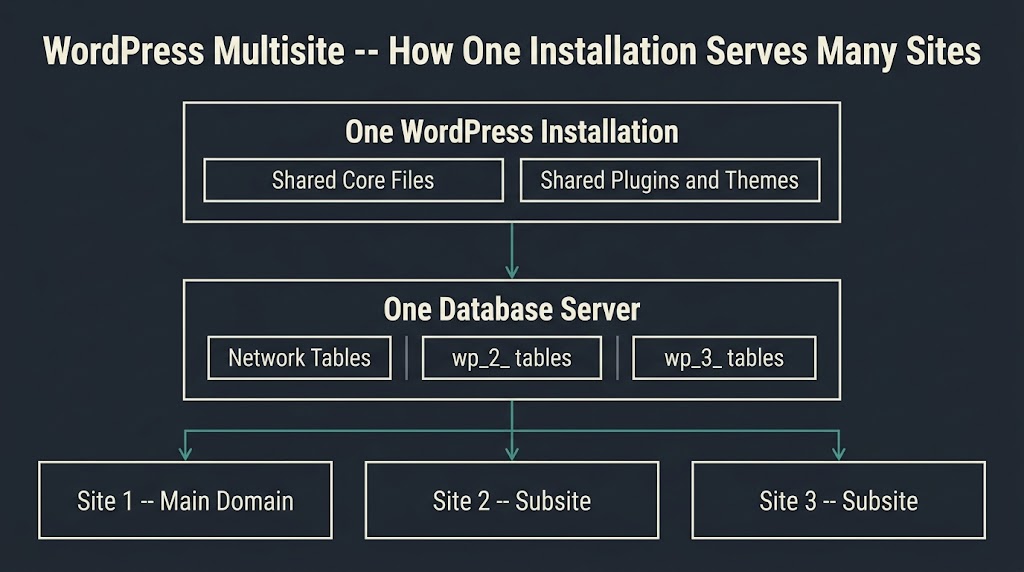
WordPress.org’s official network setup documentation walks through the exact file edits, but the architectural implication is what matters for a buyer: everything that touches the network core touches every site simultaneously.
That shared architecture is both the main advantage and the main risk. One plugin update, one configuration change, one compromised credential — and you are dealing with a network event, not a site event.
The Decision Framework: Who Should Use It
Most multisite articles skip the diagnostic step. They describe what multisite is and then tell you to use it if you have multiple sites. That is not useful. The decision depends on four structural conditions, and you should be able to answer yes to at least three before proceeding.
First, do all your sites share a development team? If different agencies or contractors manage different properties, multisite creates coordination problems rather than solving them. A plugin activated network-wide by one team breaks a subsite another team owns.
Second, do the sites share a significant portion of their design and functionality? If your regional sites all use the same theme with minor variations, multisite gives you a shared codebase you update once. If every site is architecturally different, the shared codebase becomes an obstacle.
Third, is someone at your organization the designated network administrator? Multisite introduces a user role called Super Admin that sits above the standard site admin. That person controls plugin and theme installation for the entire network. If there is no clear owner of that role, governance degrades quickly.
Fourth, are the sites likely to remain related long-term? Multisite networks are straightforward to grow but expensive to split apart. If you are building a content hub that might spin off independent brands, or a SaaS where each client gets a subsite that might eventually need its own hosting environment, the exit cost deserves serious weight.
Businesses that consistently match this profile: universities running department sites, publishers managing a portfolio of related editorial brands, franchises with a shared brand identity, nonprofits with multiple program microsites, and WooCommerce networks where a single inventory management system serves regional stores.
Businesses that often do not match: startups with one product and plans for a second, agencies managing client sites that have nothing in common, and e-commerce operators where each store needs independent plugin configurations.
Subdomain vs. Subdirectory: The First Real Decision
Once you decide multisite is the right architecture, the next choice is structural: subdomains (store.example.com) or subdirectories (example.com/store). This is not primarily an SEO decision, though SEO implications exist. It is an infrastructure decision that affects DNS configuration, SSL certificates, hosting compatibility, and how difficult a future migration becomes.
As Codeable’s technical breakdown of subdomain vs. subdirectory tradeoffs details, subdomain networks require a wildcard DNS A record — a setting that tells your domain registrar that any subdomain should point to your server — and a wildcard SSL certificate to cover all those subdomains under HTTPS. Some shared hosting providers do not support wildcard DNS, which makes subdomain multisite impossible on those plans without a hosting upgrade. Subdirectory networks, by contrast, require no DNS changes beyond your root domain setup and use a standard SSL certificate.
There is a hard technical constraint worth knowing early: WordPress restricts sites older than 30 days from using the subdirectory structure. The reasoning is that existing URLs like /blog or /contact could conflict with subdirectory subsite names. If you are activating multisite on an established site, subdomains may be your only option by default.
From an SEO standpoint, subdirectory networks consolidate domain authority more naturally. Internal links between subsites flow link equity freely. A subdomain sits at a greater distance from the root domain in how Google distributes authority, though Google’s John Mueller has confirmed that both structures can rank equally well. The practical SEO difference shows up in analytics and Search Console management: a subdomain network requires separate Search Console properties per subdomain, while a subdirectory network can be tracked under a single property.
The sharper recommendation: use subdirectories for content networks, multi-location businesses, and anything where subsites reinforce a single brand identity. Use subdomains when subsites operate as genuinely independent entities — separate audiences, separate editorial strategies, separate link profiles.
| Factor | Subdomains (site1.example.com) | Subdirectories (example.com/site1) |
| DNS requirement | Wildcard A record | None beyond root |
| SSL certificate | Wildcard SSL required | Standard root certificate |
| SEO authority flow | Each subdomain builds independently | Subsites share root domain authority |
| Search Console | Separate property per subdomain | Single property possible |
| Hosting compatibility | Requires DNS access; some hosts restrict | Works on most plans |
| Best fit | Independent brands, user networks | Content hubs, franchises, publishers |
| Hosting plan cost (managed) | $50-$200/month | $50-$200/month |
| Migration complexity if you switch | High | High |
What Professional Setup Actually Costs
This is the section most agency blogs skip. They skip it because they either do not want to anchor a number or they price on a case-by-case basis and do not want to undercut their proposals. We will state the ranges and explain the drivers, because a recommendation without pricing context is not a recommendation.
A basic multisite configuration — activating the network, choosing and implementing subdirectory or subdomain structure, configuring SSL, auditing plugin compatibility for three to five subsites, setting up user roles, and launching with a shared theme — runs approximately $2,500 to $5,000 for a team that has done it before. This assumes no content migration and a single shared theme across all subsites.
Add content migration from existing standalone sites and the range moves to $5,000 to $10,000. Migration involves database export and restructure, URL remapping, media file reorganization, search-replace operations across serialized data, 301 redirect implementation, and Search Console reconfiguration. Each of these has a nonzero error surface.
Networks with domain mapping (where each subsite uses a custom domain like regionone.com instead of example.com/regionone), WooCommerce subsites, custom Super Admin governance rules, or more than ten subsites at launch run $10,000 to $20,000 and up. Enterprise networks on platforms like WordPress VIP or Pantheon carry their own hosting and professional services costs on top.
Hosting is a separate line item. Shared hosting can technically run multisite, but under any real traffic load the shared database and PHP limits become the bottleneck. Managed WordPress hosting plans designed for multisite — Kinsta, WP Engine, Pantheon, and similar platforms — run $50 to $200 per month depending on site count and resource allocation. That is the realistic infrastructure cost for a network that performs reliably.
What drives the spread is not arbitrary. It tracks three variables: the number of subsites at launch, whether existing content is being migrated, and the complexity of the plugin and theme stack. Ask any agency to break their quote down along those three lines. If they give you a flat number without that breakdown, the number is a guess.
Plugin Compatibility: The Issue Most Buyers Do Not Anticipate
Not every WordPress plugin is written to behave correctly in a multisite environment. A plugin that works perfectly on a single-site install may behave unpredictably when activated network-wide because it stores data in ways that do not account for the per-site table structure.
The compatibility landscape has two tiers. Passive compatibility means the plugin does nothing multisite-specific but also does not break anything. Active compatibility means the plugin deliberately handles network activation, per-site option storage, and Super Admin controls. Many popular plugins — including some SEO plugins, page builders, and WooCommerce extensions — have partial active compatibility that works for most use cases but fails in edge cases.
As Multidots’ analysis of WordPress multisite pros and cons for large organizations notes, plugin compatibility issues require testing and sometimes custom development to resolve. That testing time is a real cost item in any professional engagement. The way to manage it: build a plugin audit into the project scope. Before any development begins, every plugin in the required stack should be tested in a staging multisite environment. Compatibility failures at this stage are cheaper than failures post-launch.
Plugin management in multisite also works differently from a single-site install. The Super Admin installs and updates plugins network-wide. Individual site admins can activate or deactivate plugins that have been made available to them, but they cannot install new ones. This centralized control is a feature for governance and a friction point for teams that need to move fast on a per-site basis.
Security: The Shared Codebase Problem
The security implication of multisite architecture is simple and worth stating plainly: one vulnerability can affect every site on the network simultaneously.
On a single-site install, a compromised plugin might give an attacker access to one site. On a multisite network, that same plugin — activated network-wide — gives an attacker access to everything sharing that codebase. The Super Admin account is similarly powerful: anyone who gains access to it controls every subsite, every user database, and every piece of content across the network.
Kinsta’s security guide for multisite managers outlines the practical mitigations, and they are consistent across the industry: enforce two-factor authentication on every Super Admin account, restrict the Super Admin role to the minimum number of people necessary, use a web application firewall (WAF) at the network level, set file permissions correctly (644 for files, 755 for directories), and maintain a regular automated backup schedule that stores copies off the primary server. Kinsta’s WordPress multisite security documentation covers the implementation steps for each of these controls.
The backup architecture deserves specific mention. Backup solutions for single sites typically restore the entire database. On a multisite network, that approach restores all subsites simultaneously — which is correct for a full network recovery but wrong if only one subsite experienced a problem. Look for backup solutions that support per-subsite restoration without touching the rest of the network.
Our team treats the security audit as a non-negotiable deliverable in any multisite engagement. Shared architecture amplifies both the efficiency gains and the attack surface in equal measure.
Multisite vs. Separate Installs vs. a Management Tool
Multisite is not the only way to manage multiple WordPress sites centrally. Two alternative approaches deserve comparison.
Separate installs managed through a tool like ManageWP, MainWP, or Kinsta’s site management dashboard give you centralized update management, uptime monitoring, and reporting across independent WordPress installations. Each site remains fully isolated. A problem on one site does not touch the others. Plugin compatibility is per-site, so there is no network-wide risk. The tradeoff is that shared themes and plugins must be maintained and updated independently on each install, even if they are identical.
As ManageWP’s own comparison of multisite versus multiple sites describes, multisite is the better fit for centralized governance of related sites; separate installs with a management tool are the better fit when sites need independence and isolation matters more than shared code efficiency.
The honest framing: multisite reduces administrative overhead when sites are genuinely related and centrally governed. It adds complexity and risk when the sites are unrelated or owned by different teams. A management tool gives you similar dashboard convenience without the architectural commitment.
A third path exists for teams with a modern JS stack: a headless WordPress configuration where a single WordPress instance serves as a content API and a Next.js or similar front-end consumes it across multiple domains. This is more complex to build and maintain than multisite, but it provides clean separation of concerns that some teams prefer. BetaTech handles this architecture on a project-by-project basis, and we are direct about the tradeoff: headless adds front-end development cost and operational complexity that multisite avoids.
The Setup Process: What Happens in What Order
For a buyer who wants to understand what they are purchasing before they commission it, here is the actual sequence of a professional multisite setup engagement.
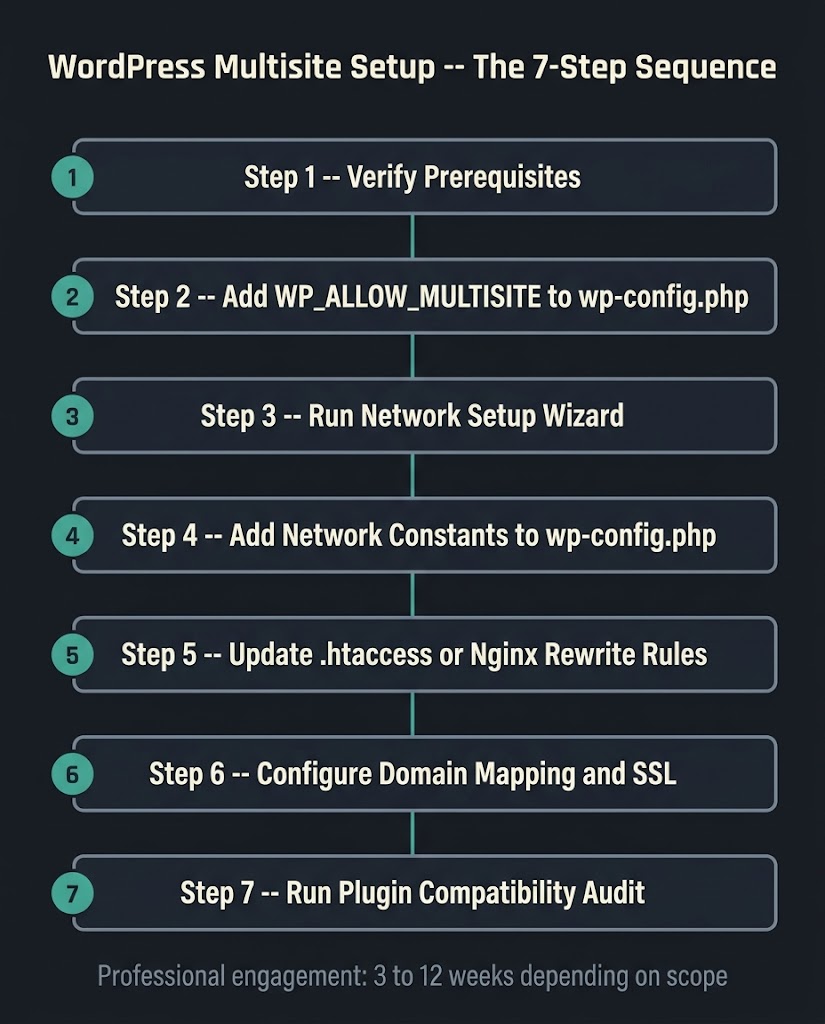
The process begins before any code is touched. WordPress.org’s pre-network checklist specifies that all active plugins must be deactivated before network activation, pretty permalinks must be working on the existing install, and the site must be accessible at a true domain root (not inside a subdirectory) if you want subdomain support. Missing any of these steps creates errors during activation that can require a database rollback to resolve.
After those prerequisites are confirmed, the setup sequence is: add define(‘WP_ALLOW_MULTISITE’, true) to wp-config.php, navigate to Tools > Network Setup in the WordPress admin, choose subdomain or subdirectory structure, run the installer, add the generated constants to wp-config.php, and update the .htaccess or Nginx rewrite rules with the network-specific configuration. That is the technical activation. What follows it is the real work.
Post-activation tasks that fill most of the project hours include: configuring domain mapping if subsites use custom domains, installing and testing the wildcard SSL certificate for subdomain networks, running the plugin compatibility audit, establishing the Super Admin governance rules, migrating existing content if the network is being built from standalone sites, configuring per-site backup schedules, and load-testing the database under realistic traffic conditions.
For a five-subsite network built from scratch with shared theme, no content migration, and straightforward plugin stack, the professional engagement typically runs three to six weeks from kickoff to launch. Add content migration from two or more existing sites and six to twelve weeks is realistic.
Our team spans Bangladesh and the US, which means revision cycles on a multisite build compress naturally. Feedback given at end of a US business day is actioned and returned before the next morning. On a project with tight launch timelines, that overlap in working hours produces a material difference without US agency overhead.
When Not to Use WordPress Multisite
This section appears in almost no competing article. It needs to be said plainly.
Do not use multisite if your sites have nothing architectural in common. Shared code helps when the code is actually shared. Five sites with five different page builders, five different WooCommerce configurations, and five different developer teams gain almost no advantage from a multisite network and absorb all the governance and security risk.
Do not use multisite if your sites need independent hosting environments. Multisite puts all sites on the same server. Traffic spikes on one subsite consume server resources that other subsites share. Separate installs on separate servers eliminate that coupling.
Do not use multisite as a cost-cutting measure on shared hosting. The database performance requirements for a multisite network under real traffic exceed what shared hosting plans are provisioned to handle. If the hosting budget is the driver, a management tool like ManageWP on separate installs is cheaper and more stable than forcing multisite onto an underpowered shared plan.
Do not use multisite if you cannot name the Super Admin. If there is no designated person who owns the network governance role, plugin approvals will be ad hoc, updates will be delayed, and the security posture will degrade. The tool requires an owner.
FAQ
What is the difference between a WordPress multisite subdomain and a subdirectory?
A subdomain network places each subsite at a unique hostname (site1.example.com), while a subdirectory network places each subsite at a path under the root domain (example.com/site1). Subdomains require wildcard DNS configuration and a wildcard SSL certificate. Subdirectories work with standard DNS and a standard SSL certificate. For most content networks and franchise businesses, subdirectories are the simpler starting point. Subdomains make more sense when subsites operate as genuinely independent brands with separate marketing strategies.
How many sites can a WordPress multisite network handle?
There is no hard limit in WordPress core itself. Networks with hundreds of subsites exist — WordPress.com runs multisite at scale. The practical ceiling is your server’s resources: database performance, memory allocation, and storage. A managed hosting plan provisioned for multisite (Kinsta, WP Engine, Pantheon) handles 20 to 50 active subsites without issue. Beyond that, database optimization, object caching (Redis or Memcached), and a CDN become necessary infrastructure items, not optional ones.
Is WordPress multisite good or bad for SEO?
It is neutral when configured correctly. Google treats subdirectory subsites as part of the root domain and subdomain subsites as distinct entities. Neither structure is penalized by default. The SEO implications are administrative: a subdirectory network consolidates Search Console reporting and authority flow, while a subdomain network requires separate Search Console properties per subdomain and builds domain authority independently for each. Plugin compatibility with popular SEO tools (Yoast, Rank Math) must be tested before launch, as multisite-specific behaviors sometimes require additional configuration.
Can I use WooCommerce on a WordPress multisite network?
Yes, with caveats. WooCommerce is multisite-compatible, but not every WooCommerce extension is. Payment gateways, shipping plugins, and inventory management extensions vary widely in their multisite support. A WooCommerce multisite network where each subsite operates as an independent store — separate products, separate checkout, separate payment accounts — is a common and workable architecture. A network where inventory is shared across subsites requires custom development. Audit every required extension before committing to the architecture.
What happens to my existing site if I activate multisite on it?
The existing site becomes the “main site” of the network (site ID 1). Its content, users, and URLs remain intact. The activation process edits two files (wp-config.php and .htaccess), does not delete any data, and is reversible — though reversing it after subsites have been created requires a database cleanup. The pre-activation requirement to note: your existing WordPress site must have pretty permalinks enabled, all plugins deactivated temporarily, and must be installed at the domain root (not in a subdirectory) if you want subdomain support.
What should I ask an agency before hiring them to set up a WordPress multisite?
Ask for a breakdown of their quote along three lines: number of subsites at launch, whether content migration is included, and the plugin and theme stack complexity. Ask whether they have done multisite setups with domain mapping before, and if so, what hosting environment they recommend and why. Ask what their plugin compatibility testing process looks like. Ask what the exit cost is — what it would take to separate the network into standalone sites if the architecture needs to change. An agency that cannot answer these questions clearly has probably not delivered this architecture professionally.
Plan Your Multisite Architecture Before You Write a Line of Code
If you are evaluating whether WordPress multisite setup is the right architecture for your business, the most useful thing we can do before any work begins is help you map the decision. We scope multisite projects based on honest cost drivers, recommend the right hosting environment, and tell you plainly when a management tool or separate installs would serve you better.
Talk to our development team about your site structure. We will give you a direct answer.