
Many United States business owners allocate massive budgets to gorgeous, visual-heavy custom websites, only to watch their search engine impressions tank. As an engineering-focused SEO manager, I see this issue regularly. The root cause is a fundamental disconnect between aesthetic frontend styling and clean backend execution. If your development team prioritizes flashing graphics over code efficiency, Google will penalize your domain.
For modern technical SEO optimization, speed is not a subjective metric. Google tracks specific, automated user-experience data points known as page experience metrics. To build a lead-generation machine that ranks efficiently, you must bridge code execution with crawlability. This structural guide cuts through the standard marketing fluff to break down exactly what your engineering team must build to pass Google’s strict performance baselines.
Passing Google Core Web Vitals requires optimizing modern engineering stacks for three distinct performance parameters: Largest Contentful Paint (LCP) for loading efficiency, Interaction to Next Paint (INP) for runtime interactivity, and Cumulative Layout Shift (CLS) for visual stability. True technical optimization requires developers to eliminate render-blocking scripts, compress heavy layout elements, and implement explicit sizing to secure organic engine visibility.
The Technical Reality Behind Google Page Experience Metrics
Many backend engineers view performance through the single lens of server response times. While raw database processing speed matters, Google analyzes how a user experiences structural page rendering on a physical device. This means a server can return data in milliseconds, but if your frontend JavaScript engine requires seconds to parse and render that layout, your page fails.
Understanding Core Web Vitals: what developers need to know begins with acknowledging that these metrics simulate real-world mobile network environments. Google evaluates your site using actual user data sourced from the Chrome User Experience Report. If real-world visitors experience lag, layout movement, or slow button responsiveness, your organic search visibility drops.
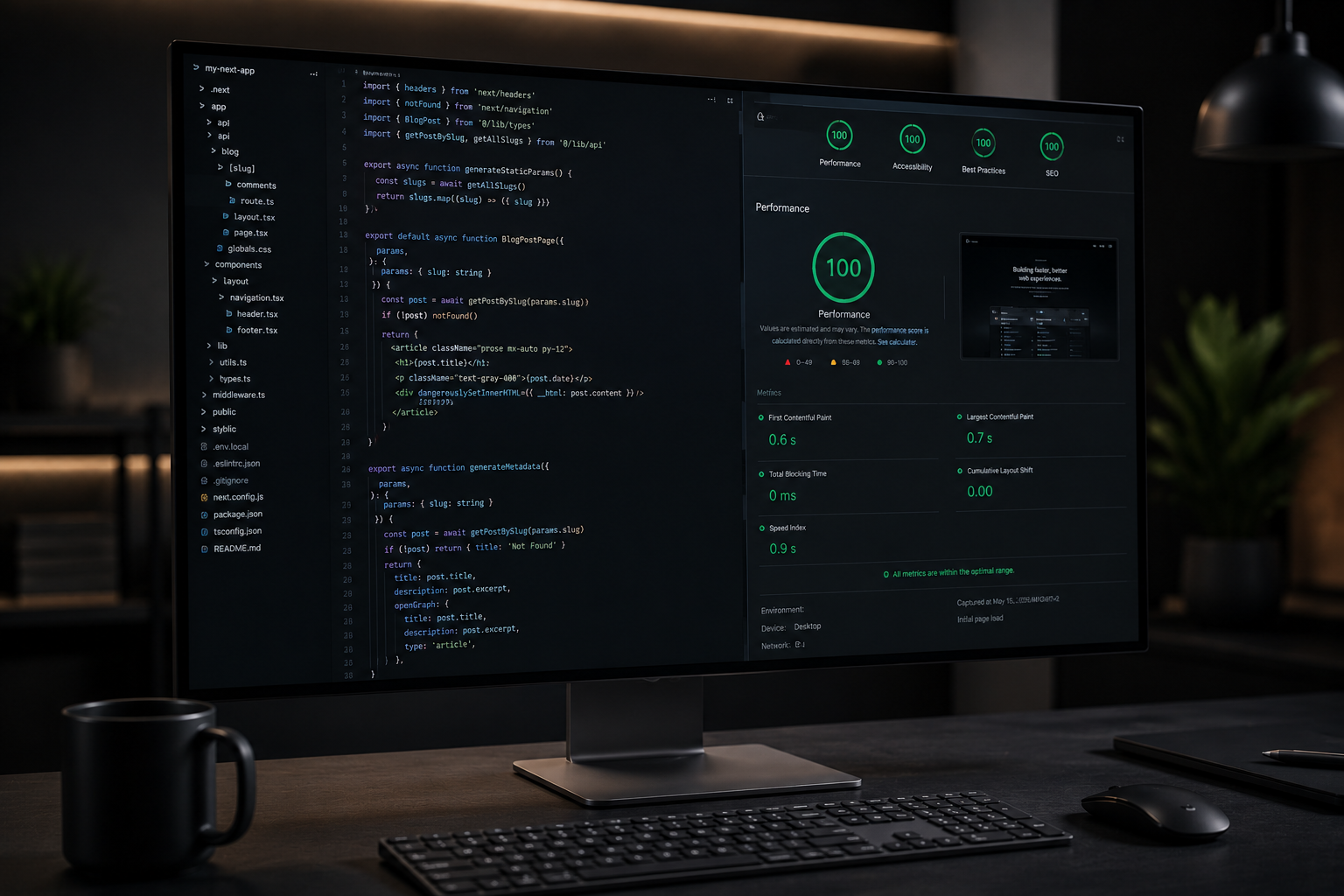
Every single engineering deployment should target strict, quantitative thresholds. Your development team must actively measure performance using automated tools like Lighthouse, web-vitals libraries, or direct monitoring through Google Search Console. Let us dive directly into the three distinct metric columns that dictate your search engine health.
1. Largest Contentful Paint (LCP): Optimizing Loading Efficiency
Largest Contentful Paint measures how long it takes for the primary content block on a page to render visibly within the viewport. This element is typically a hero banner image, a large headline text block, or a featured product asset. For a clean, search-optimized site, your LCP must occur within 2.5 seconds of the initial page request.
[Largest Contentful Paint Timelines]
0.0s —– 2.5s [Good Baseline] —– 4.0s [Needs Improvement] —– 4.0s+ [Poor Performance]
When diagnosing a failing LCP, the culprit is rarely simple server latency. Brittle structural choices, heavy asset sizes, and unoptimized script execution paths frequently delay rendering. To improve this metric, developers must focus heavily on the critical rendering path.
Technical Resolutions for Delayed LCP
- Eliminate Render-Blocking JavaScript: Heavy script tags placed in the document head pause HTML parsing. Engineers must apply async or defer attributes to non-essential scripts, or transition to server-side rendering frameworks like Next.js to deliver instant markup.
- Implement Advanced Image Optimization: High-resolution hero images drag down loading benchmarks. Developers should convert legacy PNG or JPEG files into next-generation WebP formats, utilize responsive srcset attributes, and apply a fetchpriority=”high” attribute to the primary hero image.
- Deploy Modern Content Delivery Networks: Storing all static dependencies on a single origin server causes geographic latency. Running assets through distributed server networks decreases the physical distance data travels, drastically lowering time-to-first-byte metrics.
2. Interaction to Next Paint (INP): Maximizing Runtime Interactivity
Interaction to Next Paint tracks web page responsiveness by measuring the latency of every user interaction—like clicks, taps, and keyboard inputs—made during a visit. The final score represents the longest interaction latency observed, excluding outliers. To pass Google’s standard, your site must maintain an INP of under 200 milliseconds.
[Interaction to Next Paint Benchmarks]
0ms —– 200ms [Passed] —– 500ms [High Latency Warning] —– 500ms+ [Failed Execution]
High INP scores typically point to a main thread that is heavily congested by excessive JavaScript tasks. When a user clicks a menu toggle or a form submit button, the browser cannot paint the updated pixels immediately because it is stuck processing large, unoptimized code blocks in the background.
[User Click Event] -> [Browser Main Thread Blocked by Long Task] -> [Delayed UI Update] = High INP
[INTERNAL LINK: technical SEO services → technical SEO optimization services hub]
Engineering Fixes for Main Thread Congestion
To lower script execution delay, developers must break up complex monolithic operations into smaller, asynchronous tasks. Using native browser scheduling mechanisms like setTimeout or requestIdleCallback allows the browser main thread to pause low-priority processing, prioritize the physical user interaction, and paint the graphical updates instantly.
Furthermore, engineering teams must audit third-party tracking scripts, chat widgets, and analytic tags. These external tools frequently inject heavy, unminified payloads that execute during the initial page initialization, completely locking up device processing capacity.
3. Cumulative Layout Shift (CLS): Securing Visual Stability
Cumulative Layout Shift measures the sum total of all unexpected layout shifts that occur during the entire lifespan of a page. A layout shift happens whenever a visible element changes its physical position from one painted frame to the next. To preserve a clean user experience and maintain search visibility, your CLS score must stay below 0.1.
[Cumulative Layout Shift Targets]
0.0 —– 0.1 [Stable Structure] —– 0.25 [Visual Shifts Detected] —– 0.25+ [Unstable Layout]
Unstable page layouts are incredibly frustrating for mobile users. A reader attempts to tap a button, but a sudden layout shift causes them to click an incorrect link accidentally. From an organic search perspective, Google heavily penalizes domains that suffer from unpredictable visual movement.
Core Architecture Triggers for High CLS
- Missing Image and Video Dimensions: If an HTML <img> tag lacks explicit width and height attributes, the browser allocates zero initial space for it. Once the asset downloads fully, the browser suddenly jumps the text layout down to fit the asset, causing a massive layout shift.
- Dynamic Ad and Widget Injection: Injecting marketing banners, email capture forms, or cookie consent notices dynamically near the top of the viewport without reserving container space is an architectural error. These elements force existing page nodes to shift suddenly.
- Unoptimized Custom Web Font Loading: Loading custom web fonts via external servers can create a Flash of Unstyled Text (FOUT) or a Flash of Invisible Text (FOIT). When the custom font file finally loads, the text block changes size, shifting surrounding layout boxes.
Advanced Architecture Strategies: Framework Benchmarks
The selection of your development stack dictates your baseline Core Web Vitals health. For instance, relying heavily on old monolithic architectures cluttered with excessive visual page-builder plugins creates a chaotic web of deeply nested code elements. This style of development degrades site performance by forcing mobile devices to parse megabytes of redundant structural code.
[Monolithic Builders with Plugin Clutter] -> Bloated Code Output -> Poor Core Web Vitals
[Tailored Next.js / React Deployments] -> Lean, Structured Markup -> High-Performance Rankings
Modern web design requires a shift toward clean, lightweight code. Utilizing a custom WordPress speed workflow—where theme files are hand-coded from scratch using minimal, semantic template structures—keeps the server response clean and accessible to search bots.
For high-scale enterprise applications, transitioning to modern frontend decoupling via Next.js or React allows for pre-rendering clean, static HTML structures at build time. When combined with utility-first frameworks like Tailwind CSS, styles are compiled into ultra-lean files, completely removing dead layout instructions and accelerating overall browser execution times.
How Code Architecture Influences Modern Crawlability
Search engine bots are bound by operational budgets. When Googlebot visits an unoptimized website, it allocates a limited amount of computing power and time to crawl those pages. If your site code is cluttered, deeply nested, or excessively reliant on slow client-side JavaScript execution, the crawler will exhaust its budget before indexing your vital lead-generation assets.
[Slow Site Layout] -> Googlebot Depletes Crawl Budget -> Key Pages Excluded from Index
[Optimized Clean Site] -> Fast Bot Traversal -> Immediate Indexing of Revenue-Driving Pages
By ensuring your engineering team adheres closely to the guidelines of Core Web Vitals: what developers need to know, you inherently build an architecture that search bots can read efficiently. Clean code structure allows crawlers to navigate your site hierarchy rapidly, map schema structures cleanly, and surface your pages within modern generative AI search answers.
Core Web Vitals Engineering FAQ
Why is my site fast on a desktop but failing Core Web Vitals on mobile?
Google tests page experience using low-to-mid tier mobile devices operating on simulated throttling networks. While a high-end desktop computer can parse bloated JavaScript and massive CSS files quickly, a standard mobile processor will experience significant processing lag. Your engineering team must optimize performance against mobile constraints first.
Can we pass Core Web Vitals while running third-party tracking scripts?
Yes, but your developers must actively manage how those scripts initialize. Third-party marketing tags, analytic scripts, and conversion trackers should never load synchronously in your site head. They must be deferred, loaded through a tag management platform using optimized container instructions, or self-hosted to minimize DNS lookup delays.
How do custom web fonts affect my Cumulative Layout Shift (CLS) score?
When custom fonts load slowly, the browser initially displays a fallback system font. If the geometric spacing of your custom font differs significantly from the system font, the layout will shift sharply once the custom file loads. Developers can fix this by applying a font-display: swap property in their CSS and utilizing matching font-preloading hints.
What is the quickest way to fix a failing Interaction to Next Paint (INP) score?
Open your browser developer tools and run a performance trace during user interactions. Identify any script tasks that take longer than 50 milliseconds to complete. Engineers can reduce these long tasks by minifying heavy scripts, eliminating unoptimized event listeners, and breaking up large rendering operations into modular background microtasks.
The Final Blueprint: Partner with BetaTech
Achieving flawless page experience metrics requires an agile engineering partner that values structural performance over superficial decoration. At BetaTech, we reject corporate marketing fluff and focus entirely on building high-speed digital architectures that convert organic traffic into revenue.
Our nimble team of 8 cross-functional experts—including Founder and CEO Adnan Shawkat, Operations Manager Miraj Ahmed, CIO and Senior WordPress Developer Sharmin Salma Tisha, UI/UX Designer Mahmudul Hasan, Content Writer Md. Arifur Rahman, and myself driving search optimization—brings between 5 to 13 years of hyper-focused industry experience to every development cycle.
Because our cross-functional team spans global time zones between Bangladesh and the United States, we operate a continuous 24/7 development process. This agile model allows us to deliver rapid engineering sprints, provide around-the-clock live site monitoring, and manage complex system optimizations without the massive overhead costs of traditional Western agencies. We craft clean, custom codebases that secure modern search engines visibility and drive qualified business inquiries straight to your pipeline.
Schedule a Strategy Session with Our Team Today: Book a Call with BetaTech’s Global Expert Team