Most articles about migrating from WooCommerce to Shopify tell you to export a CSV, set up some redirects, and call it a day. That version of the process is real, but it is missing the part where things go sideways. Before you commit to a migration, you need to understand what can break, what it will cost, and whether the move makes sense for your store in the first place.
A WooCommerce to Shopify migration typically costs between $3,000 and $15,000 for a store with under 1,000 products and no heavy custom functionality; complex stores with custom code, large catalogs, or integrated third-party systems run $15,000 to $30,000 or more. The migration itself takes 4 to 8 weeks from kickoff to go-live. The three things most likely to cause problems are URL structure changes that break SEO, incomplete product variant migration, and custom WooCommerce functionality that has no direct Shopify equivalent.
Is This Migration Right for Your Store?
The first question is not “how do I migrate.” It is “should I migrate at all.”
WooCommerce and Shopify serve genuinely different types of businesses. According to market data analyzed across BuiltWith, StoreLeads, and W3Techs, Shopify holds 26.2% ecommerce platform market share versus WooCommerce’s 20.1%, but among high-traffic stores in the top 1 million ecommerce sites, Shopify leads at 28.8% versus WooCommerce’s 18.2%. That skew tells you something real: Shopify disproportionately serves stores that have scaled past the point where managing a self-hosted stack is worth the overhead.
Migrate to Shopify if your store fits this profile: you spend significant time each month on plugin conflicts, hosting issues, or security patches rather than on products and marketing; your WooCommerce build was done by a freelancer three years ago and nobody on your team can confidently maintain it; you process high order volume and need checkout reliability without building it yourself. Stay on WooCommerce if your store depends on deep custom logic, complex pricing rules, or a content-heavy WordPress site that feeds the store. Shopify’s checkout customization is limited below the Plus tier, and the CMS is not a WordPress replacement.
What WooCommerce to Shopify Migration Actually Costs
The range you will see quoted is $3,000 to $30,000. That spread is not arbitrary. Three variables drive almost all of it.
The first is catalog size and complexity. A store with 200 simple products and clean data can be migrated with a combination of Shopify’s native Store Migration app, a tool like Matrixify or LitExtension, and a few hours of QA. A store with 5,000 SKUs, bundled products, custom attributes stored in WooCommerce metafields, and variant combinations approaching the former 100-variant ceiling requires hands-on data mapping and cleanup before import. The second variable is custom functionality. If your WooCommerce store uses custom checkout flows, subscription logic, wholesale pricing tiers, or any plugin that has no Shopify equivalent, replicating that behavior costs development time on the Shopify side. The third variable is the theme and design work. If you are migrating and rebuilding the storefront from scratch rather than adapting an existing Shopify theme, add a full design and development engagement to the cost.
Here is an honest cost table for the US mid-market:
| Store Type | Catalog Size | Custom Code | Estimated Cost | Timeline |
| Simple, template-ready | Under 500 SKUs | None | $3,000 — $6,000 | 2 — 4 weeks |
| Mid-complexity | 500 — 2,000 SKUs | Minor customizations | $6,000 — $15,000 | 4 — 6 weeks |
| Complex / custom-built | 2,000+ SKUs or heavy custom logic | Significant | $15,000 — $30,000+ | 8 — 12 weeks |
Beyond migration cost, budget for Shopify’s ongoing platform fee. Plans run from $29/month (Basic, billed annually) to $299/month (Advanced). If you use a third-party payment gateway instead of Shopify Payments, add a transaction fee: 2% on Basic, dropping to 0.5% on Advanced. At meaningful order volume, that fee compares unfavorably to WooCommerce’s zero platform transaction fee. Run the numbers on your actual monthly order volume before signing anything.
Risk 1: Your URLs Will Change and Google Will Notice
This is the most common source of post-migration ranking drops, and it is the one most guides address in a single sentence.
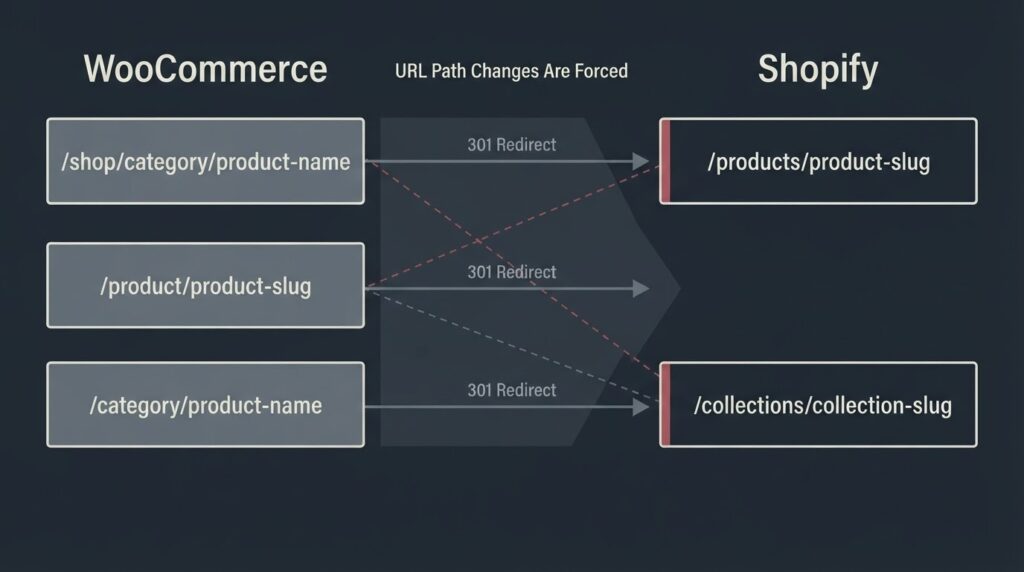
Shopify enforces a fixed URL structure. Products live at /products/your-slug. Collections live at /collections/your-slug. You cannot change these paths. On WooCommerce, your product URLs might be /shop/category/product-name or /product/product-name or whatever your permalink settings were. That structure will not map to Shopify’s enforced paths without a redirect for every single changed URL.
A 301 redirect preserves the majority of a page’s link equity, but it does not preserve it perfectly, and it depends on every old URL being mapped correctly to its new counterpart. Miss a URL and Google treats that page as gone. For stores with hundreds or thousands of inbound links distributed across product and category pages, a sloppy redirect implementation means measurable organic traffic loss.
Understanding how 301 redirects function technically for SEO is not optional for anyone managing this migration. Shopify allows you to import redirects in bulk via CSV. Build that redirect map from a crawl of your live WooCommerce site before you touch anything in the new store.
Risk 2: Post-Migration SEO Recovery Takes Longer Than Vendors Admit
Even a well-executed migration causes a temporary ranking fluctuation. Google has to recrawl and reindex your new URL structure, process your redirect signals, and re-evaluate your pages on the new platform. That takes time.
Based on Search Engine Journal’s analysis of ecommerce platform migrations, sites that experience a traffic drop post-migration typically begin to see recovery within 4 to 12 weeks, provided the redirects are in place and the on-page content is preserved correctly. If the migration changed your title tags, removed product descriptions, or altered your H1 structure, recovery takes significantly longer. Migrations involving a domain change (not just a platform change) can take six months or more to stabilize.
Plan the migration around your business calendar. Do not launch on Shopify two weeks before your peak season. Schedule it during a low-traffic month, and run parallel tracking in GA4 on both platforms for at least two weeks after launch to catch any data loss or tagging errors before you lose confidence in the numbers.
Risk 3: Your Product Catalog May Not Transfer Cleanly
The data migration itself — products, orders, customers, coupons, blog posts — is mechanical, but clean source data is a precondition. If your WooCommerce database has duplicate products, malformed SKUs, or custom fields that do not map to standard Shopify fields, those problems surface during import and require manual cleanup.
Customer passwords cannot be migrated. Shopify uses a different password hashing system than WooCommerce. Your customers will need to reset their passwords after the migration. This is not a disaster, but it requires a customer communication plan. A well-timed email that explains the change and includes a direct password reset link prevents a flood of support tickets in week one.
Order history is transferable, but the connection between historical orders and migrated customer accounts requires careful handling. If you need customers to see their full purchase history inside Shopify accounts, verify that the migration tool you choose explicitly supports this before committing to it.
Risk 4: The Variant Limit Changed But Your Catalog Math Still Matters
Shopify raised its product variant limit from 100 to 2,048 variants per product as part of a major GraphQL Admin API rebuild completed in 2024. This eliminated the most-cited technical objection to migrating complex apparel or furniture catalogs. However, the 2,048 cap still applies per product, and it is still limited to three options per product (for example: size, color, material). If your WooCommerce catalog uses more than three product attributes as filterable options, or if a single product has more than 2,048 variant combinations, you need a workaround on the Shopify side — typically a third-party app or a product restructuring strategy.
This is also the threshold where it is worth asking whether a full migration is the right call or whether your catalog complexity is a signal that WooCommerce’s open architecture is genuinely a better fit long-term.
Risk 5: Performance Gains Are Not Automatic
Shopify is a managed, hosted platform, which removes the server configuration and plugin-bloat problems that make many WooCommerce stores slow. But a fast Shopify store is not guaranteed simply by migrating. It depends on the theme you choose, the apps you install, and whether your product images are properly compressed.
Google measures store performance through Core Web Vitals: Largest Contentful Paint (LCP), Interaction to Next Paint (INP), and Cumulative Layout Shift (CLS). Google’s target thresholds are LCP under 2.5 seconds, INP under 200 milliseconds, and CLS under 0.1, measured at the 75th percentile. A bloated Shopify theme with ten third-party tracking scripts can produce worse Core Web Vitals than a well-optimized WooCommerce build. If performance is the primary reason you are migrating, validate your Shopify staging store against PageSpeed Insights before you go live, not after.
The Migration Process: A Realistic Timeline
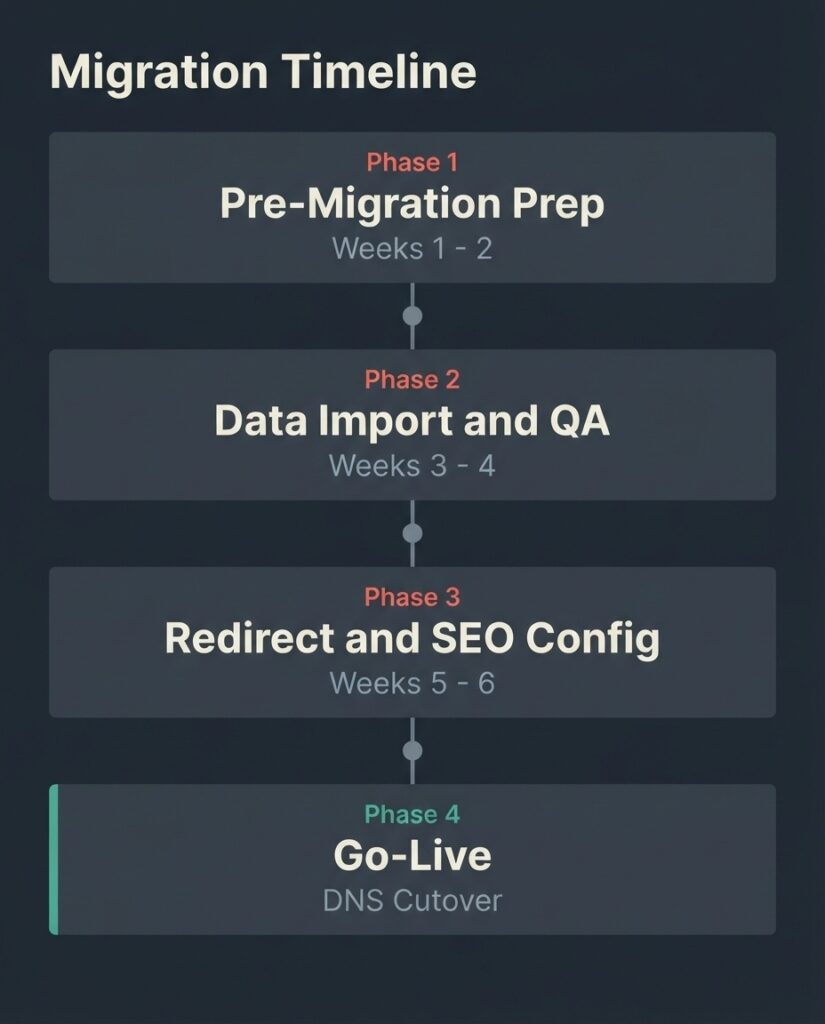
A four-to-eight-week migration breaks down roughly as follows.
Weeks one and two cover pre-migration preparation: crawling the live WooCommerce site to inventory all URLs, building the redirect map, auditing the product data for cleanup, setting up the Shopify store and theme, and confirming which migration tool or method will handle the data transfer. Shopify’s native Store Migration app handles the basics; Matrixify or LitExtension are more reliable for large or complex catalogs with order history.
Weeks three and four cover data import and QA: running the migration to a staging store, verifying product counts, checking that variants, images, and metafields transferred correctly, testing checkout, and confirming that all historical orders are accessible. Payment gateway configuration and Shopify Payments setup happens here.
Weeks five and six (or later, for complex stores) cover redirect implementation, SEO configuration (sitemap submission, Google Search Console property verification, GA4 tag confirmation), final design QA, and a pre-launch technical SEO crawl to catch any staging artifacts (noindex tags left on, canonical pointing to the wrong URL, missing title tags).
Go-live involves pointing your DNS, activating your redirect CSV in Shopify, and verifying every critical URL returns a 200 or a 301 rather than a 404.
Monitor GA4 and Search Console closely for the first two weeks.
How BetaTech Approaches This
We build primarily in WooCommerce and WordPress. We still tell some prospective clients that Shopify is the better call for their situation, because a recommendation that never costs us a sale is not credible advice. When a store owner’s primary pain is maintenance overhead and they do not need deep custom functionality, Shopify is often the honest answer.
When a migration does make sense, we treat the redirect map and the pre-migration crawl as non-negotiable deliverables, not optional line items. Our team spans Bangladesh and the US, which means the QA cycles that typically take a week of back-and-forth at a single-timezone agency happen in parallel. Feedback at the end of a US business day is typically actioned before the next morning, which compresses the four-to-six-week window in practice.
FAQ
How long does a WooCommerce to Shopify migration take?
For a simple store with under 500 products and no custom functionality, expect two to four weeks from kickoff to go-live. Mid-complexity stores with large catalogs or basic custom code typically take four to six weeks. Stores with heavily customized WooCommerce builds, subscriptions, or complex wholesale logic run eight to twelve weeks. These timelines assume you have clean product data and a decision-maker available for approvals.
Will I lose my Google rankings when I migrate from WooCommerce to Shopify?
Not if the redirect map is built correctly and the on-page content is preserved. You will likely see a temporary fluctuation while Google recrawls the new URL structure and processes the redirect signals. Recovery typically takes four to twelve weeks for well-executed migrations. Poor redirect implementation, lost content, or a domain change alongside the platform change can extend that timeline significantly.
What data can be migrated from WooCommerce to Shopify?
Products, product images, categories (as collections), customer records, order history, blog posts, and coupons can all be migrated. Customer passwords cannot be transferred due to incompatible hashing systems; your customers will need to reset their passwords. Metafields and custom product attributes require manual mapping and may not transfer cleanly without a tool like Matrixify.
Is Shopify cheaper than WooCommerce in the long run?
It depends on what you are currently paying for WooCommerce. Add up your hosting, SSL, premium plugins (SEO, page builder, checkout optimization, security), and any developer maintenance costs. Shopify’s Basic plan at $29/month covers hosting, SSL, and core functionality. If your WooCommerce stack is costing $200 to $400 per month in infrastructure and plugins, Shopify can be cheaper on a total cost of ownership basis. At scale, however, Shopify’s transaction fees (2% on Basic when not using Shopify Payments) can offset those savings depending on your order volume.
Can I migrate WooCommerce to Shopify without downtime?
Yes, with the right staging approach. You build and test the Shopify store entirely before pointing your DNS. Your WooCommerce store remains live throughout the migration. The cutover involves a DNS change that typically propagates within a few minutes to a few hours. The risk window is small, but scheduling the cutover during a low-traffic period (overnight or on a slow weekday) reduces the exposure.
Do I need a developer to migrate WooCommerce to Shopify?
For a simple store with clean data and no custom functionality, a DIY migration using Shopify’s Store Migration app or LitExtension is realistic. For any store with custom checkout logic, complex variants, metafields, or significant SEO equity that you cannot afford to lose, a developer or agency is worth the cost. The redirect map alone requires a crawl of your existing site and bulk CSV work that most founders do not have time to do correctly under pressure.
Ready to Know What Your Migration Would Actually Take?
If you have a WooCommerce store and you are evaluating the move to Shopify, the most useful first step is a scoped assessment: an audit of your current site’s URL structure, product catalog, and custom functionality that produces a concrete cost and timeline estimate for your specific situation. That is what we offer before any engagement starts.
Book a migration scoping call with BetaTech and we will tell you honestly whether the migration makes sense, what it would cost, and what the SEO risk profile looks like for your store.