If you have received a government contract requirement asking for a VPAT, or your legal team flagged your website for accessibility issues, you have probably searched “Section 508 compliance” and come away more confused than before. Most results either oversell the legal risk or explain the law in language written for procurement officers, not business owners.
This article explains what Section 508 actually is, who it legally applies to, what the overlap with the ADA and WCAG means for your private company website, what a real remediation project costs, and how to test where you stand today.
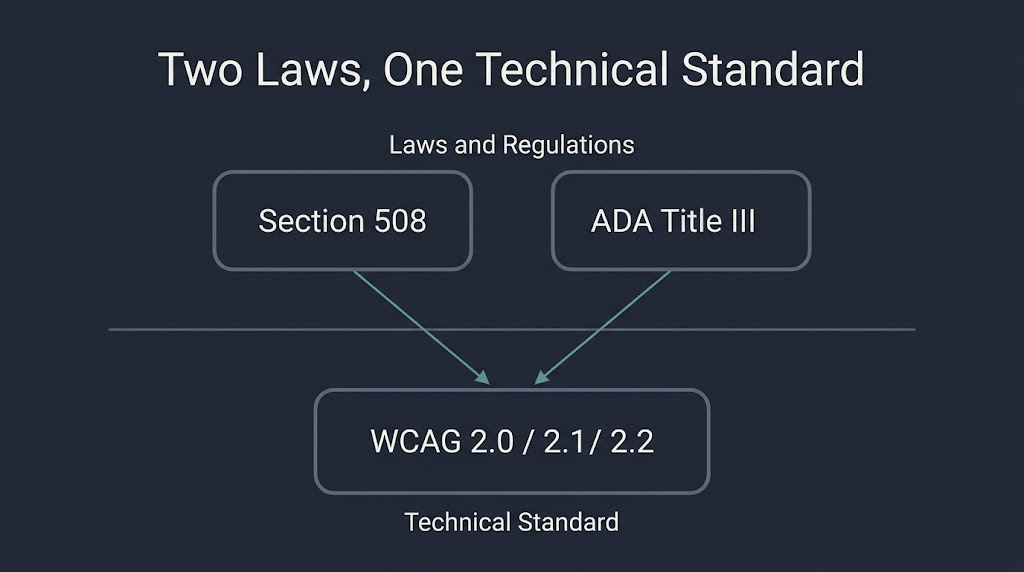
Section 508 of the Rehabilitation Act is a US federal law that requires federal agencies and the vendors selling ICT products to those agencies to meet web accessibility standards based on WCAG 2.0 Level AA. It does not directly apply to most private businesses. However, the ADA — which does apply to private businesses — requires accessible websites for any company serving the public, and courts regularly reference WCAG 2.1 Level AA as the accepted technical benchmark. The practical result: whether or not Section 508 applies to you by name, your site likely needs to meet the same technical standard.
What Section 508 Actually Is
Section 508 is an amendment to the Rehabilitation Act of 1973. In 1998, Congress amended the Act to require that federal agencies make their electronic and information technology (EIT) — later expanded to Information and Communications Technology (ICT) — accessible to people with disabilities. The law covers everything from websites and software to PDFs, kiosks, and telecommunications equipment.
The technical standard behind Section 508 is not Section 508 itself. The actual technical requirements come from the Access Board’s 2017 ICT Final Rule, which updated the 508 standards and aligned them with the Web Content Accessibility Guidelines (WCAG) developed by the W3C. Specifically, Section 508 requires conformance with WCAG 2.0, Level A and Level AA. Those 38 success criteria cover things like alt text for images, keyboard navigation, color contrast ratios, caption requirements for video, and proper heading structure.
Understanding this distinction matters. When someone says “make your site Section 508 compliant,” they mean “make your site conform to WCAG 2.0 AA at minimum.” The law is the mandate; WCAG is the measuring stick.
Who Actually Has to Comply
This is where most content on this topic either oversimplifies or quietly oversells. Section 508 strictly applies to federal agencies and, by extension, to any contractor or vendor supplying ICT products or services to those agencies. If your company sells software, digital platforms, or web services to a federal agency under a contract, your product needs to meet Section 508 standards. That requirement flows through the procurement process and is why you may have been asked for a VPAT.
If your company has no relationship with the federal government — you run an e-commerce store, a restaurant booking system, a professional services website — Section 508 does not legally apply to you. Full stop.
What does apply to you is the Americans with Disabilities Act. And that is where the confusion collapses into something important.
The ADA Piece: Where Private Businesses Actually Have Exposure
The ADA prohibits discrimination against people with disabilities in places of public accommodation. Courts have consistently ruled that websites operated by private businesses are covered under ADA Title III. The Department of Justice has not yet codified a specific technical standard for private business websites under Title III — but in every settlement, consent decree, and court ruling, WCAG has been the benchmark the parties use.
In 2024, the DOJ went further. It published a final rule under ADA Title II requiring state and local governments to meet WCAG 2.1 Level AA on their websites and mobile apps. Compliance deadlines for larger jurisdictions (populations of 50,000 or more) were extended in April 2026 to April 26, 2027; smaller jurisdictions and special districts have until April 26, 2028. While this rule covers government entities, not private businesses, it signals the direction of regulatory intent clearly.
For private businesses, the litigation data tells the same story more bluntly. Federal web accessibility lawsuits filed under ADA Title III reached 3,117 cases in 2025 — a 27% increase from 2024. New York, California, and Florida lead in filings. Plaintiffs can file in any jurisdiction where your site is accessible, regardless of where your business is physically located. Small and mid-size businesses are not exempt; firms that specialize in accessibility settlements actively target sites across every industry and revenue tier.
The practical conclusion: the label “Section 508 compliance” is federal-specific, but the underlying technical standard and the legal exposure apply broadly. Your site’s accessibility posture matters whether or not the government is your customer.
Section 508 vs. ADA vs. WCAG: How They Fit Together
These three terms are often used interchangeably by vendors who benefit from the confusion. They are not the same thing.
| Term | What It Is | Who It Covers | Technical Standard |
| Section 508 | US federal law | Federal agencies + federal contractors | WCAG 2.0 Level A and AA |
| ADA Title II | US civil rights law | State and local governments | WCAG 2.1 Level AA (2024 DOJ rule) |
| ADA Title III | US civil rights law | Private businesses open to the public | No codified standard; courts use WCAG |
| WCAG 2.0 / 2.1 / 2.2 | Technical guidelines (not law) | Anyone building web content | Defined success criteria at A, AA, AAA |
The most important thing this table shows: WCAG is the technical standard, not the law. Multiple laws point to it. WCAG 2.2, published in October 2023 and now an ISO standard (ISO/IEC 40500:2025), is the current recommended version. It adds 9 success criteria to WCAG 2.1, covering minimum touch target size (24×24 pixels), keyboard focus appearance, and alternatives to dragging interactions. If you are building a new site in 2025 or 2026, targeting WCAG 2.2 Level AA is the defensible choice — it satisfies Section 508 requirements, aligns with the ADA Title II rule, and gives you runway before regulators update to 2.2 formally.
What a VPAT Is and When You Need One
A VPAT (Voluntary Product Accessibility Template) is a document that describes how well your product or website conforms to accessibility standards. It is not a certification. It is a self-reported disclosure. When a federal agency evaluates vendors, they often require a completed VPAT — formally called an Accessibility Conformance Report (ACR) — as part of the procurement package.
The VPAT template is published and maintained by the Information Technology Industry Council (ITI). There are four versions of the template corresponding to different standards: Section 508, WCAG, EN 301 549 (European), and a combined edition. The Section 508/WCAG edition is most common for US federal procurement. You fill out the template criterion by criterion, stating whether your product supports each requirement, partially supports it, or does not support it — with notes explaining how.
A VPAT that says “partially supports” across the board is more credible than one claiming full conformance for a site that has obvious issues. Agencies review these documents as part of due diligence, and a dishonest VPAT creates legal exposure that outweighs the short-term procurement benefit.
If you have been asked for a VPAT and your site has never been audited, the right sequence is: audit first, remediate what you can, then write the VPAT based on actual tested conformance.
WCAG: The Technical Standard Behind 508
Whether the compliance requirement comes through Section 508, the ADA, a state law, or a procurement contract, the technical work is the same: meeting WCAG success criteria. The W3C Web Accessibility Initiative’s WCAG overview organizes requirements under four principles: Perceivable, Operable, Understandable, and Robust (POUR).
For a website, WCAG 2.1 Level AA requires roughly 50 success criteria. The most common failure points — the ones that show up in the majority of accessibility lawsuits — are:
- Missing or inadequate alt text on images, particularly on e-commerce product photos and banner images
- Insufficient color contrast — WCAG requires a 4.5:1 ratio for normal text; many branded designs fail this
- No keyboard navigation support — users who cannot use a mouse must be able to navigate every interactive element by keyboard
- Missing form labels — inputs without associated label elements break screen readers
- Videos without captions — any video with spoken content needs accurate captions
- PDF inaccessibility — PDFs not tagged for reading order and structure are a significant liability for businesses that distribute downloadable documents
- Missing focus indicators — WCAG 2.2 specifically tightened requirements on visible keyboard focus, meaning the browser’s default outline can no longer be suppressed without a replacement
None of these are exotic edge cases. They are structural decisions made during design and development. That is why remediation on an existing site is more expensive than building accessibility in from the start: you are correcting decisions made at the architecture layer, not adjusting content.
What Remediation Actually Involves
The Section 508 guidance on accessible web design and development frames accessibility as a design-and-development discipline, not a post-launch fix. In practice, most clients come to it as a post-launch fix. That reality shapes the cost and timeline.
A compliant remediation project on a real WordPress build involves several distinct workstreams. First, the audit: automated tools like axe DevTools or WAVE catch roughly 30 to 40 percent of WCAG violations automatically. The remaining 60 to 70 percent require manual testing with actual screen readers (NVDA, JAWS, VoiceOver) and keyboard-only navigation. Skipping manual testing and presenting an automated report as a compliance audit is one of the most common shortcuts vendors take. It produces a VPAT that will not survive scrutiny.
Second, the fix list: once you have a complete issue inventory, violations get triaged by severity (blocker, critical, major, minor) and by type (code fix, content fix, design fix). A color contrast failure is often a CSS change. A missing form label is a template change. A completely inaccessible navigation pattern might require rebuilding the component.
Third, the retest: every fixed item must be retested. Accessibility work without retesting is not compliance work; it is guessing.
Realistic cost ranges for a standard WordPress site:
| Site Scale | Audit Cost | Remediation Cost | Estimated Timeline |
| Small site, under 30 pages | $1,500 to $4,000 | $2,000 to $8,000 | 3 to 6 weeks |
| Mid-size site, 30 to 150 pages | $4,000 to $10,000 | $8,000 to $25,000 | 6 to 12 weeks |
| Large site / WooCommerce store | $10,000 to $25,000+ | $20,000 to $60,000+ | 3 to 6 months |
| New build, accessibility from day one | Included in dev scope | Adds 15 to 25% to development cost | No separate phase |
These are US market ranges drawn from published cost guides and industry data. The spread within each range tracks the number of unique templates, whether the site uses custom JavaScript interactions, whether PDF remediation is in scope, and whether a VPAT must be produced at the end.
The “new build, accessibility from day one” row is not a pitch — it is the honest math. Retrofitting accessibility costs two to three times more than building it in. If you are evaluating a redesign anyway, adding WCAG 2.1 AA conformance to the development scope is the most economical path.
At BetaTech, accessibility is a structural concern in our web design and development work, particularly heading structure, keyboard navigation, color contrast, and ARIA landmark regions. Our team spans Bangladesh and the US, which means remediation work scoped at the end of a US business day is often reviewed and actioned before the next morning — a meaningful compression on revision cycles in time-sensitive procurement situations. We do not offer specialist VPAT documentation as a standalone service, and we will say so clearly if that is the scope you need.
Testing Tools: What They Catch and What They Miss
Four tools cover most of the automated testing ground:
axe DevTools (Deque): The industry standard for automated WCAG testing. The browser extension version is free. The enterprise version integrates into CI/CD pipelines and catches violations during development, not after. Axe reports itself as catching up to 57% of WCAG issues automatically.
WAVE (WebAIM): A visual overlay tool that annotates a live web page with accessibility flags. Useful for quick client-facing reviews because the output is intuitive without technical background. Less thorough than axe for complex JavaScript interactions.
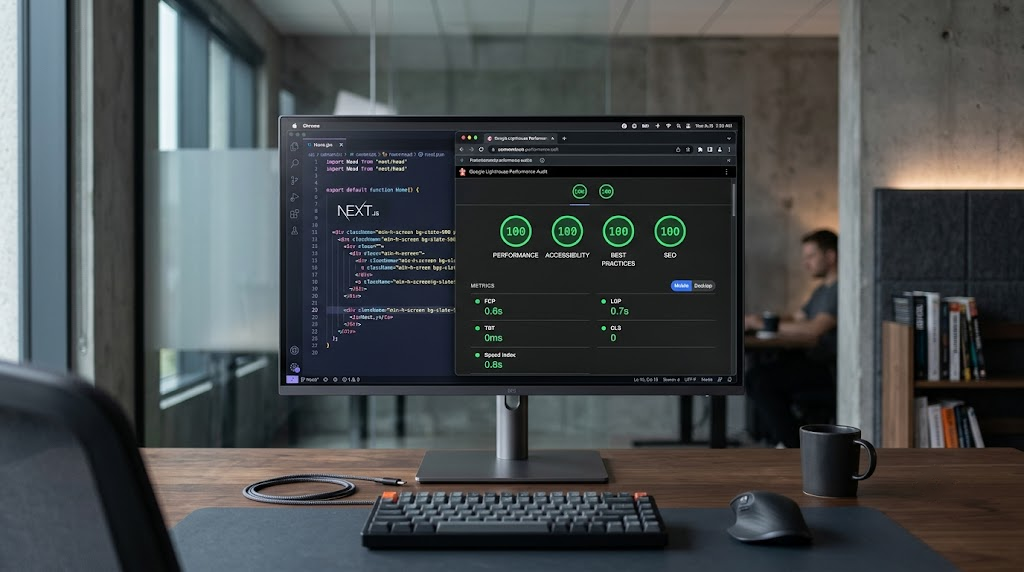
Google Lighthouse: Built into Chrome DevTools. The accessibility score covers a subset of WCAG criteria. A Lighthouse score of 100 does not mean your site is WCAG compliant; it means your site passes the subset Lighthouse checks. Many legal teams have been misled by this distinction.
ANDI (SSA/Section 508 Program): A bookmarklet developed by the Social Security Administration specifically for Section 508 testing. Used by federal agencies for their own internal reviews.
The honest summary: automated tools are the starting point for scoping an audit, not the endpoint for producing a compliance statement. Any agency or consultant offering a “Section 508 compliance certification” based solely on an automated scan is either confused about what the standards require or hoping you are.
The Legal Risk Is Real, but So Is the Proportionality
Three states — New York, California, and Florida — account for a disproportionate share of ADA website accessibility lawsuits. If your business operates in e-commerce, hospitality, food service, healthcare, or retail and your site is accessible to users in those states, your exposure is not theoretical.
That said, accessibility litigation primarily targets: (a) businesses with obviously broken accessibility patterns, like a checkout flow that cannot be completed without a mouse; (b) businesses that have already been sent a demand letter and failed to respond; and (c) businesses with prior settlement agreements they failed to implement. A site that has made documented, good-faith remediation efforts — even if not perfectly conformant — is in a materially different legal position than one that has never addressed accessibility at all.
This is not legal advice, and the landscape shifts as courts in different jurisdictions reach different conclusions. But the business case for accessibility investment does not rest solely on avoiding lawsuits. Accessible sites perform better in technical SEO audits (proper heading hierarchy, alt text, and semantic HTML are ranking signals as well as accessibility criteria), convert better with assistive technology users, and face fewer compatibility issues with automated browser testing. The benefits compound.
FAQ
Does Section 508 compliance apply to my private company’s website?
Not directly. Section 508 applies to federal agencies and the contractors who sell ICT products to those agencies. If you are not a federal agency or a vendor in a federal procurement contract, Section 508 does not apply to you by name. However, the ADA applies to most private businesses with a public-facing website, and courts use the same WCAG technical standard to evaluate ADA compliance. Your practical obligation and the technical standard you need to meet are nearly identical.
What is the difference between Section 508, the ADA, and WCAG?
Section 508 is a US federal law covering government ICT. The ADA is a broader civil rights law covering disability discrimination across employment and public accommodation, including websites. WCAG (Web Content Accessibility Guidelines) is a set of technical guidelines developed by the W3C — it is not a law, but both Section 508 and ADA enforcement reference it as the technical benchmark. Section 508 requires WCAG 2.0 Level AA; the 2024 ADA Title II rule requires WCAG 2.1 Level AA for state and local governments.
What is a VPAT and when do I need one?
A VPAT (Voluntary Product Accessibility Template) is a standardized disclosure document that describes how well your product conforms to accessibility standards. You typically need one when a federal agency or government-adjacent organization asks for it as part of a procurement or vendor qualification process. It is self-reported, not a certification. Completing one accurately requires a real audit of your site or product first.
How much does Section 508 or WCAG compliance remediation cost?
For a standard WordPress site, audit costs run from $1,500 to $10,000 depending on the number of pages and template complexity. Remediation costs run from $2,000 to $25,000 for small to mid-size sites, and significantly more for large e-commerce platforms or sites with heavy custom JavaScript. Building accessibility into a new site from the start typically adds 15 to 25% to development cost but eliminates the separate remediation phase entirely.
Can a WordPress plugin make my site Section 508 or ADA compliant?
No. Accessibility overlay plugins (widgets that add a toolbar claiming to fix accessibility automatically) do not produce legal compliance. They are rejected by screen reader users, have been challenged in court, and do not address underlying code-level issues. A plugin can assist with specific tasks like adding a skip navigation link or helping flag contrast issues during content editing, but no plugin replaces a code audit and proper remediation.
How long does it take to make a website accessible?
A small site with under 30 pages typically takes 3 to 6 weeks from audit through remediation and retest. A mid-size site takes 6 to 12 weeks. A large platform with custom interactions, a WooCommerce store with hundreds of product pages, or a site that also needs PDF remediation can take 3 to 6 months. These timelines assume a dedicated remediation engagement, not accessibility work being done alongside other active development.
Ready to Know Where Your Site Stands?
The first step is an honest audit — not an automated scan presented as a compliance report, but a structured review that identifies which WCAG 2.1 AA criteria your site fails, ranks failures by severity, and gives you a remediation roadmap with realistic effort estimates.
If you are evaluating a site redesign and want to fold WCAG conformance into the build scope from the start, we can scope that as part of a development engagement. Contact us at betatech.co/contact-us/ to describe your situation and get a straight answer on what the work involves and what it costs.