Most comparisons of these two tools are written by companies that sell plugins for one of them. That shapes what they include and what they skip. This piece covers the tradeoffs that actually matter for a business owner evaluating a WordPress build: performance costs, design flexibility, vendor dependency, and what happens to your site five years after launch.
Gutenberg is WordPress’s native block editor, built into the core since version 5.0. Elementor is a third-party drag-and-drop page builder installed as a plugin. Gutenberg produces cleaner HTML and smaller DOM trees by default, which translates to better Core Web Vitals scores without additional optimization. Elementor provides substantially more design control and a faster visual editing experience, but adds CSS and JavaScript overhead that requires active optimization to keep performance competitive. For most business websites prioritizing long-term maintainability and SEO, Gutenberg is the lower-risk default. Elementor is the better call when design complexity and visual editing speed outweigh the performance cost.
What Each Tool Actually Is
Gutenberg is not a page builder in the traditional sense. It is WordPress’s default content editor, introduced in WordPress 5.0 and matured considerably since. It works through a block-based system where every content element, a heading, an image, a button, a column layout, is a discrete block. Since WordPress 5.9, Gutenberg has also powered Full Site Editing (FSE), which extends block-based control beyond individual posts and pages to site-wide templates, headers, footers, and global styles. That is a meaningful shift. FSE means you can design an entire site using the native editor without installing a third-party page builder.
Elementor is a plugin installed on top of WordPress. It replaces the standard editing canvas with a visual drag-and-drop interface where you can place, size, and style any element in real time and see exactly how it will look on the published page. That visual immediacy is genuinely useful, especially for non-developers building complex layouts. Elementor has a free version with 32 basic widgets and a paid Pro tier that starts at $60 per year for a single site and scales to $108 per year for three sites, according to Elementor’s current pricing page.
The comparison only gets interesting when you ask what each choice actually costs you over time.
The Performance Gap: What the Numbers Actually Mean
This is where most comparisons go wrong. They run a single PageSpeed test on a demo page and declare a winner. The result is accurate in a narrow sense and meaningless in practice.
The structural reason Gutenberg outperforms Elementor is the DOM. Elementor builds pages using nested div layers to achieve its visual flexibility. Each widget, section, and column adds markup. The result is a larger Document Object Model (DOM), which the browser has to parse, style, and paint. Elementor introduced its “Optimized DOM Output” feature to reduce unnecessary nesting, and it helps, but the tool’s architecture still generates more HTML than a clean block-based Gutenberg build. As rtcamp’s technical breakdown of Gutenberg vs Elementor performance documents, Gutenberg’s native integration with WordPress core produces a smaller DOM footprint, leading to faster rendering and measurably better Core Web Vitals scores.
Why does that matter? Google’s three Core Web Vitals metrics (LCP, INP, and CLS) are direct ranking signals. LCP measures how quickly the largest visible element loads; the threshold for “good” is under 2.5 seconds. INP measures how fast the page responds to user interaction; the threshold is under 200ms. CLS measures visual stability. A bloated DOM affects all three. An Elementor build that has not been actively optimized will typically carry extra CSS and JavaScript bundles that delay the LCP element, introduce render-blocking resources, and occasionally cause layout shifts from late-loading widgets.
That does not mean an Elementor site cannot pass Core Web Vitals. It means you have to earn performance through optimization work: a caching layer, image compression, deferred loading of non-critical scripts, and sometimes a lightweight theme like Hello or GeneratePress stripped of its own styling. A Gutenberg build on the same hosting gets there faster with less effort.
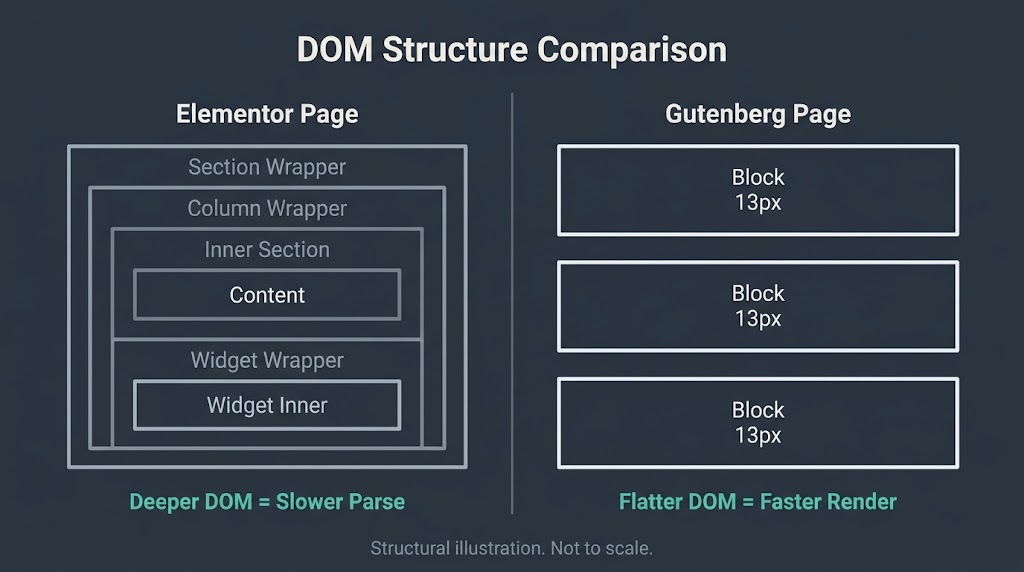
For a homepage where Core Web Vitals directly influence rankings, the difference in baseline performance matters. For an internal page that gets minimal search traffic, it matters less.
Design Flexibility: Where Elementor Wins, and by How Much
Elementor’s advantage is real and should not be understated. The drag-and-drop canvas gives designers and non-technical users genuine control over pixel-level positioning, custom spacing, responsive breakpoints, animations, hover effects, and dynamic content populated from custom fields. The theme builder in Elementor Pro lets you design custom templates for archive pages, single post layouts, WooCommerce product pages, and 404 pages using the same visual interface. That capability used to require custom PHP templates or a developer. Elementor packages it into a visual tool anyone can use.
Gutenberg’s design capabilities have expanded significantly with FSE and the growing ecosystem of block plugins like Kadence Blocks and GenerateBlocks. But the honest assessment is that Gutenberg still does not match Elementor for complex, pixel-precise visual layouts. If your site requires extensive animation, multi-step pop-up flows, or tight design spec matching from a designer’s mockup, Gutenberg will require either a developer writing custom block CSS or a premium block plugin to fill the gap. Elementor handles most of that visually.
The question is whether that design flexibility is worth the performance and dependency cost for your specific site.
The Lock-In Problem Nobody Mentions
This is the part of the comparison that most plugin-vendor articles skip entirely, because it does not serve their interests to name it.
When you build a site with Elementor, your content is stored in the database using Elementor’s proprietary structure. If you deactivate the plugin, the pages do not render as standard HTML. You see the raw shortcodes and block markup that Elementor uses internally. Switching away from Elementor, whether to Gutenberg or any other tool, means manually rebuilding every page that Elementor built. On a 30-page business site, that is a significant rebuild project. On a 200-page site, it is a migration engagement.
Gutenberg content is stored as standard WordPress block markup. If you deactivate the Gutenberg plugin (which you cannot actually do, since it is core) or switch themes, your content is portable HTML that renders correctly in any context.
This matters for three scenarios that business owners frequently encounter. First, the developer who built your site with Elementor is no longer available, and the replacement developer prefers to work in Gutenberg or a custom theme. Second, you want to switch hosting providers or move to a faster stack, and the migration is complicated by Elementor’s stored markup. Third, Elementor raises its prices or changes its licensing terms, and you cannot easily leave without rebuilding.
None of this means Elementor is the wrong choice. It means the choice carries a dependency that Gutenberg does not. Name the dependency before you build.
Pricing: The Real Cost Comparison
Gutenberg is included in WordPress at no additional cost. Third-party block libraries like Kadence Blocks and GenerateBlocks have free tiers that cover most common design needs, and paid versions of those plugins run $49 to $79 per year per site. The total annual cost for a well-equipped Gutenberg build is typically $0 to $80 per year in tooling.
Elementor’s pricing tiers as of August 2026 run as follows.
| Plan | Annual Cost | Sites |
| Elementor Free | $0 | Unlimited |
| Essential | $60/year | 1 |
| Advanced Solo | $84/year | 1 |
| Advanced | $108/year | 3 |
| Expert | Contact | 25 |
| Agency | Contact | 1,000 |
The free version covers basic layouts but excludes the theme builder, pop-up builder, WooCommerce widgets, dynamic content, custom CSS per element, and most of the features that make Elementor worth choosing over Gutenberg. In practice, the Essential plan at $60 per year is the minimum useful entry point for a business site. For an agency managing three or more client sites, the Advanced plan at $108 per year is the relevant comparison point.
The annual subscription model also means the cost compounds. A site built with Elementor Pro carries a recurring licensing cost for as long as you want access to Pro features and ongoing support. A Gutenberg site does not.
SEO Impact: Separating Fact from Assumption
Neither tool is “better for SEO” in the way that phrase is commonly used. Both integrate correctly with Yoast SEO and RankMath. Both allow you to set title tags, meta descriptions, canonical URLs, schema markup, and open graph data. The SEO plugin does that work, not the page builder.
The SEO-adjacent difference is performance. If Elementor’s additional CSS and JavaScript cause your LCP to land at 3.2 seconds instead of 1.8 seconds, and if your Core Web Vitals fail as a result, that is a ranking factor. According to the HTTP Archive Web Almanac 2024 CMS chapter, WordPress sites had a 40% Core Web Vitals pass rate on mobile in 2024, up significantly from 28% in 2023. The gap between a well-optimized and a poorly-optimized WordPress site on the same Core Web Vitals metrics is large, and page builder choice is one of several inputs to that gap, alongside hosting quality, image optimization, and caching configuration.
The honest summary: Gutenberg gives you a performance head start. Elementor can get to the same performance level, but you have to work for it. If you are not willing to do that optimization work, or if you are hiring an agency that does not include it in their deliverable, the gap will show up in your Core Web Vitals scores.
WooCommerce and eCommerce: Which Serves Stores Better?
For WooCommerce builds, Elementor Pro has a meaningful tooling advantage. Its WooCommerce builder lets you design custom product page layouts, cart and checkout templates, category archive pages, and dynamic product grids using the same drag-and-drop interface. For stores where brand consistency across every customer-facing page matters, that visual control is genuinely useful and saves developer time.
Gutenberg’s WooCommerce support has improved, and the WooCommerce block editor now covers cart blocks, checkout blocks, product query blocks, and filter blocks that handle most standard storefront needs. The WordPress Block Editor Handbook documents the official block API that WooCommerce extensions use to integrate with FSE-compatible themes. For a straightforward store with standard product templates, Gutenberg plus a well-chosen block theme is now a viable path that was not realistic three years ago.
Where Elementor still leads for stores: highly customized product page designs, promotional landing pages built with the pop-up and motion effect widgets, and teams with non-technical editors who need to update promotional content without touching code.
Full Site Editing: The Part of This Debate That Changed
The Elementor vs Gutenberg comparison in 2022 was a fundamentally different question than it is today. Three years ago, Gutenberg could edit post and page content but had limited control over site-wide design. Your header, footer, and archive templates still required a classic PHP theme or a third-party builder. That gap justified Elementor for any business site that needed brand consistency across all templates.
FSE changes that calculus. With a block theme, you can now design your header, footer, 404 page, search results layout, archive templates, and single post template entirely inside the WordPress block editor. No third-party plugin required. The design vocabulary is narrower than Elementor’s, and the learning curve for non-developers is steeper. But the site is entirely native WordPress, entirely portable, and carries no plugin dependency.
We build in Gutenberg with FSE for most new projects where the design is clean and the client needs to manage content without developer involvement. We still recommend Elementor Pro for clients who need complex landing pages on a tight timeline, or whose designer has delivered a high-fidelity mockup that requires pixel-level control to implement correctly.
The underlying principle from our positioning at BetaTech is that the unglamorous choice often wins long-term. Gutenberg’s native integration and portability tend to produce lower maintenance costs over a three-to-five year site lifecycle. Whether that matters more than Elementor’s design speed depends on your priorities.
The Decision Framework: Five Questions That Give You an Answer
Stop trying to find a universal winner. Ask these five questions about your specific project.
How complex is your visual design? If you are matching a high-fidelity mockup with custom animations, Elementor Pro earns its cost. If you are building a clean, readable business site with a consistent brand system, a Gutenberg build with a quality block theme does the job and performs better.
Who will maintain the site? If a non-technical team member will update pages after launch, Elementor’s visual editing experience has a real usability advantage. If a developer will handle all updates, Gutenberg’s code output is cleaner to work with.
How much does long-term portability matter? If you anticipate switching developers, hosting environments, or eventually migrating to a headless architecture, Gutenberg’s portable block markup is less friction. Elementor’s proprietary storage creates rebuild risk at each transition point.
Is Core Web Vitals performance critical to your SEO strategy? If you are investing in SEO and organic traffic, start with the tool that gives you the better performance baseline. That is Gutenberg, with active optimization. Elementor can get there, but you are starting behind.
What is your annual tooling budget? For a single site, the difference between $0 and $60 to $84 per year may not matter. For an agency managing dozens of client sites, the licensing math is worth running.
| Decision Factor | Gutenberg | Elementor |
| Core Web Vitals baseline | Better by default | Requires active optimization |
| Visual design flexibility | Moderate | High |
| Non-developer editing experience | Moderate | High |
| Long-term content portability | High (native WP markup) | Low (proprietary storage) |
| Annual tooling cost | $0 to $80 | $60 to $108+ |
| WooCommerce customization | Functional for standard stores | Strong for custom store templates |
| FSE / site-wide design control | Yes (native) | Yes (via theme builder) |
| Vendor dependency | None | Annual subscription required |
According to W3Techs data from August 2026, Elementor is used on 31.5% of all WordPress sites, making it the largest page builder ecosystem in WordPress by a large margin. Adoption at scale does not make it the right choice for every project, but it does confirm that the tooling ecosystem is mature, support resources are extensive, and finding a developer who can work in Elementor is not difficult.
The WordPress block editor’s own performance architecture, documented in the Block Editor performance handbook, uses async rendering to keep the editor responsive as content grows, a design decision that also benefits frontend output by keeping block structures lightweight.
FAQ
Does Elementor hurt SEO?
Elementor does not directly hurt SEO in the sense that it produces incorrect meta tags or prevents indexing. The SEO impact is indirect and comes through performance. If your Elementor build carries unoptimized CSS and JavaScript that delays LCP beyond 2.5 seconds, that is a Core Web Vitals failure and a ranking signal. A well-optimized Elementor site with a caching plugin, lazy-loaded images, and deferred scripts can pass Core Web Vitals. The point is that optimization is a required extra step with Elementor, not a bonus.
Can I use Elementor and Gutenberg on the same site?
Yes, technically. You can build some pages with Elementor and others with the native Gutenberg editor. In practice, this creates maintenance complexity: your team has to manage two editing interfaces, and styling inconsistencies between Elementor’s CSS and your theme’s block styles require deliberate management. Most developers recommend committing to one approach for consistency unless there is a specific reason to mix them.
Is Elementor Pro worth the price for a small business site?
It depends on the site. For a small business with a clean brand and a team that mostly publishes blog posts or updates simple service page content, Elementor Pro likely delivers features you will never use and a performance overhead you will not enjoy. For a small business running targeted landing pages, promotional pop-ups, or a WooCommerce store with custom product templates, the Pro features earn their cost. The honest answer is that a Gutenberg build with a quality block theme handles most small business needs without the subscription.
What happens to my Elementor content if I stop paying for Pro?
The Pro features deactivate, but the pages built with Elementor remain. However, they render using Elementor’s free version, which may cause visual differences if you used Pro-only widgets. If you deactivate Elementor entirely, pages display raw shortcode markup rather than formatted content. Migrating away from Elementor requires rebuilding those pages in the new tool.
Is Gutenberg ready to replace Elementor for business sites?
For most business sites, yes. Full Site Editing through block themes covers site-wide design. Third-party block libraries fill most design gaps. Performance is better by default. The gap that remains is in complex visual editing for non-developers and advanced WooCommerce template customization. For those specific use cases, Elementor Pro is still the faster tool.
Which should I tell my developer to use?
Give your developer the five-question framework above and ask them to walk through it with your project specifics. A developer who defaults to one tool for every project without explaining the tradeoff is not asking the right questions. The answer depends on your design complexity, your editing team’s technical comfort, your SEO priorities, and your five-year outlook for the site. There is no correct answer that ignores those variables.
Ready to make the right call for your specific site?
We scope WordPress builds around performance targets first, then design requirements. Tell us what you are building, what your Core Web Vitals baseline looks like today, and who will manage the site after launch. We will tell you which tool fits and why, and we will tell you if a different approach fits better than either.