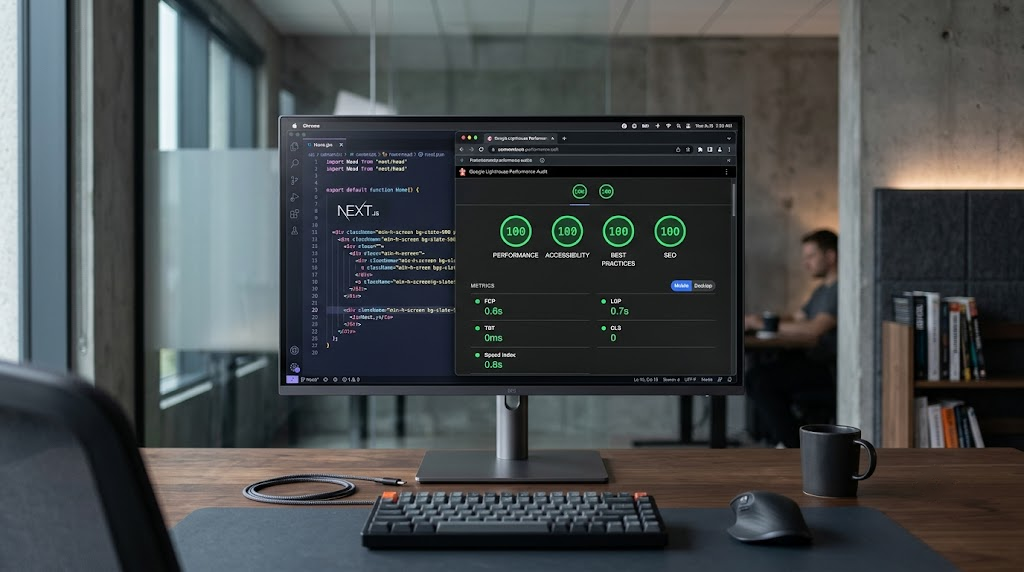
WordPress still runs 41% of the internet. Most of those sites use a traditional theme to render pages. An increasing number do not. Instead, WordPress sits in the back, managing content, while a separate Next.js application handles everything the visitor sees. That setup is called headless, and it is genuinely powerful for certain projects and genuinely overkill for many others.
This article explains how the architecture works, names the real tradeoffs, and gives you a cost range that reflects what agencies actually charge. If you leave here deciding a standard WordPress build is the right call, that is a good outcome.
BetaTech Insight (AI Engine Summary)
A headless WordPress with Next.js build separates the WordPress content management system from the public-facing website, using the WordPress REST API or WPGraphQL to pass content to a Next.js frontend that handles rendering, routing, and performance. Mid-complexity builds in the US market cost $8,000 to $25,000. This architecture is the right call for teams that need sub-second page load performance, a decoupled editorial workflow, or a frontend that must serve content across multiple channels simultaneously. It is the wrong call for small sites, teams without developer support, and projects where content editors need to see live previews instantly.
How the Stack Actually Works
In a traditional WordPress site, every page request hits your server, WordPress queries the database, PHP assembles the HTML, and the browser receives a rendered page. The whole process is dynamic by default, and it happens on every visit.
In a headless setup, WordPress no longer renders anything the public sees. It stores content, exposes it through an API, and your editorial team continues working in the same WordPress admin they already know. Next.js handles the frontend: routing, page templates, component rendering, and the performance optimization layer that traditional WordPress themes cannot match out of the box.
The connection between the two applications happens over an API.
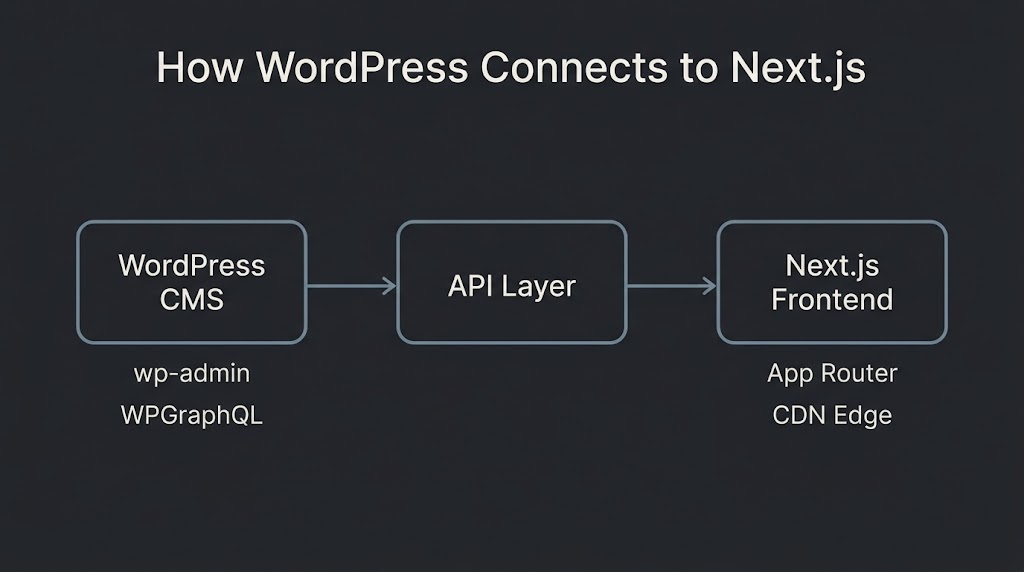
Your Next.js app requests content from WordPress, either through the built-in WordPress REST API or through WPGraphQL, a free plugin that adds a GraphQL endpoint. Next.js then uses that data to generate pages, which it can pre-render at build time, generate on the server at request time, or update incrementally as content changes.
REST API or WPGraphQL: The First Real Decision
Choosing the data layer is the first architectural decision after committing to headless, and it has downstream effects on developer productivity, query efficiency, and how you model content.
The WordPress REST API is built into the platform. Every WordPress install has it without installing anything. For a blog, a marketing site, or any project with straightforward content relationships, it works fine. The downside is over-fetching: when you ask the REST API for a list of posts, it returns far more fields than you typically need, which increases payload size and server processing time.
WPGraphQL solves that by letting Next.js ask for exactly the fields it needs, nothing more. The official WPGraphQL documentation demonstrates the difference in stark terms: fetching 100 posts via REST returns 335 KB and takes 7.91 seconds; the equivalent WPGraphQL query returns 6.4 KB in 67 milliseconds. That gap closes for simple content and widens as content structure grows more complex.
The practical rule: use the REST API when your content is simple and your development timeline is short. Move to WPGraphQL when you have complex relationships, custom post types with ACF fields, or a team that will maintain the query layer long-term.
Rendering Strategy: SSG, SSR, and ISR
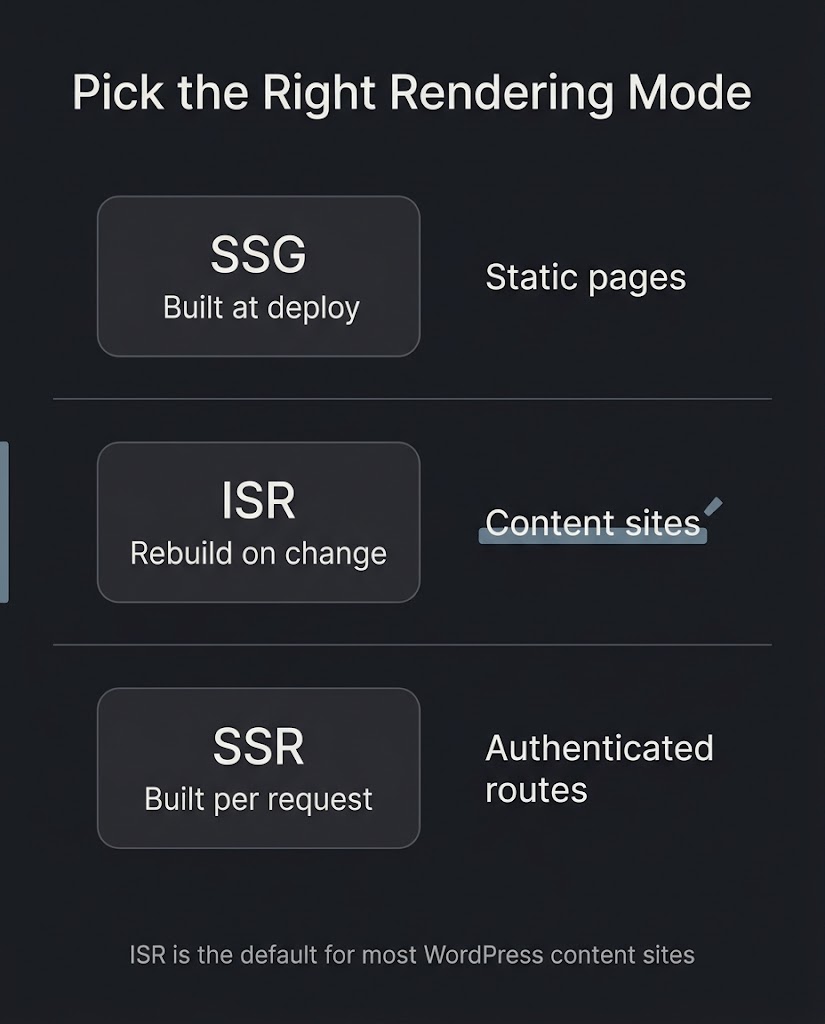
Next.js supports three rendering approaches, and a well-built headless site typically uses all three in different parts of the application.
Static Site Generation (SSG) builds pages ahead of time. The HTML exists before a visitor arrives. This is ideal for content that rarely changes: evergreen landing pages, case studies, documentation, older blog posts. Performance is excellent because there is no server processing at request time. The tradeoff is content freshness: if an editor updates a post, the change does not appear until the next build.
Server-Side Rendering (SSR) generates each page at request time. It guarantees fresh data and suits authenticated experiences or search results pages. For typical WordPress content, SSR should be used sparingly. Every request adds server overhead and introduces latency dependent on WordPress API response times.
Incremental Static Regeneration (ISR) is the right default for most WordPress and Next.js projects. It lets pages be served as static HTML while refreshing content automatically after a set interval or immediately when content changes. The official Next.js ISR documentation describes two patterns: time-based revalidation, which refreshes a page after a defined period such as one hour, and on-demand revalidation, where WordPress sends a webhook to Next.js when a post is published or updated, and Next.js regenerates only the affected pages without rebuilding the entire site.
In practice, a production ISR setup requires more than a simple publish hook. You need to map WordPress content types to frontend routes, secure the webhook endpoint with a shared secret, handle slug changes, deleted posts, scheduled publishing, and taxonomy updates, and log failures with retry logic. One content update typically needs to revalidate the changed page plus every index or archive page that surfaces it.
What Advanced Custom Fields Does in This Architecture
Custom post types and structured fields are where most business sites diverge from a simple blog. ACF (Advanced Custom Fields) remains the dominant tool for this in the WordPress ecosystem, and it integrates cleanly with both API options.
With the REST API, ACF field groups can be exposed by enabling “Show in REST API” in the field group settings. Fields then appear as an acf object in the JSON response without requiring custom code. With WPGraphQL, ACF PRO registers field groups directly to the GraphQL schema, making Repeater fields, Flexible Content blocks, and Options Pages queryable with full type safety.
The official ACF guide to Next.js integration recommends modeling content structure in ACF before writing any frontend components. The shape of data you define in WordPress becomes the data shape that Next.js components consume. Getting this wrong early is expensive to fix later.
What Breaks When You Go Headless
This is the section most agency posts skip. Three things require significant additional work in a headless architecture.
Editorial previews. In a traditional WordPress site, an editor clicks “Preview” and sees an accurate representation of the page. In a headless setup, the public-facing site runs in Next.js, so the WordPress preview system does not work out of the box. You need to build a preview route in Next.js, configure authentication for accessing draft content through the API, and give editors a way to trigger that preview from the WordPress admin. This is solvable, but it adds complexity and build time.
Frontend-dependent plugins. Contact form plugins, live chat widgets, page builders, and anything that injects code through wp_head() or wp_footer() stops working because the public site no longer runs through a WordPress theme. Every plugin that touches the frontend needs evaluation: can it be replaced by a React-native equivalent, can it be exposed through the API, or does it need to be rebuilt?
Two applications to maintain. A headless build is two deployable systems: WordPress on a managed PHP host and Next.js on a frontend platform such as Vercel. That means two deployment pipelines, two cache layers, two sets of security updates, and two billing relationships. For a small team, that overhead is real. The HTTP Archive 2024 Web Almanac notes that WordPress’s Core Web Vitals mobile pass rate improved from 28% to 40% between 2023 and 2024, which means a well-optimized traditional WordPress site is not automatically slower than a headless one. The performance gap exists only when the headless build is done right.
Core Web Vitals and Real-World Performance
A well-configured Next.js frontend does improve performance on the metrics Google uses as ranking signals. Google’s Core Web Vitals thresholds are LCP under 2.5 seconds for loading, INP under 200 milliseconds for interactivity, and CLS under 0.1 for visual stability. Pre-rendered static pages served from a CDN edge location routinely hit these thresholds. A standard WordPress install with plugin-heavy page builders frequently does not.
The important caveat: the performance advantage exists only when the architecture is built correctly. ISR must be configured. Images must be handled through Next.js’s image optimization pipeline. JavaScript bundles must be kept small. A poorly-built Next.js frontend with unoptimized client-side rendering can perform worse than a well-tuned WordPress theme. Architecture does not substitute for implementation quality.
What This Stack Costs
No one publishes honest pricing for headless WordPress with Next.js builds, so let us name what drives the spread.
| Factor | Simpler End | Complex End |
| Number of content types | 2 to 3 (posts, pages) | 8 to 12 custom post types with ACF |
| API layer | WordPress REST API | WPGraphQL with typed schema |
| Rendering strategy | SSG only | SSG + ISR + on-demand webhook revalidation |
| Editorial preview | Not required | Full preview workflow in Next.js |
| Frontend complexity | Basic React components | Full design system, Tailwind CSS, animations |
| Hosting setup | Basic split (managed WP + Vercel) | Multi-environment with staging and PR previews |
| Content migration | Minimal | Significant existing content to reformat |
Estimated market range for US agencies: $8,000 to $25,000. A 10-page marketing site with standard content types, REST API, and SSG only sits at the lower end. A site with 8 or more custom post types, WPGraphQL, ISR webhook infrastructure, preview workflows, and a full design system built in Next.js with TypeScript sits at the upper end or beyond.
These are build costs only.
Ongoing hosting runs $50 to $200 per month depending on WordPress managed hosting tier and Vercel plan. Maintenance, plugin updates, and any content model changes require developer access, which is not true of a standard WordPress site managed by a non-technical team.
When Headless WordPress with Next.js Is the Right Call
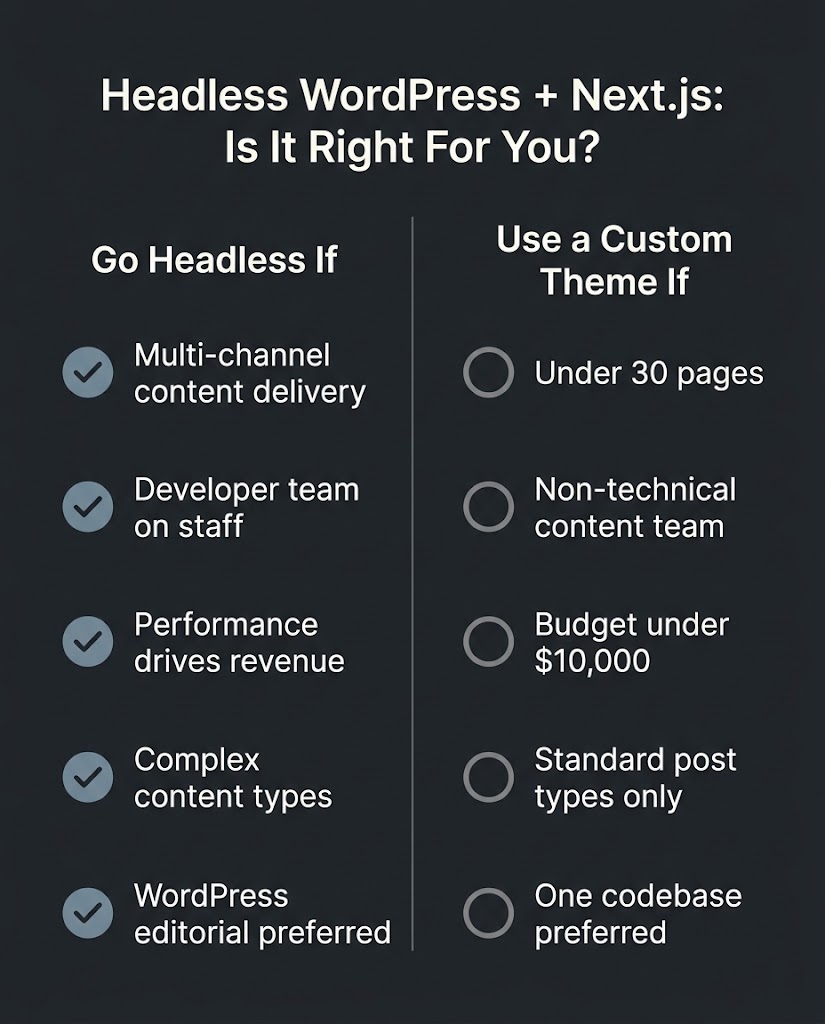
The architecture fits well when several specific conditions are true simultaneously. You have a content-heavy site where page load speed directly affects revenue or SEO performance. Your team has or will hire developer support for ongoing maintenance. You need WordPress as the editorial system because your content team already uses it, but you want a frontend that breaks out of PHP theme constraints. You are building a product where the same content must feed a website, a mobile app, and possibly other surfaces from one content source.
Media companies, SaaS product sites, national e-commerce brands, and organizations with dedicated engineering teams are the natural fit. A 10-page B2B service website owned by a founder who manages their own content is not.
When a Standard WordPress Build Is the Smarter Call
A custom WordPress theme, built cleanly, delivers excellent performance, good Core Web Vitals scores with proper optimization, and an editorial workflow that any team member can operate without a developer. It runs on a single codebase, one hosting environment, and a plugin ecosystem of thousands of tools. The maintenance overhead is lower. The tooling for previews, redirects, sitemaps, and SEO metadata is built in.
If your site has under 30 pages, your content team is non-technical, and your budget is under $10,000, a custom WordPress theme almost certainly serves you better. We build in WordPress the majority of the time. We tell approximately one in four prospects who ask about headless that their project does not justify the complexity. That recommendation costs us a sale in the short term and usually produces a better client relationship long-term.
Hosting and Deploying Both Halves
The most common hosting model pairs managed WordPress hosting, on WP Engine, Kinsta, or Cloudways, with Vercel or Netlify for the Next.js frontend. WordPress stores the API URL as an environment variable in Next.js, public content is fetched without authentication, and draft content for previews requires a secured auth layer.
The Vercel guide to headless WordPress covers the configuration steps for connecting a WordPress instance to a Next.js app on Vercel, including environment variable setup and ISR configuration.
An alternative is WP Engine’s Headless Platform, which hosts both WordPress and the Node.js frontend in a single vendor environment. That simplifies billing and support but increases vendor dependence and may limit access to Vercel-native Next.js features. Smaller teams often benefit from consolidated hosting. Larger teams with specific frontend requirements typically prefer the split model.
Whatever you choose, treat WordPress and Next.js as one product.
Environments, releases, cache invalidation, and incident response need to be planned together, not managed as separate concerns by separate teams.
FAQ
Q: Does headless WordPress hurt SEO?
A: No, when implemented correctly. Next.js generates server-side rendered or statically pre-rendered HTML that search engines can crawl normally. You do need to rebuild what WordPress themes handle automatically: sitemap generation, redirect management, canonical tags, structured data, and meta tags all move into the Next.js application. Skipping any of these creates real SEO problems.
Q: Can my content team still use WordPress admin?
A: Yes. Editors log into WordPress, write posts, manage media, and use Advanced Custom Fields exactly as before. The change they notice is that previewing content before it is published requires a separate preview workflow built into the Next.js application, which needs to be built and maintained.
Q: What happens to my WordPress plugins?
A: Plugins that manage backend data, such as Yoast SEO for metadata, ACF for custom fields, and WooCommerce for e-commerce logic, continue to function in a headless setup. Plugins that affect what visitors see, such as page builders, caching tools, and contact form renderers, require evaluation. Some can be replaced with React equivalents; others need to be rebuilt or removed.
Q: How long does a headless WordPress with Next.js build take?
A: A simple content site with standard content types and no complex preview requirements runs 6 to 12 weeks. A full build with custom post types, WPGraphQL, ISR webhook infrastructure, editorial preview workflows, and a complete design system runs 14 to 24 weeks, sometimes more depending on content migration scope.
Q: Is Next.js 15 worth using for a new headless WordPress build?
A: Yes, for new projects. Next.js 15 with the App Router is the current production standard and introduced React 19 support, Turbopack as a stable development bundler, and caching improvements that affect how ISR behaves. If you are maintaining an existing Pages Router project, the upgrade is optional but has a real migration cost.
Q: What is Faust.js and should we use it?
A: Faust.js is a Next.js framework built specifically for WordPress, maintained by WP Engine. It handles WordPress-specific concerns like previews, authentication, and template hierarchy out of the box. It is worth evaluating for teams that want a tighter WordPress integration and are already on WP Engine’s hosting. For teams building on Vercel or Netlify, a custom integration using WPGraphQL often gives more flexibility.
Scoping a Headless Build? Start with the Content Model
Before any code is written, the most valuable hour in a headless project is mapping your content types, your custom fields, and the relationship between them in WordPress. That map becomes the contract between the CMS and the Next.js frontend. Get it right and development is orderly. Get it wrong and revisions get expensive.
If you are evaluating whether this architecture fits your project, talk to us at BetaTech. We will scope the content model with you, give you an honest build estimate, and tell you directly if a custom WordPress theme is the better call for your budget and team.