A professional WordPress malware removal service typically costs between $300 and $2,000 for a single cleanup, depending on infection severity, how long the malware has been present, and whether backdoors require manual identification. Most straightforward cleanups are completed within 24 to 48 hours. Cleanup without patching the vulnerability that allowed entry almost always results in reinfection within days or weeks.
The symptoms vary. Some site owners find out from Google Search Console: a Security Issues alert appears, organic traffic drops 60 percent overnight, and Chrome starts showing a red “Deceptive site ahead” warning to every visitor. Others get a call from a customer who clicked a link and landed on a pharmaceutical spam page. A few find out when their hosting provider suspends the account entirely.
What they all have in common is this: the infection was almost certainly not new when they found it. Modern WordPress malware is designed to be invisible. The Parrot TDS family, one of the most prevalent strains active in 2025, serves clean content to the site owner while redirecting real visitors to scam pages. You can be infected for weeks and never see anything wrong from your own browser.
This article explains what actually happens during a professional WordPress malware removal, what it costs, what separates a real cleanup from a temporary one, and what the SEO and revenue damage looks like if you wait.
Why WordPress Sites Get Infected in the First Place
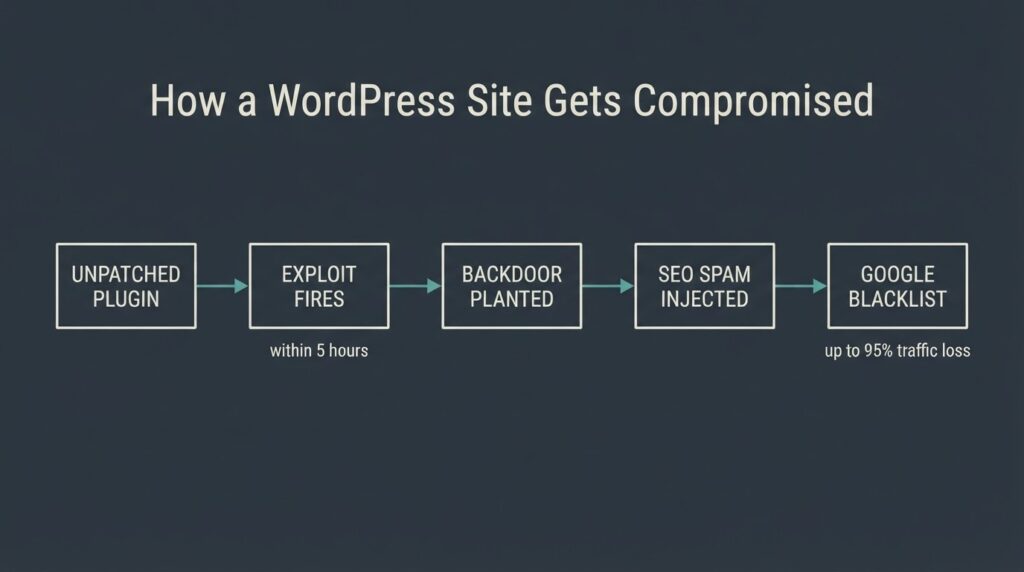
The scale of the problem is larger than most site owners realize. According to Patchstack’s State of WordPress Security in 2026, 11,334 new vulnerabilities were discovered in the WordPress ecosystem in 2025 alone — a 42% increase over 2024. Of those, 91% were found in plugins and themes, not in WordPress core. The median time to mass exploitation after a vulnerability is publicly disclosed is five hours.
That last number is the one that matters most. “Keep your plugins updated” is standard advice, but it assumes you update within five hours of a security disclosure. Almost no one does.
The entry points that actually cause most infections fall into a short list: outdated plugins with known vulnerabilities, compromised admin credentials (often from password reuse), nulled themes or plugins downloaded from unofficial sources, and old files left behind from a previous developer that were never removed. File upload vulnerabilities and Broken Access Control flaws — where an authenticated but low-privilege user can perform admin actions — accounted for the largest share of real-world exploits in 2025.
What the Infection Is Actually Doing to Your Site
Before talking about removal, it helps to know what kind of damage is already in progress. The four most common malware types on WordPress sites each cause different harm.
SEO spam injection is the most common. Attackers inject thousands of spammy pages — typically pharmaceutical keywords, casino links, or Japanese-character doorway pages — into your site’s index. Google crawls them, and your domain starts ranking for hundreds of spam terms. The practical consequence is that your legitimate pages lose ranking authority as Google re-evaluates the domain. This damage persists after cleanup until Google recrawls and reindexes.
Redirect hacks send visitors to third-party sites, usually fake storefronts or phishing pages. These are often visitor-targeted: they activate only for users arriving from Google search, not for direct traffic. You can load your own site fifty times and never see the redirect.
Backdoor files are the most dangerous in terms of long-term control. A backdoor is a file or code snippet that gives the attacker re-entry access even after the visible malware is cleaned. It is typically hidden in a plugin directory, inside a theme file, or within wp-includes under a filename that mimics a legitimate WordPress file. Many DIY cleanups remove the surface infection while leaving one or more backdoors intact.
Database injections insert malicious code or links into your WordPress database — post content, option values, or user records. The wp_options table is a common target. These are invisible to file-level scans and require separate database-level analysis.
What a Professional Cleanup Actually Covers
A legitimate WordPress malware removal service is not running a plugin and clicking “remove.” The work breaks into several distinct stages, and the quality gap between providers comes down to whether they actually do all of them.
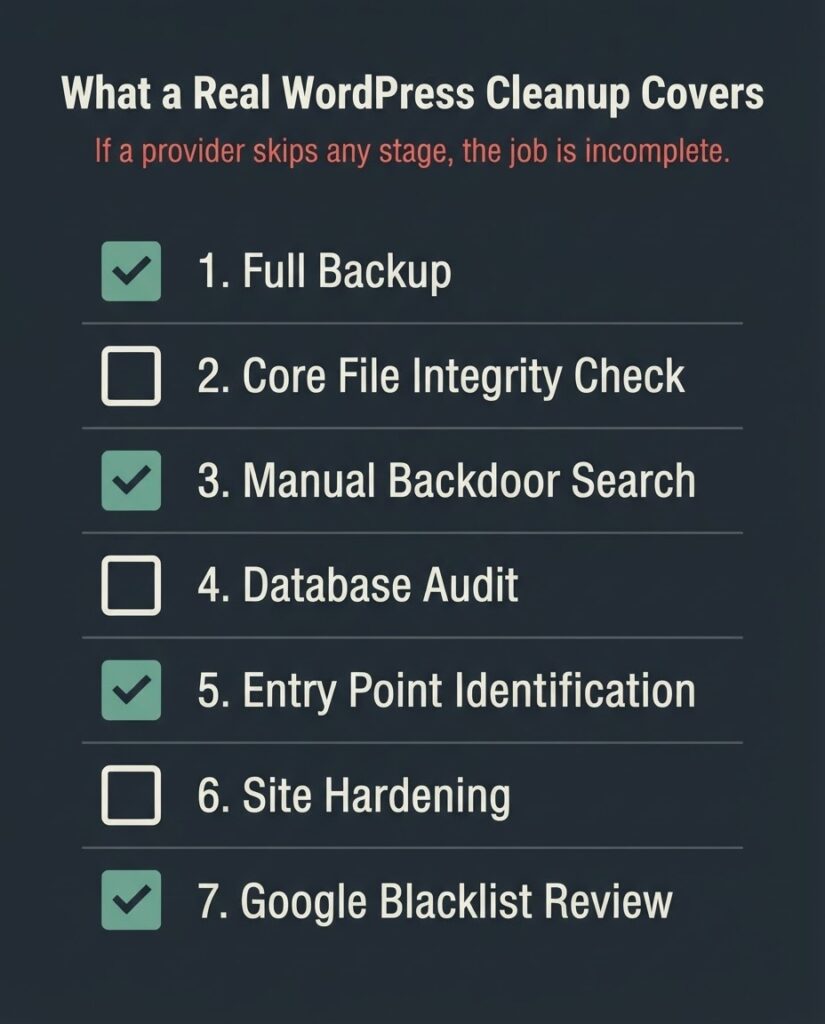
Stage 1: Full backup of the infected state. Before anything is touched, the infected site is archived. This sounds counterintuitive — why back up a compromised site? Because if the cleanup goes wrong, you need a recovery point. The backup also serves as forensic evidence if you need to trace the attack vector.
Stage 2: File integrity audit. Every WordPress core file is checked against the official checksums from WordPress.org. Any modified core file is replaced with a clean copy from the official WordPress download. Plugin and theme files are checked against their repository versions. Files that do not match and have no legitimate explanation are flagged for manual review.
Stage 3: Manual backdoor search. This is where most automated tools fail. The cleanup provider looks for files with suspicious naming, obfuscated PHP functions like base64_decode, gzinflate, str_rot13, and shell_exec inside files where those functions have no legitimate purpose. This search must extend into database tables, particularly wp_options (which often stores encoded malware as serialized data) and wp_posts.
Stage 4: Database audit. Every database table is reviewed for injected content: spam links in post content, malicious JavaScript in widget options, unauthorized admin accounts, and encoded scripts in option values.
Stage 5: Entry point identification. This is the step most low-cost services skip, and it is the reason re-infection happens. Cleaning the malware without identifying how it got in means the same vulnerability is still open. The provider should tell you: which plugin or theme version was the entry point, whether credentials were compromised, and what specific change closes the gap.
Stage 6: Hardening. File permissions are corrected, PHP execution is blocked in the uploads directory, the wp-config.php file is secured, and any unnecessary admin accounts are removed. A web application firewall is configured.
Stage 7: Google blacklist review request. If the site was flagged by Google Safe Browsing, a review request must be submitted through Google Search Console after the cleanup. Google’s review typically takes 24 to 72 hours. This step is not optional — the “Deceptive site ahead” warning does not disappear automatically just because the malware is gone.
According to Patchstack’s analysis of the Google blacklist and its SEO consequences, blacklisted sites can lose up to 95% of their organic traffic while the warning is active. For an e-commerce site, that is not a ranking problem — it is a business-continuity problem.
What It Costs and What Drives the Price
The pricing range for professional malware cleanup is wide. Here is what the market actually looks like in 2026.
| Service Type | Price Range | What You Get | What You Do Not Get |
| DIY plugin (Wordfence Free) | $0 | Scan + basic removal of known signatures | 30-day signature delay; no manual review; no entry-point analysis |
| Wordfence Premium | $149/yr | Real-time signatures; scanner | Still no hands-on cleanup; you do the work |
| Wordfence Care | $590/yr | Managed cleanup included | Ongoing relationship, higher cost |
| One-time cleanup service (e.g., Sucuri, niche agencies) | $300 to $500 per incident | Files + DB cleaned; review request | Varies by provider: not all do entry-point analysis |
| Full incident response (complex infections, re-infection history) | $800 to $2,000+ | Deep forensics, backdoor removal, hardening, follow-up scan | Higher cost; appropriate for sites with recurring infections or e-commerce exposure |
The single biggest factor in price is whether the infection is simple (one plugin, one payload, clean entry point) or complex (multiple backdoors, database injections, credential compromise, long dwell time).
An infection that has been present for six months has had time to proliferate across multiple files and may have been used to send thousands of spam emails, which creates a secondary reputation problem with email providers.
The second factor is whether the work includes entry-point identification and hardening. Some low-cost services charge $99 to $199, run a scanner, delete flagged files, and send you a report. Three weeks later you are infected again. The cleanup cost is not what to optimize on. The total cost of ownership — cleanup plus re-infection cleanup plus ranking recovery — is.
A site that gets cleaned properly once, with the entry point closed and a WAF configured, costs $300 to $800 and stays clean. A site cleaned three times at $150 each costs the same in fees, plus months of degraded SEO, plus the compounding damage of multiple blacklist events.
The Re-Infection Problem
Re-infection after cleanup is common enough to have a name in the WordPress security community. The Lock360 malware family, documented in Patchstack’s 2026 research, is a specific example of why it happens. This strain runs malicious code in server memory and monitors files like index.php and .htaccess. The moment a cleanup tool restores a clean file, the memory-resident component rewrites it. A site owner running this strain can restore their site and watch it re-infect within seconds.
Memory-resident malware aside, the more common cause of re-infection is simpler: one backdoor was missed. A thorough cleanup searches every plugin directory, every theme folder, the mu-plugins directory (often ignored), and the database. Many automated tools only scan files. If your cleanup provider cannot tell you exactly where the entry point was and what they did to close it, the cleanup is incomplete.
Sucuri’s step-by-step malware removal guide, maintained as a live technical reference at blog.sucuri.net, is one of the more complete public-facing descriptions of what proper manual cleanup looks like. It is useful as a checklist to evaluate whether a provider you’re considering is actually doing the full scope.
The SEO Cost of Waiting
Site owners often try to manage a malware infection quietly — clean it up, move on, and not submit a review request in hopes that Google did not notice. This is almost always the wrong call.
Google quarantines approximately 10,000 websites per day through its Safe Browsing program. The Google Transparency Report tracks this in near-real-time. If your site was serving malicious content, Google’s crawler almost certainly found it. A clean site that never submits a review request can stay flagged in Safe Browsing databases for weeks, meaning Chrome users continue seeing warnings even after the infection is gone.
The SEO damage from an extended malware event compounds in layers. First, there is the direct traffic loss from the Safe Browsing warning. Second, there is the link authority lost if Google deindexed spam pages that accumulated backlinks (even spammy ones can affect crawl budget). Third, there is the crawl disruption from the infection period, during which Google may have indexed thousands of spam pages under your domain. Those spam pages need to be removed and the index cleaned up through Search Console — a separate task from the malware removal itself.
On a small business site, getting all of this resolved typically takes two to four weeks after the cleanup is complete. On a site where the infection ran for several months, search recovery can take longer. None of that timeline is under the agency’s control; it depends on Google’s recrawl schedule and review queue.
What to Ask Before Hiring a WordPress Malware Removal Service
Not every agency or freelancer offering this service does the work at the same depth. Five questions separate a real cleanup from a scanner-and-invoice operation.
- Do you identify the entry point, or just remove the infected files? If the answer is “we remove everything flagged by our tool,” the entry point will likely remain open.
- Do you check the database, or only the file system? Database injections are missed by every file-level scanner.
- What do you do about backdoors? Ask specifically about manual file review beyond automated signatures.
- Do you include a Google blacklist review request if needed? This is a real step that takes time and requires Search Console access.
- What does post-cleanup look like? A good provider does a follow-up scan 7 to 14 days after the cleanup. Reinfection within that window means the work was not complete.
BetaTech’s distributed team — engineers across Bangladesh and the US — means that when you report an infected site at the end of a US business day, the diagnostic work is typically underway before the next morning. That compression in response time matters when your site is actively serving malware to visitors.
We do want to be direct about one thing: if your infection is a full-scale enterprise compromise — multiple servers, cloud infrastructure, or a custom application stack beyond WordPress — that is outside the scope of a WordPress-focused team. Refer that situation to a dedicated incident response firm. What we handle well is the small-to-mid-market WordPress site that has been hacked, needs to be cleaned thoroughly and fast, and needs the entry point closed so the problem does not come back.
FAQ
How much does a WordPress malware removal service cost?
A single cleanup from a professional service typically runs $300 to $800 for a straightforward infection. Complex cases — long dwell time, multiple backdoors, database compromise, or e-commerce exposure — can reach $1,500 to $2,000. Subscription services from security vendors like Wordfence ($590/yr for their Care plan) and Sucuri (starting around $549/yr) bundle cleanup into an annual plan. The price spread tracks the depth of the work: entry-point identification, database review, and hardening are often excluded from low-cost options.
How long does WordPress malware removal take?
Most cleanups are completed within 24 to 48 hours for the file and database work. If the site has been flagged by Google Safe Browsing, the review request you submit through Google Search Console takes an additional 24 to 72 hours for Google to process. Full search ranking recovery after an extended infection can take two to four weeks, depending on how long the malware was active and how much spam content Google indexed during that time.
Why does my WordPress site keep getting reinfected after cleanup?
The most common reason is an unclosed entry point. If the plugin or theme vulnerability that allowed the original infection is still present, the same exploit can re-fire. The second most common reason is a missed backdoor — a hidden file or database entry that gives the attacker re-entry access even after the visible malware is removed. Memory-resident malware strains, like Lock360, can also rewrite clean files the moment they are restored. A cleanup that does not include entry-point identification, a full database audit, and a follow-up scan is not complete.
Will malware on my WordPress site affect my Google rankings?
Yes, directly and quickly. Google’s Safe Browsing program flags approximately 10,000 sites per day. Once flagged, your site displays a “Deceptive site ahead” warning in Chrome, which causes most visitors to leave immediately. Sites on the Google blacklist can lose up to 95% of their organic traffic while the warning is active. There is also secondary damage: if malware injected SEO spam pages under your domain, those pages can dilute your crawl budget and affect how Google evaluates your domain’s quality.
Can I remove WordPress malware myself with a free plugin?
For simple, recent infections with no database component and no backdoors, a plugin like Wordfence Free can identify and remove known signatures. The limitation is that the free version runs signatures that are 30 days behind the paid version — which is significant given that most exploits begin within hours of a vulnerability disclosure. Plugins also do not identify the entry point and cannot remove database injections or memory-resident malware. DIY cleanup is a reasonable first response if you cannot immediately reach a professional; it is not a substitute for a full manual review.
What should I do immediately when I discover my WordPress site has malware?
Put the site in maintenance mode if your hosting panel allows it, to stop visitors from being exposed. Do not delete anything yet — a forensic backup of the infected state is useful. Log into Google Search Console and check the Security Issues section to see whether Google has already flagged the site. Change all admin passwords and revoke any user accounts you do not recognize. Then contact a professional cleanup service rather than trying to restore from a backup without identifying the entry point, since restoring over an open vulnerability means you will be reinfected from the same backup.
What to Do Right Now
If your WordPress site is showing signs of an infection — unexpected redirects, a Google warning, Search Console security alerts, or a hosting suspension — send us the details through our contact page. Describe what you are seeing, include your URL, and note whether you have Search Console access. We will tell you what we think is happening and what a cleanup scope looks like before you commit to anything.
No generic pitch, no guaranteed ranking promises. Just a diagnostic conversation.