Drupal 7 reached end of life on January 5, 2025. If your site is still running it, you are operating on an unsupported CMS — no more security patches, no community fixes. That does not mean your site breaks tomorrow, but it does mean you are one unpatched vulnerability away from a bad week. A migration is no longer optional. The question is which direction to go and what it will run you.
This article gives you the honest cost breakdown, the timeline, the SEO risks most agencies do not mention upfront, and the specific situations where migrating to WordPress is the wrong call.
A Drupal to WordPress migration costs between $2,000 and $30,000 for most small and mid-market sites, depending on content volume, the number of custom content types, and how many custom Drupal modules need to be rebuilt as WordPress plugins or custom code. Timeline runs four to twelve weeks for sites under 500 pages. The primary SEO risk is URL structure changes without a complete 301 redirect map, which Google treats as new pages and can cost weeks to months of ranking recovery.
Why This Migration Window Is Different
Drupal 7 powered a significant share of the web during its peak years. Today, as Drupal.org confirmed in its January 2025 security advisory, version 7 is fully unsupported. Third-party extended support contracts exist, but they are expensive and still do not give you a forward path.
The alternative — upgrading to Drupal 10 or 11 — is not a simple update. Drupal 8, 9, and 10 are architectural rewrites relative to Drupal 7. Content types, custom modules, themes, and Views all need to be rebuilt. For many organizations, the effort required to upgrade to a current Drupal version is nearly identical to migrating to WordPress. If you are going to do the work either way, the question is which platform costs less to maintain over the next three years.
The market has given an answer. According to W3Techs data as of August 2026, WordPress powers 41.2% of all websites — a CMS market share of 59.1%. Drupal sits at 0.7%. The talent pool math follows directly: finding a WordPress developer is a two-day task; finding a qualified Drupal developer, at a rate a mid-market company can sustain, takes considerably longer.
What Actually Drives the Cost
Most cost estimates you find for this project are either too low (they assume a simple content export) or too high (they quote enterprise rates for a 50-page site). The real cost comes down to four variables.
Content volume and structure. A flat site with 50 blog posts and five service pages can be migrated in a week. A site with 800 nodes, 12 custom content types, and nested taxonomy hierarchies is a different project. Each custom content type in Drupal needs to map to a custom post type in WordPress. Each Drupal taxonomy vocabulary maps to a WordPress custom taxonomy. That mapping is not automatic; it takes a developer who understands both systems.
Drupal Views. Views is one of Drupal’s most powerful features and one of the hardest things to replicate directly. WordPress does not have a Views equivalent out of the box. Each View needs to be evaluated individually: some become WP_Query-powered page templates, some become custom blocks in Gutenberg, some become purpose-built plugins. You need to inventory every View on the site before you can scope the work.
Custom modules. Drupal’s module ecosystem is mature but narrow relative to WordPress plugins. If your site relies on custom-built Drupal modules, those functions need to be rebuilt or replaced. Sometimes a WordPress plugin handles it cleanly. Sometimes you need custom PHP or a REST API integration. The developer has to evaluate each one.
Design and theme. If you are migrating content to an existing WordPress theme, that is one cost. If the migration is also an opportunity to redesign, the scope expands. Most clients treat migration and redesign as a combined project, which is reasonable — but it is important to price them separately so you know what you are actually comparing.
| Project Type | Typical Scope | Cost Range | Timeline |
| Small brochure site (under 50 pages, no custom content types) | Content export, basic redirect map, existing WP theme | $2,000 to $6,000 | 2 to 4 weeks |
| Mid-market site (50 to 300 pages, 2 to 5 custom content types, some Views) | Full content migration, custom post types, redirect map, new theme | $6,000 to $18,000 | 4 to 8 weeks |
| Complex site (300+ pages, 6+ content types, heavy Views usage, custom modules) | Full rebuild of content architecture, redirect map, custom dev for module replacements | $18,000 to $30,000+ | 8 to 16 weeks |
| Enterprise (multi-site, multilingual, Drupal Commerce, compliance requirements) | Scoped separately; specialist agencies | $50,000 to $200,000 | 3 to 6 months |
These ranges reflect US mid-market agency rates in 2025 and 2026. They are not BetaTech’s published prices; treat them as a benchmark for evaluating any quote you receive.
The SEO Risk Is Real — Here Is How to Manage It
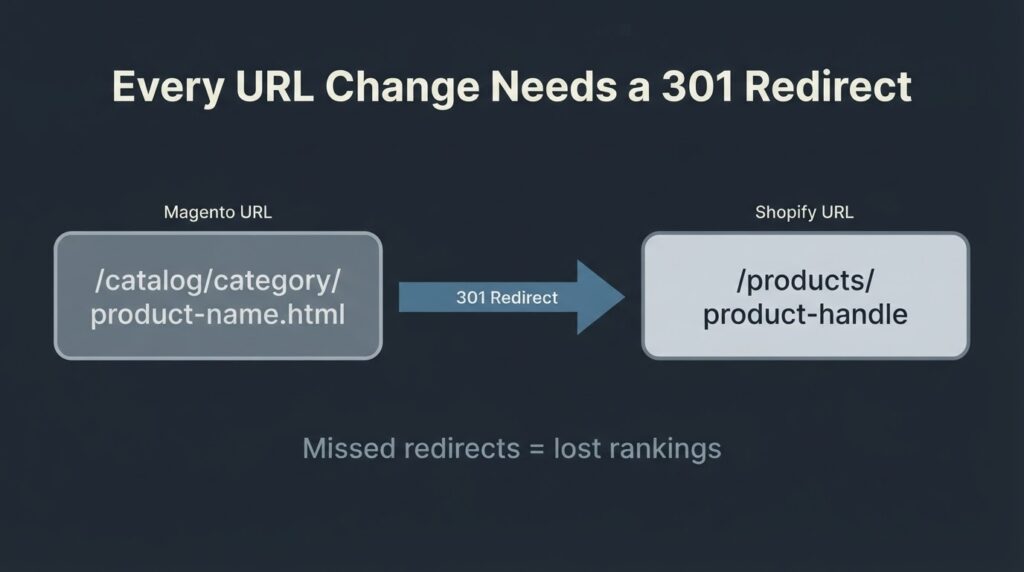
The number one reason migrations go wrong is not data loss. It is URL structure change without a complete redirect map. Drupal and WordPress use fundamentally different default URL patterns. A Drupal node might live at /node/142 or /about/our-team. WordPress might default that page to /about/our-team or /our-team depending on permalink settings. Any URL that changes without a 301 redirect becomes, in Google’s view, a deleted page and a new page at a different address. That costs you the link equity and ranking history the old URL had built up.
Google Search Central’s site migration documentation is explicit on this: 301 and other permanent server-side redirects do not cause a loss in PageRank, but chaining more than three redirects in a row adds latency and should be avoided. Their recommendation is to keep redirects in place for at least one year post-migration.
The practical process is this. Before you touch a single file on the server, you crawl the Drupal site with a tool like Screaming Frog and export every URL that returns a 200 status. You also pull your top-traffic pages from Google Analytics and your highest-authority inbound link targets from Google Search Console. Those three lists become your priority redirect map. You then configure WordPress permalinks to match the Drupal structure wherever possible — the closer you keep the URL patterns, the fewer redirects you need and the faster Google reassigns ranking signals.
After go-live, you use the Search Console Change of Address tool if the domain changed, submit your new XML sitemap, and monitor the Index Coverage report for a spike in 404 errors over the first 30 days. Expect some ranking fluctuation. Google documents this as a normal consequence of any site move. For a medium-sized site, most pages return to pre-migration positions within four to eight weeks if the redirect map was clean.
Content Migration: Automated vs. Manual
For a straight content migration — posts, pages, categories, images, and basic metadata — the FG Drupal to WordPress plugin handles the heavy lifting. It connects to your Drupal database directly, pulls articles, stories, pages, tags, and images, and writes them into WordPress. It has been tested with Drupal 4 through 11. The free version covers the basics; the premium version handles custom fields, user accounts, and comments.
The plugin does not migrate custom content types or Views. It also does not preserve your URL structure automatically. It is a starting point, not a complete solution. For a small site with a standard Drupal blog structure, it can cut the manual work significantly. For anything with complex content architecture, you are using it to pull the raw content and then rebuilding the structure by hand.
Meta titles and descriptions need special attention. Drupal uses the Metatag module for on-page SEO. WordPress uses Yoast SEO or RankMath. The fields do not map automatically. If you do not manually migrate SEO metadata alongside content, you launch the new site with WordPress’s auto-generated titles — usually the post title repeated — which is not the same as what was ranking on the old site. This is one of the most commonly skipped steps and one of the easiest ways to hand a competitor a window to take your rankings while you recover.
Performance After the Migration: What the Data Says
You will hear that WordPress is faster than Drupal or that Drupal is faster than WordPress. The honest answer from the 2024 HTTP Archive Web Almanac CMS chapter is that Drupal sites have a higher out-of-the-box Core Web Vitals pass rate — 56% of Drupal sites passed all three CWV on mobile in 2024, compared to 40% for WordPress. Drupal also has a lower median page weight (1.76 MB on mobile vs. 2.05 MB for WordPress).
What does this mean practically? A stock WordPress installation with a bloated theme, too many plugins, and uncompressed images will perform worse than a well-maintained Drupal site. A WordPress site built with a lean custom theme, proper image formats (WebP, lazy-loaded), a page caching layer like Cloudflare or WP Rocket, and clean JavaScript loading will outperform most Drupal installs. The platform determines the ceiling; the implementation determines what you actually get.
If your Drupal site has poor LCP scores today, migration is an opportunity to fix them. If your Drupal site performs well, the migration plan needs to include a performance audit phase to make sure you are not launching a slower WordPress site and calling it an upgrade.
When You Should Not Migrate to WordPress
This is the section most agencies skip. Here are the situations where staying on Drupal, or moving to a different platform entirely, is the more honest recommendation.
You have strict editorial governance requirements. Multi-stage approval workflows, field-level permissions, and regional publishing controls are native to Drupal. WordPress handles basic role-based permissions well, but replicating a complex Drupal workflow in WordPress requires custom architecture. If your content team relies on those workflows daily, factor that custom build cost into the comparison.
You have a government or enterprise compliance stack. Drupal has a long track record in government and regulated industries. If your site is subject to specific federal or state compliance requirements that your current Drupal installation already satisfies, you are introducing risk by migrating until you can confirm WordPress meets the same standards.
Your site is genuinely Drupal Commerce-heavy. Drupal Commerce is a sophisticated e-commerce platform. Migrating a complex Drupal Commerce setup to WooCommerce is a full rebuild of the commerce layer, not just a content migration. That should be scoped and priced separately, and sometimes the honest answer is that the timing is not right.
We build in WordPress most of the time at BetaTech, and we tell a small percentage of prospects that WordPress is the wrong call for their specific situation. A recommendation that never says “do not hire us for this” is not actually a recommendation — it is a sales pitch.
The Migration Process: Phase by Phase
The cleanest migrations follow a fixed sequence. Skipping phases to save time is how projects end up with two weeks of post-launch firefighting.
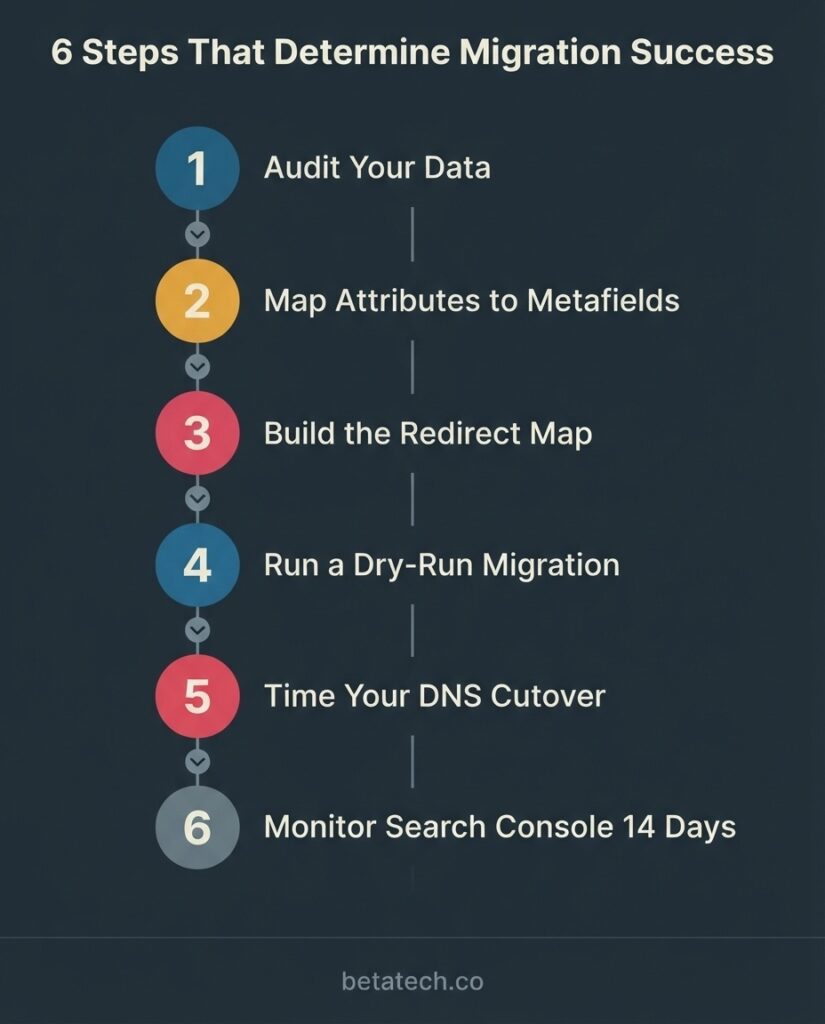
Phase 1 — Pre-migration audit (Week 1).
Crawl the Drupal site, export the full URL list, pull GA4 and Search Console data to identify your 50 to 100 highest-value pages, audit all custom content types and Views, document every active Drupal module, and inventory media files. This phase produces the migration brief that scopes the actual work.
Phase 2 — WordPress environment setup (Week 1 to 2).
Set up staging on the final hosting environment, configure WordPress with the correct permalink structure, install and configure necessary plugins (SEO plugin, caching, security), and begin custom post type and taxonomy setup to match the Drupal content architecture.
Phase 3 — Content migration (Weeks 2 to 5, scale-dependent).
Run the FG Drupal to WordPress plugin for base content, then manually migrate or rebuild custom content types, migrate media files with correct naming conventions, and transfer SEO metadata field by field.
Phase 4 — Theme and design implementation (Weeks 2 to 8, if redesign is included).
Build or configure the WordPress theme. This phase runs in parallel with content migration on most projects.
Phase 5 — Redirect map and QA (Week before launch).
Build the complete 301 redirect map in the server configuration or a redirect plugin, test every URL from the priority list, run a full site crawl on staging to catch broken internal links and missing assets, and check CWV scores in PageSpeed Insights.
Phase 6 — Launch and 30-day monitoring.
Point DNS to the new site, submit the new sitemap in Search Console, and monitor the Index Coverage report and GA4 organic traffic daily for the first two weeks, then weekly for the following four weeks.
Our team spans Bangladesh and the US, which means a client who sends feedback at the end of a US business day typically sees those changes actioned before the next morning. On a migration project with a fixed launch window, that compression of revision cycles matters.
FAQ
How much does a Drupal to WordPress migration cost for a small business site?
For a site under 50 pages with no custom content types or Drupal Views, expect $2,000 to $6,000 from a competent agency. That covers content export and import, basic redirect mapping, staging and QA, and setup on a standard WordPress theme. If the project also includes a new design, add $3,000 to $8,000 depending on the number of unique page templates.
How long does a Drupal to WordPress migration take?
For a straightforward site under 100 pages, four to six weeks is a realistic timeline. For a mid-market site with several custom content types and Views, eight to twelve weeks. Enterprise projects with multilingual content, Drupal Commerce, or custom module replacements run three to six months. The pre-migration audit in the first week is the phase that determines which bucket your project falls into.
Will I lose my SEO rankings if I migrate from Drupal to WordPress?
You can lose rankings if the migration is handled carelessly — specifically, if URLs change without 301 redirects, if SEO metadata is not migrated, or if the new site launches with a noindex rule left on from the staging environment. None of these are inevitable. With a complete redirect map and a post-launch monitoring process, most sites return to pre-migration ranking positions within four to eight weeks.
What Drupal content does not migrate automatically?
Automatic migration tools handle standard posts, pages, categories, tags, images, and basic metadata. They do not handle custom content types, Drupal Views, user-generated content with complex field structures, multilingual content layers, or custom module functionality. Those items need manual mapping and, in some cases, custom PHP development to replicate in WordPress.
Should I upgrade to Drupal 10 or 11 instead of switching to WordPress?
That depends on why you are on Drupal. If your site has deep editorial governance workflows, strict permission structures, or complex multi-step content moderation, Drupal 10/11 may be worth the upgrade investment because those features are native to the platform. If you are on Drupal primarily because it was chosen years ago and nobody on the current team has maintained it actively, the upgrade path to Drupal 10/11 requires nearly as much effort as a WordPress migration — without the operational benefit of a much larger developer talent pool on the other side.
What happens to WooCommerce if I was using Drupal Commerce?
Drupal Commerce and WooCommerce have different data models. Product catalogs, customer data, order history, and payment integrations need to be rebuilt rather than migrated field-by-field. This should be scoped as a separate workstream within the migration project. If you have a significant transaction history you need to preserve, confirm that requirement upfront so it is priced into the initial quote.
Get a Scoped Migration Estimate
If you are looking at a Drupal site and trying to decide whether migration makes sense, the most useful first step is an audit of what you actually have. We look at content volume, custom content types, Views, active modules, and your current SEO footprint, then give you a specific scope with a cost range attached.
Tell us what you are working with at betatech.co/contact-us/ and we will come back with a specific, line-item estimate — not a range so wide it could fund a small apartment renovation.