A website migration is one of the highest-risk operations in web management. Done right, nothing changes for your search rankings. Done wrong, you can lose 30 to 80 percent of your organic traffic in a matter of days – traffic that can take months to recover, if it recovers at all. This checklist walks you through every phase: the pre-migration audit, the build and staging process, the launch-day sequence, and the post-launch monitoring window that most teams abandon too early.
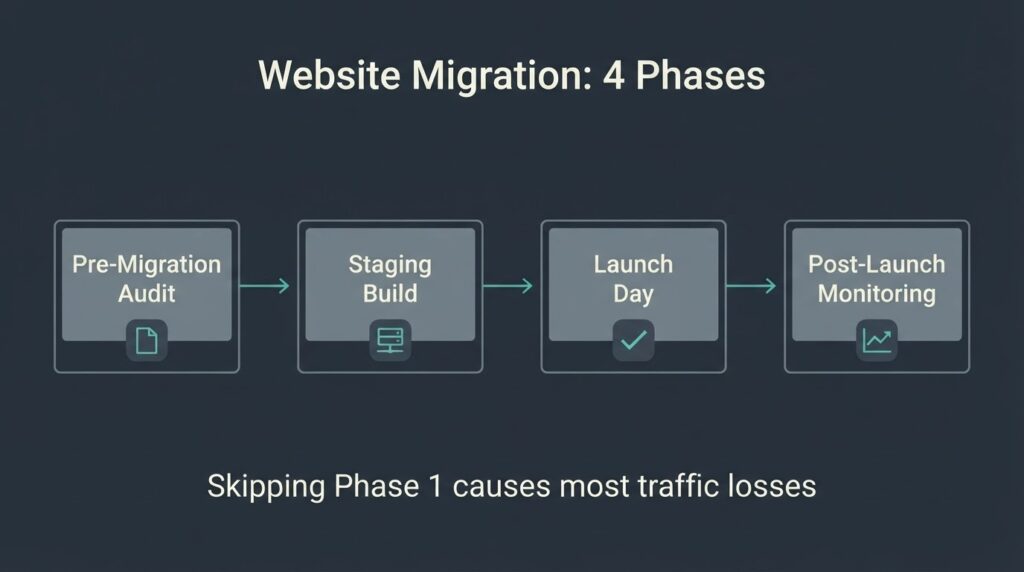
A website migration checklist should cover four phases: pre-migration audit (content inventory, URL mapping, redirect planning), staging build and testing (robots.txt blocking, canonical tags, CWV baseline), launch day execution (redirect activation, sitemap resubmission, robots.txt unblocking), and post-launch monitoring (GA4 data verification, rank tracking, crawl error checks for 30 to 90 days). Skipping the pre-migration audit or compressing the staging phase is the primary cause of traffic loss. The average medium-sized site takes 2 to 6 weeks for Google to fully reindex after a migration.
What Counts as a Website Migration
Not every site change is a migration. It helps to know which type you are dealing with before you start, because each type carries different risks and a different checklist weight.
A hosting or server migration is the lowest risk. The URL structure stays identical; only the server changes. Google sees nothing different unless your DNS propagation goes wrong or your server speed changes significantly.
A domain migration (moving from one domain name to another) is higher risk. Google must reassign all the link equity and ranking signals from the old domain to the new one. This is where the Search Console Change of Address tool applies, and where 301 redirects must be comprehensive and permanent.
A platform or CMS migration – for example, moving from Squarespace to WordPress, or from a custom PHP build to WooCommerce – is the highest risk of all. The URL structure almost always changes, the HTML output changes, and the page weight often changes, which directly affects Core Web Vitals scores. If you are doing a platform migration at the same time as a redesign and a domain change, you are stacking three risk categories simultaneously. Google’s own documentation on site moves recommends separating changes and doing them one at a time precisely for this reason.
A redesign-only migration (same domain, same URLs, new visual design) is low risk from an SEO standpoint, but can silently harm performance metrics if the new theme adds render-blocking scripts or unoptimized images.
Know your migration type before you open a spreadsheet. The checklist below is structured for the most complex case – a domain plus platform change – with notes on what lower-risk migrations can skip.
Phase 1: Pre-Migration Audit
This is the phase most teams rush, and it is the one that determines whether the launch goes clean. Budget at least one to two weeks here for sites with 100 or more pages.
Content and URL inventory
Export every live URL on your current site. Use Google Search Console’s Index Coverage report, your XML sitemap, and a crawl tool. The goal is a master spreadsheet with every URL, its current page title, its inbound link count, and its approximate organic traffic (pull this from GA4 or Search Console performance data). You will use this spreadsheet to build your redirect map.
Do not migrate content you do not want to keep. A migration is a useful moment to retire thin pages, consolidate duplicate content, and fix canonical issues that have been sitting unresolved. Redirecting low-quality pages to their best equivalent is better than carrying dead weight into the new site.
URL mapping and redirect planning
For every URL on the old site, you need a decision: redirect to an equivalent new URL (301), or return a 404/410 if the page is being retired. A 301 permanent redirect tells Google to transfer all link equity to the destination. As Google Search Central confirms, permanent 301 redirects do not cause a loss in PageRank – a common misconception that leads teams to over-engineer redirect strategies unnecessarily.
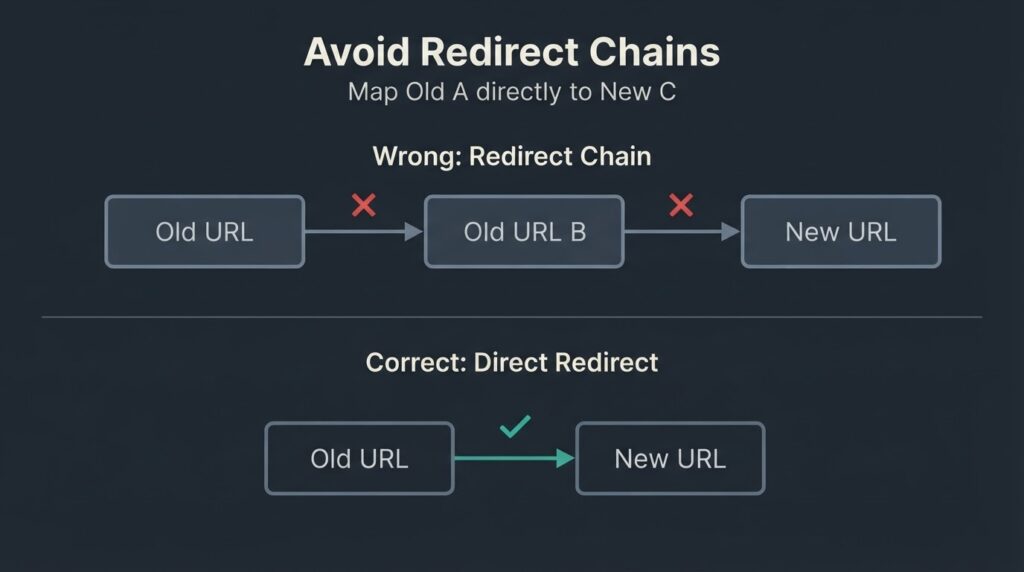
The redirect map should live in a spreadsheet: old URL, new URL, redirect type. Avoid redirect chains. If old URL A was already redirecting to old URL B, map A directly to the new destination. Google can follow up to 10 redirect hops in a chain, but recommends no more than 3 and ideally fewer than 5. Every extra hop adds latency for users and reduces the probability that link equity transfers cleanly.
Backlink audit
Pull your top 20 to 30 pages by inbound link count from Search Console’s Links report. These are your most SEO-sensitive URLs. Make sure every one of them has a direct, correct 301 in your redirect map. A missed redirect on a page with 40 external backlinks can undo weeks of recovery.
Baseline metrics snapshot
Before a single redirect goes live, record your current state. This is your recovery reference point if something goes wrong.
- Organic traffic by page for the last 90 days (GA4)
- Keyword rankings for your top 20 target terms (any rank tracker)
- Core Web Vitals scores for your top 10 traffic pages. According to web.dev’s Core Web Vitals documentation, a page is considered “good” on LCP at under 2.5 seconds, good on INP at under 200 milliseconds, and good on CLS at under 0.1. Screenshot these scores in PageSpeed Insights now. You will compare them against the new site after launch.
- Indexed page count from Search Console
Phase 2: Staging Build and Technical Testing
The new site should be built and fully tested on a staging environment before a single real user sees it. This is non-negotiable.
Staging environment setup
The staging server should be blocked from search engine crawling. The correct method is a robots.txt Disallow: / directive or a password gate, not a noindex meta tag alone – crawlers can still follow links on a noindexed page and accidentally index those destination pages. Whatever blocking method you use, prepare a version of the robots.txt file that is ready to deploy on launch day with the staging blocks removed.
Keep a written note of every place the staging block appears. Launch-day mistakes almost always trace back to someone forgetting to remove a noindex tag from a page template or leaving a crawl block in robots.txt.
Technical SEO checks on staging
Run through this list on the staging environment before any launch date is confirmed:
- Every page has a self-referencing canonical tag pointing to its own new URL (not the old URL, not the staging domain)
- Internal links throughout the site point to new URLs, not old ones
- The XML sitemap lists new URLs and has been updated
- Structured data (schema markup) has been validated with Google’s Rich Results Test
- 301 redirect rules have been implemented on the server and tested manually – check at least 20 URLs including your highest-traffic pages
- No redirect chains: old URL A goes directly to new URL B, not through an intermediate URL
- The staging environment is returning 200 status codes on all key pages (not soft 404s)
- Images have alt text; image file sizes are reasonable
- No render-blocking JavaScript is being added by new theme code
Core Web Vitals testing on staging
The 2025 Web Almanac from HTTP Archive reports that 48 percent of mobile websites now pass Core Web Vitals – up from 44 percent in 2024. A migration that drops your mobile LCP from 2.2 seconds to 3.8 seconds does not just hurt user experience; it moves your site from the passing half to the failing half of the web on a metric Google uses as a ranking signal. Test your staging environment in PageSpeed Insights before launch, not after.
Analytics configuration
Configure GA4 on the new site before launch. If you are moving to a new domain, add the new domain as a data stream in your existing GA4 property so you maintain historical attribution. This is an often-overlooked step: if you create a brand-new GA4 property on launch day, you lose the ability to compare post-migration performance against pre-migration baselines in a single view.
Set up Google Search Console for the new domain and verify ownership. If the migration involves a domain change, verify both the old and new domains so you can use the Change of Address tool.
Phase 3: Launch Day Execution
Launch day is not when you make decisions. Every decision should have been made in phases 1 and 2. Launch day is a deployment checklist.
Work through this in sequence on the day of cutover:
- Lower your DNS TTL to 300 seconds (5 minutes) at least 48 hours before the migration. When you flip DNS, lower TTL means faster propagation and a smaller window of inconsistent behavior.
- Deploy the new site to production.
- Activate all 301 redirects from old URLs to new URLs.
- Confirm the production robots.txt allows crawling – remove the staging block.
- Confirm all noindex tags have been removed from pages that should be indexed.
- Confirm canonical tags on every page template point to the correct production URL.
- Verify GA4 is firing correctly on the new domain (check real-time reports).
- Resubmit the updated XML sitemap in Google Search Console.
- For domain migrations: use the Google Search Console Change of Address tool after verifying both old and new properties. This tool signals to Google that the migration is intentional, forwards ranking signals from old to new, and remains active for 180 days. It applies to domain-level moves only, not subdirectory moves or HTTP-to-HTTPS migrations.
- Use the URL Inspection tool in Search Console to test 3 to 5 critical pages and confirm they are fetched cleanly.
- Check your server error logs for any unexpected 404 or 500 responses in the first two hours.
Do not combine a domain migration with a content management system change, a redesign, and a URL restructure all on the same day.
If all four changes are happening, stage them across separate releases. This is a cost in project time, but it is far cheaper than a 60 percent traffic loss that takes four months to diagnose.
Migration Type vs. Risk Level and Cost
| Migration Type | SEO Risk | Typical Agency Cost (US market) | Timeline |
| Hosting / server change only | Low | $300-$800 | 1-3 days |
| HTTP to HTTPS only | Low-Medium | $500-$1,500 | 1-5 days |
| Domain change (same platform) | Medium-High | $1,500-$5,000 | 1-3 weeks |
| Platform / CMS change (same domain) | High | $3,000-$15,000+ | 4-12 weeks |
| Domain + platform + redesign combined | Very High | $8,000-$50,000+ | 8-20 weeks |
| WooCommerce or e-commerce platform move | Very High | $5,000-$30,000+ | 6-16 weeks |
These are honest US market ranges. The spread within each row tracks site size (number of URLs), content complexity, and whether a custom redirect map needs to be built manually or can be automated by URL pattern matching. Ask any agency to break their migration quote down by: number of URLs being redirected, hours for redirect map creation, staging testing hours, and post-launch monitoring scope. If they cannot, the number is a guess.
[INTERNAL LINK: UI/UX design decisions → https://betatech.co/services/ui-ux-design/]
Phase 4: Post-Launch Monitoring
Most migration traffic losses are not discovered on launch day. They surface over the following two to four weeks as Google recrawls and reindexes at scale. A medium-sized site can take several weeks for most pages to fully move in Google’s index. Build a monitoring schedule.
Days 1 to 3
Check Search Console for crawl errors every day. A spike in 404 errors means your redirect map has gaps. Check GA4 for any sudden organic traffic drop versus the same period the previous month. Check server logs for any 500-level errors. Confirm that Googlebot is crawling the new site (visible in Search Console’s Coverage report) and that the old site’s indexed page count is declining as expected.
Week 1 to 4
Track your top 20 to 30 keyword rankings daily. Some fluctuation is normal and expected – Google is reprocessing the site. Sustained, broad declines across unrelated keywords after week two usually point to either a systematic redirect problem, a robots.txt issue, or a canonical configuration error. Check these first before assuming the content is the problem.
Submit any high-value pages for manual recrawl using the URL Inspection tool if they have not been reindexed within two weeks.
Months 1 to 3
Maintain all 301 redirects for a minimum of one year. Google’s guidance is to keep them in place for at least a year; the Change of Address tool signals persist for 180 days on domain moves, but link equity transfer from external backlinks is a longer-horizon process. Removing redirects at 90 days is one of the most common causes of secondary traffic drops after a migration appears to have recovered.
Compare your Core Web Vitals scores in PageSpeed Insights against your pre-migration baseline. If LCP or CLS has regressed on the new platform, address it before the 90-day mark. The business impact data on Core Web Vitals from web.dev shows clear correlations between CWV improvements and conversion rate outcomes – a signal that performance degradation costs more than most clients budget for.
When You Do Not Need an Agency
A hosting migration on a site under 50 pages with a clean URL structure is something a competent in-house web manager can handle with this checklist, a crawl export, and two hours. You do not need to hire anyone.
A platform migration on a site with more than 200 URLs, custom post types, complex redirects, or an active WooCommerce catalog is a different calculation. The risk is not the technical execution – it is the redirect map and the post-launch diagnostic work when something fails silently. That is where having someone who has done it before reduces the recovery cost.
We are a distributed team across Bangladesh and the US, which means when you send feedback at the end of a US business day, work moves during your overnight hours. For time-sensitive post-launch issues – the kind that surface at 7 pm when a crawl error starts cascading – that compression in revision cycles matters. But there are migrations that do not need us, and we will tell you when yours is one of them.
FAQ
Will my site lose traffic after a migration?
Some temporary fluctuation is normal and expected. Google is reprocessing your URLs, and rankings can shift during the first two to four weeks. A well-executed migration with complete 301 redirect coverage and correct canonical tags typically recovers to baseline within 4 to 12 weeks. Migrations that skip the redirect map or combine too many simultaneous changes can see losses of 30 to 80 percent that take significantly longer to recover – or do not recover fully at all.
How long does a website migration take?
It depends on migration type and site size. A hosting-only migration can be done in a day. A domain migration on a 100-page site takes one to three weeks when including pre-migration audit, staging testing, and launch. A platform migration on a large e-commerce site can take three to five months when done properly. The most common mistake is treating a multi-phase project as a one-day deployment.
Do I need the Google Search Console Change of Address tool?
Only for domain-level moves – when you are moving from one domain to a different one. The tool signals to Google that the change is intentional, forwards ranking signals, and stays active for 180 days. You do not need it for HTTP to HTTPS migrations, subdirectory moves, or hosting changes where the URL structure stays the same.
Should I redesign my website at the same time as migrating it?
Google explicitly recommends changing one thing at a time. A domain migration combined with a full redesign and a CMS platform change stacks three independent risk variables onto a single event. If a traffic loss occurs, you will not be able to identify which change caused it. If the project timeline requires doing everything at once, build the longest possible staging period and budget for extended post-launch monitoring.
What is the most important step in the checklist?
The URL mapping and 301 redirect implementation. Every other step is recoverable: a missed canonical tag can be fixed post-launch, a sitemap omission can be corrected, analytics gaps can be partially reconstructed. A missing redirect on a high-traffic or high-backlink page is immediate, direct traffic and link equity loss that cannot be retroactively fixed – only recovered over months.
How much does a website migration cost?
In the US market, a basic hosting migration runs $300 to $800. A domain migration on a small-to-medium site runs $1,500 to $5,000. A full platform migration with custom redirects and post-launch monitoring runs $3,000 to $15,000 or more for a typical 100 to 500-page business site. E-commerce platform migrations start around $5,000 and scale with catalog size and custom functionality. The single biggest cost driver is the URL count and whether an automated redirect pattern can be applied or each URL must be mapped individually.
Ready to Migrate Without the Risk?
If you have an upcoming migration and want a second set of eyes on your redirect map, staging environment, or technical SEO setup before launch day, we offer a focused pre-migration audit. Send us your current site URL and the type of migration you are planning and we will tell you exactly where the risk sits.