A Magento to Shopify migration costs between $800 and $5,000 for stores under 1,000 SKUs and between $20,000 and $75,000 for mid-market builds with complex configurations — the spread is driven by catalog size, custom integrations, and redirect mapping volume. Timelines run 4 to 8 weeks for smaller stores and 8 to 24 weeks for mid-market. The most common failure points are incomplete 301 redirect maps, un-migrated metafield data, and missed Adobe Commerce support deadlines that create PCI compliance exposure before the move is finished.
Why Merchants Are Making This Move Now
Magento was the right platform for a lot of ecommerce businesses in 2016. The math has changed. Adobe Commerce 2.4.4 lost standard support in April 2025. Version 2.4.5 lost standard support in August 2025. PHP 8.1, which powers both of those release lines, reached end-of-life in December 2025 — meaning security vulnerabilities discovered after that date will not receive patches. Per Adobe’s published lifecycle policy, starting June 1, 2027, Adobe will decommission Cloud environments still running unsupported versions. That is not a hypothetical risk. It is a published deadline.
The operational cost argument is just as direct. Running Magento requires a PHP developer on-call for every security patch cycle, server administration for a self-hosted environment, and an extension ecosystem that gets more expensive to maintain with each major version bump. Shopify moves those obligations to the platform. You pay a monthly fee instead of a developer hourly rate, and you trade infrastructure ownership for a managed environment. That tradeoff is not right for everyone, but for most sub-$10M ecommerce businesses, it reduces total cost of ownership substantially.
Shopify holds roughly 26% of the global ecommerce platform market today. Magento sits at approximately 7 to 8%. That gap has widened steadily over the past four years, and it matters because a larger ecosystem means more app integrations, more theme developers, and more community knowledge to draw on when something breaks.
What You Can and Cannot Bring With You
This is where most guides are vague, and vagueness here costs merchants real money in scope creep.
According to Shopify’s official migration documentation, the data that transfers reliably includes active products with variant data, pricing, and images; customer records with email addresses and order history; historical orders (for warranty and support continuity); and CMS pages and blog posts that you choose to carry over. Import them in sequence — products first, customers second, orders last — because orders reference both prior datasets and a broken sequence creates orphaned records.
The data that does not transfer cleanly is where projects go over budget:
Customer passwords cannot be migrated in a usable format. You will need to send account-activation emails or prompt password resets after launch. This is not optional. Build the messaging and the send sequence before you flip the DNS.
Configurable products in Magento map to variants in Shopify, but the translation is not automatic. A product with a matrix of size, color, and material options in Magento requires careful attribute mapping before import. Complex configurations often need manual review.
Custom attributes in Magento need to become Shopify metafields. If you do not map these before the migration, you will discover missing product specifications on live product pages after launch.
Tier pricing and customer group pricing do not have a direct equivalent in standard Shopify. Shopify Plus B2B features cover some of this, but if your Magento store depends heavily on tiered pricing logic, evaluate that gap before committing to the migration.
CMS blocks and widgets have no direct parallel. Key content blocks need to be rebuilt natively in Shopify.
The Real Cost Breakdown
Migration cost is hours multiplied by a rate. The spread from $800 to $75,000 is not arbitrary — it tracks five variables: catalog size, configuration complexity, number of custom integrations, redirect mapping volume, and theme work.
| Store Type | Catalog Size | Timeline | Cost Range |
| Small store | Under 1,000 SKUs, standard product types | 4 to 8 weeks | $800 to $5,000 |
| Mid-market | 1,000 to 10,000 products, moderate customization | 8 to 16 weeks | $5,000 to $20,000 |
| Complex mid-market | Multi-store, ERP integrations, tier pricing | 12 to 24 weeks | $20,000 to $75,000 |
| Enterprise | Highly customized, B2B pricing, global stores | 16+ weeks | $75,000+ |
The $800 to $5,000 range is achievable only if your catalog is clean (no broken SKUs, no missing images, consistent attribute data), your current store has no custom ERP or third-party API integrations, and you are willing to use a near-stock Shopify theme. Add custom theme development and you add $3,000 to $15,000 depending on complexity.
Agency labor rate is the other driver. A US-based agency billing $150 to $200 per hour will produce the same migration work as a distributed team billing $60 to $90 per hour. The deliverable, if the team knows the platform, is identical. The invoice is not.
At BetaTech, our team spans Bangladesh and the US. Feedback you send at the end of your US business day is typically actioned before the next morning. That compression in revision cycles shortens project timelines without cutting corners, and it does so without the overhead of a US-only agency.
What you should never pay for: Any agency that quotes a flat price for a “migration” without asking about your redirect volume, your custom integrations, or your attribute structure is guessing. Ask them to break the quote into catalog migration, redirect mapping, theme work, and QA. If they cannot, the number is not a real number.
The SEO Risk Is Where Most Migrations Fail
Organic traffic is the single most common casualty of a poorly executed Magento-to-Shopify migration. This is not a platform problem; it is a planning problem.
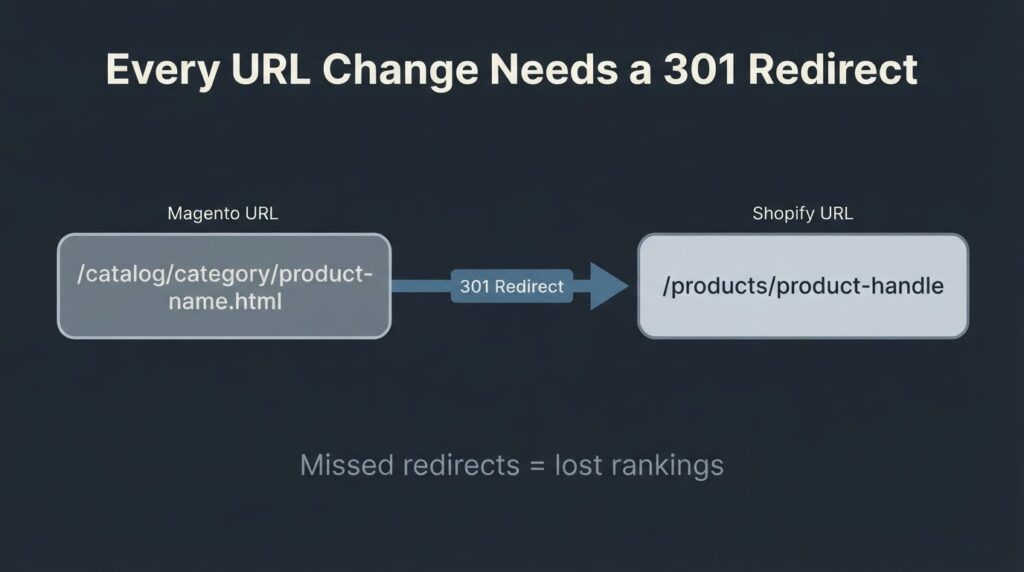
Magento URLs follow a structured, hierarchical path: /catalog/category/product-name.html or /women/shoes/sneakers.html. Shopify uses a flat structure: /products/product-handle and /collections/collection-handle. Every indexed Magento URL that changes needs a 301 redirect to its new destination. Miss a batch of high-traffic product or category pages and you will see a traffic drop that can take months to recover.
Google Search Central’s guidance on site moves with URL changes is the definitive reference here. The key operational points are these: permanent 301 redirects pass ranking signals to the new URL; 302 redirects do not. Redirect chains (A to B to C) add latency and dilute signals. You need to build and validate your redirect map before the DNS cutover, not after.
For a store with 10,000 indexed URLs, building a comprehensive redirect map is a 40- to 60-hour project by itself. That is why it appears in every migration budget as a line item. If it does not appear in the agency quote you are reviewing, ask why.
The post-launch monitoring window matters as much as the build. Set up Google Search Console for the new property before you flip DNS. Submit your new sitemap immediately. Monitor the Index Coverage report daily for the first two weeks. A spike in “not found” errors in the first 48 hours means you have missed redirects. Catching them on day one is a two-hour fix. Catching them two weeks later, after Googlebot has logged the 404s, is a longer recovery.
One practical note on Core Web Vitals: Shopify’s hosted infrastructure and theme ecosystem generally produce better LCP and CLS scores than a self-hosted Magento instance running on shared or mid-tier VPS hosting. This is not guaranteed — a bloated Shopify theme with fifteen unoptimized app scripts can perform worse than a lean Magento build. But a well-chosen Shopify theme with minimal app overhead will typically improve your Core Web Vitals scores, which has a secondary positive effect on organic rankings.
How to Choose Your Migration Method
There are three realistic options, and the right one depends on your store’s complexity.
Manual CSV import works for stores under 500 SKUs with simple product structures and no custom attributes. You export from Magento, reformat the CSV files, and import into Shopify admin. It is slow, error-prone at scale, and requires careful QA. Use it only if budget is the primary constraint.
Automated migration tools such as Matrixify or LitExtension handle medium-complexity catalogs faster and with more reliable field mapping than manual CSV. They do not eliminate the need for QA, and they do not handle theme migration, redirect mapping, or custom integration work. “Automated” means the data transfer is scripted; it does not mean the project is hands-off.
Agency-led migration is the right call for stores above 1,000 SKUs, stores with configurable product complexity, any store with ERP or PIM integrations, and any store where organic traffic is a primary revenue channel. The agency should provide a dry-run migration (test environment import before the live cutover), a validated redirect map, and a post-launch QA protocol. If they do not offer all three, keep looking.
Regardless of method, always run the migration in a development store first. A dry run surfaces data mapping errors, missing metafields, and broken variant logic before they affect a live customer.
When Not to Migrate
This question rarely appears in agency content, which is itself a red flag.
Magento (specifically Adobe Commerce) is still the correct platform if you have a B2B ecommerce operation with deeply complex customer group pricing, multi-store architecture serving different regional catalogs, or heavy ERP integration that is built around Magento’s native data structures. Re-platforming that kind of configuration to Shopify Plus is possible but expensive, and the savings from lower maintenance costs may not offset the migration investment in a three-year window.
If your primary objection to Magento is cost and your store does between $1M and $5M in annual revenue with a standard product catalog, the migration math almost always favors Shopify. If your store is a B2B operation with complex pricing rules and hundreds of custom attributes baked into your ERP pipeline, get a detailed scoping estimate before you commit.
We will tell you directly if your configuration falls into the “do not migrate yet” category. That conversation is worth having before you sign a contract.
The Six Steps That Determine Whether Your Migration Succeeds
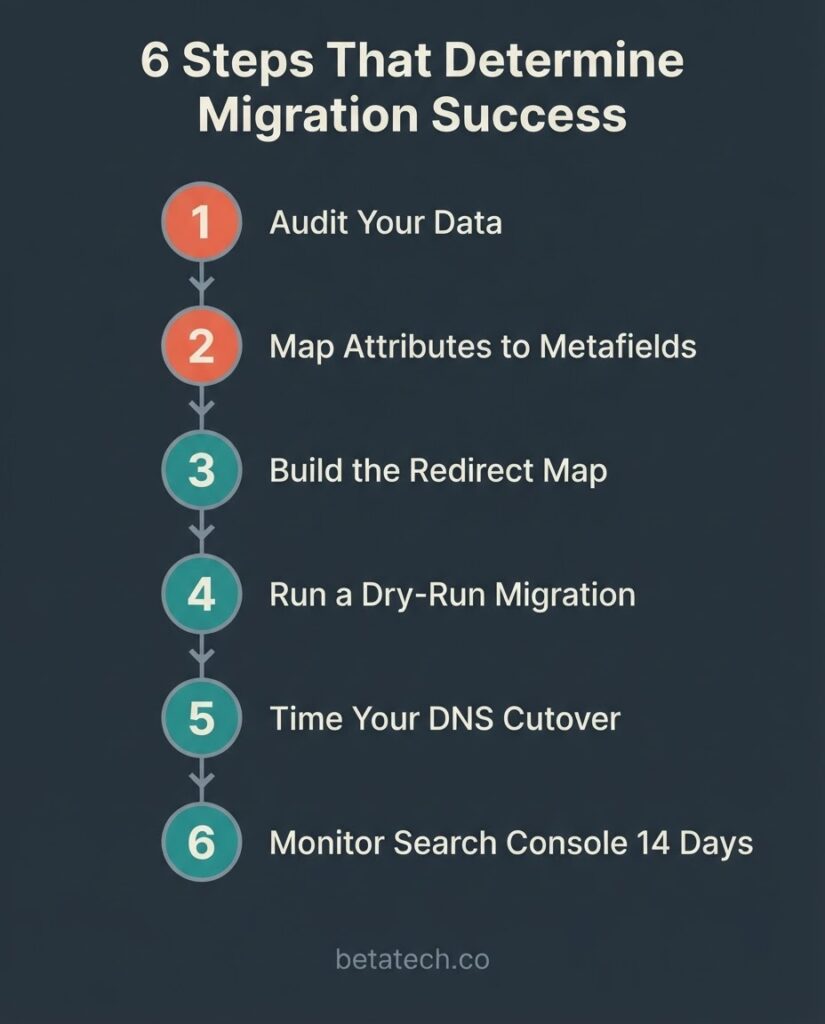
Most migrations that fail do not fail at the technical level. They fail at the planning and sequencing level. These six steps are the ones that actually determine outcomes.
Step 1: Audit your data before you touch anything. Pull your top 500 to 1,000 URLs by organic traffic from Google Search Console. Identify every active product, every custom attribute, and every third-party integration. Know what you have before you plan what to move.
Step 2: Map attributes to metafields explicitly. Every Magento attribute that is not a standard Shopify product field needs a named metafield destination. Do this mapping in a spreadsheet before the migration tool runs. Post-migration attribute hunting is expensive.
Step 3: Build the redirect map before launch day. Export every indexed URL. Map old Magento paths to new Shopify paths. Validate each destination exists. Import via CSV in Shopify admin. Test a sample of 30 to 50 redirects manually before the DNS switch.
Step 4: Run a dry-run migration in a staging store. Import everything into a development store. QA a random sample of products per category, every top-20 revenue SKU, and every complex configurable product. Fix mapping errors before they go live.
Step 5: Time your DNS cutover for low-traffic hours. Lower your DNS TTL 24 to 48 hours in advance. Flip DNS during your lowest-traffic window. Have a rollback plan documented before you start.
Step 6: Monitor Search Console daily for 14 days post-launch. Watch the Index Coverage report for 404 spikes. Track organic traffic against your pre-migration baseline. A drop under 10% in the first week is normal. A sustained drop above 20% needs immediate redirect investigation. Per Google’s own redirect guidance, permanent 301 redirects do not cause loss of PageRank — but only if they are correctly implemented and point to live pages.
The Total Cost of Staying on Magento
The argument for staying on Magento is often framed as avoiding migration cost. That framing ignores the ongoing cost of the current platform.
Maintaining an Adobe Commerce instance requires a PHP developer for each security patch cycle, typically three to four patches per year. Hosting a self-managed Magento installation runs $200 to $800 per month for a mid-market store on a dedicated server or managed cloud environment. Each major version upgrade — required to stay within Adobe’s support window — is a project of its own, typically $5,000 to $20,000.
Shopify’s own total cost of ownership research puts its platform TCO at approximately 29% better than Adobe Commerce on average, with implementation and setup costs running roughly 42% higher on the Adobe side. These are Shopify’s own figures, so apply some skepticism. But the directional finding is consistent with what merchants report independently: maintaining Magento is labor-intensive in ways that compound over time.
The checkout performance data is also relevant. Cart abandonment rates average around 70% across ecommerce according to Baymard Institute’s aggregated research. Even small improvements in checkout conversion flow directly to revenue. Shopify’s checkout is purpose-optimized for conversion in a way that a customized Magento checkout generally is not.
The honest answer is that for most merchants running a standard product catalog on Magento with no unusual B2B pricing complexity, staying on the platform is the more expensive long-term decision. The migration cost is a one-time outlay. The ongoing maintenance cost on Magento is permanent.
Frequently Asked Questions
How long does a Magento to Shopify migration take?
Small stores with under 1,000 SKUs and no complex integrations typically complete in 4 to 8 weeks. Mid-market builds with configurable products, custom integrations, and large redirect maps run 8 to 24 weeks. The longest phase for most projects is not the data import — it is the redirect mapping, QA, and pre-launch testing.
Will I lose my SEO rankings when I migrate?
You will not automatically lose rankings if you implement 301 redirects correctly before the DNS cutover, submit your new sitemap to Google Search Console immediately after launch, and monitor the Index Coverage report for the first two weeks. The risk is real but it is a planning problem, not a platform problem. Merchants who rush the redirect map and skip the dry-run are the ones who report traffic drops.
What data does not transfer from Magento to Shopify?
Customer passwords cannot be migrated in a usable format; you need to send account-activation emails post-launch. Magento configurable products require manual mapping to Shopify variants. Custom attributes need to become Shopify metafields before migration. CMS blocks and widgets have no Shopify equivalent and must be rebuilt. Tier pricing and customer group pricing logic needs to be evaluated against Shopify Plus B2B features.
Do I need Shopify Plus or will standard Shopify work?
Standard Shopify covers most merchant needs up to $1M to $2M in annual revenue. Shopify Plus ($2,300 per month or a revenue-based fee) makes sense if you need checkout extensibility for complex discount logic, B2B pricing rules, or multi-store architecture. If your primary reason for migrating is to reduce Magento maintenance costs, start with the standard Shopify plan and evaluate Plus when the revenue threshold makes it financially logical.
Can I migrate while the Magento store is still live?
Yes. The standard approach is to run the migration in a Shopify development store while the Magento store continues to take orders. The DNS cutover is the final step. For high-traffic stores, schedule the cutover during the lowest-traffic window in your analytics, lower DNS TTL 24 to 48 hours in advance, and have a rollback plan documented before you start.
How do I handle Magento’s .html URL extensions in Shopify?
Shopify does not support .html extensions in URLs. Every Magento URL ending in .html (which is most product and category URLs by default) needs a 301 redirect to the corresponding flat Shopify URL. This is one of the most common redirect gaps in self-managed migrations. Automate the pattern rules first (all /catalog/product/.html to /products/), then handle exceptions manually.
Ready to scope your migration?
If you are currently on Magento 2.4.4 or 2.4.5, your PHP environment is either past end-of-life or approaching it, and the support clock is running. The right next step is a scoped estimate, not a generic proposal.
Tell us your product count, your current integrations, and your organic traffic volume, and we will give you a realistic cost range and timeline before you commit to anything.