Shopify ecommerce website development quotes look like they were pulled from different planets. One developer tells you $800. One agency sends a proposal at $45,000. A third says “it depends” and never explains what it depends on.
That range is not random — and it is not a scam. Every one of those numbers can be technically correct, because “build me a Shopify store” describes anywhere from a 48-hour template configuration to a six-month custom engineering project. The problem is that nobody in the middle of that conversation is telling you what actually drives the price difference.
That is what this article does. No filler, no sales language — just a structural breakdown of every cost layer that exists inside a Shopify ecommerce project, what each one actually buys you, and how to make a rational budget decision before you sign anything.
Shopify ecommerce website development costs range from $2,500 for a basic template-configured store to $100,000+ for a fully custom Shopify Plus build. The price gap is driven by four variables: build type (template vs. custom), app stack complexity, integration requirements, and post-launch support scope. US businesses should budget for total first-year ownership — not just the launch fee — as recurring platform, app, and maintenance costs typically add $1,200–$30,000+ annually depending on store tier.What “Shopify Ecommerce Website Development” Actually Means
The term gets used to describe at least five fundamentally different scopes of work, and that is the root cause of every confusing quote you have ever received.
At the lowest tier, someone is logging into Shopify, activating a pre-built theme, uploading your logo, and adding your products. At the highest tier, a development team is writing custom Liquid templates, building headless frontend architecture with React or Next.js, engineering bespoke checkout flows, integrating your ERP and fulfillment stack via API, and architecting a system designed to process thousands of daily orders without breaking.
Both of those are technically “Shopify ecommerce website development.” They share almost nothing in terms of skill, time, tooling, or real output.
Before you evaluate a single quote, you need to know which category your actual business requires — and most US founders get this wrong in the first discovery call.
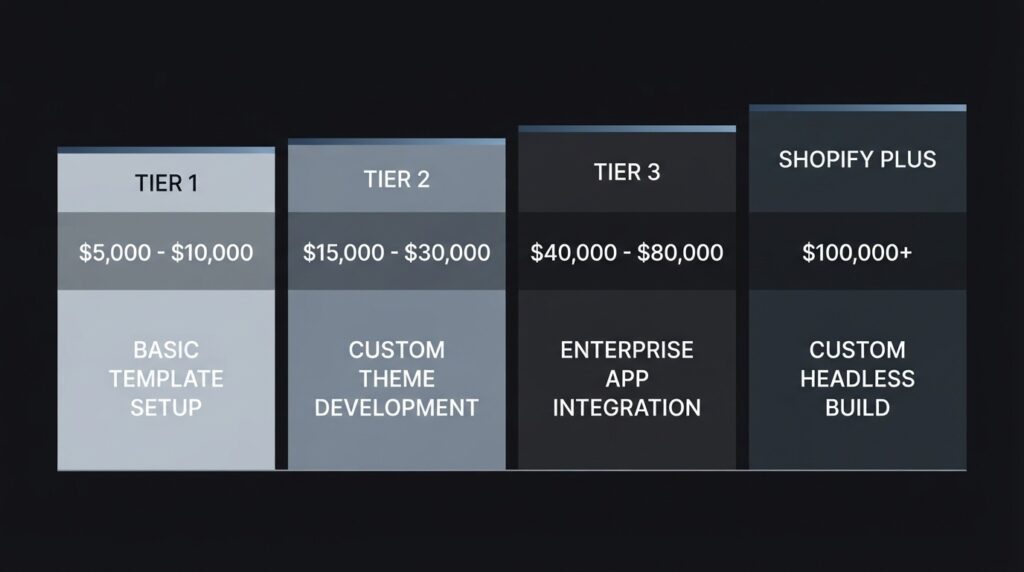
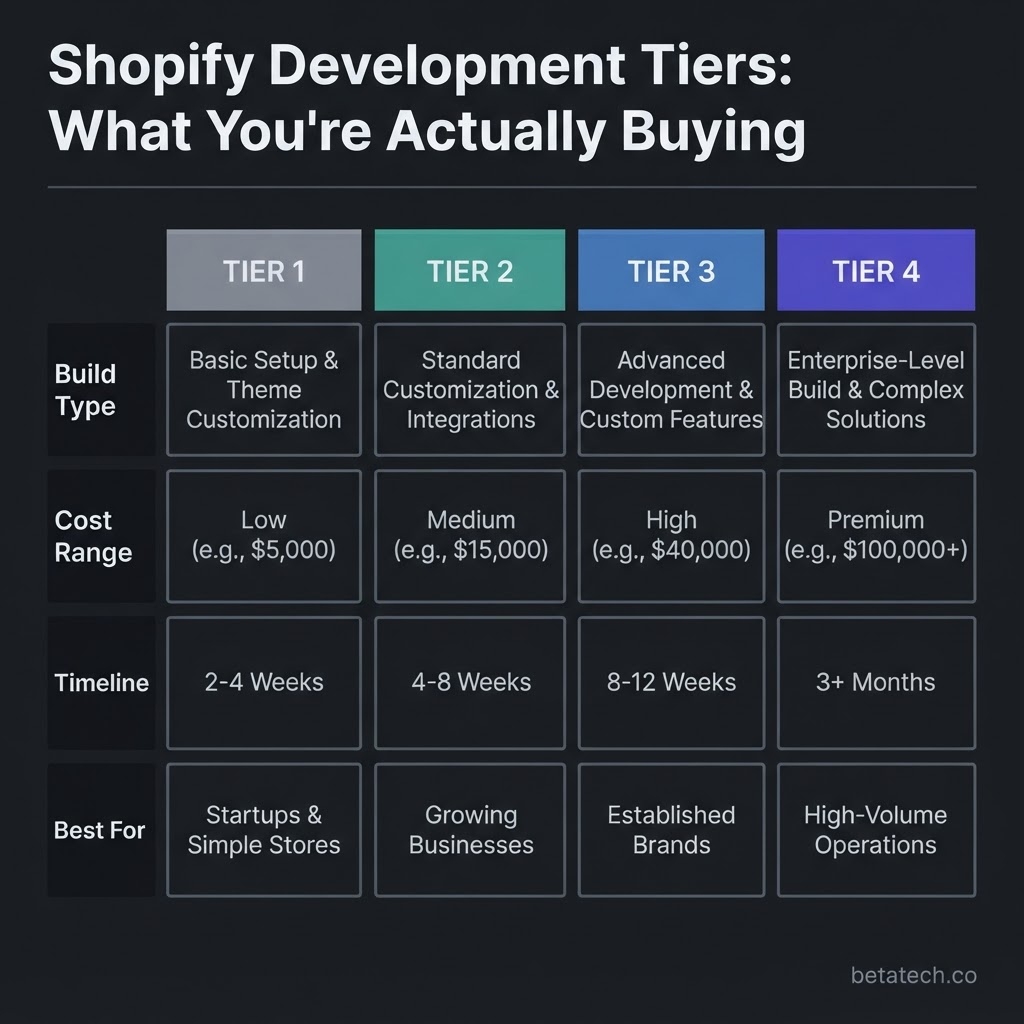
The Four Build Types and What Each Costs
Tier 1: Template Configuration ($500–$3,000)
This is the entry-level build. A developer or designer activates a Shopify theme — either a free theme from Shopify’s library or a premium theme like Dawn, Impulse, or Prestige — and configures it to match your brand. The work includes color and font styling, homepage section setup, navigation structure, product and collection page configuration, and basic app installations like a review tool and email capture.
This tier makes sense if you are validating a product idea, launching a side project, or entering the market with a lean catalog of fewer than 50 products. The store will function. It will take payments. It will look presentable.
What it will not do is give you any meaningful competitive differentiation, technical performance optimization, or infrastructure that scales past your first few hundred orders without friction.
Tier 2: Premium Theme + Custom Development ($3,000–$10,000)
This is where most serious small-to-mid-market US businesses actually belong. A developer starts with a premium or well-structured theme, then writes custom Liquid code to extend it — building unique section layouts, modifying product page logic, adding custom filter behavior, or creating collection templates the theme does not support out of the box.
At this tier, the development team is also handling proper Core Web Vitals optimization. That means image compression and lazy loading, deferred JavaScript, clean CSS architecture, and structured data markup using Schema.org’s Product schema for rich result eligibility in Google search. These are not cosmetic choices — they directly affect both search ranking and conversion rate.
The difference between a store built at this tier versus Tier 1 is measurable in site speed scores, mobile usability, and the team’s ability to make changes without breaking adjacent functionality.
Tier 3: Fully Custom Shopify Development ($10,000–$35,000)
Custom development means the frontend is built from scratch. No theme is used as a starting point, or the theme is so heavily customized that the original codebase is unrecognizable. Developers are writing Liquid templates for every page type, engineering custom JavaScript for interactive functionality, and building a component architecture that behaves exactly as the business requires.
At this level, the technology stack expands. Frontend engineers may use Tailwind CSS for utility-first styling, Alpine.js for lightweight component interactivity, or a partial headless architecture where the storefront is decoupled from Shopify’s backend using a React or Next.js frontend connected via Shopify’s Storefront API. This gives dramatically faster page load times, full frontend design freedom, and better rendering performance for Core Web Vitals metrics like Largest Contentful Paint (LCP) — which Google uses directly as a page experience ranking signal.
This tier is the right choice for brands with unique merchandising logic, complex product configurations, or a customer experience vision that no existing theme can approximate.
Tier 4: Shopify Plus Enterprise ($25,000–$100,000+)
Shopify Plus projects are a different category entirely. The cost is not primarily driven by design complexity — it is driven by systems integration, operational architecture, and migration scope.
At this level, a development team is building custom checkout extensions using Shopify’s Checkout Extensibility framework, integrating with NetSuite, SAP, or Salesforce via APIs, configuring B2B pricing and wholesale portals, setting up multi-currency and multi-region storefronts, and often migrating a large product catalog and order history from a legacy platform like Magento or BigCommerce. According to verified 2026 cost data, Shopify Plus implementations routinely exceed $50,000 once integration and QA scope is fully accounted for.
The Real Cost Architecture: What Every Line Item Is Buying
Understanding the build tier is step one. The second and more important step is understanding that every Shopify ecommerce development project contains six distinct cost layers — and agencies that quote low are almost always omitting two or three of them from the initial proposal.
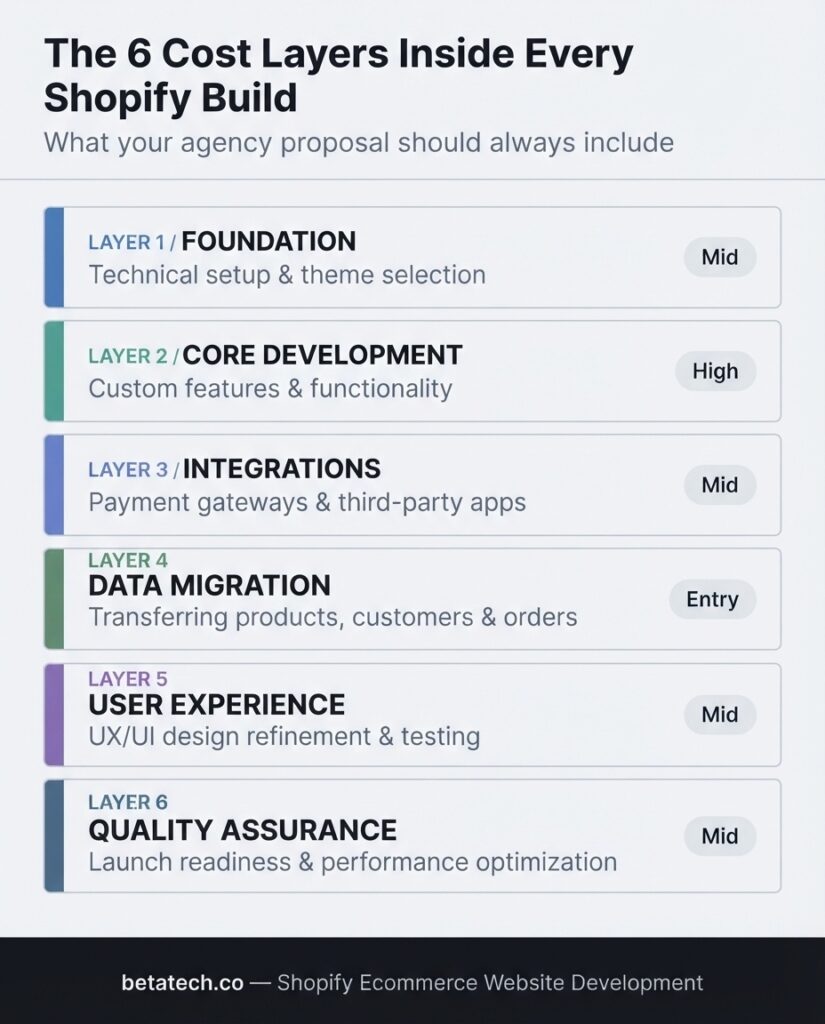
Layer 1: Discovery and Architecture Planning
Before a single line of code is written, the project requires a structured discovery phase. This includes mapping your product catalog structure, defining your collection taxonomy, specifying your checkout requirements, identifying your third-party integration dependencies, and documenting your core user journeys.
This work typically takes 8–20 hours on a mid-tier project. Agencies that skip it — or bundle it into a vague “project kickoff” — almost always create scope creep problems by week three, because technical decisions made without proper planning cost three to five times more to reverse than to get right the first time.
Layer 2: UI/UX Design
Design is not decoration. On an ecommerce site, UI/UX design is a direct revenue function. Page layout decisions — where the add-to-cart button lives, how product images load, how trust signals are positioned, how the mobile checkout flow is structured — have documented conversion rate implications.
Good UI/UX for a Shopify store includes wireframing, mobile-first design, accessibility compliance under WCAG 2.1 standards as documented by the W3C Web Content Accessibility Guidelines, and high-fidelity mockups before development begins. Budget $1,500–$6,000 for this layer on a custom project, and do not let it get compressed into a half-day task.
At BetaTech, our UI/UX designer Mahmudul Hasan works in parallel with development — which is a structural workflow advantage that most small agencies do not have. Design reviews happen in real time, not in a handoff sequence that adds two weeks to every revision cycle.
Layer 3: Frontend Development
This is the visible work — the code that renders what users see and interact with. On a Shopify project, frontend development involves Liquid templating, JavaScript, CSS (often via Tailwind CSS for utility efficiency), and any framework-level components required by the project.
Performance engineering is embedded in this layer on properly built stores. According to Google Search Central’s guidance on Core Web Vitals and search performance, pages that meet the “Good” threshold across LCP, FID/INP, and CLS receive a page experience ranking signal advantage. On competitive ecommerce keywords, that advantage is not marginal — it directly affects organic visibility.
Lazy loading, script deferral, image format optimization (WebP, AVIF), render-blocking CSS elimination, and font subsetting are not optional performance polish. They are structural build requirements that belong in the original project scope, not in a future optimization sprint.
Layer 4: Backend Logic and App Integration
“Backend” on Shopify is different from a fully custom-built platform. Shopify manages hosting, server infrastructure, and core commerce logic. What “backend development” means in a Shopify context is the configuration and customization of Shopify’s admin, the setup and integration of third-party apps, and any custom metafield architectures or API connections the store requires.
A clean backend structure includes a disciplined app selection strategy. Every app installed on a Shopify store adds JavaScript to the page load, adds database query overhead, and introduces a potential conflict point with other apps. Agencies that recommend 15 apps on a basic store are not being thorough — they are building fragility into your platform and padding their hours.
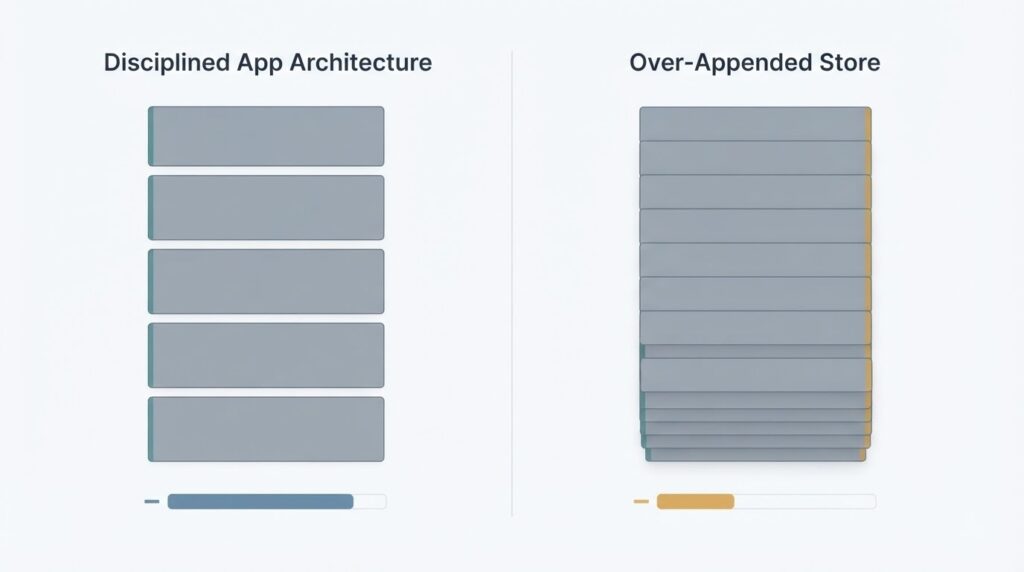
At BetaTech, our CIO Sharmin Salma Tisha architectures Shopify backends with maximum functionality at minimum app bloat — the same philosophy we apply across.
Layer 5: SEO Architecture
SEO is not a feature you add after a site is built. It is a structural property of how the site is built. Every Shopify ecommerce development project should include canonical URL configuration, proper hreflang tags for multi-region stores, Schema.org Product and BreadcrumbList markup, clean URL structure, XML sitemap generation, and robots.txt auditing before the site goes live.
Shopify’s default theme configurations handle some of this adequately. But Shopify’s default URL structure — which forces /collections/ and /products/ prefixes — creates duplicate content patterns that need active management. The platform also does not automatically handle faceted navigation in a way that prevents crawl budget waste on large catalogs. These are technical SEO issues that need to be addressed in the development phase, not six months later when you’re wondering why organic traffic isn’t growing.
Layer 6: Quality Assurance and Launch
QA is the layer most frequently compressed when a project is running over budget or behind schedule. A proper QA process for a Shopify store includes cross-browser testing (Chrome, Safari, Firefox, Edge), device-level mobile testing on actual iOS and Android hardware, checkout flow testing across every payment method configured, load testing on product and collection pages, and a final performance audit using PageSpeed Insights before go-live.
Skipping this layer does not save money — it transfers the cost from the project budget to the post-launch support budget, where fixes are more expensive and more disruptive.
The Hidden Cost Category Nobody Puts in the Proposal
Post-launch operational costs are the line item that turns a $5,000 Shopify build into a $12,000 first-year expense — and most agencies do not present this honestly in their initial scope.
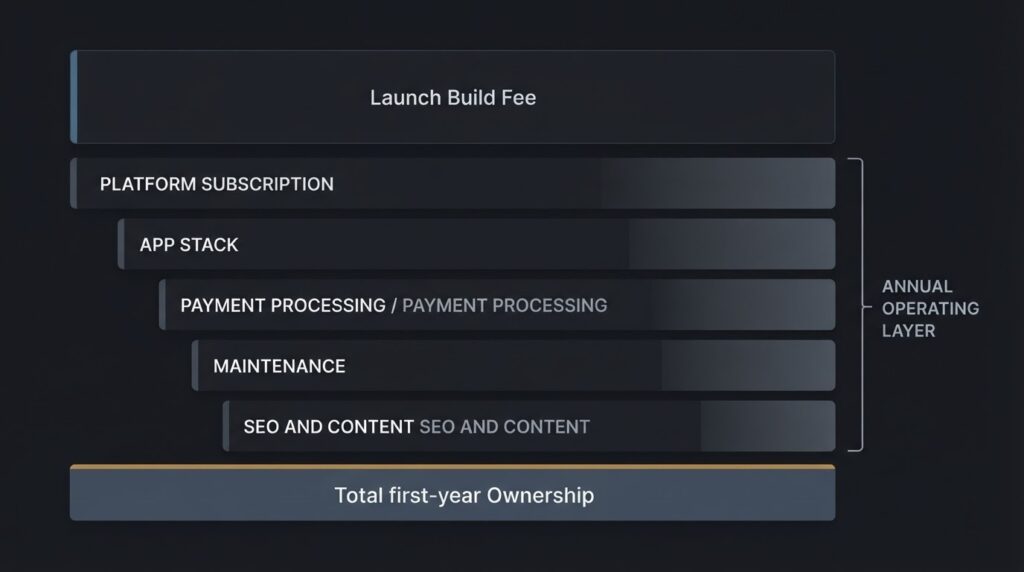
Here is what the first 12 months of operating a Shopify store actually costs:
- Shopify Platform Subscription: $29/month (Basic) to $2,300/month (Plus). Most scaling US businesses sit on the $79 or $299/month plan — that is $948 to $3,588 per year before a single app is installed.
- App Stack: The average scaling Shopify store runs 6–15 apps. A realistic mid-market app stack — reviews, email marketing, loyalty program, advanced search, inventory management, and upsell — can run $200–$600/month, or $2,400–$7,200 annually.
- Payment Processing: Shopify Payments charges 2.4%–2.9% + 30¢ per transaction depending on plan. On $500,000 in annual revenue, that is $12,000–$14,500 in processing fees alone.
- Maintenance and Support: Even well-built stores need ongoing developer attention. Shopify updates, app conflicts, theme section additions, product page refinements, and security patch reviews require a support retainer or regular development hours. Budget $300–$1,500/month depending on store complexity.
- SEO and Content: Organic traffic does not maintain itself. A Shopify store needs consistent technical SEO auditing, content publishing, and backlink strategy.
The honest first-year total for a mid-market Shopify build that is properly supported: $15,000–$35,000, not the $8,000 launch quote that showed up in your inbox.
Freelancer vs. Agency: The Real Tradeoff
This is the most common decision point in a US buyer’s Shopify development process, and it is almost always framed incorrectly. The question is not “which is cheaper?” — it is “which structure fits the actual scope and risk profile of my project?”
A skilled freelancer is the right choice for isolated, well-defined tasks — a specific page rebuild, a theme section addition, a single app integration. The problem with hiring a solo freelancer for a full Shopify ecommerce build is operational: one person cannot simultaneously handle design, frontend development, backend logic, SEO architecture, QA, and post-launch support with equal competency. The project either takes longer, produces uneven quality across those disciplines, or creates a single point of failure if the freelancer becomes unavailable.
A properly structured agency — not a bloated 200-person shop with account managers who have never touched a code editor — brings a cross-functional team to the project. At BetaTech, our 8-person global team operates across the US and Bangladesh in a 24/7 continuous development cycle. When our US-side team closes out for the day, our Bangladesh-based development team is already running the next build phase. That is not a marketing claim — it is a time zone structural advantage that compresses project timelines in a way a single-location agency cannot replicate, without the overhead that a large US agency charges to fund its downtown office lease.
The result: enterprise-caliber Shopify development executed at a price point that makes sense for the US SMB market.
What Good Shopify Ecommerce Website Development Actually Looks Like
After you understand the cost architecture, the natural next question is: what does quality execution actually look like, and how do I recognize it before I sign a contract?
Here are the technical and process markers that separate properly built Shopify stores from ones that look fine at launch and create problems at scale:
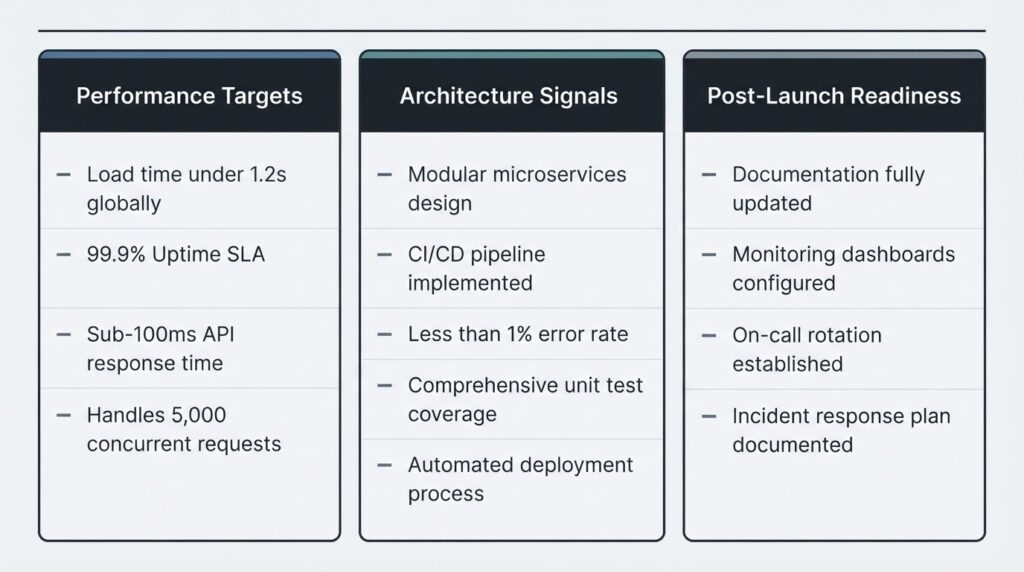
Performance Targets That Should Be Non-Negotiable:
- LCP (Largest Contentful Paint) under 2.5 seconds on mobile
- CLS (Cumulative Layout Shift) score below 0.1
- Total page weight under 1.5MB on the homepage
- PageSpeed Insights mobile score above 75 at launch
Architecture Signals of a Well-Built Store:
- Zero render-blocking scripts above the fold
- Images served in WebP or AVIF format with proper srcset attributes
- Schema.org Product markup on all product pages for rich result eligibility
- Clean metafield architecture that does not require a developer to update product data
- Shopify sections and blocks built to be content-editable by a non-technical team
Post-Launch Operational Readiness:
- A documented app stack with no redundant tools
- A staging environment for testing changes before they hit the live store
- A baseline PageSpeed report captured at launch for future benchmarking
- A handover document that explains how to make common updates without developer involvement
If the agency or developer you are evaluating cannot speak to every item on that list, the gap will show up in your site’s performance data and your support ticket volume within 90 days of launch.
Shopify vs. WooCommerce vs. Custom Build: When Shopify Is the Right Call
Shopify is not the right platform for every ecommerce business, and part of what you are paying a development agency for is honest platform guidance — not a developer who recommends whatever they know best.
Shopify is the correct choice when:
- You need to launch within 4–12 weeks and cannot afford a long custom development cycle
- Your team is non-technical and needs a manageable admin interface for daily operations
- You want Shopify’s built-in hosting reliability, security, and PCI compliance handled at the platform level
- Your business model fits a standard D2C or B2C commerce pattern
Shopify becomes the wrong choice when:
- You need deep content architecture and blog/editorial functionality (WordPress + WooCommerce handles this better)
- You require highly non-standard checkout logic that Shopify Plus’s Checkout Extensibility still cannot accommodate
- You are building a marketplace or multi-vendor platform, which typically requires a custom backend built on Laravel or Node.js
According to Statista’s 2025 ecommerce platform market share data, Shopify holds approximately 10% of the global ecommerce software market and roughly 29% of the US ecommerce platform market — which makes it the dominant platform for US-based independent stores. That market position means a larger ecosystem of third-party apps, more developer talent available, better third-party integrations, and a more stable long-term platform investment.
But market share is not a reason to choose a platform on its own. Platform fit against your specific business requirements is.
How to Evaluate an Agency Proposal Without Getting Burned
Most US business owners evaluate Shopify development proposals by comparing the total price and the portfolio aesthetics. Both of those data points are nearly useless in isolation.
Here is the evaluation framework that actually protects your investment:
Ask for a line-itemed scope document. Every hour of work should be accounted for. Discovery, design, development, QA, SEO setup, and launch should each appear as separate line items with time estimates. A single lump-sum quote with no breakdown is a scope management problem waiting to happen.
Ask what post-launch support looks like and what it costs. If the agency says “we hand over the keys at launch,” you are one Shopify app update away from a broken checkout flow with no one responsible for fixing it.
Ask about their performance benchmarks. Any agency serious about Shopify ecommerce website development should be able to tell you what PageSpeed scores their builds typically achieve and what their standard for Core Web Vitals compliance looks like at handover.
Ask whether they have worked in your specific vertical. A developer who has built Shopify stores for software companies may not understand the catalog complexity, inventory patterns, or checkout requirements of a B2B industrial supplier. Vertical experience is not vanity — it reduces discovery time, reduces scope errors, and produces better architecture decisions.
Never select based on the lowest quote. The lowest quote either reflects the least experience, the most aggressively compressed scope, or the most items missing from the line items. Sometimes all three.
The BetaTech Approach to Shopify Ecommerce Development
At BetaTech, we do not build Shopify stores that look good in a screenshot. We build stores that perform under traffic, hold up under Shopify’s update cycles, and give your internal team the operational control to run the business without filing a support ticket every time you need to change a banner.
Our global 8-person team — distributed across Bangladesh and the United States — means your project runs in a genuine 24/7 development cycle. While your US-based project manager is reviewing yesterday’s build progress in the morning, our Bangladesh-based developers are already three hours into the next phase. No delays. No timezone bottlenecks.
Our Founder and CEO Adnan Shawkat has built this team around one operational principle: every person on the project has hyper-focused experience in their specific discipline. Our UI/UX Designer does not also write backend code. Our SEO Manager does not also do graphic design. Specialization at every layer means decisions are made by people who have solved that specific problem 50 times before — not generalists reading documentation for the first time.
We bring that same architecture discipline to your Shopify build: clean Liquid code, disciplined app selection, performance-first frontend engineering, and an SEO structure that is built into the development process — not bolted on afterward.
FAQ
How long does Shopify ecommerce website development take?
A template-configured Shopify store can launch in 1–2 weeks. A custom Shopify build with UI/UX design, custom Liquid development, app integration, and QA typically takes 6–12 weeks. Shopify Plus enterprise builds with ERP integrations and data migration can run 4–6 months. Timeline is a direct function of scope clarity — projects with vague requirements at kickoff always run longer than their estimates.
What is the minimum realistic budget for a professional Shopify store?
For a store that is professionally designed, performance-optimized, and built to convert rather than just function, the realistic minimum is $3,500–$5,000 for a theme-based build. Below that, you are either getting an unconfigured template or a freelancer working 15 hours on a project that needs 40. Budget the first-year operating costs on top of that — platform subscription, apps, and basic support.
Will my Shopify store rank on Google without additional SEO work?
Not competitively. Shopify’s platform handles basic on-page SEO defaults reasonably well, but a newly built store with no domain authority, no structured data markup beyond what the default theme provides, no content strategy, and no backlink profile will not organically rank for competitive commercial keywords. SEO architecture built into the development phase — proper Schema markup, clean URL structure, technical metadata — gives you a foundation. Growing from that foundation requires an active SEO program.
Can I update the store myself, or do I need a developer for every change?
On a well-built Shopify store, your team should be able to handle homepage content changes, product updates, collection edits, blog publishing, banner swaps, and basic promotional setup without developer involvement. If the store was built with properly structured Shopify sections and blocks, and with clear content fields rather than hardcoded text, day-to-day operational changes belong to your team. Developer time should be reserved for new feature development, app integrations, and significant structural changes — not routine content updates.
What is the difference between Shopify and Shopify Plus, and do I need Plus?
Shopify Plus is Shopify’s enterprise tier at $2,300/month. It provides customizable checkout via Checkout Extensibility, unlimited staff accounts, B2B wholesale features, Shopify Flow automation, multi-store management via the Organization Admin, and a dedicated merchant success manager. For most US SMBs generating under $1M/year in online revenue, the standard Shopify Advanced plan ($299/month) provides all the functionality they need without the Plus overhead. Plus becomes the rational choice when you need custom checkout logic, B2B pricing tiers, multi-region storefronts, or when your transaction volume makes the lower processing fees offset the higher monthly fee.
What should I ask an agency before hiring them for Shopify development?
Ask for a line-itemed scope document, not a single total price. Ask what their Core Web Vitals benchmarks look like at handover. Ask what the post-launch support structure is and what it costs. Ask for examples of stores they have built in your industry vertical. Ask specifically who will be doing the design, the development, and the SEO architecture — not just who the account manager is. The quality of the answers to those six questions will tell you more about an agency than their portfolio or their website.
Ready to Build a Shopify Store That Actually Performs?
You now have a complete picture of what Shopify ecommerce website development actually costs, what drives the gaps between quotes, and what you should be demanding from any development partner before you commit budget.
If you are a US business owner who is done getting vague proposals and wants a development team that can explain every line item, hit every performance benchmark, and run a continuous development cycle across time zones so your project does not wait for Monday morning — BetaTech is ready to talk specifics.
Book a call with BetaTech’s global expert team. We will audit your current requirements, give you an honest scope assessment, and tell you exactly what tier of Shopify ecommerce website development your business actually needs — before we propose a single dollar figure.
👉 Schedule Your Discovery Call → betatech.co