WordPress powers roughly 41% of every website on the internet. It also powers a disproportionate share of slow ones. If your site is dragging and you are weighing whether to hire a WordPress speed optimization service, the first question is not which provider to call. It is whether you know what is actually causing the problem, because the fix changes dramatically depending on the answer.
This is what you need to understand before signing anything.

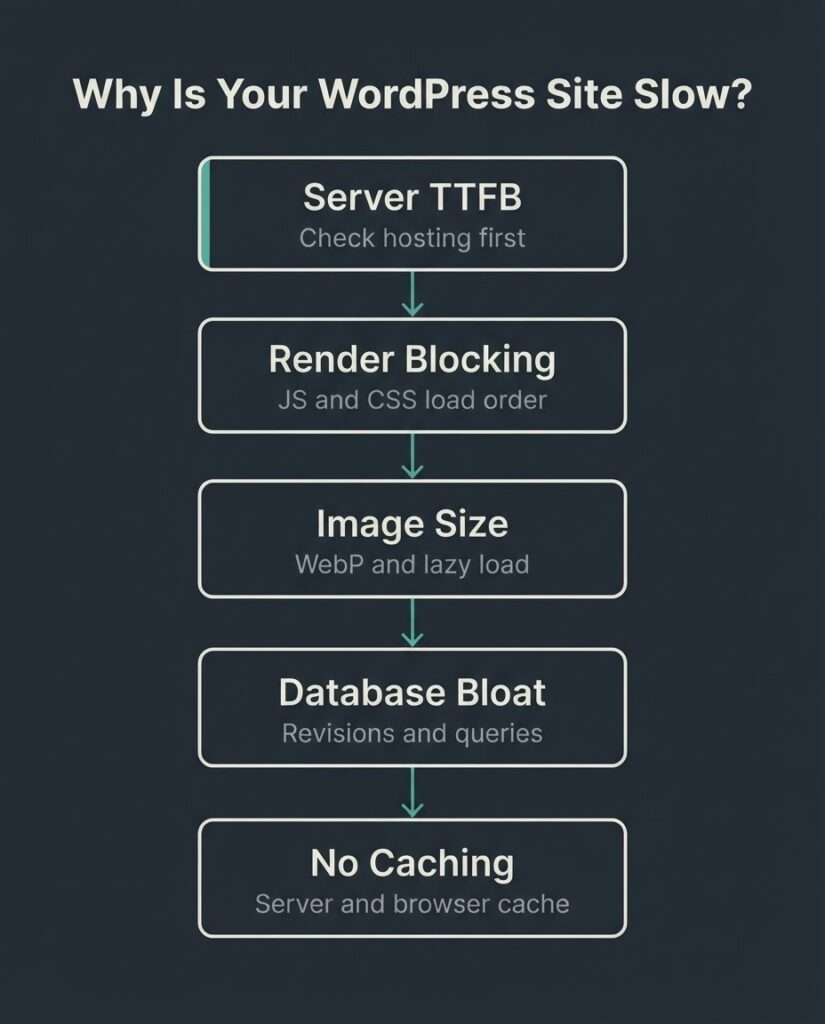
A professional WordPress speed optimization service typically costs between $300 and $3,000 for a one-time engagement, with WooCommerce and complex custom builds running higher. The work addresses the measurable causes of slowness: server response time (TTFB), render-blocking JavaScript and CSS, unoptimized images, database query bloat, and missing or misconfigured caching. Google measures the result through three Core Web Vitals: LCP (under 2.5 seconds), INP (under 200ms), and CLS (under 0.1). A site passing all three on mobile is in the top 48% of websites on the web.
Why Site Speed Is a Revenue Problem, Not Just a Technical One
The performance case for speed optimization is not abstract. Portent’s research across 100 million page views and 20 B2B and B2C websites found that a site loading in 1 second converts at 2.5 times the rate of a site loading in 5 seconds for e-commerce, and at 3 times the rate for B2B lead generation. The gap widens sharply after 3 seconds.
These are not fringe cases. The median page is still slow. According to the 2025 HTTP Archive Web Almanac, only 48% of mobile websites pass all three Core Web Vitals thresholds. More than half of sites on the web are failing on the device most of their visitors are using.
Speed also connects to rankings. Google confirmed Core Web Vitals as a component of its page experience ranking signals. Failing Core Web Vitals will not tank a site by itself, but it puts you at a disadvantage in competitive SERPs where content quality is otherwise similar across results.
What Actually Makes a WordPress Site Slow
Most people assume the culprit is the host or the number of plugins. Those are factors, but they are rarely the whole story. The real causes fall into five categories, and identifying which one dominates your site determines what the fix actually is.
The first is server response time. If your Time to First Byte (TTFB) is above 600ms, the problem starts before the browser has rendered a single pixel. This usually points to shared hosting without server-side caching, or a host that is simply undersized for your traffic.
The second is render-blocking resources. JavaScript and CSS files that load in the document’s head block the browser from painting the page. A WordPress install with 20 plugins commonly has 15 to 30 separate script and style requests, many of which are loaded in the wrong order or loaded on every page regardless of whether they are needed.
The third is unoptimized images. As of 2025, JPEG is still the format for 57% of LCP images across the web, despite WebP offering meaningfully smaller file sizes at equivalent quality. Hero images uploaded at 3,000 pixels wide and served at full resolution to a 400-pixel mobile screen are one of the fastest ways to fail LCP. The WordPress.org performance handbook specifically identifies image handling as one of the first areas to address.
The fourth is database bloat. WordPress stores revisions, transients, spam comments, and unused meta data. On a site that has been running for several years, the database can become genuinely heavy. Poorly coded plugins perform excessive or redundant queries on every page load, and this compounds over time.
The fifth is insufficient or misconfigured caching. Without page caching, WordPress generates each page dynamically from the database on every request. With correct server-side caching, returning visitors and search engine crawlers receive a pre-built HTML file. The difference in TTFB is often 300ms to 700ms.
A professional optimization engagement should identify which of these is the dominant problem for your specific site before touching anything.
What Core Web Vitals Actually Measure
Google publishes the thresholds clearly. Understand them before you hire anyone, because they are the objective benchmark against which optimization work should be measured.
LCP (Largest Contentful Paint) measures when the largest visible element on the screen finishes loading. Under 2.5 seconds is good. Above 4 seconds is poor. In practice, the LCP element is an image on 85% of desktop pages, which makes image optimization directly tied to this metric.
INP (Interaction to Next Paint) replaced FID in March 2024 as the interactivity metric. It measures the delay between a user’s click or tap and the next visual response. Under 200ms is good. Above 500ms is poor. Heavy JavaScript execution is the primary cause of poor INP, and it is the metric most likely to fail on plugin-heavy WordPress sites.
CLS (Cumulative Layout Shift) measures unexpected visual movement during page load. A score under 0.1 is good. Late-loading fonts, images without declared dimensions, and ad slots that push content down are the common causes.
Web Vitals documentation from Google gives the formal definitions and measurement methodology if you want to validate any numbers a vendor presents to you.
What a Professional Speed Optimization Engagement Includes
A credible engagement is diagnostic first and prescriptive second. Be skeptical of any provider who quotes a price without first running tools against your specific site.
Here is what a structured engagement typically covers, roughly in priority order:
Baseline audit. PageSpeed Insights, Lighthouse, and Google Search Console’s Core Web Vitals report establish starting scores across mobile and desktop. A good provider will also pull Chrome UX Report (CrUX) field data, not just lab scores, because lab scores can be gamed and field data reflects real user experience.
Hosting and server configuration review. Is PHP up to date (8.1 or higher)? Is server-side page caching enabled? Is a CDN in place? For most small business WordPress sites, this is where the biggest gains are available with the least risk of breaking things.
Image audit and conversion. Identifying oversized images, converting to WebP, enabling lazy loading for below-the-fold images, and ensuring the LCP image is not lazy-loaded (which would delay it further).
Plugin and script audit. Removing unused plugins, deferring non-critical JavaScript, removing render-blocking CSS from the critical path, and consolidating where possible. This is where judgment matters: a bad audit removes plugins that something else depends on.
Database cleanup. Removing expired transients, post revisions past a reasonable threshold, orphaned metadata, and optimizing database tables.
Caching configuration. Setting up or correcting page caching, browser caching headers, and optionally object caching for high-traffic or WooCommerce sites.
Post-optimization verification. Comparing before and after scores, confirming Core Web Vitals field data improves over the following 28-day window, and documenting what was changed so your team can maintain the gains.
Pricing: What It Actually Costs and Why the Range Is Wide
WordPress speed optimization service pricing in the US market ranges from roughly $300 to $3,000 for a one-time engagement. That is not a vague range; it tracks to specific variables.
| Scope | Typical Range | What Drives It |
| Basic shared-host audit + caching fix | $300 to $600 | Simple site, standard hosting, no custom code |
| Full optimization: images, caching, JS/CSS, database | $700 to $1,500 | Any site with 3+ years of content and 10+ plugins |
| WooCommerce or custom-theme optimization | $1,200 to $2,500 | Database-heavy queries, checkout performance, product image volume |
| Enterprise or complex custom build | $2,500 to $5,000+ | Custom PHP, API integrations, multi-server setups |
| Monthly retainer (performance monitoring + maintenance) | $150 to $500/month | Ongoing Core Web Vitals tracking, post-update regression checks |
The spread is driven primarily by site complexity, hosting environment, and whether custom code is involved. A brochure site on a managed host like WP Engine with a lightweight theme is a different problem than a WooCommerce store with 2,000 products, six active payment gateway plugins, and three years of database growth.
One honest tradeoff worth naming: if your site is on very cheap shared hosting, the most cost-effective single action is often to move to a managed WordPress host and configure server-side caching. A speed optimization service on top of inadequate hosting is like tuning a car engine without addressing a failing fuel pump. We tell clients this when it applies, even if the hosting migration is not work we are handling.
DIY vs. Hiring: Where the Line Actually Is
Not every WordPress site needs a professional service. Here is a practical decision frame.
Do it yourself if: You have a simple site (under 20 pages, no e-commerce), your PageSpeed score on mobile is above 65, your LCP is between 2.5 and 4 seconds, and you have a few hours to install and configure a caching plugin like WP Rocket, run an image compression pass, and upgrade your PHP version. The gains from this work are real and you do not need to pay someone to do them.
Hire a service if: Your site scores below 50 on mobile PageSpeed, your LCP is above 4 seconds, you are running WooCommerce and have noticed cart abandonment issues, you have already tried plugins and the score has not improved, or the site is custom-built and you are not certain what plugins and queries are running. A professional can identify the specific bottleneck in a way a plugin cannot.
One thing that will not help either way: Chasing a 100/100 PageSpeed Insights lab score. The lab score is a proxy. What Google actually measures for rankings is field data from real Chrome users, and a site can have a 95 lab score with poor field data if it uses techniques that game the lab environment. Focus on passing Core Web Vitals in the Google Search Console field data report, not on the Lighthouse number.
A Google-commissioned study conducted by Deloitte and 55 across 37 brands and more than 30 million user sessions, published on web.dev, found that a 0.1-second improvement in mobile speed increased retail conversion rates by 8.4%. The measurement was against real user sessions, not lab data. That is the number worth optimizing for.
[INTERNAL LINK: UI/UX design decisions that affect load time → https://betatech.co/services/ui-ux-design/]
WooCommerce-Specific Considerations
A WooCommerce build has performance constraints a standard WordPress site does not. Cart and checkout pages cannot be fully cached because they are session-dependent. Product catalog pages with large image sets are heavy by default. The more payment and shipping plugins you layer on, the more JavaScript loads on pages where a buyer is deciding whether to complete a purchase.
On a WooCommerce optimization engagement, the work usually splits roughly as follows: 40% image and CDN work, 30% JavaScript audit and deferral, and 30% server-side configuration (object caching, database query review, PHP-FPM tuning where the host permits). The checkout flow gets treated separately because a caching misconfiguration there causes real transactional problems.
If you are running WooCommerce on shared hosting and experiencing load times above 3 seconds on product pages, the honest answer is that the host is likely the bottleneck, and no optimization service will fully solve it. Moving to a managed environment solves the floor problem before you spend money on the ceiling.
Is Speed Optimization a One-Time Fix or Ongoing Work?
The honest answer is: it depends on how your site changes.
A one-time optimization engagement is sufficient if you do not add new plugins frequently, your content team does not upload unoptimized images, and you are on a managed host that handles server configuration. In that case, a quarterly check of Core Web Vitals field data in Google Search Console is enough to catch regression early.
An ongoing retainer makes sense if you are actively developing the site, adding plugins for new features, running frequent promotions that require new page builds, or operating a WooCommerce store with a large product catalog. Performance degrades after every major WordPress or plugin update until someone checks it. The cost of not catching a regression early is often higher than the retainer.
We see the same pattern repeatedly: a business does a one-time speed engagement, scores improve, then six months later a plugin update or a new Elementor template undoes half the gains because nobody was watching.
FAQ
How much does WordPress speed optimization cost?
For most small business sites, a one-time professional optimization runs between $700 and $1,500. Basic shared-host fixes start around $300. Complex WooCommerce builds or sites with custom themes typically fall in the $1,200 to $2,500 range. The variables are site complexity, hosting environment, and whether custom PHP or third-party API integrations are involved. Ask any provider to break down their quote by task category before agreeing to a number.
How long does a WordPress speed optimization engagement take?
Most providers complete foundational work (caching, image optimization, plugin audit, JS deferral) in 3 to 7 business days for a standard WordPress site. WooCommerce or custom-built sites add time because the database and checkout flow require separate handling. Measuring the outcome takes longer: Core Web Vitals field data in Google Search Console updates on a rolling 28-day window, so you will not see final numbers for about a month after the work is done.
Does WordPress speed optimization improve Google rankings?
Google uses Core Web Vitals as one component of its page experience ranking signals. Passing all three thresholds does not guarantee a ranking improvement, and failing them is not a guaranteed penalty. What it does affect is the user experience data Google collects from real Chrome sessions, which is a legitimate ranking input. The more defensible argument for speed optimization is the conversion impact: faster sites convert better across every vertical measured, which makes the investment justifiable on revenue grounds alone.
What is the difference between a PageSpeed Insights score and Core Web Vitals?
PageSpeed Insights gives you a lab score generated by Lighthouse running on a controlled device. Core Web Vitals in Google Search Console reflect actual field data collected from real Chrome users visiting your site. Google’s rankings use field data, not lab scores. A site can score 90 in the lab and still fail Core Web Vitals in the field if real users are on slower devices or connections. Any optimization service that only shows you the lab score without checking field data in Search Console is giving you an incomplete picture.
Should I use a plugin like WP Rocket or hire a service?
A caching plugin handles a subset of the problem well: page caching, browser caching, basic JavaScript deferral, and image lazy loading. If those fixes move your Core Web Vitals into the passing range, you do not need to hire anyone. Where plugins fall short is database optimization, server-side configuration, and diagnosing custom-code bottlenecks. If you have installed a caching plugin and your scores have not improved, the bottleneck is likely something the plugin cannot reach.
What happens if a plugin update breaks my site after optimization?
Performance gains from an optimization engagement can be partially or fully reversed by a major plugin update, a WordPress core update, or a new theme version. This is the strongest argument for either a monthly maintenance retainer or a quarterly performance check. Before any provider finishes an engagement, ask them to document the specific changes made so your team or a future developer can reference them when investigating regressions.
Get a Performance Diagnosis Before You Spend Anything
If you want to know specifically what is slowing your site and which fixes will have the highest impact, we offer a technical performance review. We run your site against both lab and field data tools, identify the dominant bottleneck from the five categories above, and give you a prioritized list of what to fix and what it realistically costs. No retainer required to start.