WooCommerce powers 35% of all ecommerce sites on desktop and 44% on mobile, according to the 2025 Web Almanac by HTTP Archive. That market share figure gets used a lot in agency pitches. What it does not tell you is what a development engagement actually includes, what it costs, or why the same project can run $6,000 at one agency and $35,000 at another. This article breaks that down clearly.
Professional WooCommerce development services typically run $5,000 to $30,000 for a custom-built store, depending on the number of unique page templates, the complexity of payment and third-party integrations, and whether custom plugin development is required. A basic WooCommerce setup using a purchased theme costs $1,500 to $5,000. Enterprise-scale stores with bespoke logic can exceed $80,000. The WooCommerce plugin itself is free to install; the cost is entirely in design, custom development, and ongoing hosting and maintenance.
What “WooCommerce Development” Actually Means
WooCommerce is a free, open-source plugin that converts any WordPress site into a functioning ecommerce store. The plugin handles product catalogs, cart logic, checkout flows, customer accounts, and order management out of the box. What a development agency adds on top of that foundation is where the real work, and the real cost, lives.
A WooCommerce development engagement typically spans one or more of the following scopes: building a custom theme to match your brand rather than licensing a pre-built one; developing or configuring plugins to handle business logic your industry requires; integrating payment gateways, shipping APIs, inventory systems, or CRMs; migrating an existing store from another platform; and optimizing performance so the store actually passes the load speed and usability standards that affect both conversion and organic search.
Not all of these are required for every project. The first thing a credible agency should do is identify which of these scopes apply to your situation. If they quote you a number before asking which of these apply to your business, that quote is a guess.
The Four Scope Tiers (and What They Cost)
Market pricing for WooCommerce development follows four rough tiers. These are US market ranges. An offshore-only team may quote lower; a Manhattan-based agency will quote higher.
| Scope Tier | What It Includes | Typical US Market Range | Timeline |
| Basic setup | Pre-built theme, standard WooCommerce configuration, up to 50 products loaded, basic payment gateway (Stripe or PayPal) | $1,500 – $5,000 | 2 to 4 weeks |
| Semi-custom | Licensed theme with significant customization, up to 3 integrations (shipping, CRM, email), custom product logic | $5,000 – $15,000 | 4 to 8 weeks |
| Fully custom | Bespoke theme built from scratch, custom plugin development, multiple integrations, performance optimization, SEO technical setup | $15,000 – $35,000 | 8 to 16 weeks |
| Enterprise/complex | Multi-currency, B2B pricing tiers, custom checkout flows, headless or API-first architecture, ongoing sprint-based delivery | $35,000 – $80,000+ | 4 to 6+ months |
According to Codeable’s 2026 WooCommerce development cost guide, a basic project runs $1,500 to $8,000 and a complex custom build can exceed $100,000 depending on scope. The ranges above reflect what an 8-to-20-person agency working in the US mid-market typically charges. You will find lower quotes from solo freelancers and significantly higher ones from larger US-based agencies with substantial overhead.
The three variables that drive cost more than anything else: the number of unique page templates required (product listing, product detail, cart, checkout, account pages, and any custom category or landing pages), whether you need custom plugin development rather than configuration of existing plugins, and how much existing product or customer data needs to be migrated and cleaned before import.
Ask any agency to break their quote down along those three lines. If they cannot, the number is a guess.
What Custom WooCommerce Theme Development Means in Practice
A custom theme is not a modified template. It is a set of PHP template files, a functions.php structure, and associated CSS, typically built using a child theme pattern or a starter theme like Underscores. If you are building with the WordPress block editor (Gutenberg), the theme also needs a set of block.json definitions and editor-facing CSS so the client experience matches the front end.
A custom theme gives your development team full control over markup, which matters directly for performance. Pre-built themes like Flatsome or Divi ship with feature-rich admin interfaces, but they load JavaScript and CSS for features you may never use. That overhead is one of the primary reasons WooCommerce stores struggle with Lighthouse scores: the 2025 Web Almanac records a median mobile Lighthouse Performance score of 38 for WooCommerce sites, compared to 55 for Shopify. The gap is not WooCommerce’s fault structurally; it is a consequence of building on top of over-engineered theme frameworks.
A well-built custom theme, paired with server-side caching, a CDN like Cloudflare, and proper image optimization, can close most of that gap. This is engineering discipline, not magic.
Payment Gateway Integration: More Than Flipping a Switch
WooCommerce ships with native support for WooPayments, Stripe, and PayPal. Connecting a standard gateway is configuration work, not custom development. Where development effort enters the picture is when your business requires something nonstandard: a gateway your industry mandates, a split-payment setup, a subscription billing model, or a checkout flow that differs from the WooCommerce default.
The WooCommerce Payment Gateway API is class-based and well-documented, meaning a competent PHP developer can build a custom gateway integration for most processors. The complexity scales with the payment flow, not with the gateway itself. A simple redirect-based gateway integration is days of work. A fully embedded, tokenized checkout with 3DS2 verification, fraud scoring, and a custom order management hook is weeks.
One thing many agency pitches skip: PCI DSS compliance is the store owner’s responsibility, not the plugin’s. As WooCommerce’s own documentation states, the core WooCommerce plugin is not PCI certified, because it does not handle cardholder data directly. The payment gateway extension you choose determines your compliance scope. A gateway that uses hosted payment fields (where card data never touches your server) keeps you in the lower Self-Assessment Questionnaire A scope. A custom integration that handles card data on your server puts you in SAQ D, which is substantially more demanding. Ask your developer which SAQ tier your setup puts you in before you go live.
WooCommerce Performance: The Real Cost of Getting It Wrong
Performance is where most budget WooCommerce builds fail in year two, not at launch. A store that loads acceptably on a developer’s desktop becomes a different problem at real traffic volumes, on real mobile networks, with a dozen third-party tracking scripts added by the marketing team over 18 months.
The three Core Web Vitals metrics that matter most for WooCommerce stores are LCP (Largest Contentful Paint), INP (Interaction to Next Paint), and CLS (Cumulative Layout Shift). LCP is the primary failure point: only 45% of WooCommerce sites on desktop and 39% on mobile pass the LCP threshold, compared to 92% and 86% for Shopify respectively. The reason is structural: SaaS platforms control the hosting environment and default theme performance. Self-hosted WooCommerce does not.
A properly scoped build addresses this at the architecture level, not as an afterthought. That means: selecting hosting with object caching and a full-page cache layer (not shared hosting), configuring Cloudflare or an equivalent CDN, eliminating render-blocking resources from the theme, lazy-loading images below the fold, and deferring non-critical JavaScript. These are not add-ons; they are the difference between a store that converts and one that does not.
Cart abandonment data makes the performance argument concrete. Baymard Institute’s research puts average cart abandonment at 70.22%, with complicated or slow checkout experiences as a consistent contributing factor. Every additional second of checkout load time compounds that figure. A development engagement that delivers a fast, clean checkout flow is not a premium; it is the baseline requirement for a store that covers its own build cost.
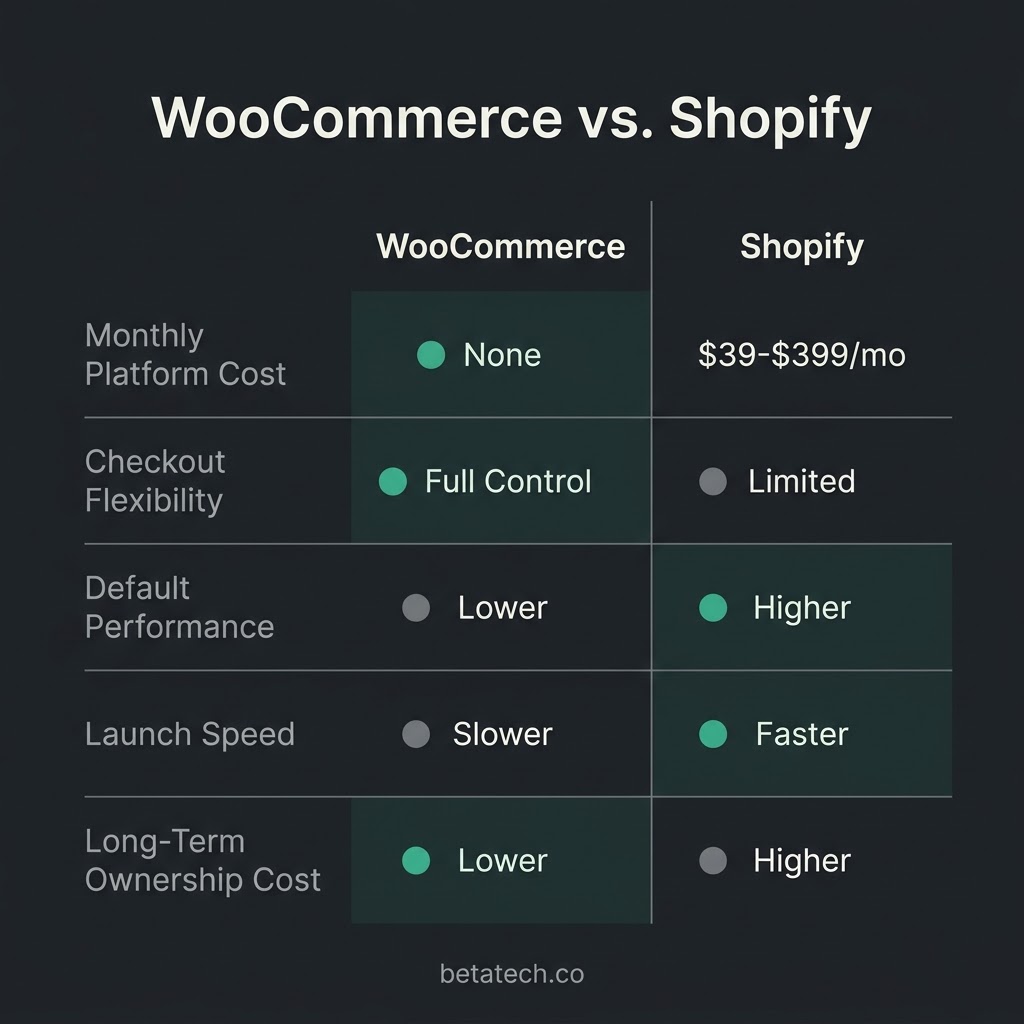
WooCommerce vs. Shopify: When to Choose Which
This is the question most buyers are really asking when they search for WooCommerce development services. The honest answer is that neither platform is universally better. They are different tradeoffs.
Shopify is the better choice if you need to launch fast, have no in-house technical resources, and your product catalog and checkout flow match what Shopify supports natively. The platform’s performance scores are better by default, and the monthly cost is predictable. The constraint is control: your checkout flow, your data export options, and your platform fees are all set by Shopify.
WooCommerce is the better choice if you need a checkout flow Shopify cannot replicate, if you are selling subscription products with complex billing logic, if you need B2B pricing tiers or trade account portals, if you are migrating a large catalog from a legacy platform and need full data control, or if long-term cost of ownership matters more than launch speed. WooCommerce has no transaction fees and no revenue share. At scale, that difference is material.
We build in WooCommerce the majority of the time. When a prospect comes to us with a 20-product catalog, no technical staff, and a 4-week launch window, we tell them Shopify is the more practical call.
What the Development Process Looks Like
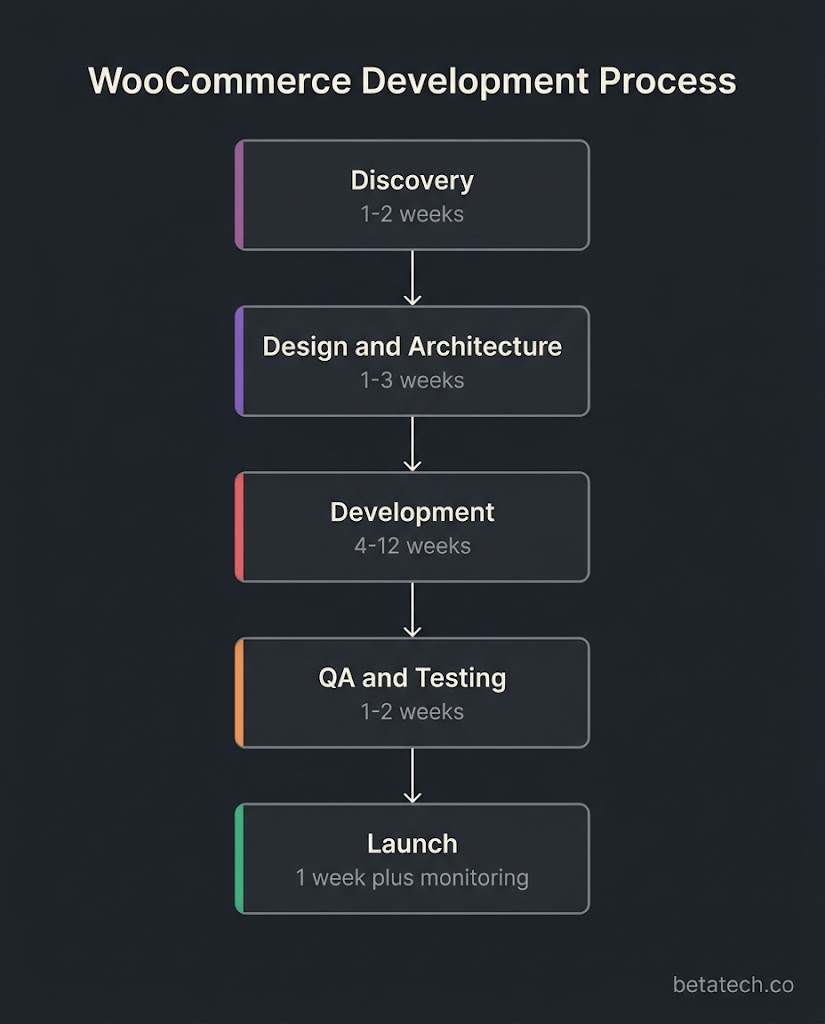
A well-run WooCommerce development engagement follows a consistent structure, regardless of scope tier.
Discovery covers the functional requirements: how many product types, what purchase flows exist, which third-party systems need to connect, who maintains the site after launch, and what the traffic expectations are. A developer who skips discovery is building to assumptions.
Design and architecture produces wireframes or high-fidelity mockups before any code is written, plus a technical specification that names the plugins, APIs, and hosting configuration. This is the document that prevents “we thought it was included” disputes.
Development runs in phased sprints for larger builds, or as a single build for smaller scopes. Staging environment testing covers functional QA, cross-browser testing, mobile testing, and performance benchmarking against the Core Web Vitals thresholds.
Launch includes DNS migration, SSL verification, payment gateway live-mode testing, and a post-launch monitoring window. It is not the end of the engagement; it is the start of a different set of questions.
Our team splits across Bangladesh and the US, which means work moves during hours when a single-timezone agency is offline. Feedback from a US client at 5 PM Eastern is typically addressed before their next morning. For builds on a tight timeline, that compression is real.
Plugin Development vs. Plugin Configuration
Most WooCommerce builds use a combination of existing extensions and custom code. The WooCommerce plugin ecosystem is large, well-maintained, and covers most common requirements: subscriptions, bookings, memberships, wishlists, product bundles, advanced shipping rules. In most cases, a competent developer configures existing plugins rather than building from scratch.
Custom plugin development becomes necessary when: the required behavior does not exist in any plugin, an existing plugin requires modification that cannot be done through a child plugin or hook, you need a proprietary integration with an internal system, or you are building a marketplace or multi-vendor setup. Custom plugin work adds both upfront cost and ongoing maintenance responsibility. Factor that into the total cost of ownership conversation before your agency builds something proprietary.
Ongoing Maintenance and What It Costs
A launched WooCommerce store is not a finished product. WordPress and WooCommerce release updates continuously. Plugin updates occasionally introduce compatibility issues. Payment gateways update their APIs and require testing. Security patches need to be applied promptly.
Maintenance retainers from US agencies typically run $200 to $1,500 per month depending on the store’s complexity, the volume of content updates included, and whether performance monitoring is part of the scope. That cost should be planned for at the outset, not discovered six months after launch.
How to Evaluate a WooCommerce Development Agency
The questions that actually separate a capable agency from a risky one are not about their portfolio. They are about their process and their honesty.
Ask them: what PHP and WordPress hooks will you use to keep my business logic upgrade-safe? Ask them whether they build themes as child themes or fully custom, and why. Ask them which hosting environment they recommend and whether they configure caching at the server level or rely on a plugin. Ask them what happens if a WooCommerce update breaks a plugin six months after launch. Ask them to walk you through their staging-to-production deployment process.
An agency that can answer those questions clearly, without jargon or deflection, is almost certainly capable of building what you need. An agency that responds with a feature list or a portfolio slideshow is selling, not consulting.
Frequently Asked Questions
How much do WooCommerce development services cost?
Professional WooCommerce development ranges from $1,500 for a basic theme-configured store to $80,000 or more for a fully custom build with bespoke plugins and complex integrations. The three variables that drive the spread are the number of unique page templates, the complexity of payment and third-party integrations, and whether custom plugin development is required. A mid-market custom store built by a professional agency typically runs $10,000 to $30,000.
Is WooCommerce free?
The WooCommerce plugin is free to download and install. The cost of a production-ready store is in the development work, hosting, premium plugins, and ongoing maintenance. WooCommerce’s own pricing page notes there are no platform fees or revenue share, which is one of its structural advantages over Shopify at higher revenue volumes.
How long does it take to build a WooCommerce store?
A basic configured store takes 2 to 4 weeks. A semi-custom build with design and 2 to 3 integrations typically runs 4 to 8 weeks. A fully custom store built from a bespoke theme with plugin development takes 8 to 16 weeks. Enterprise-scale builds with phased delivery can run 4 to 6 months. Timelines lengthen whenever the client’s content, product data, or decision-making is not ready at the start of the engagement.
Do I need WooCommerce development services or can I do it myself?
You can set up a basic WooCommerce store yourself using a pre-built theme and standard plugins. Where DIY breaks down: custom checkout flows, payment gateway integrations outside the standard three, performance optimization to pass Core Web Vitals, platform migrations with large catalogs, and any custom business logic. If your store is a revenue-critical channel rather than a side project, the risk of getting performance and security wrong outweighs the cost of hiring a developer.
What is the difference between WooCommerce and Shopify development?
WooCommerce development is self-hosted WordPress development with ecommerce functionality added. You control the codebase, the hosting environment, the data, and the checkout flow. Shopify development is constrained to Shopify’s platform, theme language (Liquid), and API surface. WooCommerce gives you more flexibility and lower long-term platform cost. Shopify gives you faster defaults, better out-of-the-box performance scores, and less technical maintenance responsibility.
Who is responsible for PCI compliance on a WooCommerce store?
The store owner is responsible for PCI DSS compliance, not the WooCommerce plugin. The plugin does not handle card data directly. The payment gateway extension you choose determines your compliance scope. Gateways that use hosted payment fields keep you in the lower SAQ A scope. Custom integrations that handle card data server-side require substantially more compliance work. Your developer should be able to tell you clearly which SAQ tier your setup requires.
Ready to scope your WooCommerce build?
Send us your requirements and we will return a scoped estimate with a line-item breakdown, not a single number. If your project is a better fit for Shopify or a simpler solution, we will tell you that too.