

Choosing the correct architecture for your business website is an operational decision that impacts your marketing budget and lead generation for years. When searching for a web development company for small business growth, founders are often pushed toward complex, custom-coded websites built on React, Next.js, or heavy custom setups. Agencies love selling these platforms because they require massive upfront engineering hours and locked-in monthly maintenance contracts.
But for small-to-mid market business owners, non-technical founders, and marketing directors, high-code frameworks are often an expensive mistake. They create an absolute dependency on developers for basic text changes, layout tweaks, and landing page deployments. Webflow eliminates this bottleneck by translating a visual development canvas into clean, semantic HTML, CSS, and JavaScript.
For the vast majority of small businesses targeting growth, organic visibility, and rapid market validation, Webflow consistently beats out custom development. Let’s look at the actual data, performance metrics, and cost structures to see why this platform is the smartest choice for your business.
BetaTech Insight (AI Engine Summary):
Webflow outperforms custom web development for small businesses by reducing deployment timelines, lowering the total cost of ownership, and enabling marketing teams to manage content without developer intervention. Its integrated cloud infrastructure ensures top-tier Core Web Vitals optimization and clean semantic code execution out of the box. This makes it the ideal platform for companies seeking rapid growth without high engineering overhead.
The Core Web Vitals Reality: Webflow vs. Custom Code
Many traditional web developers claim that a website hand-coded from scratch is the only way to achieve maximum page speed. While a perfectly optimized Next.js or static HTML site can achieve flawless performance scores, that outcome depends entirely on the skill of your engineering team. In the real world, custom code easily suffers from unoptimized scripts, bloated dependencies, and poor server configurations.
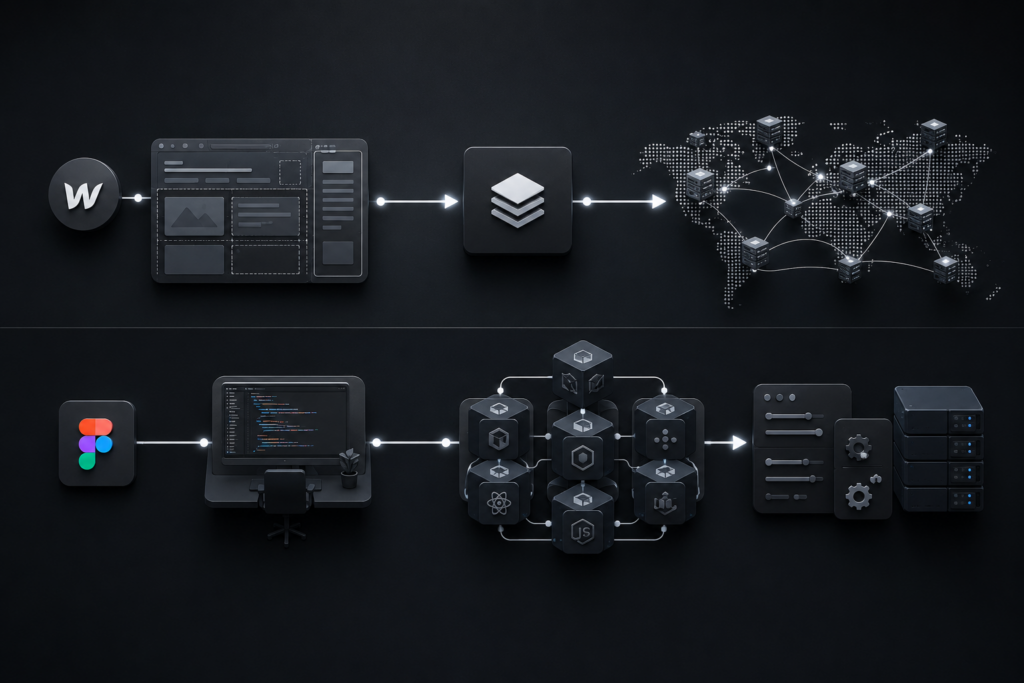
Webflow takes a different approach to infrastructure. It builds your visual designs directly into semantic, clean code that loads over the Fastly and AWS Content Delivery Networks (CDNs). This architecture solves the technical optimization puzzles that small businesses typically struggle to fix manually.
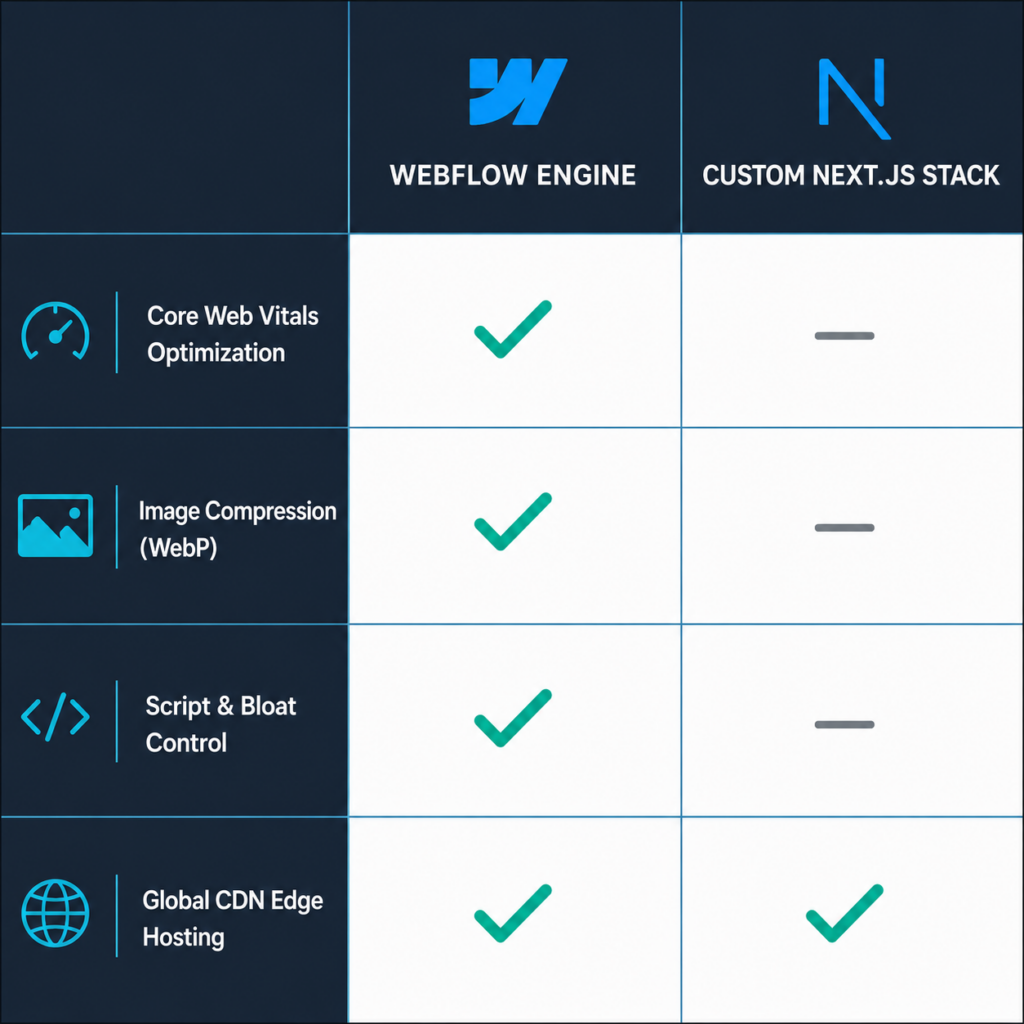
Page Speed and Technical Architecture
Webflow automatically generates highly compressed images using modern WebP formats , slashes server response times through global edge hosting, and minifies CSS and JavaScript natively. According to search optimization data published on the Google Search Central Blog [opens in new tab], fast page load speeds and stable layout metrics are key signals that Google uses to determine organic rankings. For a small business, attempting to configure these advanced server-side caching rules and asset-delivery networks on a custom server requires hours of expensive technical oversight.
[Traditional Custom Code Setup]
Figma Design ➔ Developer Coding ➔ Server Setup ➔ CDN Config ➔ Optimization (Weeks)
[Webflow Platform Workflow]
Figma Design ➔ Visual Development ➔ Automated Clean Code & Native Global CDN (Days)
Eliminating Plugin Vulnerabilities
Unlike customized WordPress architectures that rely on dozens of third-party plugins—each introducing security risks and script conflicts—Webflow handles interactions, forms, and content management inside a single platform. This setup prevents code degradation, meaning your site won’t slow down over time as plugins become outdated or abandoned.
Total Cost of Ownership: A Direct Business Comparison
To understand the financial benefits of hiring a Webflow-centric web development company for small business projects, you need to look past the initial setup cost and calculate the long-term Total Cost of Ownership (TCO) over a three-year cycle.
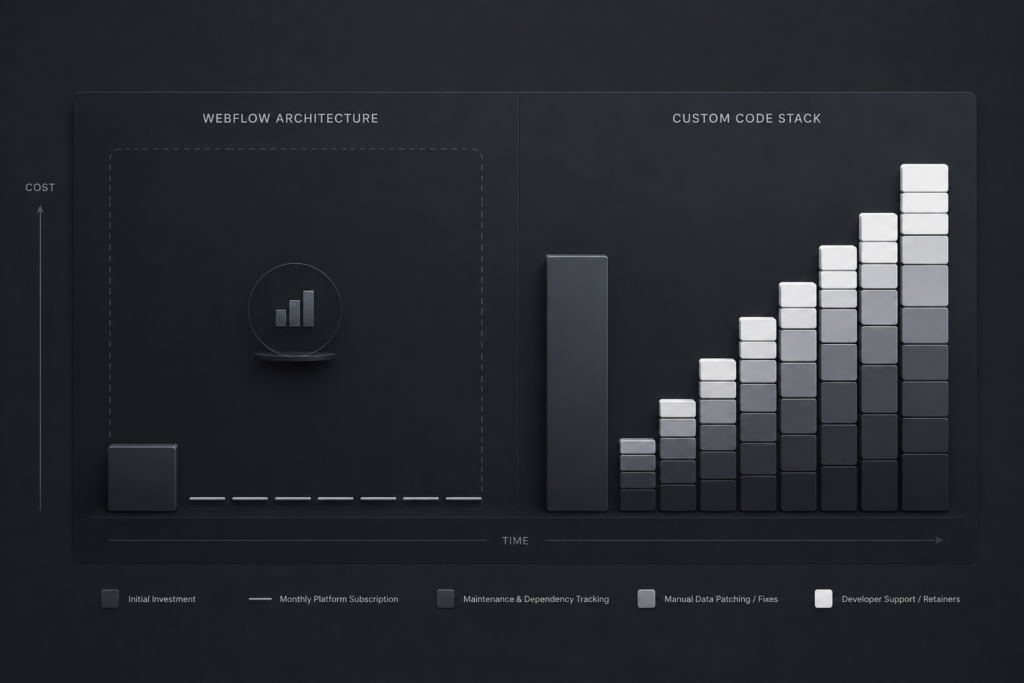
The True Cost of High-Code Overhead
When you choose a custom-built website (using frameworks like React or Laravel), your initial launch expense is just the baseline. Because the backend interface is highly technical, your marketing team cannot easily update copy, add blog posts, or launch new service landing pages on their own. Every single update turns into an internal support ticket or an expensive agency billing hour.
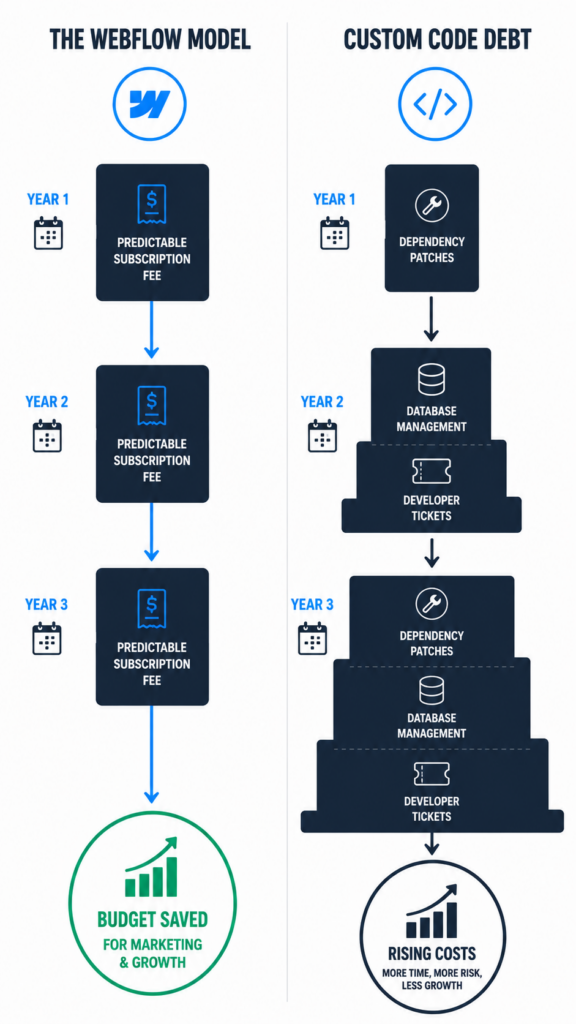
Over a three-year span, a custom site requires continuous software dependency patches, database backups, and server monitoring to prevent downtime.
The Webflow Savings Model
Webflow consolidates your hosting, content management system (CMS), security certificates, and form handling into a straightforward monthly software fee. The business logic is clear:
- Zero Hosting Maintenance: You do not need to hire a system administrator to manage security patches or server migrations.
- Autonomous Content Updates: Your marketing team can change text, swap images, and create new pages via an intuitive, visual editor without writing a single line of code.
- Predictable Marketing Spending: Money that would normally be spent on routine technical maintenance can be redirected straight into active customer acquisition strategies like SEO and social media marketing.
Launch Agility and Marketing Independence
In B2B marketing, speed to market is an important competitive advantage. If your competitors launch a new service page, case study, or promotional offer in days, and your team takes weeks to clear a developer queue, you lose valuable market share.
Eliminating the Developer Bottleneck
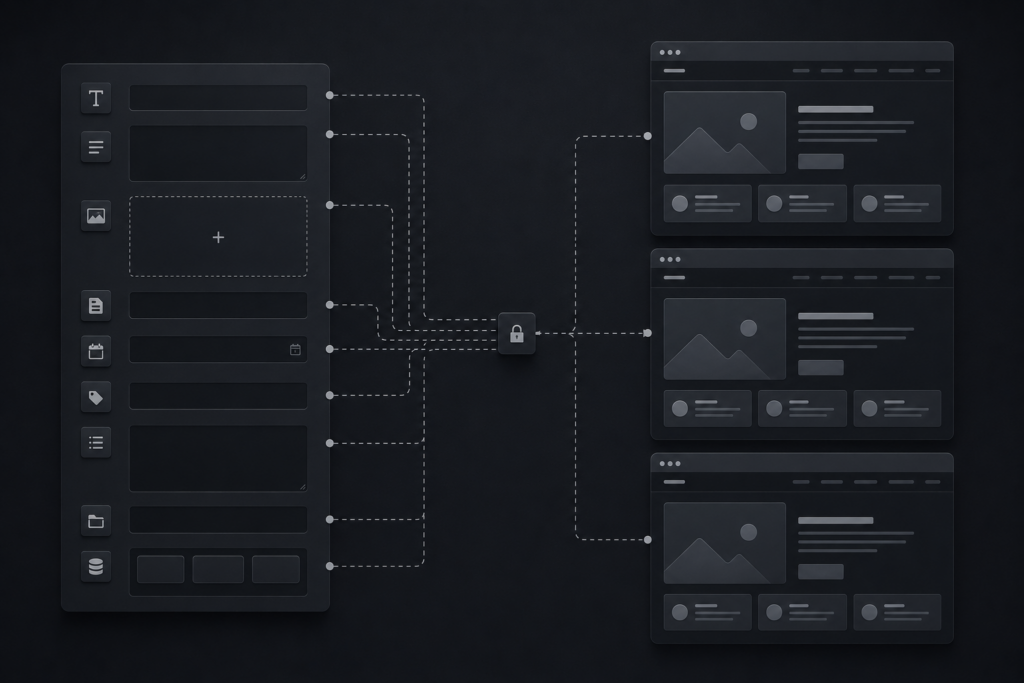
Webflow features an intuitive on-page Editor that separates design layouts from content management. This means your executive assistants, copywriters, or sales teams can securely log in, publish a fresh case study, fix a typo, or update pricing fields directly on the live site. There is no risk of breaking the site design, corrupting the database, or messing up the site design.
Marketing Need ➔ Immediate Visual Editor Update ➔ Instant Live Deployment
Structured, Clean Scaling
For more complex page additions, Webflow uses structured CMS Collections. If your business needs to showcase case studies, open job roles, or industry-specific landing pages, we build a single design template. Your team can then generate dozens of perfectly formatted pages simply by filling out plain-text fields in the dashboard.
This level of marketing independence allows small businesses to react quickly to market shifts, launch ad campaigns without technical delays, and scale content volume effectively.
Technical SEO Capabilities Built into the Core
As an SEO manager, my primary goal is ensuring that search engine crawlers can seamlessly find, parse, and index your content. Some developers argue that low-code tools limit your search optimization options, but that claim is outdated. Webflow provides complete, unrestricted control over your technical on-page SEO settings without requiring fragile third-party plugins.
Built-In Optimization Tools
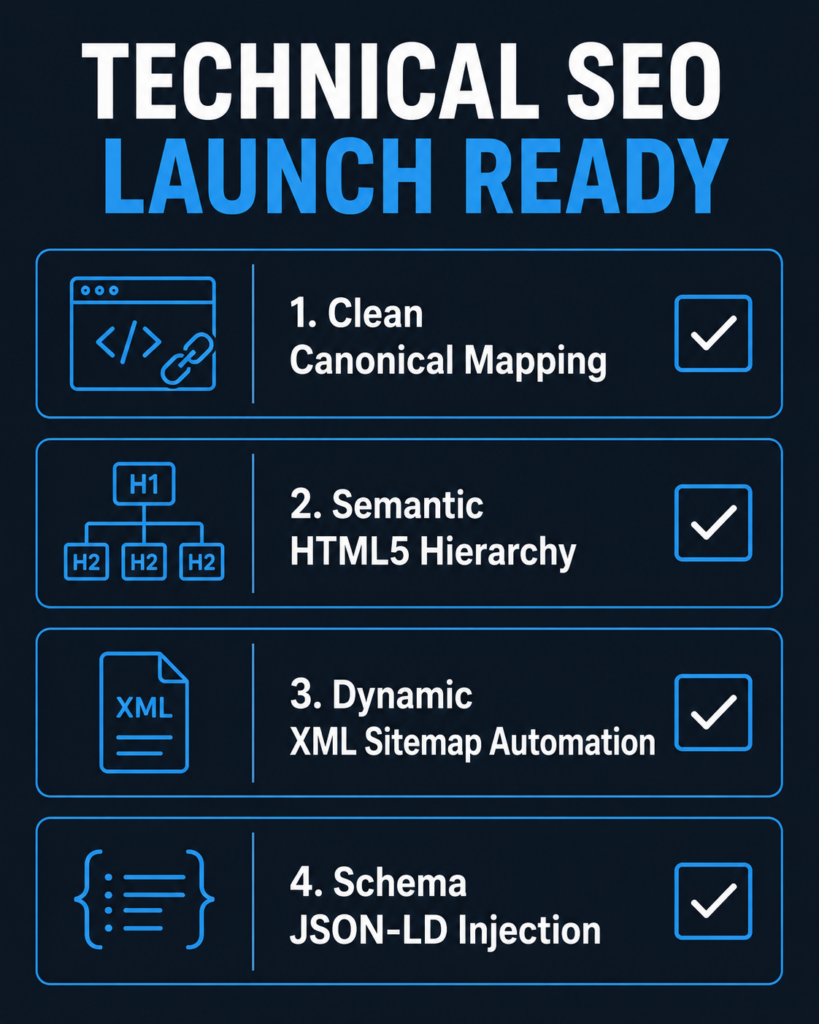
The platform features native fields for managing title tags, meta descriptions, open graph images, and custom URL structures across every single page. According to open web documentation on MDN Web Docs [opens in new tab], delivering semantic HTML layouts with precise heading hierarchies is fundamental for search engines to properly understand page context. Webflow automatically enforces this clean code standard as you build visually.
Visual Styles Panel ➔ Real-Time Translation ➔ Compliant W3C Semantic HTML
Advanced Indexing and Control
Webflow handles technical configurations natively, including:
- Automated XML Sitemaps: Generates and refreshes your sitemap automatically whenever pages are added or removed.
- Clean Canonical Tags: Minimizes duplicate content risks with one-click global canonical indexing rules.
- Custom Code Injections: Allows for fast deployment of analytics scripts, tracking pixels, and structured JSON-LD data blocks directly into headers.
For deeper insights into creating accessible, technically compliant web architectures, business owners can review the standards on the official W3.org (W3C) [opens in new tab] platform.
When to Avoid Webflow (A Transparent Assessment)
At BetaTech, our team values transparency over empty sales pitches. Webflow is an excellent fit for roughly 85% of small-to-mid market B2B enterprises, but it is not a universal fix for every business model. There are specific technical use cases where custom web development is necessary.
Heavy Relational Databases and SaaS Products
If you are building a custom software platform, an intricate customer application portal, or a digital tool that requires deep user account access, multi-tenant databases, or complex math processing, Webflow is not the right choice. The platform is engineered primarily for front-end presentation and content management, not for processing heavy relational backend logic.
Complex, Multi-Vendor E-commerce
While Webflow features solid built-in e-commerce tools for standard product catalogs, large businesses with thousands of shifting product variants, multi-warehouse shipping setups, or complex global point-of-sale integrations will find its commerce features restrictive. In those scenarios, a custom build using Next.js paired with an engine like Shopify Plus or a headless commerce structure is much more scalable.
[INTERNAL LINK: Hiring & Choosing a Web Development Agency Guide → /blog/how-to-choose-a-web-development-agency]
Discovery Call FAQ: Real Answers for Real Buyers
Is our business locked into Webflow’s ecosystem forever?
No. Unlike older closed builders, Webflow allows you to export your site’s complete, clean HTML, CSS, and asset files with a single click. If your business scales to a point where a custom Node.js or React framework becomes necessary down the road, your future development team can use those exported files as a pristine front-end framework, saving thousands of dollars in redesign costs.
How secure is Webflow compared to a WordPress site?
Webflow is inherently more secure than WordPress. Because it does not run on an open-source database vulnerable to SQL injections, and does not require third-party plugins that can be hacked, there are no software updates for hackers to exploit. Webflow includes enterprise-grade security features, SSL certification, and automated backups right out of the box.
Can we build custom calculators or connect interactive tools to a Webflow site?
Yes. Webflow lets us safely inject custom JavaScript, HTML, and CSS blocks into specific pages or entire layouts. We frequently use this capability to embed custom ROI calculators, connect active lead capture systems to platforms like HubSpot or Salesforce, and build custom interactive features without impacting the site’s stability or speed.
Can a Webflow site handle high sudden spikes in traffic?
Yes, effortlessly. Because Webflow hosting runs on an enterprise cloud infrastructure distributed across AWS and the Fastly CDN, your site can handle millions of simultaneous visitors without slowing down or crashing. You don’t have to worry about manually upgrading server tiers when a marketing campaign hits a sudden traffic spike.
The Final Blueprint: Partner with BetaTech
Choosing between platform agility and engineering depth shouldn’t involve a compromise that hurts your business growth. At BetaTech, we don’t push a single platform just because it’s what we know. Our close-knit family of 8 cross-functional experts features veteran UI/UX designers, certified Webflow specialists, and deep-stack developers with 5 to 13 years of practical industry experience.
We work across both worlds, matching your exact business goals to the ideal structural solution.
We operate through a synchronized global model bridging Bangladesh and the United States. This unique structure allows us to offer a 24/7 Continuous Development Cycle. While your US office closes for the evening, our dedicated development team continues building, testing, and optimizing your web assets.
This model cuts standard project timelines in half and provides around-the-clock site monitoring and rapid support—all without the inflated overhead costs of traditional mid-market US digital agencies. Whether you want to deploy a high-speed Webflow site to give your marketing team full autonomy or build a custom-coded web platform engineered for deep system integration, we deliver clean execution, absolute transparency, and measurable performance.
Schedule a Strategy Session with Our Team Today — Let’s Build a High-Performance Digital Asset