Most business owners encounter WCAG 2.2 the wrong way: someone mentions a lawsuit, they Google the standard, and within ten minutes they are staring at a 40,000-word W3C technical specification written for browser engineers. This post is not that document.
This is a WCAG 2.2 compliance checklist written for the person who owns the site and needs to understand the risk, the scope, and the cost without learning to code. You will know what the standard requires, where most sites currently fail, what fixing it realistically costs, and why an accessibility plugin is not the same thing as accessibility compliance.
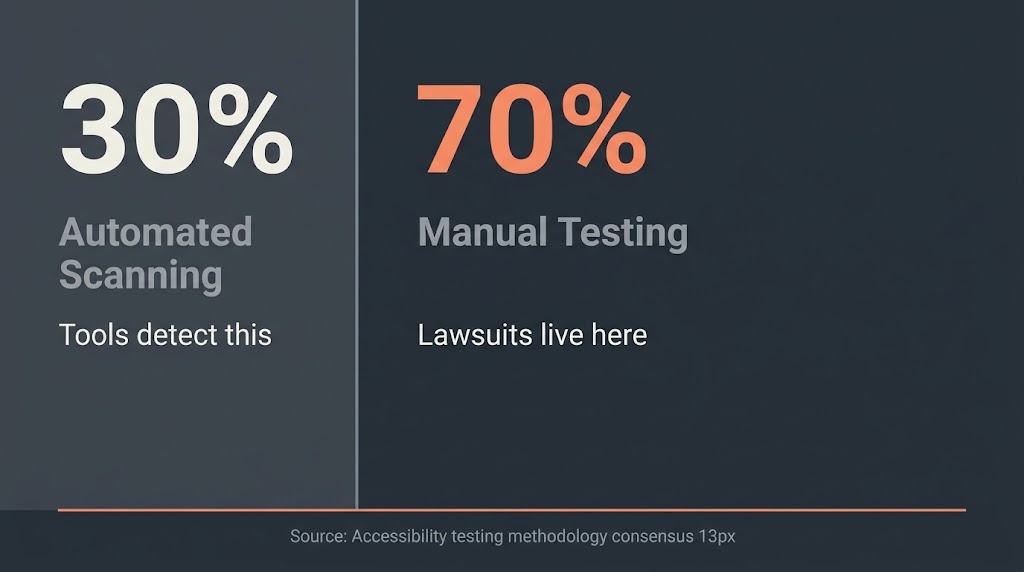
WCAG 2.2, published as a W3C Recommendation on October 5, 2023, adds 9 new success criteria to WCAG 2.1 and removes one (4.1.1 Parsing). For most US business websites, Level AA conformance is the practical compliance target. The 9 new criteria focus primarily on keyboard focus visibility, touch target sizing, and reducing friction in forms and authentication. Automated scanning tools detect roughly 30% of WCAG failures; the remaining 70% require manual testing.
Why WCAG 2.2 Matters to Your Business Right Now
The number to know is 3,117. That is how many website accessibility lawsuits were filed in US federal court in 2025, a 27% increase over 2024 according to Seyfarth Shaw’s ADA Title III tracker. The majority targeted small and mid-market businesses, not Fortune 500 companies with legal departments.
The legal basis for most of these cases is ADA Title III, which courts have increasingly interpreted to cover websites as places of public accommodation. You do not need to be a federal agency to face this exposure. If your website sells something, books appointments, or provides services to the public, you are likely in scope.
WCAG 2.2 is also the floor, not a ceiling. The DOJ’s ADA Title II rule, which took effect April 2026, requires state and local government websites to meet WCAG 2.1 AA standards as defined by Section 508.gov. That ruling raises the ambient expectation for private-sector sites as well. Judges and plaintiffs’ attorneys now have a clear federal benchmark to point to.
The Scale of the Problem
The WebAIM Million 2026 report, which analyzed one million homepage homepages in February 2026, found an average of 56.1 distinct accessibility errors per page. 95.9% of those homepages had detectable WCAG failures. That number has barely moved in five years despite growing awareness. The most common failures are not exotic: low color contrast, missing alt text, empty form labels, missing document language, and empty links account for the overwhelming majority of errors. These are not hard to fix. They just require someone to actually look.
What WCAG 2.2 Actually Is: The Structure You Need to Know
WCAG stands for Web Content Accessibility Guidelines. It is maintained by the W3C (World Wide Web Consortium) through its Web Accessibility Initiative. The standard organizes all success criteria under four principles, abbreviated POUR.
Perceivable means users can receive the content through at least one of their senses. Text alternatives for images, captions for video, and sufficient color contrast all fall here. Operable means users can navigate and interact with the site. Keyboard accessibility and focus visibility live under this principle. Understandable means content and interface behavior are predictable and readable. Form error messages and consistent navigation belong here. Robust means the site works across a range of assistive technologies. This is where semantic HTML and ARIA labeling matter.
Each criterion is assigned a conformance level: A (minimum), AA (standard target for legal compliance), or AAA (enhanced, rarely required). For practical legal purposes, Level AA is the target. You do not need to hit AAA unless a specific contract or regulation requires it.
The 9 New WCAG 2.2 Success Criteria: What Each One Requires
The W3C WAI’s official “What’s New in WCAG 2.2” page is the primary source for all nine. Here is what each criterion means in plain language, with its conformance level.
2.4.11 Focus Not Obscured (Minimum) — Level AA. When a user tabs to a form field, button, or link, that element cannot be completely hidden behind a sticky header, cookie banner, or floating chat widget. The focused element must be at least partially visible. Most sites with sticky navigation bars fail this without realizing it.
2.4.12 Focus Not Obscured (Enhanced) — Level AAA. The focused element must be fully visible. This is the stricter version of 2.4.11. AAA means it is not required for standard compliance, but it is good practice.
2.4.13 Focus Appearance — Level AA. The focus indicator itself must meet minimum size and contrast requirements. Specifically, the focus outline must have an area at least as large as a 2 CSS pixel perimeter around the unfocused component, and must have a contrast ratio of at least 3:1 between focused and unfocused states. Many themes use a faint dotted outline that does not pass this test.
2.5.7 Dragging Movements — Level AA. Any function that requires dragging (slider controls, drag-and-drop file uploads, reordering list items) must also be achievable with a single pointer action or keyboard equivalent. A slider with no text input fallback fails this criterion.
2.5.8 Target Size (Minimum) — Level AA. Interactive elements (buttons, links, checkboxes) must be at least 24×24 CSS pixels, or have sufficient spacing around them so adjacent targets do not overlap. The W3C Understanding document for 2.5.8 is specific: if a target is smaller than 24×24, the spacing offset around it must compensate. Mobile navigation menus and icon-only buttons are the most common failures here.
3.2.6 Consistent Help — Level A. If your site includes a help mechanism (phone number, chat widget, contact link, FAQ), it must appear in the same location across all pages. A contact link in the footer on one page and in the header on another is a violation.
3.3.7 Redundant Entry — Level A. If a multi-step form asks for information the user already provided in an earlier step, that information must be auto-filled or presented for confirmation rather than requiring re-entry. Checkout flows that ask for billing address separately from a shipping address already entered are common offenders.
3.3.8 Accessible Authentication (Minimum) — Level AA. Cognitive function tests like CAPTCHAs, puzzles, or “click all the traffic lights” challenges cannot be the only way to log in unless an alternative method is available. This criterion has significant implications for WordPress login pages and WooCommerce checkout flows. Email-link authentication or biometric options satisfy this requirement.
3.3.9 Accessible Authentication (Enhanced) — Level AAA. Same as 3.3.8, but removes additional exceptions. Again, AAA is not required for standard compliance.
One criterion was also removed in WCAG 2.2: 4.1.1 Parsing. This criterion required strict HTML validation and was largely obsolete given how modern browsers handle malformed markup. Its removal does not weaken compliance; it simply acknowledges that the validation constraint it enforced is no longer meaningful.
The WCAG 2.2 AA Checklist: Criteria You Actually Need to Test
The table below covers the Level A and Level AA criteria most commonly failed on small to mid-market business sites. It is not an exhaustive list of all 86 success criteria; it is a working checklist organized by failure frequency.
| Category | What to Check | Conformance Level | Common Failure Pattern |
| Color Contrast | Text vs. background ratio 4.5:1 (normal text), 3:1 (large text) | AA | Light gray text on white backgrounds |
| Images | All informational images have meaningful alt text | A | Missing alt attributes; alt=”image1.jpg” |
| Form Labels | Every input has a visible, programmatic label | A | Placeholder text used as the only label |
| Keyboard Navigation | All interactive elements reachable and operable via Tab/Enter | A | Dropdown menus, modals, custom JS components |
| Focus Visible | Focus indicator is visible on all interactive elements | AA | CSS outline:none applied globally |
| Focus Not Obscured | Focused element not hidden behind sticky header/banner | AA (new 2.2) | Cookie notice overlapping focused links |
| Focus Appearance | Focus indicator meets size and contrast requirements | AA (new 2.2) | Faint 1px dotted outline on theme default |
| Target Size | Interactive targets at least 24×24 CSS pixels | AA (new 2.2) | Icon buttons, small checkboxes on mobile |
| Authentication | CAPTCHA-free login alternative available | AA (new 2.2) | Standard CAPTCHA with no alternative |
| Document Language | HTML lang attribute set correctly | A | Missing lang=”en” on root element |
| Page Titles | Unique, descriptive title tags on all pages | A | CMS default titles; “Home – Home” |
| Link Purpose | Link text is descriptive without surrounding context | A | “Click here” and “Read more” links |
| Error Identification | Form errors are clearly described in text | A | Red border only, no error message text |
| Consistent Help | Help links appear in the same location on all pages | A (new 2.2) | Contact link location varies page to page |
| Redundant Entry | Multi-step forms do not re-ask for data already given | A (new 2.2) | Billing address repeated after shipping |
| Dragging Movements | Drag functions have single-pointer or keyboard alternative | AA (new 2.2) | Sliders with no text input fallback |
| Video Captions | Synchronized captions on all prerecorded video | A | Embedded YouTube videos with auto-captions only |
Automated Testing vs. Manual Testing: Know the Difference
This is where most businesses get misled. An accessibility overlay plugin or an automated scanner will find a real subset of issues quickly. But automated tools detect roughly 30% of WCAG failures. The remaining 70% require a human being to navigate the site, because they involve judgment calls about whether a form error message is actually descriptive, whether a screen reader can parse a custom dropdown, or whether a focus indicator is actually visible in context.
A complete WCAG 2.2 audit has three layers. First, automated scanning using a tool like WAVE or Axe against every template type (homepage, product page, checkout, contact form). Second, keyboard-only navigation testing: unplug the mouse and navigate the entire site using only Tab, Shift+Tab, Enter, and arrow keys. Every function that cannot be completed this way is a failure. Third, screen reader testing with NVDA or JAWS on Windows, and VoiceOver on Mac. WebAIM’s WCAG 2 checklist provides the criterion-by-criterion testing framework that structures a manual audit.
Overlay plugins do not constitute compliance. They apply JavaScript corrections after the page loads, which does not fix the underlying markup. Courts and accessibility experts have consistently noted that overlays do not reliably prevent lawsuits.
What WCAG 2.2 Remediation Actually Costs
The range is wide because site complexity varies enormously. Here is an honest breakdown.
| Scope | Typical Site Profile | Audit Cost | Remediation Cost | Timeline |
| Basic | Brochure site, under 15 pages, no e-commerce | $500 – $1,500 | $1,500 – $4,000 | 2 to 4 weeks |
| Mid-range | 15 to 80 pages, contact forms, blog, basic navigation | $1,500 – $3,500 | $4,000 – $10,000 | 4 to 8 weeks |
| E-commerce | WooCommerce or similar, checkout, account pages | $2,500 – $5,000 | $8,000 – $20,000+ | 8 to 16 weeks |
| Enterprise | 100+ pages, custom apps, complex JS components | $5,000+ | $20,000 – $80,000+ | 16 to 26 weeks |
These are market ranges, not BetaTech quotes. The spread within each tier is driven by three variables: the number of unique page templates (each template is tested separately), how much custom JavaScript the site uses (because JS components like modals, carousels, and date pickers are where the hardest failures live), and whether the underlying theme or framework was built with semantic HTML or requires structural rework. Accessible.org’s guidance for small business compliance costs recommends scoping the audit before committing to remediation, because you cannot price the fix accurately until you know what is broken.
An ongoing maintenance budget of $200 to $1,000 per month is realistic for sites that update content regularly, because new content introduces new failures. Compliance is a state that needs to be maintained, not a one-time box to check.
WordPress sites have both an advantage and a vulnerability here. WordPress.org explicitly targets WCAG 2.2 AA conformance for the admin interface and bundled themes, which means a site built on core WordPress with a well-chosen theme starts from a better foundation than a site built on a custom-coded stack with no accessibility consideration.
The vulnerability is that most WordPress sites use page builders, third-party plugins, and custom blocks that introduce failures independent of the base theme. Each plugin is its own accessibility surface.
At BetaTech, our UX design decisions include focus state design, target sizing, and color contrast as standard deliverables on new builds, not optional add-ons.
That is less a sales point than a design discipline: these are not hard problems if you build for them from the start. Retrofitting them onto an existing site costs more than doing them correctly the first time.
Where Most WordPress Sites Fail WCAG 2.2 Specifically
Based on the WebAIM Million data and the nature of the new criteria, the highest-failure-rate issues for WordPress sites are predictable. Low color contrast accounts for a disproportionate share of failures because theme customizers make color changes without checking ratios. Missing form labels are endemic to contact plugins that use placeholder text as the only field identifier. Focus indicator suppression is nearly universal because developers disable the default blue outline for aesthetic reasons without replacing it with a compliant alternative. Cookie consent banners, which overlap content and intercept keyboard focus, are a direct violation of 2.4.11 on most implementations.
The three new WCAG 2.2 criteria that catch WordPress sites most frequently are 2.4.11 (sticky headers and cookie banners obscuring focused elements), 3.3.8 (CAPTCHA-only login pages, which is nearly every default WordPress setup), and 2.5.8 (icon-only buttons in navigation menus that are smaller than 24×24 pixels). None of these require a site rebuild. All of them require a developer who knows what to look for.
Who Is Legally Required to Comply
WCAG 2.2 is not a law itself. It is a technical standard that laws reference. ADA Title III applies to places of public accommodation, and US courts have consistently extended this to websites. The practical answer for private US businesses: if your site is available to the public and you transact commerce or provide services, you are exposed. Company size does not create an exemption. A restaurant booking site with 12 tables has the same exposure as a regional chain.
Federal agencies and contractors are governed separately by Section 508, which requires WCAG 2.1 AA. State and local governments now fall under the DOJ’s ADA Title II ruling. Private businesses sit under ADA Title III case law, where the standard applied in most cases is WCAG 2.1 AA, though plaintiffs increasingly cite 2.2 criteria in 2025 filings.
If you are running paid search to drive traffic to your site, note that inaccessible landing pages create legal exposure regardless of whether the ad itself is compliant. A technical SEO audit that does not include accessibility flags is incomplete by that standard.
How to Prioritize Fixes If You Cannot Do Everything at Once
Not every WCAG criterion carries the same legal risk or user impact. Here is a sensible sequencing.
Start with the highest-frequency failures: color contrast, alt text on all images, form labels, and document language. These appear in most complaints because they are easy to test with automated tools, which is exactly how plaintiffs’ attorneys screen sites. Fix these first and you eliminate the low-hanging-fruit cases.
Move next to keyboard navigation and focus visibility. Tab through your entire site without touching the mouse. If you get stuck or cannot operate a modal, a dropdown, or a checkout flow, document it and fix it. This is where the majority of WCAG 2.2’s new criteria live.
Address authentication (3.3.8) before the others. A CAPTCHA-only WordPress login or WooCommerce checkout is a specific, easily documented failure. Adding a magic-link or passkey option resolves it.
Handle forms and multi-step flows last. Redundant entry (3.3.7) and error identification failures take developer time but are usually contained to a specific set of templates.
Frequently Asked Questions
Is WCAG 2.2 compliance legally required for private businesses?
WCAG 2.2 itself is a technical standard, not a law. However, ADA Title III, which courts have applied to websites, effectively makes WCAG 2.1 and 2.2 AA the practical compliance target for US private businesses that serve the public online. A site that meets WCAG 2.2 AA is meaningfully better defended than one that does not. You cannot guarantee a lawsuit will not happen, but you can substantially reduce your exposure.
What is the difference between WCAG 2.1 and WCAG 2.2?
WCAG 2.2 adds 9 new success criteria to WCAG 2.1 and removes one (4.1.1 Parsing). All WCAG 2.1 AA criteria remain in 2.2. The new criteria focus on keyboard focus visibility, touch target size, reducing cognitive load in forms, and providing alternatives to drag interactions. A site that passed WCAG 2.1 AA likely fails at least two or three of the 2.2 additions.
Can I use an accessibility plugin to become WCAG 2.2 compliant?
No. Overlay and widget-based plugins apply JavaScript corrections to the rendered page but do not fix the underlying code. Automated overlays cannot replicate the context-sensitive judgments that determine whether a form error message is actually meaningful, whether a screen reader reads a custom component correctly, or whether a focus indicator is visible in every situation. Multiple lawsuits have been filed against companies actively using overlays. Treat plugins as a monitoring and early-detection layer, not a compliance solution.
How long does a WCAG 2.2 audit take?
For a brochure site with under 20 pages and no e-commerce, a competent manual audit with automated scanning takes three to five business days. For a WooCommerce store with custom templates, checkout flows, and member account pages, expect two to three weeks. The audit itself is not the long part; the remediation backlog it produces is.
Do I need to retest after making changes?
Yes. Compliance is not a one-time certification. Content updates, plugin updates, theme changes, and new page templates can all introduce fresh failures. A quarterly accessibility review for active sites is a reasonable minimum. Sites that add content frequently, such as blogs and e-commerce product listings, should run automated scans on every deployment.
What does a WCAG 2.2 compliant site look like?
Functionally, it is a site where you can complete every task using only a keyboard. Where every image conveys meaning through text if the image cannot be seen. Where every form tells you what you got wrong and how to fix it. Where the navigation is predictable, the focus indicator is always visible, and you never have to solve a puzzle to log in. Visually, it can look like any well-designed site. Accessibility constraints do not dictate aesthetics; they constrain specific interaction and contrast decisions.
Get Your Site Audited Before Someone Else Does
If you have read this far, you already know your site has some failures. Almost every site does. The question is whether you find them on your own schedule or on a plaintiff attorney’s.
BetaTech offers a scoped accessibility audit for WordPress and WooCommerce sites. We run automated scanning across your page templates, conduct keyboard-only navigation testing, and deliver a prioritized remediation list with estimated developer hours for each fix. No upsell to a retainer before you know what the work involves. Scope your accessibility remediation here.