The European Accessibility Act (EAA) became enforceable on June 28, 2025. If your business sells products or services to customers in the European Union, including via a website or mobile app, you may already be subject to it. The more important question, which most compliance guides skip, is whether it actually applies to your specific situation and what you realistically need to do if it does.
This article answers both questions directly. No overlay upsells. No guaranteed-compliance claims. Just the scope, the standards, the costs, and the practical remediation steps.
The European Accessibility Act requires businesses selling digital products or services in the EU to meet the technical standard EN 301 549, which for websites currently means conforming to WCAG 2.1 AA at minimum. Enforcement began June 28, 2025, with fines varying by member state from roughly 5,000 euros to 500,000 euros per violation. Businesses with fewer than 10 employees and under 2 million euros in annual turnover are classified as microenterprises and are partially exempt from the service-side requirements.
What the EAA Is and What It Covers
The EAA is formally Directive (EU) 2019/882, a European Union law that harmonizes accessibility requirements across all 27 member states. Before the EAA, each country had its own rules, which created a patchwork that made cross-border compliance nearly impossible to scope. The directive eliminates that inconsistency by setting a single floor.
For digital products and services, the covered categories include e-commerce websites and consumer-facing apps, banking and financial services online, electronic ticketing and transport services, audio-visual media services, telephony services, e-books, and self-service kiosks. If you run an online store that accepts EU customers, you are in scope.
What the EAA does not cover is equally important to understand. Business-to-business platforms where the end user is not a consumer are assessed differently. Healthcare services are generally out of scope unless they involve one of the listed digital service categories. Content published before June 28, 2025 on a site that already existed has until June 28, 2030 to be brought into compliance. Contracts for services signed before June 28, 2025 have until June 28, 2027.
Does It Apply to Your US-Based Business?
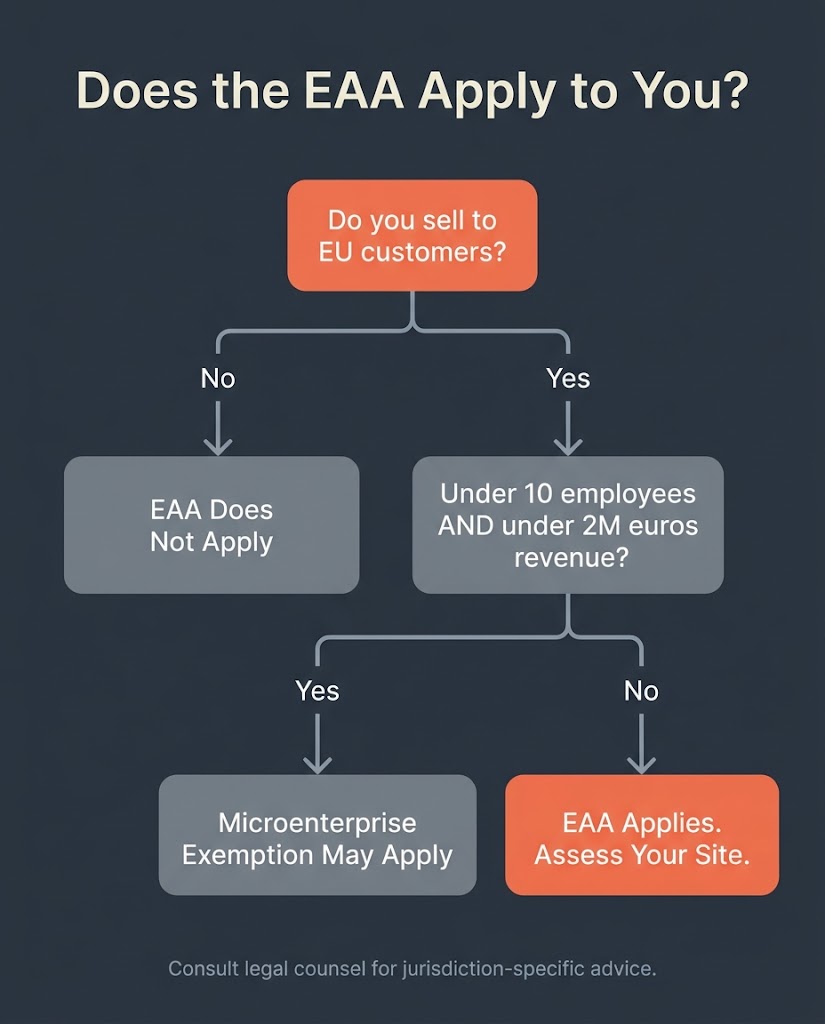
The short answer is: if you sell to EU customers, yes. The EAA is not limited to companies headquartered in the EU. Any business placing products or services on the EU market, regardless of where it is incorporated, falls under the directive. A US-based SaaS company with a German subscriber base, a US e-commerce store shipping to France, a US publisher selling e-books to Spanish readers, all of them are in scope.
The one meaningful carve-out for small operators is the microenterprise exemption. A microenterprise is defined as a business with fewer than 10 employees AND annual turnover of no more than 2 million euros (or a balance sheet total not exceeding 2 million euros). If you meet both criteria, the EAA’s service-side accessibility requirements do not apply to you. Product-side requirements (physical hardware, kiosks) still apply even to microenterprises.
If you are a solo founder or a team of eight with under 2 million euros in EU-facing revenue, you likely qualify for the exemption. If you run a 50-person e-commerce operation selling meaningfully into the EU market, you do not.
The Technical Standard: EN 301 549 and WCAG 2.1 AA
The EAA itself does not write out line-by-line technical requirements. It defers to the harmonized European standard EN 301 549, which is the document that actually specifies what “accessible” means in measurable terms. EN 301 549 currently incorporates WCAG 2.1 AA as its web content benchmark. An update to EN 301 549 that includes WCAG 2.2 is expected but not yet finalized as of mid-2026.
WCAG 2.1 AA is organized around four principles, usually referenced by the acronym POUR: Perceivable, Operable, Understandable, and Robust. Practically, achieving Level AA conformance means your site must do the following things: all images have descriptive alt text, all videos have captions and audio descriptions, color contrast meets a minimum ratio of 4.5:1 for normal body text, every function can be operated by keyboard alone without a mouse, focus indicators are visible so keyboard users know where they are on the page, form fields are labeled in a way that screen readers can interpret, error messages are descriptive and associated with the relevant field, page language is declared in the HTML, and the site does not use patterns that are known to trigger seizures.
EN 301 549 goes further than WCAG in a few areas. It covers documentation, support services, and hardware accessibility in ways that WCAG does not. For a pure website or web application, WCAG 2.1 AA conformance is the core technical work, but you also need to publish an accessibility statement that documents your conformance level, names any known non-conformant elements, and provides a contact channel for users to report issues.
It is worth being clear about one thing: WCAG conformance and EAA compliance are not the same concept. WCAG is a technical standard. EAA compliance is a legal status that depends on meeting EN 301 549, publishing the required documentation, and operating within the enforcement framework of the specific EU member state where you face scrutiny.
What Automated Scans Miss
This distinction matters because a significant share of businesses have responded to the EAA by installing an accessibility overlay widget, running an automated scan, and calling the job done. Neither approach gets you to WCAG 2.1 AA conformance. Automated scanning tools catch roughly 25% of accessibility issues according to auditing research. The other 75% require manual evaluation by a human tester using assistive technologies including screen readers, keyboard navigation testing, and voice control.
The European Disability Forum has publicly stated that overlay tools alone do not guarantee compliance with European accessibility legislation. An overlay can patch some superficial issues but it cannot fix broken focus management, missing semantic structure in HTML, or form fields that lack programmatic labels. A site with an overlay is not a compliant site.
Penalties: What Non-Compliance Actually Costs
Enforcement is handled at the member state level, which means the specific penalty you face depends on which EU country’s regulators take action against you. Germany has set fines for non-compliance at up to 500,000 euros. Italy caps penalties at around 40,000 euros for private entities. Some jurisdictions add daily accrual fines of up to 1,000 euros per day for ongoing non-compliance. The Dutch Authority for Consumers and Markets (ACM) has already begun active enforcement for e-commerce and electronic communications providers as of 2025.
Penalties are not the only risk. Regulators can require you to withdraw non-compliant products or services from the EU market, which for a web-based business means being ordered to block EU customers until compliance is achieved. For a US company with meaningful EU revenue, the operational disruption can exceed the fine itself.
The enforcement threshold matters too. Regulators prioritize complaints-driven cases. A user who cannot access your checkout process because they rely on a screen reader and your site fails keyboard navigation is the trigger for an enforcement action. The more EU-facing traffic you have, the higher your exposure.
| Member State | Reported Maximum Fine |
| Germany | Up to 500,000 euros |
| Netherlands | Active enforcement, ACM, amounts vary |
| Italy | Up to 40,000 euros (private entities) |
| General EAA range | 5,000 to 100,000 euros per violation |
| Daily accrual (some jurisdictions) | Up to 1,000 euros per day |
Penalty figures reflect reported and publicly documented national implementations. Consult legal counsel for jurisdiction-specific exposure.
What EAA Compliance Actually Costs to Build
This is the question every vendor avoids answering precisely because the answer varies. Based on independently published audit pricing data, a manual accessibility audit runs $1,250 to $2,750 per digital asset. A single website with a moderate page count is one digital asset; a separate mobile app is another. Pricing is typically per page or screen: $100 to $250 for complex pages (forms, dynamic content, interactive components), and $25 to $100 for simpler static pages.
Remediation cost is the largest variable. If your site was built with reasonable semantic HTML structure and modern WordPress themes using standard heading hierarchies, the fixes are often targeted and manageable, days of developer work for a focused sprint. If your site was built with a drag-and-drop builder that outputs non-semantic markup, skips heading levels, and generates images without alt text at the template level, you are looking at structural remediation that can take weeks. An Accessibility Conformance Report (ACR) mapped to EN 301 549, which is the standard documentation regulators and procurement teams expect, typically runs $350 to $950 as an additional cost on top of the audit.
Ongoing compliance is a recurring line item, not a one-time fix. Plan for annual re-audits as your site adds content and functionality, particularly if you are on WooCommerce with regular product additions, because new pages and checkout flows introduce new accessibility risk.
The Practical Remediation Workflow
The right sequence for getting a site into EAA compliance follows a five-step pattern. First, run an automated scan to map the rough scope. Tools like Axe, WAVE, or Lighthouse will surface the obvious issues and give you a starting count. Remember that this catches only around a quarter of problems, but it prioritizes the sprint. Second, commission a manual audit by a human tester using actual assistive technology. This is the only way to produce results that map to WCAG 2.1 AA success criteria with the specificity regulators or procurement teams expect. Third, triage the issues by severity. Missing alt text and keyboard trap errors block users entirely and should be addressed first. Color contrast failures and missing error associations are high priority but less blocking. Fourth, remediate in development. On a WordPress site, this typically means updating theme templates or child theme CSS for contrast and focus indicators, adding aria-label attributes and descriptive alt text at the content level, auditing and fixing form markup, and verifying heading structure across all page templates. Fifth, document. Publish an accessibility statement on your site, produce an ACR against EN 301 549 if you have EU procurement exposure, and set a calendar for re-auditing.
For a 20-page WooCommerce store in reasonably good structural health, this is a realistic 6 to 12 week engagement including audit, remediation, and documentation. A larger catalog site or one with a heavily customized checkout flow takes longer. A site built on a well-maintained WordPress theme that follows block editor conventions starts from a better position than one built on a legacy page builder.
Our team spans Bangladesh and the US, which means the audit-fix-retest cycle moves faster than it does through a single-timezone agency. Developer work actioned at the end of a US client day is typically reviewed and ready for feedback the following morning, compressing the sprint without adding headcount.
The Disability Access Argument Beyond Compliance
The compliance argument for EAA is real, but it is also the weaker of two arguments for fixing accessibility. According to 2024 Eurostat data, 87.2% of people with a disability in the EU used the internet in the previous 12 months, compared to 95.2% of those without a disability. That 8-point gap represents a consistently underserved market that uses the internet for banking, shopping, finding information, and making purchases. When your checkout flow is inaccessible to a screen reader user, you are not failing a compliance checkbox. You are losing a sale.
Accessibility improvements also overlap directly with Core Web Vitals performance. Clean semantic HTML, properly sized images with alt attributes, and logical heading structure improve both WCAG conformance and search engine crawlability. A site that passes WCAG 2.1 AA tends to have better Largest Contentful Paint (LCP) and Cumulative Layout Shift (CLS) scores than one that does not, because both outcomes reward well-structured markup. The SEO dividend from accessibility remediation is not guaranteed, but the correlation between semantic quality and crawl efficiency is structural, not accidental.
What to Do Now
If your business sells to EU customers and you have more than 10 employees or more than 2 million euros in EU-facing revenue, you are in scope for the EAA. If you are not sure whether your site meets WCAG 2.1 AA, the fastest way to find out is a structured audit rather than an automated scan. The scan will give you a list. The audit will give you a prioritized remediation plan.
Frequently Asked Questions
Does the European Accessibility Act apply to US companies?
Yes, if you sell or offer products and services to customers in the EU. The EAA covers any business placing covered products or services on the EU market, regardless of where the company is incorporated or physically located. A US e-commerce brand with EU customers is in scope the same way a Berlin-based retailer is.
What is the microenterprise exemption under the EAA?
A microenterprise is defined as a business with fewer than 10 employees and annual turnover (or annual balance sheet total) not exceeding 2 million euros. Microenterprises providing services are exempt from the EAA’s service-side accessibility requirements. Product-side requirements still apply. This is a hard threshold: if your business exceeds either the headcount or revenue figure, the exemption does not apply.
Is WCAG 2.1 AA enough for EAA compliance?
WCAG 2.1 AA conformance satisfies the core technical requirement under EN 301 549, which is the harmonized standard the EAA references. But technical conformance alone is not full compliance. You also need to publish a compliant accessibility statement, maintain documentation of how your product or service meets accessibility requirements, and name the enforcement authority to which users can submit complaints. EN 301 549 also covers non-web aspects (documentation, support services, hardware) that WCAG does not address.
Will an accessibility overlay satisfy the EAA?
No. The European Disability Forum has warned explicitly that overlay tools do not guarantee compliance with European accessibility legislation. Overlays fix a subset of superficial issues but cannot address structural problems in HTML, broken keyboard navigation, or missing ARIA semantics. A proper audit and code-level remediation are required.
What does an EAA compliance audit actually cost?
Manual accessibility audits run $1,250 to $2,750 per digital asset. Remediation cost depends on the current state of your codebase: a site built with clean semantic HTML will cost less to remediate than one built on a non-semantic page builder. An Accessibility Conformance Report (ACR) mapped to EN 301 549 costs an additional $350 to $950. Most organizations budget $1,000 to $5,000 per year for maintenance after the initial compliance sprint is complete.
What is the EAA compliance deadline for existing websites?
The EAA’s enforcement date was June 28, 2025, applying to newly marketed products and services. Existing digital content on sites that were already live before that date has until June 28, 2030 to be brought into full compliance. Service contracts entered into before June 28, 2025 have until June 28, 2027.
Run a real audit before the next product update adds new non-compliant pages.
If your site sells to EU customers, the right starting point is a structured accessibility review that maps your current WCAG 2.1 AA conformance gaps against the pages that matter most: your homepage, product listings, checkout flow, and contact forms. Contact BetaTech for a scoped accessibility review. We will tell you what your site needs, what it will take to fix, and whether the remediation is something your current developer can execute or whether you need development support.