Most business owners searching for WordPress plugin development services have already been through the cycle. You found a plugin that does 80% of what you need, spent two hours configuring it, realized it cannot do the other 20%, and now you are wondering whether someone can just build the missing piece. That is a legitimate question, and the answer depends on three variables that most agencies will not discuss until after you have signed an engagement letter.
This article covers what custom plugin development actually costs, how long it realistically takes, what the decision should hinge on, and what to watch for when evaluating a vendor. No guaranteed outcomes, no invented case studies. Just the system.
Custom WordPress plugin development typically costs between $1,000 and $10,000 for most small-to-midsize business use cases, with simple utility plugins starting around $500 and complex integrations or WooCommerce extensions reaching $30,000 or more. Development timelines run from one week for a straightforward feature to three to four months for an enterprise build. Whether you need custom development at all depends on whether a standard plugin solves your problem at acceptable long-term cost, a question worth answering before you spend anything.
What a WordPress Plugin Actually Is (And Why It Matters for This Decision)
WordPress powers 41% of all websites on the internet as of August 2026. That reach is partly because of the plugin system. A plugin is a self-contained piece of PHP code that attaches to WordPress using a mechanism called hooks. According to the official WordPress Plugin Developer Handbook, hooks are pre-defined points in WordPress core where external code can attach, modify data, or trigger new behavior without editing the core files themselves.
There are two types of hooks: actions, which let a plugin run a function at a specific moment (such as after a form is submitted), and filters, which let a plugin intercept and modify data before it is used (such as rewriting a product price before it displays). Every well-built plugin uses hooks exclusively and never modifies WordPress core files directly. If a developer proposes direct core edits, that is your first red flag.
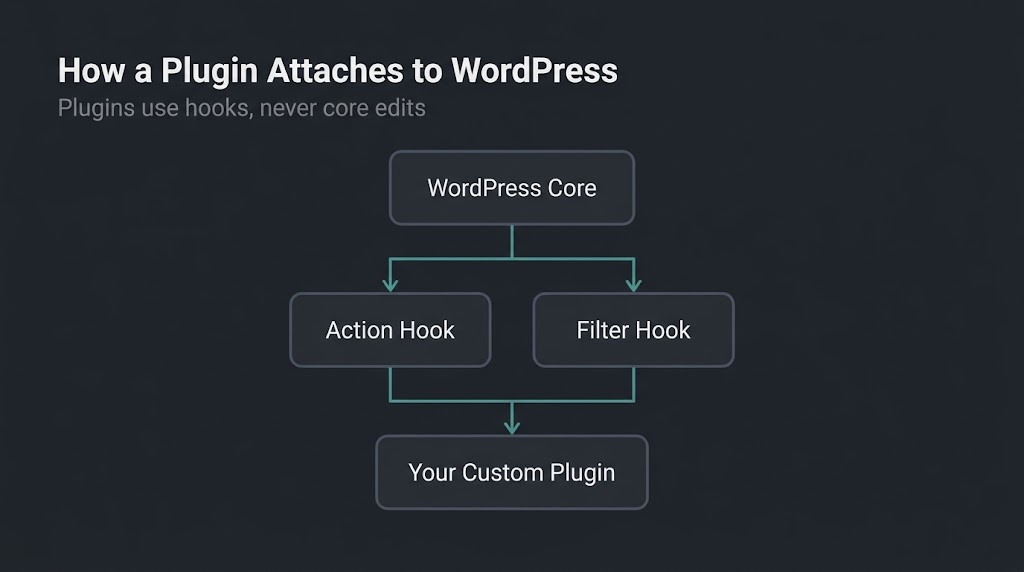
This architecture is important to understand because it determines cost. A plugin that hooks into two or three standard WordPress events and adds a settings page is a two-day project. A plugin that hooks into WooCommerce’s checkout pipeline, validates against an external CRM API, creates custom database tables, and exposes its own REST API endpoint is a ten-week project. The underlying technology is the same. The scope is not.
The 69,000-Plugin Problem
The WordPress.org repository holds over 69,000 free plugins, and thousands more are sold through commercial marketplaces. The question is not whether a plugin exists for your general problem. It almost certainly does. The question is whether the available option fits your specific operational context closely enough that its total cost of ownership is lower than building something custom.
Off-the-shelf plugins have real advantages. They are immediately installable, often free or under $200 per year, and maintained by teams who respond to WordPress core updates. For standard functionality (contact forms, SEO meta handling, image optimization, basic e-commerce), off-the-shelf is almost always the right call.
The calculus changes under three conditions. First, when the generic plugin solves 70% of your problem but the remaining 30% requires a workaround that your team has to execute manually every day. Second, when the plugin loads CSS and JavaScript across every page of your site, dragging down your Core Web Vitals scores (Largest Contentful Paint and Cumulative Layout Shift in particular) even on pages where the plugin is not active. Third, when the functionality directly drives revenue and you cannot afford to have it break on the plugin author’s update schedule.
Cost Comparison: Off-the-Shelf vs. Custom
| Scenario | Off-the-Shelf Cost | Custom Cost | Deciding Factor |
| Contact form | $0 to $99/year | $1,000 to $3,000 | Go off-the-shelf |
| Basic e-commerce checkout | $0 (WooCommerce core) | $5,000+ | Go off-the-shelf |
| Custom pricing rules tied to CRM data | $200 to $400/year + conflict risk | $4,000 to $12,000 | Likely custom |
| Multi-step booking + payment + notification | $300 to $800/year stacked | $8,000 to $25,000 | Evaluate 2-year TCO |
| Proprietary internal workflow tool | No viable option | $10,000 to $50,000 | Custom only |
The second column often looks cheaper at first glance. Run the numbers over 36 months, add the hourly cost of manual workarounds, and add one conflict resolution incident (a realistic annual event when stacking four or more premium plugins), and the gap frequently closes or reverses.
What Custom WordPress Plugin Development Actually Costs
Price ranges circulate widely online and most are honest within their bracket. According to BestWebSoft’s plugin development cost guide, simple plugins run $500 to $1,000, medium-complexity plugins run $1,000 to $5,000, and enterprise-level builds start at $5,000 and can reach $50,000 or more. Those ranges are accurate. What they do not explain is what moves a project from one bracket to the next.
Four variables drive cost, in roughly this order of weight:
Feature surface area. The number of distinct user-facing features and admin settings is the single largest cost driver. A plugin that does one thing, configured through one settings screen, is categorically cheaper than one that offers conditional logic, user-role-based access, and bulk import/export.
External integrations. Does the plugin need to talk to a third-party service? Every API integration adds authentication logic, error handling, webhook listeners, and rate-limit management. A Stripe integration is two or three days of work. An integration with a niche ERP system that has inconsistent documentation is potentially three weeks.
Database architecture. Standard WordPress plugins can store data in the native options table or post meta. High-volume plugins that need to store and query thousands of records efficiently require custom database tables with indexed queries. That architecture work adds time and cost, but it is what separates a plugin that performs well at scale from one that starts slowing your site down at 10,000 rows.
Ongoing maintenance scope. WordPress core updates regularly. WooCommerce updates more frequently still. WooCommerce’s current stable release is version 11.0.1, pushed on August 10, 2026, with changes affecting the Store API, session handling, and authorization checks. A plugin that hooks deeply into WooCommerce internals needs compatibility testing and updates on a cadence tied to WooCommerce’s release schedule, which runs several major versions per year.
US-based WordPress developers at mid-market agencies bill $80 to $150 per hour. The spread on any project quote comes directly from hourly rate multiplied by scoped hours, plus QA, staging environment testing, and documentation. Ask any agency to break their quote into those components. If they cannot, the number is a guess.
How Long Does Development Take?
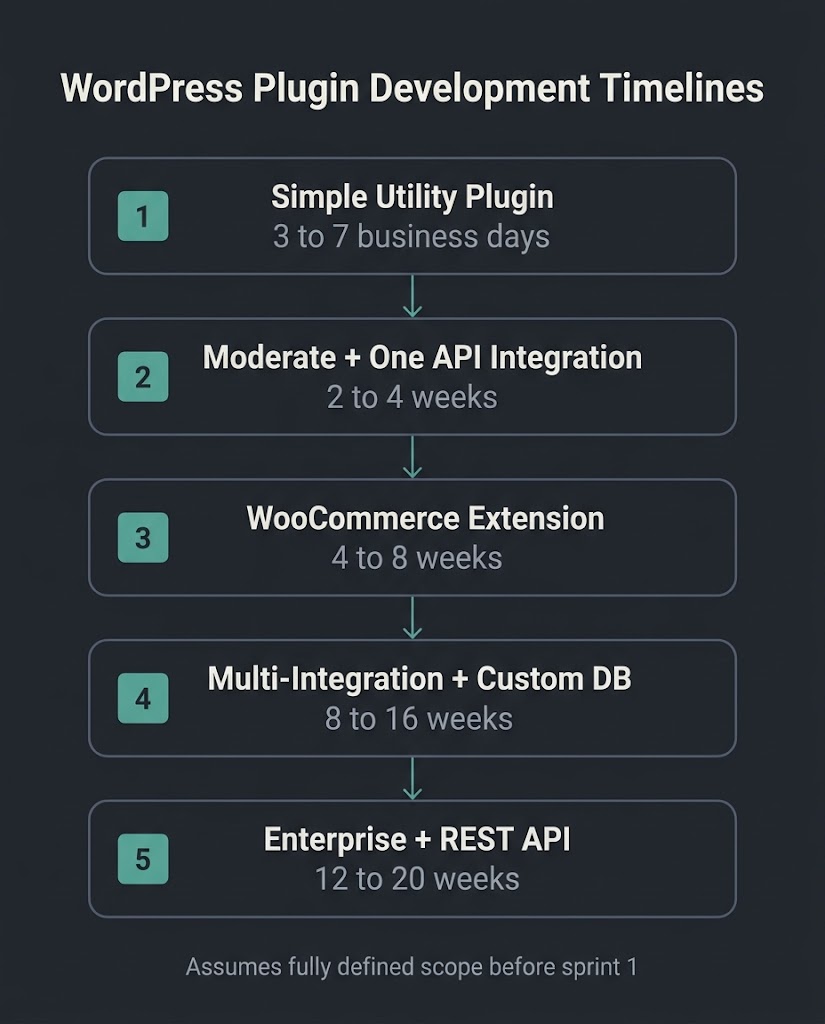
Timeline varies by complexity, but here are honest brackets:
| Build Type | Timeline |
| Simple utility plugin (one feature, one settings page) | 3 to 7 business days |
| Moderate plugin with one API integration | 2 to 4 weeks |
| WooCommerce extension with custom checkout logic | 4 to 8 weeks |
| Multi-integration, custom database, admin dashboard | 8 to 16 weeks |
| Enterprise plugin with REST API exposure | 12 to 20 weeks |
These assume the scope is fully defined before development begins. Scope changes mid-project are the most common reason timelines slip. The second most common reason is that the buyer has not yet secured API documentation or access credentials for the third-party systems the plugin needs to connect to. Prepare that before the first development sprint, not during it.
Our team at BetaTech spans Bangladesh and the US, which means work moves during hours when a purely US-based agency is offline. Feedback given at the end of a US business day is regularly actioned before the next morning. On a six-week plugin build, that compression meaningfully shortens the revision cycle without inflating the hourly rate.
The Security Question
Security is a legitimate concern with custom code, and it cuts both ways. Popular off-the-shelf plugins are large targets precisely because of their market share. A vulnerability in a plugin installed on two million sites is worth exploiting at scale. A custom plugin built for one company is not a worthwhile target for automated scanning, which provides a degree of protection through obscurity.
The risk with custom development runs in the other direction: the code is only as secure as the developer who wrote it. The WordPress Plugin Handbook covers security requirements including input sanitization, output escaping, nonce verification for form submissions, and capability checks before any privileged action runs. A developer who skips any of those steps introduces a vulnerability that no popular-plugin automated scanner will ever flag, because the vulnerability is unique to your site.
Before you engage any agency, ask specifically: Do they sanitize all user inputs with WordPress’s built-in sanitization functions? Do they use nonces for form handling? Do they run their code through WordPress Coding Standards checks? The answers tell you more about technical competence than any portfolio screenshot.
WooCommerce Extensions: A Specific Category Worth Separating Out
WooCommerce deserves its own section because the use cases are materially different from standard WordPress plugins. WooCommerce is the dominant e-commerce layer on WordPress, active on 19.8% of all WordPress sites per W3Techs, and its official plugin listing on WordPress.org confirms it is designed explicitly to be extended through hooks and filters rather than modified directly.
That design philosophy matters for buyers: the right approach to WooCommerce customization is almost always a custom extension that hooks into WooCommerce’s events rather than editing WooCommerce’s own files. Editing core WooCommerce files gets overwritten on the next update. Extensions survive updates because they hook into stable API points rather than file-level code.
Common WooCommerce custom plugin use cases include: custom shipping rate calculators that pull rates from a carrier API; wholesale pricing tiers that override retail prices based on user role or company account; subscription logic that does not fit standard WooCommerce Subscriptions behavior; B2B purchase workflows that require manager approval before an order is processed; and product configurators with interdependent options that standard variable products cannot handle.
Each of these exists in the $3,000 to $15,000 range depending on integration depth. Most have no adequate off-the-shelf equivalent.
Five Red Flags When Evaluating a WordPress Plugin Development Agency
The market for WordPress development includes a wide range of skill levels. These are the signals that should slow your evaluation:
They cannot explain their approach to update compatibility. Ask what happens to your custom plugin when WordPress releases a major version update. A capable agency describes their testing environment (staging, with the new version installed before launch), their use of WordPress hooks rather than core modifications, and their plan for notifying you when changes are needed.
They quote without asking about your existing plugin stack. Plugin conflicts are one of the most common causes of post-launch problems. Any agency that quotes a custom plugin without auditing what is already installed on your site is skipping a step that can turn a six-week project into a ten-week debugging exercise.
They do not include documentation in the scope. You own the code at the end of the engagement. “You own the code” is meaningless without documentation that lets any other developer pick up the project. If a statement of work does not mention a technical readme, a code comments standard, or a handover document, add it to the contract before signing.
They claim a percentage performance improvement without measuring your current baseline. Any before/after claim that is not anchored to an actual measured baseline (a PageSpeed Insights score, a specific LCP or CLS measurement) is a marketing assertion, not a technical result.
The quote does not break down into hours or phases. A $12,000 quote for a plugin with no itemization is either a very confident agency or a very imprecise one. Ask for phase-by-phase breakdown: discovery and scoping, development, QA and staging, launch, post-launch support period.
How to Write a Plugin Brief That Gets You an Accurate Quote
The single most common reason plugin development quotes vary by 300% across agencies is that the buyer gave a different brief to each one. Specificity collapses that range. A useful brief answers these questions:
What does the plugin need to do, described as a user story: “When a wholesale customer places an order over $500, apply a 12% discount and send a confirmation email to the account manager.” Not: “custom pricing plugin.”
What systems does it need to integrate with, including the name of the external service and whether a public API is available?
What WordPress and WooCommerce version is currently running on the site?
What other plugins are currently active, particularly those that handle checkout, pricing, caching, or security?
Who will maintain the plugin after launch, and is an ongoing maintenance agreement in scope?
What is the target date, and is there a hard deadline or a preferred delivery window?
Agencies that receive a brief this specific can price accurately. Agencies that receive “I need a custom plugin” are guessing.
When Custom Is the Wrong Call
We turn away roughly one in five prospects who inquire about custom plugin development. Not because the problem is not real, but because the economics do not support custom work at their current stage.
If your site is generating under $10,000 per month in revenue, the ROI calculation on a $12,000 custom plugin rarely closes within a year. If the functionality you need has a viable premium plugin solution in the $200 to $500 per year range and no meaningful operational gap, the premium plugin is the right answer. If your team does not have anyone who can manage plugin updates and compatibility checks over time, the ongoing maintenance cost of a custom build needs to be factored in at the outset.
The honest position: custom plugin development is an investment that pays off when the problem is specific to your operations, when the alternative requires ongoing manual labor or subscription stacking, and when the site is mature enough that stability and performance matter more than initial cost savings. Below that threshold, a good off-the-shelf plugin is the better call, and we will tell you that on the first call.
FAQ
How much does custom WordPress plugin development cost?
Simple utility plugins typically run $500 to $1,000. Moderate-complexity plugins with one or two external integrations fall in the $3,000 to $10,000 range. Enterprise builds involving custom database architecture, multiple API connections, and complex admin interfaces reach $15,000 to $50,000 or more. The spread is driven by feature count, number of external integrations, database complexity, and the hourly rate of the agency or developer you hire.
How do I know if I need a custom plugin or an existing one?
Start by documenting exactly what you need the plugin to do in operational terms, not conceptual ones. Then search the WordPress.org repository and commercial marketplaces. If a viable option exists, test it against your exact requirements on a staging site. If it requires more than two workarounds or manual steps to handle your core use case, custom development is worth pricing out. If it does the job cleanly at an acceptable annual cost, it is the right answer.
Who owns the code after the project is complete?
You should. Any reputable agency will state in the contract that intellectual property transfers to the client upon final payment. Confirm this before signing. Also confirm that the code will be delivered with documentation and that it does not contain any proprietary frameworks or closed-source dependencies that the agency owns.
Will a custom plugin break when WordPress updates?
Not if it is built correctly. A plugin that uses WordPress hooks and follows the coding standards documented in the official Plugin Developer Handbook survives core updates because it attaches to stable API points rather than core files. Issues arise when developers use deprecated functions or modify core files directly, both of which a competent agency avoids. Ask specifically whether the developer runs their code through PHPCS with WordPress-specific rules before delivery.
How long does WordPress plugin development take?
A simple plugin can be scoped, built, tested, and deployed in three to seven business days. Moderate builds run two to four weeks. WooCommerce extensions with API integrations typically take four to eight weeks. Complex enterprise builds with custom database tables and admin dashboards run three to five months. Timeline accuracy depends almost entirely on how well the scope is defined before development begins.
What is the Stack Overflow Developer Survey data telling us about PHP and WordPress in 2026?
According to the 2025 Stack Overflow Developer Survey, PHP remained in use by 18.9% of developers surveyed, which includes the WordPress development ecosystem. WordPress-specific PHP development (custom themes, plugins, REST API work) remains a stable and active skill category. This matters for buyers because a healthy developer community means the skill is not in shortage and competitive pricing is available.
Ready to scope your plugin project?
Send us a description of what you need the plugin to do, what systems it needs to connect to, and what is currently running on your WordPress site. We will tell you whether custom development is justified, provide an honest scope estimate, and flag if an off-the-shelf option covers your use case well enough to skip the build entirely. Describe your plugin requirements to our team.