
Switching From Elementor? Read This Before You Decide
The most-used Elementor alternatives for WordPress are Bricks Builder, Beaver Builder, Divi, Gutenberg (the native WordPress block editor), and Oxygen Builder. In controlled GTmetrix benchmarks, Gutenberg scores 89/100 with an LCP of 2.2 seconds versus Elementor’s 81/100 and LCP of 3.1 seconds. Whether switching is worth it depends on your site’s current configuration, your team’s technical ability, and how much content would need to be migrated.
Why This Question Is Harder Than It Looks
Most “alternatives to Elementor” articles are written by tools competing with Elementor, which means the list always happens to rank whoever paid for the post at the top. That is not useful if you are trying to make a real decision about a real site.
This article is written from a different position. We build in WordPress most of the time, we use different tools depending on the project, and we have a financial interest in you understanding the tradeoffs clearly — because a client who makes the wrong call in week one becomes a difficult project in month four.
Elementor is installed on approximately 32.67% of WordPress sites as of mid-2026, making it the dominant third-party page builder by a wide margin. That scale matters: the plugin ecosystem built around it is enormous, support resources are plentiful, and clients often already know how to edit pages in it. That is real value. It also means the reasons to leave have to be real, not just trendy.
What Actually Drives People to Look for Elementor Alternatives
The three complaints we hear on discovery calls are consistent.
The first is performance. Elementor generates more DOM nodes and loads more CSS and JavaScript than leaner builders because it was designed for design flexibility first. In a controlled WordPress page builder performance benchmark by WP Rocket, Elementor scored 81/100 on GTmetrix with a 5-second load time and an LCP of 3.1 seconds. Bricks Builder, by contrast, scored 88/100 with an LCP of 2.3 seconds under identical conditions. That gap is meaningful for sites where Google Search performance matters.
The second is pricing structure. Elementor Pro starts at $60/year for one site and jumps to $228/year for 25 sites. If you run an agency managing a portfolio of client sites, the per-site math gets expensive quickly. Several competitors offer unlimited-site licenses for $89 to $249 per year, and Bricks offers a genuine lifetime license at $599 one-time with no further renewals.
The third is lock-in. Elementor stores design data in its own proprietary format. If you switch builders later, you are not migrating templates — you are rebuilding pages. That migration cost is real, measured in developer hours, and rarely discussed in the articles encouraging you to switch.
The Performance Reality: A Comparison That Uses Real Numbers
The table below uses benchmark data from WP Rocket’s controlled testing environment. Same hosting, same content structure, same measurement tool (GTmetrix mobile). These are not marketing numbers.
| Builder | GTmetrix Score | Load Speed | LCP | Annual Price (1 site) | Lifetime Option |
| Gutenberg (native) | 89/100 | 3.5s | 2.2s | Free | N/A (core WP) |
| Bricks Builder | 88/100 | 3.7s | 2.3s | $79/year | $599 one-time |
| Oxygen Builder | 87/100 | 3.8s | 2.4s | ~$199 one-time | Yes (one-time) |
| Beaver Builder | 86/100 | 4.0s | 2.5s | $89/year | No |
| Elementor | 81/100 | 5.0s | 3.1s | $60/year (1 site) | No |
| WPBakery | 80/100 | 5.0s | 2.7s | ~$69 one-time | Yes (one-time) |
Largest Contentful Paint (LCP) is the Core Web Vitals metric that measures how quickly the main visible content of a page loads. Google’s threshold for a “good” score is 2.5 seconds or faster. By that standard, Elementor fails the out-of-the-box benchmark; Gutenberg, Bricks, Oxygen, and Beaver Builder pass it.
Two caveats matter here. First, these are clean-install benchmarks. A heavily optimized Elementor site with a caching plugin like WP Rocket applied can close much of this gap. Second, Elementor has been actively reducing its code output since introducing Flexbox containers and reducing DOM nesting. Performance on Elementor in 2025 is materially better than it was in 2020. The gap is real; it is just smaller than Reddit threads from three years ago suggest.
Matching the Builder to the Situation
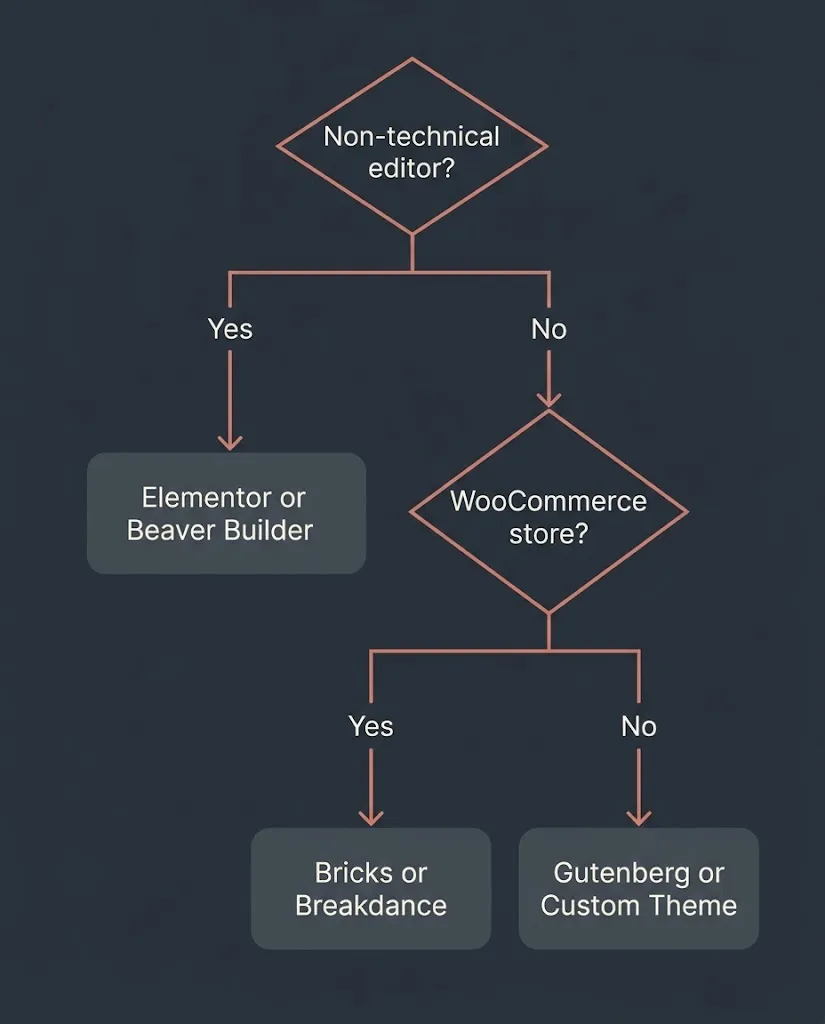
The right alternative depends on who is maintaining the site after launch and what the site actually does. Here is the breakdown we use internally.
For non-technical founders who need to edit content themselves: Elementor remains defensible because its editor is genuinely intuitive. Beaver Builder is the cleaner alternative if performance is a concern — it scores higher in benchmarks, its code output is stable, and its interface is nearly as accessible. Divi ($89/year, unlimited sites) is worth considering if you are managing multiple web properties, since the per-site economics improve significantly at scale.
For WooCommerce stores: Elementor has one of the strongest WooCommerce ecosystems of any page builder, with a native WooCommerce Builder included in paid plans. Breakdance (from $99/year) and Bricks Builder also include WooCommerce Builders and perform better in speed tests, which matters for product pages where load time directly affects conversion. If WooCommerce is the core revenue engine, performance is not optional — a one-second improvement in LCP has documented conversion implications from multiple e-commerce studies.
For agencies and developers managing multiple client sites: Bricks Builder at $249/year for unlimited sites or $599 lifetime is a strong economic argument. Its developer-first architecture — no front-end jQuery dependency, dynamic CSS loading, clean HTML output — makes long-term maintenance more predictable. We also recommend developers evaluate whether Gutenberg Full Site Editing meets the brief before reaching for any third-party builder at all. For many business websites with fewer than 15 page templates, FSE is sufficient and eliminates one entire plugin dependency.
For sites where SEO and technical performance are the primary concern: The answer is usually Gutenberg or a custom WordPress theme with no page builder at all. A custom theme built with Tailwind CSS and no visual builder will consistently outperform any drag-and-drop builder in Core Web Vitals, because there is no builder-layer abstraction generating DOM overhead. This is the path we recommend to clients whose sites are running in competitive search markets where every millisecond of LCP matters.
The Gutenberg Question
The WordPress block editor — commonly called Gutenberg — is worth treating seriously as a standalone option rather than a fallback. It is built into WordPress core, which means no third-party plugin dependency, no annual license fee, and no proprietary data format that creates migration problems later.
The tradeoffs are real. Gutenberg’s Full Site Editing interface is more complex than Elementor’s for someone new to it, the design system is less visual, and building custom block layouts from scratch requires more technical skill than dragging Elementor widgets. But for a site that already has a defined design and just needs to be maintainable by a content editor, Gutenberg is often the correct answer. The WordPress core Gutenberg plugin remains free and is updated continuously as part of WordPress’s development roadmap.
The Lifetime License Question
One thing competitors rarely explain clearly: Bricks Builder and Oxygen Builder offer genuine lifetime licenses, while Elementor Pro eliminated its lifetime option in 2022. If you are building a site intended to run for five or more years, the long-term cost arithmetic changes significantly. At Bricks Builder’s $599 lifetime rate versus Elementor’s $60/year Essential plan, break-even is ten years for a single-site user. At the Agency level ($228/year for Elementor’s 25-site plan versus $599 lifetime unlimited for Bricks), break-even is under three years. Those numbers are worth running before you decide.
You can verify current pricing at Bricks Builder’s official pricing page and Elementor’s plan page — both update regularly and should be checked at the time of purchase.
What the Migration Actually Costs
This is the number most articles skip. Switching page builders on a live site with substantial content is not a plugin swap. Elementor stores layout data as post meta in its own serialized format. Switching to Bricks Builder, Beaver Builder, or any other builder means either rebuilding pages manually or using a migration tool that produces imperfect results needing review.
For a typical 10 to 20-page business site, a developer-led migration from Elementor to Bricks or Beaver Builder runs two to four days of work — call it $800 to $2,000 at market rates, depending on page complexity and how much custom CSS and widget configuration is involved. For a WooCommerce store with custom product templates, that number is higher. This cost is real and should be factored into the “switching makes sense” calculation.
If your existing Elementor site is performing adequately and the main reason you are considering switching is that someone told you Elementor is bloated, that migration cost may not pay off. If your LCP is above 4 seconds and your bounce rate shows it, or if your annual Elementor renewal just hit the point where a lifetime alternative is economically rational, switching has a clear justification.
Elementor Alternatives Outside WordPress
A segment of the audience searching this keyword is actually questioning whether to stay on WordPress at all. Webflow is the most common consideration. We have written elsewhere about when Webflow is the right call — short version: fewer than 20 pages, no complex data, no in-house WordPress developer. If that describes your situation, Webflow is a legitimate answer and you should not hire us for a WordPress build to solve a problem that does not require one. For anything more complex — WooCommerce, custom post types, an existing WordPress content library, a site that needs to integrate with third-party PHP plugins — WordPress with the right builder remains the more practical and maintainable choice.
FAQ
Q: Is Bricks Builder better than Elementor?
Bricks Builder produces cleaner code, faster load times, and better out-of-the-box Core Web Vitals scores than Elementor in controlled benchmarks. The tradeoff is a steeper learning curve for non-technical editors and a smaller third-party addon ecosystem. For performance-focused projects managed by developers, Bricks is the stronger choice. For sites that need to be edited by a non-technical team without developer involvement, Elementor is still easier to hand off.
Q: Does Elementor slow down my WordPress site?
It depends on how it is configured. Elementor adds more DOM nodes and loads more CSS and JavaScript than leaner builders by default, which raises LCP in benchmarks. On a properly optimized setup — Flexbox containers enabled, unused CSS removed, a caching layer like WP Rocket in place — the performance gap versus competitors closes substantially. An unoptimized Elementor site, especially one with many third-party addons, is likely to fail Core Web Vitals on mobile.
Q: What is the best free Elementor alternative?
Gutenberg, the native WordPress block editor, is the strongest free alternative. It ships with every WordPress installation, generates lightweight markup, and supports Full Site Editing. For users who need more visual drag-and-drop capability without paying, Beaver Builder Lite and the free tier of Brizy are functional options, though their free versions have meaningful feature limitations compared to their paid counterparts.
Q: Is there a lifetime license option for page builders?
Yes. Bricks Builder offers a lifetime license at $599 for unlimited sites. Oxygen Builder has historically offered one-time pricing starting around $199. Divi offered a $249 lifetime option for a period, though its current primary offer is $89/year for unlimited sites. Elementor Pro eliminated its lifetime license in 2022 and is now subscription-only.
Q: Can you switch from Elementor to another builder without rebuilding your site?
Not without some rebuild work. Elementor stores layout data in a proprietary format that does not transfer cleanly to other builders. Migration tools exist but produce output that requires manual review and cleanup. For a typical 10 to 20-page business site, expect two to four developer days for a full migration. Factor that cost into any switching decision before committing.
Q: What page builder do agencies use most?
Elementor remains the most widely deployed page builder in agency environments, primarily because of its ecosystem size and client familiarity. Among performance-focused agencies, Bricks Builder has gained significant ground since 2022. Some agencies building performance-critical sites have moved toward Gutenberg FSE or fully custom WordPress themes with no page builder layer at all.
The Practical Decision Framework
Stay on Elementor if: your site is performing adequately in Core Web Vitals, your team can edit it without developer involvement, and the annual license cost is not a significant budget item.
Switch to Bricks Builder if: your developer is driving the build, performance and clean code are non-negotiable, and you are willing to invest in the migration now to reduce long-term licensing costs.
Switch to Beaver Builder if: you need a balance of editor accessibility and better-than-Elementor performance, and you manage a small number of sites where Beaver’s per-site pricing is manageable.
Use Gutenberg if: the site has a defined design that will not change frequently, an in-house content team will handle updates, and you want to eliminate builder-layer plugin dependency entirely.
If you are not sure which of these describes your situation, that is a 30-minute conversation, not a blog post. We scope WordPress builds regularly and give a direct recommendation before quoting.