
Best WordPress Hosting for Agencies: What Reviews Miss
Most agency hosting comparisons are written by publishers who get paid when you click a link and sign up. That does not make the information wrong, but it does mean certain questions never get asked: What happens to the hosting account when a client wants to own it? How does server TTFB propagate into a client’s Core Web Vitals score? And which plan actually fits an agency running 10 to 15 active sites without hitting overage charges every quarter?
Those are the questions this post answers.
The best WordPress hosting for agencies in 2025 depends on portfolio size and workflow. Kinsta and WP Engine lead on isolation, performance guarantees, and staging workflow for agencies running 10 or more active sites, with plans starting at $109/mo and $284/mo respectively at that scale. Cloudways offers the lowest cost-per-site entry point (from $11/month) with flexible scaling, but requires more configuration. Shared hosting is not appropriate for active client work. The single most important technical criterion is TTFB: Google’s threshold for a “good” score is under 0.8 seconds, and your hosting platform determines whether your clients can hit it.
Why Hosting Is a Performance Decision, Not a Commodity
WordPress powers roughly 43% of all websites on the web, according to W3Techs’ ongoing tracking data. That ubiquity makes hosting feel interchangeable. It is not.
For an agency, hosting choice directly affects two things your clients measure: their site’s speed and its search visibility. Google has confirmed that Core Web Vitals are a page experience ranking signal, covering Largest Contentful Paint (LCP, target under 2.5 seconds), Interaction to Next Paint (INP, target under 200ms), and Cumulative Layout Shift (CLS, target under 0.1). All three metrics are partially downstream of your hosting infrastructure.
The most direct connection runs through TTFB (Time to First Byte). Per Google’s own documentation on TTFB at web.dev, a good TTFB is 0.8 seconds or less. A server that takes 1.5 seconds to respond means your LCP cannot clear 2.5 seconds no matter how well you’ve optimized the front end.
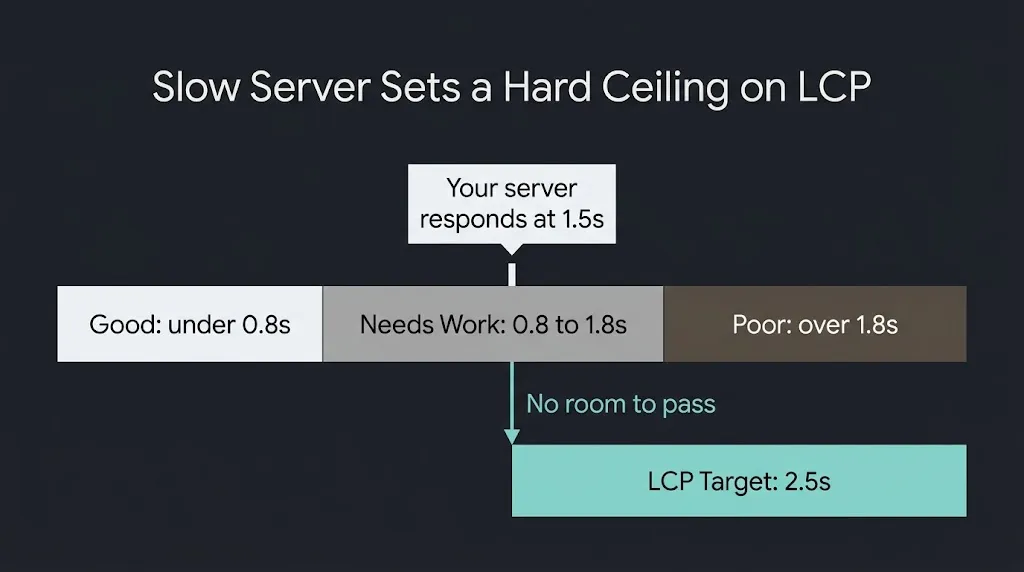
When you’re accountable for a client’s site performance, that constraint is your problem.
The Five Criteria That Actually Separate Agency Hosts
Most comparison articles rank hosts on uptime and support scores. Those are baseline requirements, not differentiators. The criteria that separate agency-appropriate hosting from general hosting are different.
Isolation architecture. Shared hosting puts your client’s site on a server with hundreds of other sites. A traffic spike on one tenant degrades performance for all of them. Managed hosting providers use container-based isolation (each site runs in its own environment) so one client’s traffic spike does not eat another client’s PHP workers. For agency work, shared environments are disqualifying. Your client at position A cannot be held hostage to someone else’s Black Friday traffic.
TTFB and CDN configuration. A managed host at a premium price point should be delivering TTFB under 500ms from US origin for US-based visitors. The 2025 HTTP Archive Web Almanac reports that 55% of desktop sites and 44% of mobile sites achieve a “good” TTFB globally, meaning a meaningful portion of the web is still failing this threshold. Agencies on providers with edge caching and global CDN baked in have a structural advantage over those on budget VPS.
Staging and deployment workflow. Every professional WordPress build needs a staging environment where you can push updates, test plugin changes, and get client approval before anything touches production. How that workflow operates varies significantly by host. One-click staging that pushes changes to a staging URL, allows selective push-back to production, and maintains separate database states is the minimum. Hosts that make you manage staging via cPanel or manual file transfers add hours to every project.
Client handoff and billing ownership. This is the question almost no review article addresses. When a project ends, your client may want to own the hosting account directly. Some providers (Cloudways, WP Engine) have a formal site transfer mechanism that moves the site to a client-owned account without data loss. Others require a full migration. If your preferred host cannot cleanly transfer billing to a client, you are either locked into being an ongoing hosting reseller or you are setting up a messy migration conversation at project close.
Overage model and predictability. WP Engine and Kinsta price by visit count per month. If a client’s traffic spikes in November, you can hit overage charges without warning. Cloudways uses infrastructure-level billing (you pay for the server you provision, not per visit), which is more predictable for volatile traffic patterns. Neither model is universally better, but you need to understand which one you are on and build client contracts around it.
Provider Comparison: The Agency-Relevant Numbers
The four providers agencies evaluate most seriously are WP Engine, Kinsta, Cloudways, and Pressable. Here is how they compare on the criteria above.
| Provider | Entry Multi-Site Plan | Sites Included | Visit Cap | Staging | Client Transfer | White Label |
| WP Engine | Growth: $109/mo | 10 | 100K/mo | Yes, 1-click | Yes (formal) | No |
| Kinsta | Agency 20: ~$284/mo | 20 | Varies by plan | Yes, selective push | Yes (site transfer) | Partial |
| Cloudways | From $11/mo (1 server) | Unlimited on server | No cap (infra billing) | Yes (manual setup) | Yes (account transfer) | Yes |
| Pressable | From $350/mo (8 sites) | 8 | Varies | Yes | Yes | Yes (full) |
| Flywheel (WP Engine) | Agency: $242/mo | 30 | 400K combined | Yes | Yes | Yes |
A few notes on this table.
WP Engine’s Growth plan at $109/month covers 10 sites with 100,000 total monthly visits and 20 GB of storage. That works for most mid-size agency portfolios, but the per-visit overage model means a client with a successful campaign can push you into a higher tier unexpectedly. Kinsta’s agency pricing is higher upfront but the per-site isolation, built on Google Cloud Platform, is strong, and the staging workflow (selective SitePush) is one of the cleanest in the market. Cloudways gives you unlimited sites per server and no visit caps, which is the best model for agencies with volatile or high-traffic client sites, at the cost of more infrastructure responsibility. Pressable offers the most complete white-label program, which matters if you are reselling hosting as a service line under your own brand.
When Managed WordPress Hosting Is Not the Right Answer
Managed WordPress hosting is not always the right call. Three situations where we would tell a client to look elsewhere:
A client who needs full server control for a custom application stack does not belong on a managed WordPress host. WP Engine and Kinsta lock down server configuration by design. If you need custom PHP extensions, non-standard MySQL configurations, or server-level processes that the managed environment does not support, you need a VPS or dedicated infrastructure. Cloudways (which is managed cloud rather than managed WordPress) gives more flexibility here.
A client with a very simple informational site and low traffic is overpaying on any plan above $25 to $30 per month. Flywheel’s Starter plan at $25/month handles sites under a certain traffic threshold competently. Putting a 5-page brochure site on a Growth plan to consolidate billing is a cost decision you can make, but it is not a performance requirement.
A client who is price-sensitive and already self-managing a reliable cPanel VPS with a working SSL, CDN, and backup routine should stay there. Moving them to managed hosting for the convenience of your workflow, when they are happy with their current setup, is a conversation you will regret.
Core Web Vitals and the Hosting Stack: What Your Clients Will Ask About
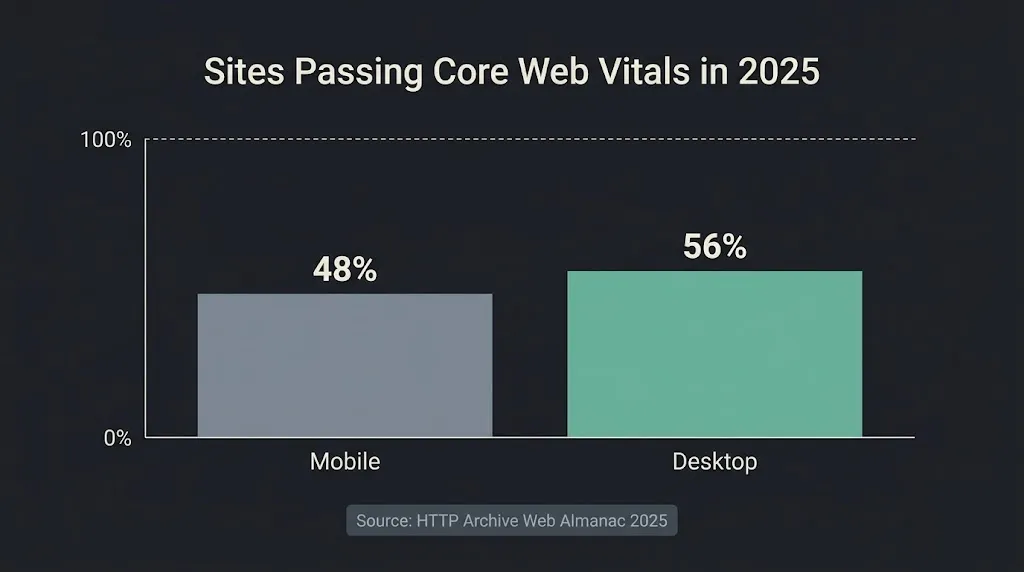
As agencies get evaluated on deliverables, the Core Web Vitals report in Google Search Console has become a document clients reference in quarterly reviews. The 2025 Web Almanac data shows that 48% of mobile sites and 56% of desktop sites pass Core Web Vitals globally, which means roughly half of the web is still failing at least one metric. Agencies that can consistently deliver passing scores for client sites have a measurable differentiator.
The hosting stack contribution to CWV is real but partial. A managed host with server-level caching, a proper CDN, and good TTFB removes the server-side ceiling. It does not eliminate LCP issues caused by unoptimized images, render-blocking scripts, or poorly structured WordPress themes. Both matter. But starting with a host that can deliver sub-500ms TTFB consistently means your optimization work on the front end actually has room to make a difference.
Hosts that provide integrated CDN (WP Engine’s EverCache and CDN combination, Kinsta’s edge caching on Google Cloud) handle the infrastructure layer. Your development choices – image formats (WebP over JPEG where possible), lazy loading configuration, plugin bloat management – handle the application layer. The best hosting in the world does not compensate for a WordPress install with 40 active plugins and a 4 MB hero image.
The White-Label and Reseller Question
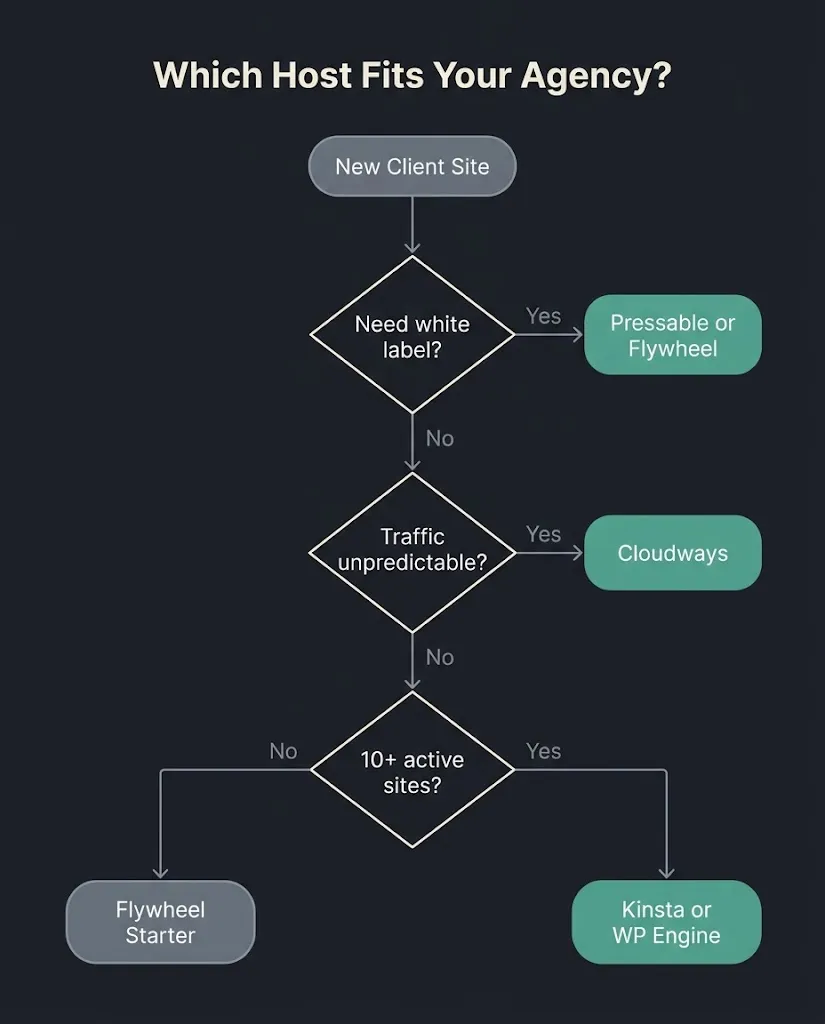
If your agency wants to resell hosting as a monthly service line, the platform decision gets more specific. Not all managed hosts support white-label: custom nameservers, client-facing dashboards under your brand, and the ability to price hosting independently of what you pay the provider.
Pressable’s white-label program is the most complete of the major managed hosts, allowing custom nameservers and a branded client portal. Cloudways allows agencies to resell and later transfer server ownership to a client account when the engagement ends or the client wants billing control. Flywheel (now under the WP Engine umbrella) has historically been the designer-and-agency-friendly option with white-label DNS, though its positioning and feature set have shifted somewhat since the WP Engine acquisition.
If white-label is important to your revenue model, confirm the specific features with each provider directly before committing. White-label capabilities are the one area where marketing copy and actual feature availability diverge most frequently.
Agency Partner Programs: Useful or Marketing Noise?
WP Engine, Kinsta, Cloudways, and Pressable all run agency partner programs offering referral commissions, volume discounts, or priority support. WP Engine’s program offers 8 to 10% commission on referred MRR, free to join, with a 3 to 5 day approval process. These programs can meaningfully reduce your hosting cost if you are actively referring clients. The discount structure typically requires minimum monthly spend or referred revenue thresholds to unlock meaningful tiers.
The partner program benefits worth evaluating: volume pricing on your own agency account, dedicated support contact or priority queue access, and migration assistance for client onboarding. The benefits not worth evaluating heavily: award badges, co-marketing placements, and leaderboard recognition. Those exist to keep partners loyal, not to help your clients. BetaTech’s view on paid placement and unaudited award programs: look at what the provider’s infrastructure actually does, not at the badge count in their marketing.
Our Workflow at BetaTech
We deliver WordPress builds for US-based clients from a distributed team spanning Bangladesh and the US. The time zone overlap means that server configuration questions, hosting setup, and pre-launch checklists can move during hours when a purely US-based agency is offline. When a client sends feedback on a staging environment at the end of their business day, the action often lands before they return to their desk. This compresses the hosting-setup and QA phase of most projects, which has a direct effect on timeline.
Our recommendation defaults are Kinsta or Cloudways depending on portfolio size and whether the client needs ongoing billing ownership. For clients who want to own their account from day one, Cloudways’ account transfer model is the cleanest solution we have found. For clients where we retain hosting management, the Kinsta isolation and staging workflow fits how we work.
FAQ
Q: Can I host all my client sites on one WP Engine or Kinsta account?
Yes, within the limits of your plan. WP Engine’s Growth plan covers 10 sites; their Scale plan covers 30. Kinsta’s Agency 20 plan covers 20 sites. Both allow you to add individual sites beyond those limits at a per-site overage rate. The management dashboard lets you operate all sites from a single login, which is the primary operational benefit over managing separate accounts per client.
Q: What happens to hosting when a client project ends and the client wants to take over the account?
This depends on the provider. WP Engine has a site transfer feature that moves a site to a client-owned account while preserving all data. Cloudways allows you to transfer an entire server to a client account. Kinsta has a site transfer process that should be confirmed with their team for the specific plan type. Clients who are cost-sensitive should note that when they take ownership, they take on the plan cost directly.
Q: Does the hosting provider actually affect my client’s Google rankings?
Not directly, but server performance affects Core Web Vitals, which Google uses as a page experience signal. A host delivering TTFB over 1.8 seconds makes it structurally difficult for a site to achieve a passing LCP score regardless of other optimizations. A client site failing Core Web Vitals is competing at a disadvantage in page experience signals compared to a site that passes. The relationship is real but not deterministic – a passing Core Web Vitals score on good hosting does not guarantee ranking improvement.
Q: Is Cloudways appropriate for agency use even though it’s not a traditional managed WordPress host?
Yes, with the caveat that it requires more configuration than WP Engine or Kinsta. You provision a cloud server (DigitalOcean, Google Cloud, AWS, etc.), and Cloudways manages that server with a control panel, one-click WordPress installs, staging, and automated backups. You handle more decisions (server size, location, scaling) than on a fully managed platform. The payoff is cost efficiency, no visit caps, and a clean account transfer model. For agencies with some technical depth, it is a strong option. For smaller agencies that want zero infrastructure decisions, WP Engine or Kinsta is the better match.
Q: Should I use multisite or separate WordPress installs for client sites?
Separate installs in most cases. WordPress Multisite is operationally efficient on the surface but creates dependencies that cause problems during migrations, client handoffs, and plugin updates. A plugin update or security issue that affects one site on a multisite network affects all sites sharing that installation. Separate installs, managed from one agency dashboard (as WP Engine, Kinsta, and Cloudways all support), give you operational control without the shared-risk architecture.
Q: What is the minimum hosting budget for a professional agency client site?
Plan on $25 to $50 per month per site for a managed WordPress environment at the entry level. WP Engine’s Startup plan runs $30/month for one site. Flywheel starts at $25/month. If you are managing 10 or more sites, multi-site plans reduce per-site cost significantly: WP Engine’s Growth plan at $109/month works out to about $11 per site, assuming all 10 site slots are in use. Shared hosting plans under $10/month are not appropriate for active client work where uptime, performance, and support response time affect your reputation.
Ready to scope a WordPress project that includes a hosting recommendation built into the delivery?
We include hosting architecture as part of every WordPress engagement at BetaTech – not as an upsell, but because the build decisions and the hosting environment need to match. If you are evaluating a new build or migrating an existing site and want a direct conversation about what hosting setup fits your client’s actual traffic and requirements, tell us about the project and we will give you a straight answer.