If you run a US-based website and have been ignoring GDPR because you are not a European company, you may be more exposed than you think. The question is not whether you are based in the US. The question is whether any of your site visitors are in the European Economic Area — and whether your site is tracking them.
That distinction matters because GDPR is built on geography of the data subject, not geography of the company. A US business with no EU office, no EU employees, and no EU customers can still fall inside GDPR’s scope if European visitors land on their site and the site is tracking those visitors via analytics, ad retargeting, or behavioral profiling tools.
This article walks through exactly how to determine whether GDPR applies to your site, what it actually requires if it does, how it compares to what US state laws already demand, and what a proper WordPress implementation looks like.
No scare tactics. Just the mechanism, the tradeoffs, and what a reasonable response looks like.
GDPR cookie consent rules apply to US websites when those sites collect personal data from visitors located in the European Economic Area, regardless of whether the business has any EU presence. Under GDPR Article 3, tracking the online behavior of EU visitors — through analytics cookies, advertising pixels, or third-party scripts — is enough to trigger compliance obligations. Penalties reach up to €20 million or 4% of global annual revenue. US state laws like CCPA use a different opt-out model and apply only to residents of specific states.
Does GDPR Apply to Your US Website?
The honest answer is: it depends on two things, and you can determine both in about ten minutes.
GDPR Article 3 applies to non-EU organizations in two specific scenarios. First, if your organization offers goods or services to people in the EU — whether paid or free. Second, if your organization monitors the online behavior of people in the EU. The second trigger is the one that catches most US business owners off guard.
If your site runs Google Analytics, Meta Pixel, LinkedIn Insight Tag, or any advertising retargeting pixel, you are monitoring visitor behavior. If any of those visitors are in the EU or EEA — Germany, France, Spain, the Netherlands, and 24 other countries — you are technically within GDPR’s scope for those interactions. The law does not require you to be actively targeting European buyers. It requires only that you are processing data about them.
That said, regulatory enforcement follows risk. A small local services business in Ohio whose EU traffic is zero to one percent of total visitors and who runs only first-party session cookies is an extremely low-priority target compared to a US SaaS company actively marketing to European enterprises. Understanding the realistic risk level for your specific situation is more useful than treating every US business as equally exposed.
How GDPR Cookie Consent Works
Under GDPR and the ePrivacy Directive, cookies fall into four categories, and the consent requirement depends on which category they belong to.
Strictly necessary cookies are exempt from consent requirements. These are cookies that the site cannot function without — session authentication, shopping cart state, load balancing, and security tokens. You still need to disclose their existence in your privacy policy, but you do not need to ask for permission before setting them.
Preference cookies, which remember language settings or display preferences, generally require consent. Statistics cookies — including Google Analytics — require consent because they track user behavior across pages, and that behavioral data qualifies as personal data under GDPR Recital 30. Marketing and advertising cookies, including any pixel used for remarketing or behavioral targeting, require explicit opt-in consent before firing.
The mechanism matters: consent must be freely given, specific, informed, and unambiguous. Scrolling past a banner does not count. Pre-ticked boxes do not count. Burying consent in a privacy policy that nobody reads does not count. The UK ICO’s guidance on PECR — which mirrors GDPR’s consent standard — requires a “clear positive action,” meaning a deliberate click. The “accept all” button must be as visually prominent as the “reject all” or “manage preferences” button. In 2025, Swedish regulators issued enforcement actions specifically targeting dark patterns in cookie banners — designs that make rejection difficult or visually obscure the decline option. This is active enforcement territory, not theoretical.
The Fine Risk: What the Numbers Actually Say
GDPR enforcement is not a theoretical concern. The GDPR Enforcement Tracker records 3,202 total cases and €6.31 billion in cumulative fines since 2018, with €1.2 billion issued in 2025 alone. The largest single fine was €1.2 billion against Meta in May 2023. The second largest was €530 million against TikTok in May 2025.
Those are platform-scale fines. A small US business is not in that enforcement bracket. Regulators focus their limited resources on organizations processing data at scale, organizations that have explicitly been put on notice and ignored it, and organizations with a significant European customer base or marketing presence.
For a US small business with minimal EU traffic and no active EU marketing, the realistic near-term risk is receiving a complaint or a cease-and-desist rather than a direct regulatory fine. The practical risk of being non-compliant is not primarily a €20 million fine — it is being exposed to a data subject access request that you are not prepared to handle, losing the trust of a European B2B partner who runs a vendor compliance check, or having your advertising data degraded because your Google Consent Mode configuration is wrong.
That last point is worth sitting with: improper consent mode configuration can damage the quality of your GA4 conversion tracking and your Google Ads attribution, regardless of whether a regulator ever contacts you.
GDPR vs CCPA: The Opt-In / Opt-Out Split
This is the single most practically important distinction for a US business owner managing both a US audience and any EU exposure.
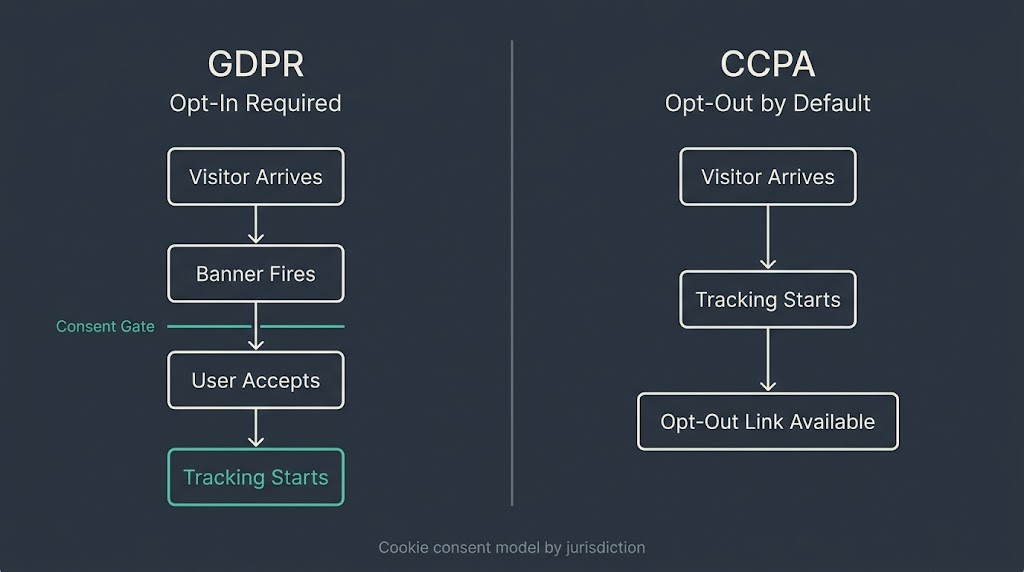
GDPR requires opt-in consent for non-essential cookies. No cookie fires until the user actively accepts. The default state is no tracking. CCPA and most US state privacy laws use an opt-out model: data collection begins by default, and users must actively signal that they want to stop being tracked. The difference in UX and implementation is significant.
| Dimension | GDPR (EU/EEA) | CCPA/US State Laws |
| Default state | No tracking until consent | Tracking begins by default |
| Consent model | Opt-in required | Opt-out mechanism required |
| Who it applies to | Any site collecting EEA visitor data | Businesses meeting size/revenue thresholds, by state |
| Analytics cookies | Require prior consent | Generally allowed by default |
| Penalties | Up to €20M or 4% global revenue | Up to $7,500 per intentional violation (CCPA) |
| Geographic trigger | Data subject location (EEA) | Data subject location (specific US states) |
| Coverage today | One regulation, 30+ countries | 20 US states with comprehensive laws as of 2026 |
The IAPP’s US State Privacy Legislation Tracker shows 20 states now have comprehensive consumer privacy laws in effect, including California, Virginia, Colorado, Connecticut, and Texas. Most use an opt-out model for general data collection, but several require explicit consent for sensitive data categories. Indiana, Kentucky, and Rhode Island laws took effect January 1, 2026.
If your site serves US visitors broadly and also draws EU traffic, you need a consent solution that handles both models: opt-out for US visitors, opt-in for EEA visitors. Geo-targeting consent banners at the CMP level is the technical mechanism for this. It is standard in most consent management platforms.
Google Consent Mode v2 and Why It Matters for US Sites
Even if GDPR enforcement risk feels distant, Consent Mode v2 is a concrete operational issue for any site running Google Analytics 4 or Google Ads targeting EEA traffic.
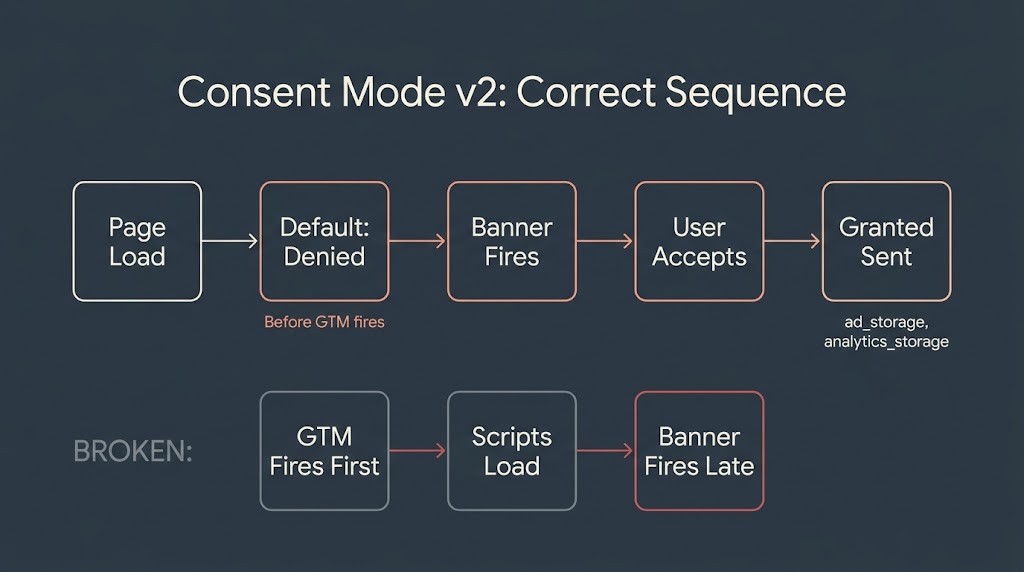
Google’s Consent Mode documentation specifies four parameters that must be configured correctly for EEA visitors: ad_storage, ad_user_data, ad_personalization, and analytics_storage. When a user declines cookies, these parameters must be set to denied before any Google tag fires. Google uses modeled data to partially reconstruct measurement for users who decline, but unmodeled gaps in your GA4 data are a real consequence of misconfigured or absent consent mode.
The correct implementation sequence matters. The default consent state must be set to denied for EEA regions before the Google tag fires. The consent update only triggers to granted after a user actively accepts. If your consent banner loads asynchronously and fires after the Google tag, your consent signals are out of order and your implementation is non-compliant by design. This is one of the most common technical errors we see in sites that believe they have “installed a cookie banner.”
WordPress Implementation: What Actually Works
For most small and mid-market US businesses, a WordPress site with an established consent management plugin is a practical and sufficient starting point. The plugin landscape has matured significantly. The key decision criteria are not which plugin has the most features — they are whether the plugin blocks scripts before consent fires, whether it auto-scans your site to detect cookies rather than relying on you to declare them manually, and whether it integrates cleanly with Google Tag Manager for Consent Mode v2.
The table below covers the four most commonly used options on WordPress sites:
| Plugin | Script Blocking | Auto-Scan | GTM/Consent Mode v2 Integration | Pricing |
| Cookiebot (Usercentrics) | Yes | Yes (cloud-based) | Yes | Free tier; paid from ~$9/month |
| CookieYes | Yes | Yes | Yes | Free tier; paid from ~$10/month |
| Complianz | Yes | Partial | Yes | Free tier; paid from ~$49/year |
| WPConsent | Yes | Manual config | Partial | Free; Pro from ~$49/year |
None of these are perfect, and none of them replace understanding what cookies your site actually sets. Before installing any plugin, run a manual audit: open Chrome DevTools > Application > Cookies on your own homepage before accepting any consent. Everything you see there should be either strictly necessary or blocked pending consent. If you see GA4, Meta Pixel, or any third-party marketing script already loaded before consent fires, your implementation is broken regardless of what plugin is active.
Banner Design: The Dark Patterns Problem
Cookie consent implementation is partly a legal problem and partly a UX problem. Regulators have been increasingly specific about what makes a consent banner compliant at the design level, not just the code level.
Dark patterns that draw active enforcement attention include: making the “Accept All” button significantly more prominent or colorful than “Reject All” or “Manage Preferences”; requiring multiple clicks to decline while acceptance requires one; using language like “Allow cookies to enjoy a better experience” without explaining what cookies actually do; and not surfacing a consent preference center once a user has already accepted.
A compliant banner does not need to be ugly or conversion-hostile. What it needs is visual symmetry between accept and decline options, plain language explaining what each cookie category does, a preference panel that users can return to at any time, and a design that does not rely on friction to generate “consent.” This is genuinely a UX design problem, not just a legal checkbox.
US State Laws Are Catching Up
For US businesses that believe GDPR does not apply to them at all, US state laws are closing the gap on both notice requirements and consumer rights. California’s CCPA and CPRA, Virginia’s VCDPA, Colorado’s CPA, and 17 more state laws now require some combination of privacy notices, opt-out mechanisms for data sales, and data subject rights (access, deletion, correction).
The important practical point: if your site uses a consent banner designed for GDPR compliance, it will generally over-comply with US state law requirements — US state laws ask for less, not more. The reverse is not true. A US-only “privacy notice” and a basic opt-out link does not satisfy GDPR’s prior-consent requirement for non-essential cookies.
The fastest path to multi-jurisdictional compliance is a single consent management platform that serves GDPR opt-in banners to EEA visitors and opt-out notices to US visitors, geo-detected automatically. This is not complex to implement. It is a configuration choice in any major CMP.
Frequently Asked Questions
Does GDPR apply to my US business if I have no EU customers?
It depends on whether you have EU visitors and whether you track them. GDPR Article 3 triggers based on the location of the data subject, not the location of your customers or office. If your site runs analytics, advertising pixels, or behavioral tracking scripts and any EEA visitors land on your site, you are processing their personal data and are technically within scope. How seriously regulators would prioritize your site given minimal EU exposure is a separate risk calculation, but non-compliance is not a safe default.
What is the difference between GDPR cookie consent and CCPA compliance?
GDPR requires opt-in: no non-essential cookie fires until a user actively accepts. CCPA requires opt-out: data collection begins by default, and you must offer users a “Do Not Sell or Share My Personal Information” mechanism. A site targeting only US consumers primarily needs to comply with applicable US state laws, which are generally less restrictive than GDPR on cookie consent.
A site with any EEA traffic needs both: geo-targeted opt-in consent for EEA visitors and opt-out mechanisms for covered US residents.
Are Google Analytics cookies strictly necessary under GDPR?
No. Google Analytics sets persistent tracking cookies that collect behavioral data — pages visited, session duration, referral source, and device identifiers. These are classified as statistics or performance cookies under GDPR’s taxonomy and require prior consent from EEA visitors. Running GA4 without a consent banner for EU users, or without Google Consent Mode v2 correctly configured, means you are collecting analytics data without a valid legal basis.
What happens if I just ignore GDPR on my US site?
Maximum GDPR penalties reach €20 million or 4% of global annual revenue, whichever is higher. Practical risk for a small US business with minimal EU exposure is lower than those headline numbers suggest — regulators focus on scale and pattern. More immediate risks include: receiving a data subject access request you cannot respond to, failing a vendor compliance check from a European B2B partner, or having your GA4 and Google Ads data degraded by absent Consent Mode v2 signals. Ignoring it is a choice, but it is a choice with an escalating cost as your EU exposure grows.
Can I install a cookie consent plugin and call it done?
Not quite. A plugin is the tool; correct configuration is the work. The three most common errors after installing a consent plugin are: the plugin loads after Google Tag Manager and fails to block scripts before consent fires, the cookie audit is incomplete so the plugin declares fewer cookies than the site actually sets, and the Consent Mode v2 integration is either missing or misconfigured. Installing a plugin is the right first step. Verifying it with Chrome DevTools before going live is the second step most businesses skip.
How does a consent banner affect my site’s conversion rate?
A well-designed consent banner has a measurable but manageable impact. A poorly designed or dark-pattern-compliant banner that regulators would flag has the opposite problem — it inflates apparent “consent” while degrading trust and inviting regulatory attention. The honest tradeoff is that a properly implemented opt-in banner for EEA visitors will reduce the proportion of visitors whose behavioral data you can collect. The correct response to that tradeoff is accurate measurement of consenting visitors, not finding design tricks that manufacture false consent.
Where BetaTech Fits In
We do not sell cookie consent software. What we do is build and configure WordPress sites where the technical stack — Google Tag Manager, GA4 Consent Mode v2, the CMP of your choice — is actually set up correctly from the start, rather than bolted on afterward. Our team spans Bangladesh and the US, which means a compliance audit scoped on a Tuesday afternoon in New York is typically configured and tested before Wednesday morning. That compression matters when you have a site launch date or a partner due diligence deadline.
If you are not sure whether your current site’s consent implementation is actually blocking scripts before firing, or whether your GA4 Consent Mode v2 signals are reaching Google correctly, a scoped technical review takes about three hours to run and document.
Have a live site and want to know whether your cookie consent implementation is actually working?
We offer a focused technical audit that checks your consent stack, your Consent Mode v2 configuration, and your cookie inventory against what your banner actually declares. Reach out here and tell us your site URL — we will scope the review and respond with what we find.