Your WordPress site is hacked. You found out because Google Search Console sent you a security alert, a customer texted you that the site is redirecting to a pharmacy store, or your hosting company suspended the account. The damage is already happening: organic traffic is dropping, Google Safe Browsing may have flagged your domain, and every hour the site stays compromised extends the cleanup.
This guide walks through the recovery process the way a working developer actually handles it: from confirming the infection and identifying the hack type, through cleanup and hardening, to getting Google to remove the blacklist warning. It also tells you honestly when DIY makes sense and when it does not.
A hacked WordPress site can be recovered in most cases. The process has four stages: confirm and isolate the hack, scan and remove malicious code, harden the installation to close the entry point, then request a Google review to lift any Safe Browsing blacklist. Professional cleanup typically costs $300 to $400 for a one-time incident. Doing it yourself is viable for straightforward malware infections but risky if the site has backdoors, processes customer payment data, or has been reinfected more than once.
Why WordPress Sites Get Hacked (and Why It Is Getting Worse)
WordPress powers over 43% of all websites on the internet. That scale makes it an attractive automated attack target, and the numbers reflect it. According to Patchstack’s State of WordPress Security in 2026, researchers found 11,334 new vulnerabilities in the WordPress ecosystem in 2025 alone — a 42% increase over the prior year.
Ninety-one percent of those vulnerabilities were in plugins, not in WordPress core.
The more alarming number is timing. Patchstack’s data shows the weighted median time to mass exploitation of a newly disclosed high-severity vulnerability is five hours after public disclosure. That means a plugin you have not updated since last Tuesday may already be an active attack vector. Outdated plugins are the single most common entry point, followed by stolen or brute-forced admin credentials and compromised hosting accounts.
Step 1: Confirm the Hack and Identify the Type
Before you touch anything, confirm what you are dealing with. Not every site problem is a hack. A bad plugin update, a corrupted theme file, or a botched migration can look similar to malware from the outside.
Use Google’s URL Inspection tool in Search Console to see what Google actually sees when it crawls your pages. This bypasses browser caching and shows you what search engine bots receive, including any injected content that hackers hide from logged-in site owners using cloaking techniques. Also run a free scan at Sucuri SiteCheck (sitecheck.sucuri.net) and cross-reference with the Wordfence free plugin’s built-in scanner.
Once confirmed, identify which type of hack you have. This determines your cleanup path.
| Hack Type | What It Looks Like | Primary Damage |
| SEO spam / Japanese keyword hack | New pages in Japanese or pharma keywords appear in Google | Rankings destroyed, manual action from Google |
| Redirect hack | Visitors are sent to spam or adult sites | Revenue loss, trust damage, blacklisting |
| Backdoor injection | No visible symptoms initially | Persistent access for attacker, reinfection risk |
| Admin account creation | Unknown users appear in wp-admin | Full site takeover possible |
| Content injection | Pharma links or hidden text in pages | SEO penalties, Google blacklist |
| Defacement | Homepage replaced with attacker’s content | Visible brand damage |
The Japanese keyword hack deserves specific attention because it is one of the most common and most damaging to SEO. Hackers create hundreds of auto-generated pages in randomly named directories (for example, /ltjmnjp/341.html) stuffed with Japanese text and affiliate links to fake merchandise stores. These pages appear in your Google index, dilute your site’s topical authority, and may trigger a manual action. They often go undetected for months because the hack uses cloaking: site owners see a 404 error, but Google bots see the spammy content.
Step 2: Immediate Triage (Do These Before You Clean Anything)
Speed matters here, but doing things in the wrong order makes cleanup harder. Complete all of the following before you start removing files.
Put the site in maintenance mode. This prevents visitors from hitting the infected site while you work and stops Google from crawling new spam pages. Most caching plugins and WordPress page builders have a maintenance mode. If you are locked out of wp-admin entirely, you can create a maintenance page manually via your hosting file manager.
Change every password. This means your WordPress administrator account, your hosting control panel, your database password in wp-config.php, your FTP or SFTP credentials, and the email account connected to WordPress. Do this before you scan or clean. If you clean the site without rotating credentials, the attacker can simply re-enter. After changing passwords, update the security salts and keys in wp-config.php using the official generator at api.wordpress.org/secret-key/1.1/salt/ — this invalidates all existing logged-in sessions immediately.
Check Google Search Console Security Issues. The Security Issues report in Google Search Console shows exactly which pages Google has flagged, what category of issue it detected (malware, content injection, URL injection, social engineering), and sample affected URLs. You will need this information both for your cleanup and for the review request you submit after the site is clean.
Remove any unknown admin users. Go to Users in wp-admin and delete any accounts you do not recognize. If hackers added themselves as verified owners in Search Console, revoke their access there too.
Step 3: Scan and Remove the Malware
The cleanup process depends on how severe the infection is. For most infections, a three-stage approach works.
Stage A: Run an automated scanner. The Wordfence free plugin includes a malware scanner that compares your WordPress core files, plugins, and themes against known-good versions from the WordPress.org repository and Wordfence’s own malware signature database. Run a full scan and review every flagged file before taking action. Do not blindly delete files a scanner flags without understanding what each one does.
Stage B: Reinstall WordPress core files. Download a fresh copy of WordPress from wordpress.org and replace your wp-admin and wp-includes directories entirely. Do not overwrite wp-config.php or your wp-content directory at this stage. This eliminates any core file tampering without touching your content or plugins. WP-CLI users can run wp core verify-checksums to identify altered core files and wp core update –force to restore them.
Stage C: Audit plugins and themes. Deactivate and delete any plugin or theme you are not actively using. For active plugins, compare file modification dates against the last time you intentionally updated them. Files modified at a date that does not correspond to an update you made are suspect. Look specifically in wp-content/uploads for PHP files; that directory should contain only media files, never executable PHP. Check your .htaccess file for redirect rules you did not add.
The code pattern to look for in suspicious PHP files is obfuscated execution: any combination of eval, base64_decode, str_rot13, gzinflate, or preg_replace with the /e modifier applied to encoded strings. These are the fingerprints of injected backdoors.
If the scanner finds the same infection reappearing after cleanup, you are dealing with a memory-resident or persistent backdoor. Patchstack’s 2026 research documents malware families (Lock360 is one) that run in server memory and automatically rewrite cleaned files the moment they are restored. At that point, a clean restore from backup or a full server-level remediation is the right call, not continued manual cleanup.
Step 4: Restore From Backup or Rebuild — When Each Makes Sense
Manual cleanup is the right approach for isolated infections on sites with no clean backup available. But it has a ceiling. If you have any of the following conditions, restoring from a verified clean backup is faster, safer, and more thorough than manual cleanup:
- You have a backup dated before the infection (check file modification dates to estimate when the hack entered).
- The infection spans hundreds of files or database records.
- The site handles WooCommerce orders or stores any customer data.
- You have been through manual cleanup once and the site reinfected within days.
A pre-infection backup restores cleanly, eliminates all injected code at once, and leaves a known-good baseline you can then harden. The downside is losing any content or orders created between the backup date and today. For most small business sites that publish a few posts per month, that is an acceptable tradeoff.
After any restore, all passwords still need to be rotated and the entry point still needs to be identified and closed. A restore does not prevent reinfection if the vulnerable plugin or stolen credential that allowed access the first time is still in place.
Step 5: Harden the Site to Close the Entry Point
Cleaning a hacked site without hardening it is wasted work. Per research cited on web.dev, 20% of hacked sites are reinfected within 24 hours of cleanup. This is because most cleanups address the symptoms (the malicious files) without addressing the cause (the open door).
The WordPress hardening documentation at developer.wordpress.org covers the full technical checklist. The items that actually move the needle for most small business sites are:
Update everything. Run updates for WordPress core, every active plugin, and every active theme immediately after cleanup. Delete any plugin or theme that has been abandoned by its developer (no updates in over 12 months in the WordPress.org repo is the rule of thumb).
Set correct file permissions. WordPress files should be 644 (owner read/write, group and world read). Directories should be 755. The wp-config.php file should be 440 or 400. Overly permissive permissions (666 or 777 on files) are a direct invitation to write attacks.
Disable file editing in wp-admin. Add define( ‘DISALLOW_FILE_EDIT’, true ); to wp-config.php. The built-in PHP file editor in wp-admin is the first thing an attacker uses after gaining admin access. There is no legitimate reason most businesses need it enabled.
Enable two-factor authentication. Any plugin that adds TOTP-based 2FA to WordPress login works here. Wordfence, WP 2FA, and Google Authenticator all have free tiers. 2FA makes brute-forced or stolen credentials far less useful.
Add a WAF. Cloudflare’s free plan puts a reverse proxy and basic ruleset in front of your site and blocks a meaningful percentage of automated attacks before they reach WordPress. A plugin-level WAF like Wordfence adds a second layer at the application level. These work differently and together they are better than either alone.
Step 6: Fix the SEO Damage and Get Off Google’s Blacklist
A hacked site that has been flagged by Google Safe Browsing shows a red interstitial warning to visitors in Chrome, and organic traffic will drop sharply or go to zero while the warning is active. Getting this warning removed is a separate process from cleaning the site, and it requires a formal review request through Google Search Console.
The process: once you are confident the site is clean, go to the Security Issues report in Search Console. For each flagged issue type, confirm the example URLs no longer serve malicious content. Use the URL Inspection tool rather than a browser to check, because hackers often cloak malicious content from logged-in site owners. Then select “Request Review,” describe the specific steps you took to clean the site (what files you removed, what you reinstalled, what entry point you closed), and submit. Google’s response time runs from a few days to a few weeks. Do not resubmit before you receive a decision; doing so extends the queue.
If your site had the Japanese keyword hack or pharma spam, there are additional SEO steps. Use Search Console’s URL Removal tool to request temporary de-indexing of the spam URLs while Google processes your review. Audit your XML sitemap for any URLs the attacker added. If the attacker added themselves as a verified owner in Search Console, revoke their access before submitting the review request.
According to Wordfence’s professional cleanup service data, most sites are cleared from search engine blocklists within one to three days of submitting a review, assuming the cleanup was thorough. The keyword is thorough: a review that comes back as not approved is almost always because the site was cleaned visually but backdoor files were left in place, and Google’s crawlers found the infection again on a subsequent crawl.
Step 7: DIY vs. Hiring a Professional — An Honest Framework
Most guides skip this section or bury it at the end. It is actually the question that determines whether the rest of this article applies to you.
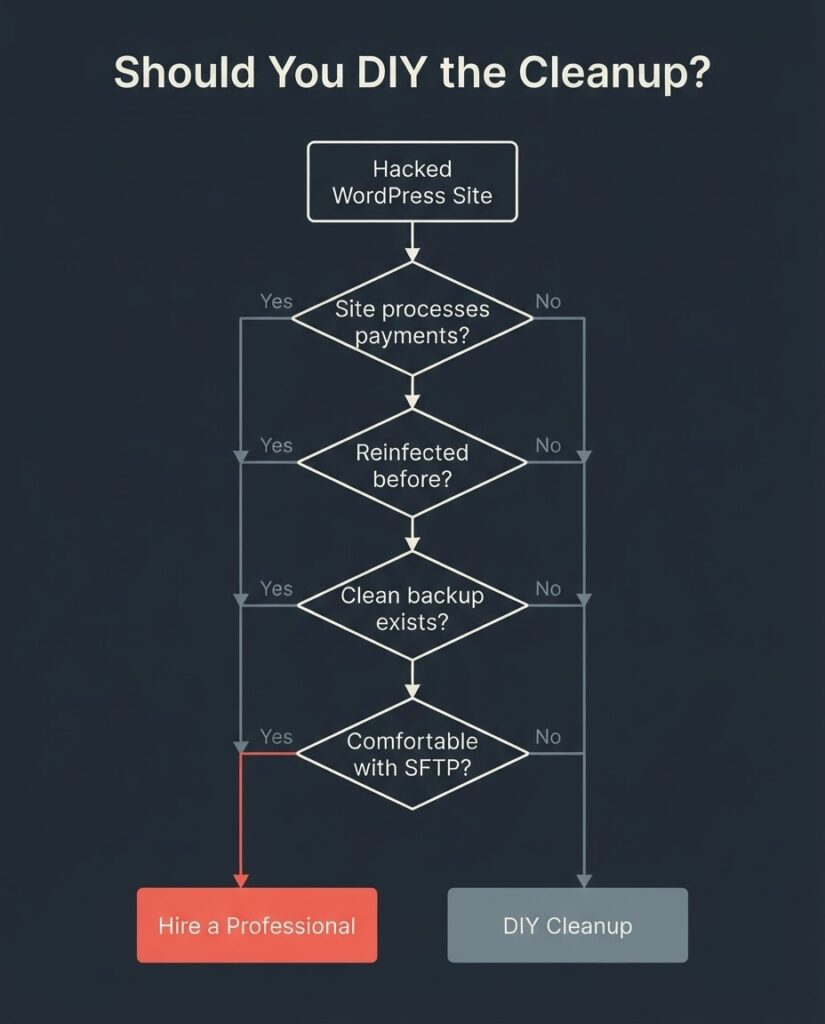
DIY cleanup works when: the infection was caught early (within days), it is limited to a specific plugin or theme file, the site does not process transactions, you have a confirmed pre-infection backup, and you are comfortable working in SFTP and examining PHP files.
Hire a professional when: the site has been reinfected after a prior cleanup, it runs WooCommerce or stores customer personal data, you have identified multiple entry points, you cannot find the backdoor, or you do not have a pre-infection backup and the infection spans the database.
The market rate for a professional one-time cleanup from a reputable security vendor sits at $300 to $400. Subscription plans from vendors like Sucuri and Wordfence run $199 to $499 per year and include unlimited cleanups, which changes the economics if you have been hit more than once or if you want ongoing monitoring.
The hidden cost of DIY gone wrong is not the time you spend; it is the extended period of traffic loss and potential customer data exposure while the site stays compromised. For a site generating $5,000 per month in e-commerce revenue, a three-week cleanup effort that leads to reinfection costs far more than a $400 professional remediation.
At BetaTech, our WordPress work includes post-hack audits and rebuilds for clients who have been through the cleanup cycle and want the underlying architecture fixed, not just patched. Our team spans Bangladesh and the US, which means we can begin a post-hack audit within hours of a request — feedback and site access given at the end of a US business day is typically being acted on before the next morning. That timeline matters when organic traffic is dropping in real time.
FAQ
How do I know for certain that my WordPress site has been hacked?
The most reliable confirmation method is Google Search Console’s Security Issues report (search.google.com/search-console/security-issues), which shows Google’s findings directly. Back that up with a free Sucuri SiteCheck scan and the Wordfence plugin’s scanner. Do not rely only on how the site looks in your browser — most infections cloak themselves so that logged-in site owners see a clean site while search engine bots and regular visitors get the malicious content.
How long does it take to fix a hacked WordPress site?
A straightforward infection caught early typically takes four to eight hours to clean manually or two to four hours with a professional service. Sites with backdoors, persistent malware, or database injection can take 24 to 72 hours or longer. Getting removed from Google Safe Browsing after cleanup takes an additional few days to a few weeks from the time you submit a review request in Search Console.
Should I restore from backup or clean the files manually?
Restore from a pre-infection backup if you have one and can date it to before the compromise. Manual cleanup is appropriate when no clean backup exists or when you need to preserve recent orders and content that were created after the last backup. The key question is whether the backup is genuinely pre-infection: restore a backup that already contains malware and you are back where you started.
What is the Japanese keyword hack and how do I know if I have it?
It is a specific type of SEO spam attack where hackers create hundreds of auto-generated pages on your site filled with Japanese text and affiliate links to counterfeit merchandise stores. You can detect it by doing a site:yourdomain.com search in Google and looking for URLs with unfamiliar directory paths, or by checking Search Console for URL injection warnings. It is particularly damaging because Google may index hundreds of spam pages under your domain before you notice.
How much does it cost to have a hacked WordPress site cleaned professionally?
One-time cleanup from a reputable security vendor typically runs $300 to $400 per incident. Annual subscription plans from Sucuri and Wordfence that include unlimited cleanups run $199 to $499 per year. An independent agency or freelance developer will typically charge $150 to $500 depending on site complexity and the severity of the infection. Cheaper is rarely better here: incomplete cleanup leads to reinfection, and a second cleaning costs as much as the first.
Can I prevent my WordPress site from being hacked again after cleanup?
You can reduce the probability significantly. The high-return actions are: keep every plugin and theme updated (or delete what you are not using), enable two-factor authentication on all admin accounts, add a WAF via Cloudflare or Wordfence, and run daily offsite backups. No configuration eliminates risk entirely. According to Patchstack’s 2026 security data, 46% of WordPress vulnerabilities did not receive a patch from the plugin developer in time for public disclosure, meaning updates alone do not close every window.
If your site is under active attack or you have found an infection you cannot trace, BetaTech offers post-hack site audits. We review your file system, database, and access logs, identify the entry point, and give you a scoped cleanup and hardening plan.