If you are paying $99 a month for “WordPress maintenance and support,” you should be able to answer one question: if a plugin update breaks your checkout at 9 PM on a Friday, what happens next?
For most plans at that price, the answer is: nothing, until Monday, when you file a ticket, which may or may not be handled the same day, and which may or may not be covered under your plan at all. That is not a support plan. It is a monitoring subscription with a reassuring name.
WordPress now powers 41.2% of all websites globally, which means there is a large and growing market for services that promise to keep those sites running. The plans range from $30 to $600+ a month, and on paper many of them describe the same work. The differences that matter only surface when something goes wrong.
This piece breaks down what each pricing tier actually covers, where the gaps tend to be, and what to ask any vendor before you sign.
A WordPress support plan is a monthly service agreement covering updates, backups, security scanning, and reactive help when something breaks. Plans run from roughly $30 to $100/month for automated maintenance with minimal human involvement, $100 to $300/month for professional plans with included support hours and staging environments, and $300 to $1,000+/month for premium plans with WooCommerce-grade testing, faster SLAs, and dedicated development time. The single most important distinction to understand before buying: maintenance and support are not the same thing.
Maintenance and Support Are Two Different Things
Most plans bundle both words into the name. Few plans actually deliver both at the same level.
Maintenance is scheduled, largely automated work: applying WordPress core updates, updating plugins and themes, running security scans, and creating backups. It runs on a calendar whether or not you log in or contact anyone.
Support is reactive, human work: diagnosing why your checkout stopped working after a plugin update, fixing the PHP conflict that threw your homepage into maintenance mode, or responding when your site goes down. This is where quality diverges sharply between providers.
The practical test is simple. Ask any vendor: “If an update you applied breaks a form on my site, is fixing that covered under my plan or billed separately?” Budget plans almost universally charge for reactive fixes. Mid-tier plans typically include a small number of hours. Premium plans absorb it.
WordPress.org recommends checking for updates and running maintenance tasks at least every three to six months at minimum, but active sites with multiple plugins realistically need update management far more frequently than that. The security data explains why.
The Security Argument for Not Skipping This
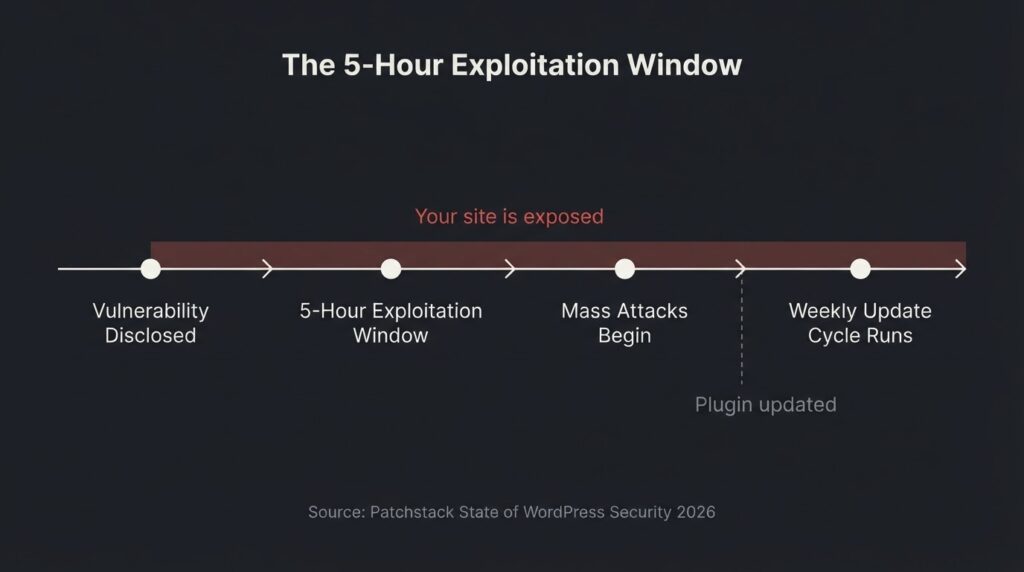
The update-delay risk is quantifiable. Patchstack’s 2026 State of WordPress Security report found 11,334 new vulnerabilities in the WordPress ecosystem in 2025, a 42% increase year-over-year. Plugins accounted for 91% of those vulnerabilities. The weighted median time to first mass exploitation of a heavily targeted vulnerability after public disclosure was 5 hours.
That number matters for a specific reason. If your plan updates plugins weekly or biweekly, and a critical vulnerability is disclosed on a Tuesday, your site has already been in the exploitation window for days before your update cycle reaches it.
At the same time, 46% of those vulnerabilities had no patch available at the time of disclosure, which means updating would not have helped regardless. This is why a quality support plan should include a web application firewall and active security monitoring in addition to updates, not instead of them.
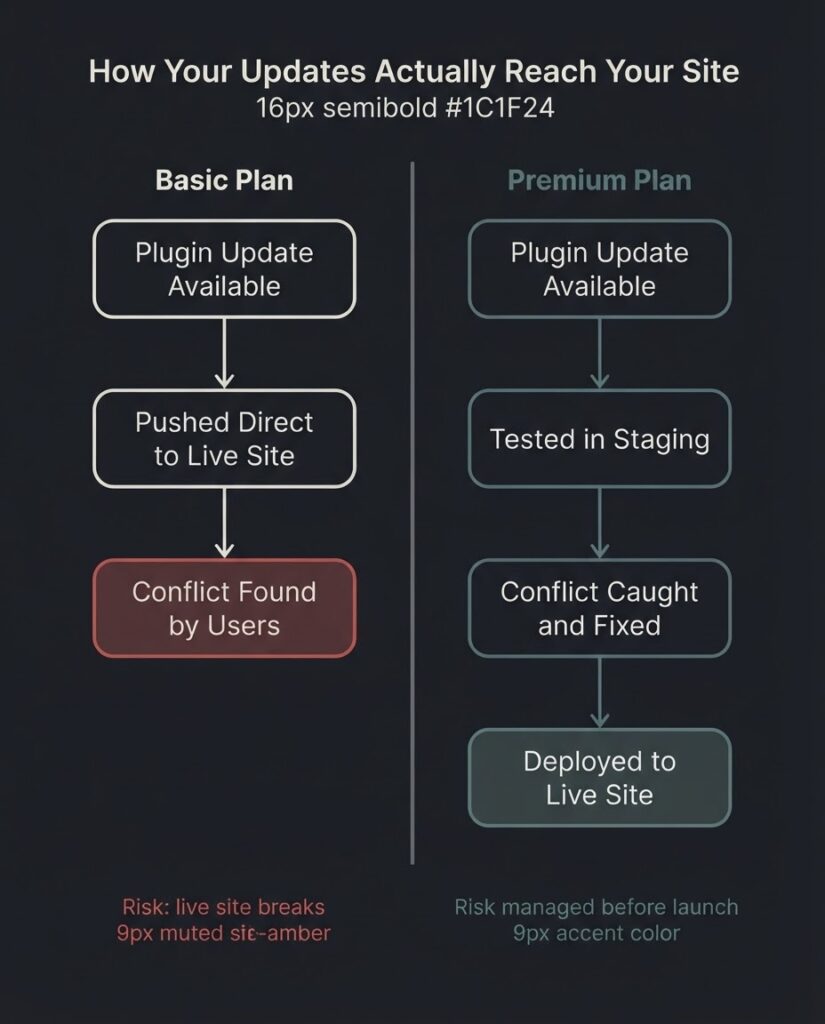
The tradeoff is real: aggressive updates reduce exposure to known vulnerabilities but create risk of plugin conflicts. Deferred updates reduce conflict risk but increase security exposure. A staging environment is what breaks the tradeoff, because it lets you test updates before they reach the live site. Budget plans almost never include one.
[INTERNAL LINK: WordPress design and development services → https://betatech.co/services/web-development/]
What Each Pricing Tier Actually Includes
Here is an honest breakdown of what you can expect at each level. These are market ranges drawn from current provider pricing, not guarantees.
| Tier | Monthly Price Range | Updates | Backups | Security | Reactive Support | Staging |
| Basic/Automated | $30 to $100 | Pushed live directly | On-server, often daily | Scans only | Not included or billed per incident | No |
| Professional | $100 to $300 | Live or with light testing | Offsite, daily | Scans + WAF | Included hours (1 to 3/month) | Sometimes |
| Premium | $300 to $600+ | Tested in staging before deploy | Offsite, daily, longer retention | Active monitoring + cleanup included | Priority SLA, 4 to 8 hrs/month | Yes |
| WooCommerce/Enterprise | $500 to $1,000+ | Staged + regression tested | Offsite, often real-time | Active monitoring + cleanup included | Dedicated response, payment flow testing | Yes |
A few things to understand about this table. The Basic tier is not worthless. For a brochure site with low traffic, automated updates and daily backups are materially better than nothing. The risk calculus changes the moment your site processes payments, generates leads as your primary sales channel, or supports a membership.
The WooCommerce tier warrants its own note. Every plugin update on a store needs to be validated against checkout, payment gateway processing, and order flow. A conflict that silently breaks payment processing for 6 hours on a busy day costs real money. That additional testing cost is why WooCommerce maintenance realistically starts around $500/month and can exceed $1,000 for stores with complex integrations.
The Staging Environment Question
This is the single most useful filter for evaluating a plan. A staging environment is a copy of your live site where updates are applied and tested before being pushed to production. If a plugin update conflicts with your theme and breaks your navigation, the conflict surfaces in staging, not in front of your customers.
Most basic plans skip this entirely because it adds operational cost. Some mid-tier plans offer it for an additional fee. Premium plans include it by default.
Pantheon’s learning center documentation on WordPress maintenance plans explains how structured Dev, Test, Live workflows handle this at the platform level for teams that want it built into their hosting infrastructure rather than managed separately. That approach makes sense for developer teams or agencies managing multiple sites. For most small business owners, a maintenance plan that includes staging testing is the more accessible path to the same outcome.
If a vendor cannot tell you clearly whether updates are tested in staging before hitting your live site, treat the answer as no.
Managed Hosting vs. a Support Plan: Where One Ends
If you are on WP Engine, Kinsta, or a comparable managed WordPress host, you are already getting some of what a basic maintenance plan provides: automated updates, daily backups, security monitoring at the server level, and a CDN. That is real value and it reduces what you need from a separate plan.
What managed hosting does not typically cover is application-level support: diagnosing plugin conflicts, fixing broken functionality, editing content on request, running performance audits, or providing reactive help when something behaves unexpectedly. Google’s Core Web Vitals documentation makes clear that LCP, INP, and CLS are ranking signals measured from real user data, not server metrics. A hosting platform cannot optimize those for you; that requires application-level decisions about image handling, third-party scripts, and plugin configuration.
The practical question: if you are already on managed hosting, you are probably looking for a plan that fills the application-level gap, not one that replicates infrastructure work you are already paying for. Ask any vendor explicitly whether their plan assumes self-managed hosting or whether hosting is bundled in, and what changes if you keep your existing host.
Core Web Vitals and Performance Monitoring
Performance monitoring shows up on the feature list of many premium plans but is rarely defined clearly. Here is what it should mean in practice.
Core Web Vitals are three metrics Google uses to measure real-world user experience: Largest Contentful Paint (LCP, which measures load speed and should be under 2.5 seconds), Interaction to Next Paint (INP, which measures responsiveness and should be under 200 milliseconds), and Cumulative Layout Shift (CLS, which measures visual stability and should be 0.1 or lower). Google’s web.dev documentation on Web Vitals sets these as the thresholds for “good” performance.
A plugin update that introduces an unoptimized script can push your LCP from 1.8 seconds to 4.2 seconds overnight without triggering any visible error. The site still works; it just loads noticeably slower. Over weeks, this degrades your Core Web Vitals score in Search Console and can affect rankings. A support plan that includes monthly performance auditing would catch this. Most plans do not include it, but it is worth asking for.
At BetaTech, our distributed team spans Bangladesh and the US, which means performance testing and audit work often moves during hours when a US-based agency has already logged off. Feedback given at the end of a US business day is typically actioned before the next morning. For clients running active sites, this compresses the time between “we noticed a slowdown” and “it’s fixed.”
Five Questions to Ask Before You Sign
These are the questions that separate plans worth buying from plans that look good on paper.
The first is about update workflow. “Do you test updates in a staging environment before deploying to my live site?” If the answer is no or vague, updates go directly to production. You will find out about conflicts after users do.
The second is about reactive support. “If an update you apply breaks something on my site, is fixing it included in my plan or billed as an additional service?” Many plans cover the update; none cover the cleanup. Get this in writing.
The third is about backup specifics. “Where are my backups stored, and how fast can you restore a clean version of my site?” Backups stored on the same server as your site are lost in a server failure. Ask for offsite storage and a real restoration SLA, not just “we can restore it.”
The fourth is about security coverage. “If my site gets malware, is cleanup included or charged as an emergency service?” Emergency malware removal typically runs $200 to $500 per incident as an add-on. If your plan does not include cleanup, you are not actually insured against the most disruptive scenario.
The fifth is about response time specificity. “What counts as a response for your SLA, and what remedy exists if you miss it?” An automated ticket acknowledgment is not a response. Ask what happens when a human actually reviews your issue, and what the provider does if they miss their own guarantee.
What WooCommerce Sites Need to Understand
If you run WooCommerce, a basic maintenance plan is not a conservative choice. It is a miscalculation of risk.
Every plugin that touches your store, whether it handles payments, inventory, shipping, or tax, needs to be verified against actual transaction flows after an update. A conflict that breaks your Add to Cart button is obvious. A conflict that causes payment processing to fail silently for 10% of transactions is not, and you may not find it until a customer complains or you reconcile your merchant account.
This is why WooCommerce maintenance is priced separately and higher. You are not just paying for faster response times. You are paying for someone to run a test transaction through your checkout after every significant update cycle. That is the deliverable that justifies the premium tier for e-commerce. If a plan does not mention post-update transaction testing, ask directly whether it is included.
The DIY Calculation
Running WordPress maintenance yourself is genuinely feasible if your site is simple, your plugin count is low, and you have the time and inclination. It takes roughly 2 to 4 hours a month for a straightforward site with 10 to 15 plugins. You will need to update core, plugins, and themes on a regular schedule, maintain your own backup system with offsite storage, and monitor uptime independently.
The constraint is not knowledge. It is time and responsiveness. The security data cited earlier, with vulnerabilities being weaponized within 5 hours of disclosure, means that a weekly update schedule leaves a window. For most business owners, the math shifts in favor of a professional plan somewhere around the point where an hour of their time costs more than the plan itself, or when the site starts generating revenue that depends on reliable uptime.
We do not think every site needs a premium plan. A single-page lead-gen site with minimal plugins and low traffic can be served well by automated management at the $30 to $80 range. The plan should match the risk profile of the site, not be upsold to match the vendor’s revenue target.
FAQ
What does a WordPress support plan actually include?
At minimum, a support plan should cover WordPress core updates, plugin and theme updates, offsite daily backups, uptime monitoring, and basic security scanning. What separates a maintenance plan from a support plan is the reactive component: whether a human fixes things that break, and whether that human’s time is included in the monthly fee or billed separately. Confirm both before you sign.
How much should I expect to pay for a WordPress support plan?
Market rates run from $30 to $100/month for automated maintenance with no included developer time, $100 to $300/month for professional plans with support hours and sometimes a staging environment, and $300 to $1,000+/month for premium plans with priority SLAs, active security monitoring, and dedicated development hours. WooCommerce stores typically need the $500+ range because of the post-update transaction testing required to protect checkout flows.
Is a WordPress support plan worth it if I already have managed hosting?
Managed hosting covers server-level maintenance: infrastructure updates, security at the hosting layer, server-side backups, and CDN delivery. It does not cover application-level work: plugin conflicts, broken functionality after updates, content edits, or Core Web Vitals optimization. Most businesses on managed hosting still need a support plan that fills the application layer gap.
What happens if a plugin update breaks my site?
The answer depends entirely on your plan. Budget plans push updates directly to the live site; you find the conflict when users do, and fixing it is often billed as a separate service. Quality plans test updates in a staging environment first, catch the conflict before it reaches production, and include the fix as part of the plan. This is the most important operational question to ask any vendor before buying.
What is an emergency response SLA and do I need one?
A service level agreement (SLA) specifies how quickly a provider will respond when something critical fails, such as a site going down or a security breach being detected. Basic plans may offer 24 to 48-hour response windows, which is acceptable for non-revenue-generating sites. If your site processes payments or is your primary lead channel, you should have a plan with a 2 to 4-hour SLA at minimum and clear definition of what “response” means, specifically when a human is actively working on your issue.
Should a WordPress support plan include malware removal?
Yes, and confirm it explicitly. Many plans include security monitoring (scanning and alerting) but charge separately for cleanup, typically $200 to $500 per incident. A plan that monitors for malware but bills you emergency rates to remove it is not providing meaningful security coverage. Ask directly: “If malware is found, is cleanup and restoration included in my monthly fee?”
Ready to talk about what your site actually needs?
BetaTech offers WordPress design and development and technical work for small and mid-market businesses. If you are not sure whether your current support arrangement covers the scenarios that matter, tell us about your site and we will give you an honest read on where the gaps are. No pitch, no pressure.