Professional WordPress maintenance services typically cost $50 to $150/month for basic plans (plugin updates, backups, uptime monitoring), $150 to $500/month for standard business plans (security scanning, performance checks, priority support), and $500 to $2,000+/month for premium or enterprise plans covering WooCommerce, custom development hours, and SLA-backed response times. The single biggest variable driving the price spread is how much human judgment and response capacity is included, not how many automated tasks run in the background.
What You Are Actually Buying When You Pay for Maintenance
Most business owners assume WordPress runs itself after launch. For the first few weeks, that impression holds. Then a plugin update breaks a contact form. Then a security scanner flags an outdated PHP version. Then Google Search Console shows a Core Web Vitals regression nobody noticed for three months. None of these are disasters in isolation, but they accumulate into real cost: developer hours to fix, lost form submissions, slower search rankings.
WordPress maintenance services exist to catch these problems before they compound. A good plan is not just a list of automated tasks. It is an active relationship with someone who understands your site’s architecture and has the authority to act quickly when something goes wrong.
The Scale of the Risk: Why Neglected Sites Are High-Value Targets
WordPress powers roughly 35% of all mobile sites tracked by the HTTP Archive, and among sites using an identifiable CMS, that share is well above 50%. That scale makes it the most targeted platform on the web. According to Patchstack’s 2025 State of WordPress Security report, 7,966 new vulnerabilities were found in the WordPress ecosystem in 2024 alone. That is approximately 22 new vulnerabilities disclosed every single day. By the 2026 edition of the same report, that figure had climbed to 11,334 new vulnerabilities in 2025, a 42% year-over-year increase.
Critically, 96% of those vulnerabilities lived in third-party plugins, not in WordPress core itself. This matters because it reframes what maintenance actually protects you from. Your site is not primarily threatened by someone attacking the WordPress software engine. It is threatened by one of the 30 to 60 plugins your developer installed, many of which have not been touched since launch.
One additional detail that does not get enough attention: in 2024, 33% of WordPress vulnerabilities were not patched before they were publicly disclosed. Many involved abandoned plugins that will never receive an update. If you have plugins that have not been updated in over a year, there is a real probability that some of them are permanently unpatched. A maintenance provider who audits and removes dead plugins is doing something automated update tools cannot.
What WordPress Maintenance Services Actually Include
The task list varies by provider and plan tier, but a legitimate maintenance service should cover these categories.
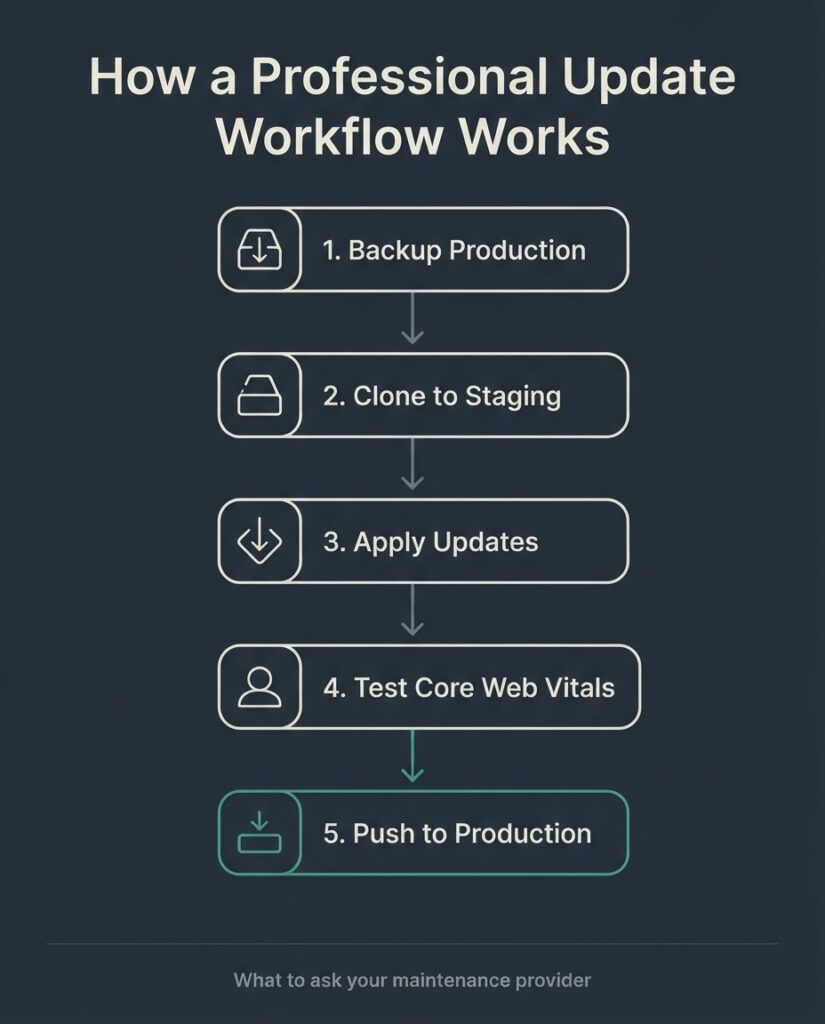
Core, plugin, and theme updates are the baseline. WordPress core ships minor and security releases automatically for self-hosted installs, but major version updates require manual action. Per the WordPress.org updating documentation, the one-click update process is straightforward in most environments, but it can break compatibility with older plugins or themes. A professional service tests updates in a staging environment first and maintains a rollback procedure. Providers who push updates directly to production without staging are cutting corners that will eventually cost you.
Backups are non-negotiable, but the details matter more than people realize. Daily automated backups stored offsite (not on the same server as your live site) are the minimum standard. The backup is meaningless unless it has been tested. If your provider cannot tell you the last time they verified a restore from backup, they are maintaining an illusion of protection, not the real thing.
Security monitoring and malware scanning involves ongoing checks for known vulnerabilities, file integrity verification, and malware detection. Note the limitations here: as Patchstack’s research shows, generic WAF (web application firewall) solutions at the network level do not have application-layer visibility into WordPress, which means they miss WordPress-specific exploitation patterns. A maintenance provider using a WordPress-aware security tool is meaningfully different from one relying solely on a CDN-level firewall.
Uptime monitoring alerts someone when the site goes down. The real value is response time, not the monitoring itself. A monitoring tool that sends an email that nobody reads for six hours is not uptime monitoring.
Performance monitoring is where most maintenance plans are weakest. Google defines its Core Web Vitals thresholds clearly: LCP (loading) under 2.5 seconds, INP (responsiveness) under 200 milliseconds, and CLS (visual stability) below 0.1. These are ranking signals. A site that passes all three Core Web Vitals on mobile gets a measurable advantage in Google’s ranking systems. According to HTTP Archive data, only 40% of WordPress sites passed all three Core Web Vitals on mobile in 2024. That means 60% of WordPress sites carry a performance penalty their owners may not even know about. A maintenance plan that ignores these metrics is not maintaining the full site.
SSL certificate management ensures your certificate does not expire, which causes browsers to display security warnings to your visitors. This is entirely automatable, yet it remains one of the most common causes of avoidable downtime.
PHP version management is underappreciated. PHP 8.1 reached end of life in December 2024. Running an end-of-life PHP version means no security patches are issued for the language your site runs on. A maintenance service should track the PHP roadmap and coordinate version upgrades before your host forces them on you.
Database optimization involves removing post revisions, spam comments, transients, and other accumulated clutter that slows query performance over time. On a site with two to three years of content history, an unoptimized database can add measurable latency to every page load.
What Each Price Tier Actually Gets You
The price ranges you find online are real, but the spread reflects scope, not quality. Here is a plain breakdown:
| Plan Tier | Monthly Cost | What’s Typically Included | What’s Usually Not Included |
| Basic | $50 to $150 | Plugin/theme/core updates, daily backups, uptime monitoring, SSL management | Security scanning, performance monitoring, support hours, staging environment |
| Standard | $150 to $350 | Everything in Basic, plus security scanning, database optimization, monthly reporting, limited support hours (1 to 2 hrs) | Developer work beyond minor edits, WooCommerce-specific tasks, CWV monitoring |
| Business | $350 to $500 | Everything in Standard, plus Core Web Vitals monitoring, priority response SLA, 3 to 5 hours of included development time | Major redesigns, SEO campaigns, paid ad management |
| Premium / Enterprise | $500 to $2,000+ | Everything above, plus WooCommerce maintenance, staging environment access, custom dev capacity, compliance reporting | Nothing significant, but verify scope in the contract |
The most common mismatch in the market: buyers purchase a $50/month basic plan and assume they have solved their maintenance problem. They have not. A $50/month plan is typically automation-only: scripts that run updates and create backups with no human reviewing the output. When something breaks, they are on their own. If your site generates revenue, quote for at least the standard tier and verify what response time commitment is included.
WooCommerce sites need special consideration. Payment gateway compatibility, order database size, product catalog updates, and inventory sync failures each create maintenance surface area that a standard plan was not designed to handle. Budget for at least the business tier if you are running an active store.
When You Do Not Need a Paid Maintenance Service
This is worth saying plainly: not every WordPress site needs a paid maintenance retainer.
If your site is a low-traffic brochure site with fewer than five plugins, you have no e-commerce functionality, and you or someone on your team can spend 30 to 45 minutes monthly running updates and verifying backups, you can manage basic maintenance yourself. The WP Engine resource on maintenance plan structure outlines the full task set, and the work is genuinely learnable.
The case for a paid service gets stronger when: you run a site that generates direct revenue; you have more than 15 to 20 plugins; you lack a staging environment; your team has no one with WordPress experience; or your site handles payment data, personal health information, or any data that creates legal exposure if it is compromised. At that point, the $150 to $350/month investment is insurance that pays for itself the first time a serious incident does not happen.
[INTERNAL LINK: technical SEO and performance optimization → https://betatech.co/services/seo-service/]
How to Evaluate a WordPress Maintenance Provider
Before you sign anything, ask these five questions. The quality of the answers tells you almost everything.
1. Do you test updates on a staging environment before pushing to production?
The correct answer is yes, for every major plugin update and every core version update. An agency that updates live directly is accepting risk on your behalf without telling you.
2. How often do you verify backups actually restore?
Automated backups that have never been tested are false security. A provider should test restores at least quarterly. Ask for the date of the last verified restore.
3. What is your response time if the site goes down?
Get a specific number during business hours and an honest statement about after-hours coverage. “We will get back to you as soon as possible” is not an SLA.
4. Do you have visibility into Core Web Vitals and performance regressions?
If they say yes, ask what tool they use and how alerts are triggered. If they have never heard the question, performance is not part of their service.
5. What happens when a plugin is abandoned and will never be patched?
The correct answer involves auditing the plugin’s function, finding a maintained alternative, and recommending removal or replacement. An answer that amounts to “we will just update what is available” misses the entire category of permanently unpatched risk.
The Distributed Team Advantage for Maintenance Response
One structural reality about BetaTech: our team spans Bangladesh and the US, which means a maintenance issue flagged at the end of a US business day reaches an active work session on our side before your next morning. This is not a 24/7 on-call guarantee; it is a time-zone structure that compresses response cycles and shortens the window between detection and resolution. For maintenance work specifically, faster iteration on updates and security responses translates directly to reduced exposure time.
WordPress Maintenance and SEO: The Connection Most Owners Miss
Site performance is a ranking factor. Core Web Vitals, page load speed, and crawl accessibility all feed into Google’s evaluation of your pages. A site that has not had its database optimized in two years, is running PHP 8.0 (end of life), and has accumulated three conflicting caching plugins will fail its Core Web Vitals in ways that are entirely preventable with routine maintenance.
Maintenance also affects crawl budget. A WordPress site with hundreds of orphaned post revisions, auto-draft entries, and redundant attachments in the media library creates unnecessary crawl overhead. This matters more at scale, but the cleanup cost on a site that has never been audited is almost always higher than the cost of preventing the problem.
According to the HTTP Archive Web Almanac 2024 CMS chapter, WordPress sites improved their Core Web Vitals mobile pass rate from 28% to 40% between 2023 and 2024. That improvement reflects platform-level changes by Automattic and the broader ecosystem, but it also reflects maintenance-level decisions by site owners who optimized image delivery, updated themes, and cleaned up plugin bloat. The remaining 60% who did not pass are, in many cases, running sites that have not been actively maintained.
FAQ
What is the difference between WordPress hosting and WordPress maintenance?
Hosting provides the server infrastructure your site runs on: the physical or virtual machine, storage, bandwidth, and network connectivity. Maintenance covers the software layer: WordPress core, plugins, themes, security, performance, and content layer tasks. Managed WordPress hosting (WP Engine, Kinsta, Pressable) often includes some maintenance functions like automatic minor updates and daily backups, but it does not typically cover custom plugin management, Core Web Vitals monitoring, or any developer work when something breaks. You often need both.
How often should WordPress be updated?
WordPress core security and minor releases should be applied within 48 hours of release for sites handling sensitive data or revenue. Major releases (6.x) can be evaluated over a week or two because they require compatibility testing. Plugin updates should be reviewed and applied at least monthly; critical security patches should be applied immediately. The HTTP Archive data shows that sites running unpatched plugins with high install counts are the most commonly exploited. Frequency matters.
What happens if I do not maintain my WordPress site?
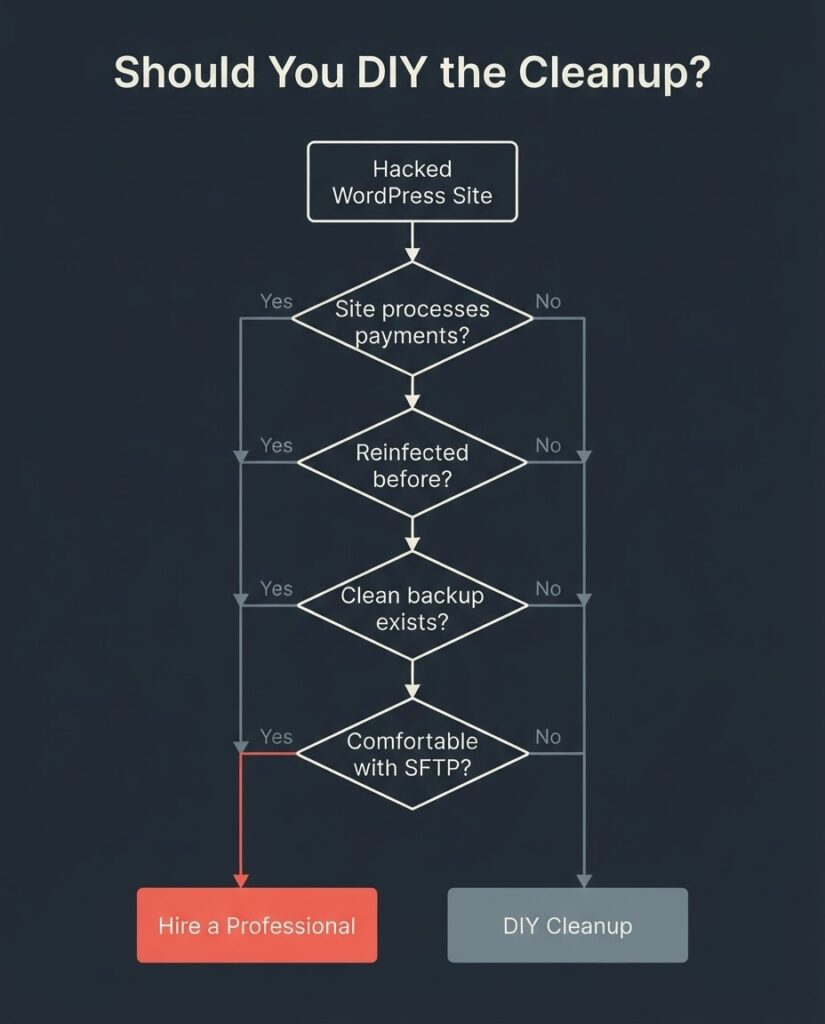
The site does not immediately break. The risk builds over time. An unmaintained site typically accumulates several unpatched plugin vulnerabilities within 60 to 90 days. The odds of exploitation increase with the site’s traffic and the visibility of its domain. Beyond security, outdated PHP versions and plugin conflicts degrade performance gradually, often in ways Google’s crawlers notice before you do. The average cleanup cost for a hacked small business site runs $500 to $3,000, not including lost revenue from downtime or the SEO recovery period after Google flags the site for malware.
Can I maintain my WordPress site myself?
Yes, for simple sites with a limited plugin stack. The realistic time requirement is 30 to 60 minutes per month for updates, backup verification, and a basic performance check. The work is learnable. Where self-maintenance breaks down is in the decision-making layer: knowing which plugin updates are safe to apply immediately versus which require staging-environment testing, knowing when a PHP version upgrade will break a custom theme, and knowing how to read a security scan report. Those decisions benefit from experience that a non-technical owner typically does not have.
What should a WordPress maintenance contract include?
At minimum: the specific tasks covered and their frequency, the response time SLA for downtime and security incidents, the backup schedule and offsite storage location, clarity on whether development hours are included or billed separately, the notice period to exit the agreement, and what happens to your site files and access credentials if you leave. Any contract that does not specify response time in hours is a contract that will disappoint you.
Is WordPress maintenance worth the money for a small business?
For a revenue-generating site, yes. The math is straightforward: a $200/month maintenance plan costs $2,400/year. A single hack cleanup costs $500 to $3,000, does not include the revenue lost during downtime, and does not include the SEO penalty if Google flags the site as malicious. For a site generating even $5,000/month in revenue, one avoided incident pays for roughly two years of maintenance.
For a low-traffic informational site with no revenue dependency, a basic $50 to $75/month plan or self-maintenance is a reasonable choice.
Get a Scope Estimate for Your Site
If you want to know what a maintenance plan should cost for your specific site, send us the URL and a brief description of what your site does. We will review the plugin stack, PHP version, current Core Web Vitals scores, and backup setup, and give you an honest assessment of what level of coverage your site actually needs. No sales pitch, just a scoped recommendation.