You have probably seen quotes that range from $4,000 to $40,000 for what sounds like the same project. That gap is not random. It tracks three variables: how much data you are moving, how much of your existing technical SEO equity is at risk, and how many systems the new platform has to talk to. Ask any vendor to break their number down along those three lines. If they cannot, the number is a guess.
This article explains the cost structure of a website replatforming project, what separates a $6,000 job from a $60,000 one, where budgets blow up after the contract is signed, and the conditions under which replatforming is the wrong call entirely.
Website replatforming cost ranges from $3,000 to $15,000 for a small brochure or content site, $8,000 to $40,000 for a mid-market business site with established SEO equity, and $40,000 to $150,000+ for a WooCommerce or complex ecommerce build with third-party integrations. The primary cost drivers are data migration complexity, the number of URLs requiring 301 redirects, integration rebuild requirements, and whether a full technical SEO migration plan is included. Agencies that quote without scoping these four variables first are estimating, not pricing.
What “Replatforming” Actually Means (and What It Does Not)
Replatforming means moving your site to a different platform or CMS while preserving your content, your URL structure, your organic rankings, and your brand identity. It is not a redesign, though the two often happen at the same time. It is not a rebuild from scratch, though a poorly managed replatform can become one when hidden complexity surfaces mid-project.
The distinction matters for budgeting. A redesign changes how your site looks and how users move through it. A replatform changes the engine underneath. Doing both at once is the most common source of cost overruns, because the two workstreams have different risk profiles and neither team can move as fast when the other is changing variables simultaneously.
If your primary problem is that your site looks outdated, start with a redesign. If your primary problem is that your site is slow, difficult to update, or breaking under current traffic, start by diagnosing whether the platform is the actual cause.
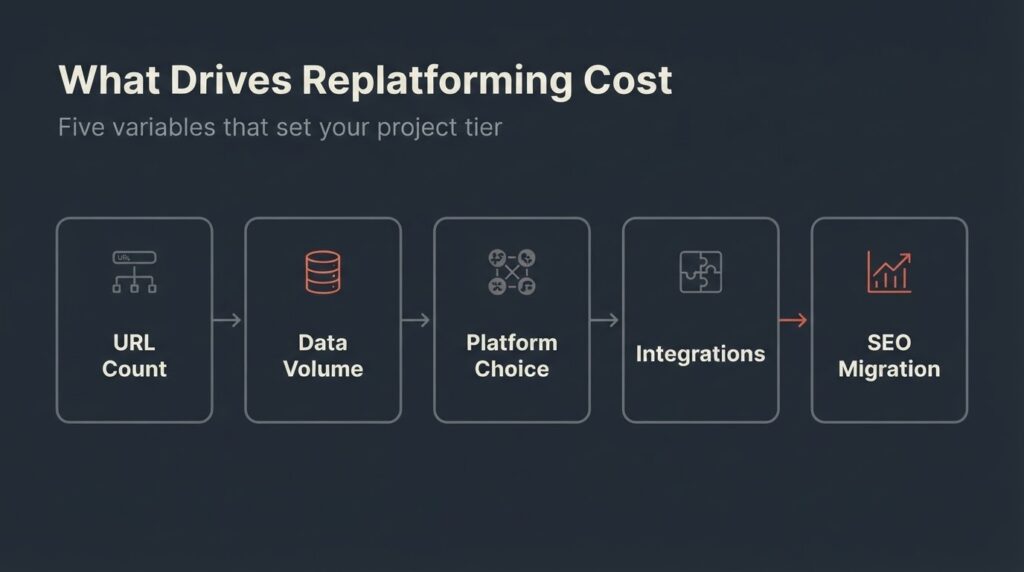
The Five Variables That Set Your Replatforming Cost
Number of URLs and redirect complexity
Every URL on your current site that changes its address during a replatform needs a server-side 301 redirect pointing old to new. Miss one high-traffic URL, and you hand that page’s ranking authority to a dead endpoint. Miss a hundred, and your organic traffic takes a hit that can persist for months.
Google’s documentation on site moves with URL changes recommends keeping 301 redirects live for at least one year, verifying every redirect via Google Search Console, and submitting a Change of Address notification after the move. That process takes real time. For a 50-page site with clean URL structure, a redirect audit and implementation might run 8 to 12 hours. For a 500-page site with legacy URL patterns carried over from two previous platforms, it can run to 60 or 80 hours.
Data volume and content migration
Content migration is the cost item that surprises people most. Moving pages is not copy-paste. Every page needs its metadata checked (title tags, meta descriptions, canonical tags, Open Graph data), its internal links updated to new URL patterns, its images re-optimized for the new platform’s file handling, and its structured data re-implemented if the new CMS uses a different schema framework.
Automated migration tools handle structured data like product catalogs and customer records reasonably well for straightforward setups. For anything with custom post types, custom fields, or content built with page builders like Elementor or WPBakery, expect manual intervention on a significant percentage of pages.
Platform choice and its technical overhead
Moving from one WordPress installation to another (different host, same CMS) is the lowest-complexity replatform. Moving from WordPress to a headless architecture using Next.js as a frontend costs significantly more, because the content rendering layer has to be rebuilt from scratch and your editorial team needs training on a new publishing workflow.
The HTTP Archive 2025 Web Almanac reports that WordPress powers approximately 64% of all CMS-driven websites. That market dominance has a practical implication: more developers know how to migrate into and out of WordPress than any other platform, which keeps labor costs competitive. Headless migrations carry a premium because the talent pool is smaller and the testing surface is larger.
Third-party integrations
Each integration your current site uses (CRM, email marketing, booking system, payment gateway, product feed, analytics) has to be verified, re-authenticated, and tested on the new platform. Some integrations transfer cleanly. Others require new API connections built from scratch.
A site with three clean integrations might add $1,500 to $4,000 to the total project cost for integration QA. A site with eight integrations, some of which use legacy APIs or custom webhooks, can add $10,000 to $25,000. This is the single most common source of budget surprises after contracts are signed, because integrations are rarely documented well enough for a vendor to scope them accurately without a discovery phase.
SEO migration scope
A replatform without a technical SEO migration plan is the fastest way to lose organic traffic you spent years building. Post-migration traffic drops of 20 to 30% are common when the process is handled poorly, according to Search Engine Journal’s analysis of migration hangover patterns. That is not a platform problem. It is a process problem, and it is preventable.
Proper SEO migration covers: pre-migration traffic and ranking baseline capture in GA4, full XML sitemap audit, URL mapping documentation, redirect chain testing, canonical tag verification on the new platform, structured data re-implementation, and post-launch monitoring for crawl errors in Google Search Console. Agencies that fold SEO migration into a general “launch checklist” are not doing the same work as those who treat it as a distinct workstream with its own deliverables.
Cost Ranges by Project Tier
The table below uses real market data from multiple independent sources.
These ranges reflect agency work in the US market. Offshore teams, including distributed teams like ours, typically deliver at the lower end of each range without reducing the scope of the technical work.
| Project Tier | Description | Estimated Cost | Timeline |
| Tier 1: Small site | Under 50 pages, minimal integrations, same CMS family, clean URL structure | $3,000 to $8,000 | 3 to 6 weeks |
| Tier 2: Mid-market site | 50 to 300 pages, established SEO equity, 2 to 4 integrations, CMS change | $8,000 to $25,000 | 6 to 12 weeks |
| Tier 3: WooCommerce or mid-market ecommerce | Product catalog, customer data, payment gateway, SEO-sensitive category pages | $18,000 to $60,000 | 10 to 20 weeks |
| Tier 4: Complex ecommerce or enterprise | Deep integrations, ERP/CRM connections, B2B pricing logic, 1,000+ URLs | $60,000 to $150,000+ | 5 to 12 months |
One note on these ranges: the floor of Tier 1 is achievable only when the site has minimal custom functionality, the current URL structure is clean enough to map cleanly to the new platform, and the content does not require manual reformatting. Most real projects fall in the middle of their tier, not the bottom.
The ranges above are drawn from data across multiple managed hosting and agency sources documenting 2026 migration pricing, adjusted for agency scope (SEO migration, QA, and redirect mapping included versus excluded).
Where Budgets Actually Break
The “while we’re at it” problem
Replatforms expand. A client approves a $12,000 migration and then, during the project, requests a new homepage layout, a contact form overhaul, and a blog redesign. Those are scope additions, but they feel like natural extensions of an already open project. Teams that do not separate replatform deliverables from redesign deliverables in writing routinely end up delivering $20,000 of work on a $12,000 contract.
The fix is a clearly scoped Phase 1 limited to the migration itself, with a Phase 2 for improvements. This costs slightly more in planning time but saves significant budget disputes at the end.
Undocumented integrations
The most common mid-project surprise is an integration nobody on the client side mentioned during scoping because they did not know it needed to be migrated. A form connected to a third-party CRM, a live chat widget tied to a historical conversation database, a custom product feed going to Google Merchant Center: all of these need to be audited before a quote is final, not discovered during development.
Any agency quoting a replatform without a paid discovery or scoping phase first is either including undocumented integration risk in their margin or planning to invoice it as a change order. Ask which one before you sign.
Dirty data
Years of accumulated content create problems: duplicate page metadata, broken internal links, pages with no titles, products with missing images, blog posts with canonical tags pointing to the old domain. Migrating dirty data just moves the problem to a new address. Cleaning it adds time, and that time costs money. A site data audit before migration is not optional; it is the difference between a clean launch and a crawl error report that takes three months to fix.
The SEO Risk in Plain Terms
Replatforming is a site migration event. Google treats site migrations as significant changes that require recrawling and reindexing. As Google Search Central documents, “a medium-sized website can take a few weeks for most pages to move in our index; larger sites can take longer.” That is normal and manageable. What is not manageable is launching without proper redirects, without a submitted sitemap, or without verifying the new site in Search Console before launch.
The specific technical requirements for a clean SEO migration include the following. First, every changed URL needs a 301 redirect, not a 302, not a meta refresh. Second, the new site needs its robots.txt and noindex rules reviewed to ensure nothing accidentally blocks Googlebot, which is a common error when developers use a staging environment that was set to noindex and then forget to update it on launch. Third, Core Web Vitals performance on the new platform needs to be benchmarked before launch. Google defines good Core Web Vitals thresholds as LCP under 2.5 seconds, INP under 200 milliseconds, and CLS under 0.1. If the new platform performs worse on these metrics than the old one, the migration may trade platform flexibility for a rankings penalty.
One thing we check on every project we touch: whether the new platform’s default configuration ships with Cumulative Layout Shift (CLS) issues from unspecified image dimensions or late-loading web fonts. These are fixable, but only if you know to look for them. [INTERNAL LINK: custom WordPress development → betatech.co/services/web-development/]
Replatforming vs. Redesign: The Decision You Actually Need to Make
These two are often conflated, but they answer different problems.
| Symptom | Right solution |
| Site looks outdated, brand has evolved | Redesign (same platform, new design) |
| Site is slow, fails Core Web Vitals | Performance audit first; may not need replatform |
| CMS is impossible to update without a developer | Replatform or add a better editor layer |
| Organic traffic declining year over year | Technical SEO audit before anything else |
| WooCommerce can’t handle current product catalog complexity | Replatform to a more appropriate ecommerce system |
| Site is on a deprecated or unsupported platform | Replatform |
| Current vendor holds all the credentials and code | Replatform to something you can own |
We build in WordPress most of the time, and we still tell some prospects that what they actually need is a performance audit and a content refresh, not a migration. Replatforming costs money and carries risk. If the evidence does not support it, we say so. [INTERNAL LINK: UI/UX work that typically runs alongside a replatform → betatech.co/services/ui-ux-design/]
What a Realistic Project Scope Looks Like
For a typical BetaTech engagement in this category: a US-based service business, 80 to 150 pages, existing WordPress site with some SEO equity, moving to a custom WordPress theme with a modern block-based editing experience.
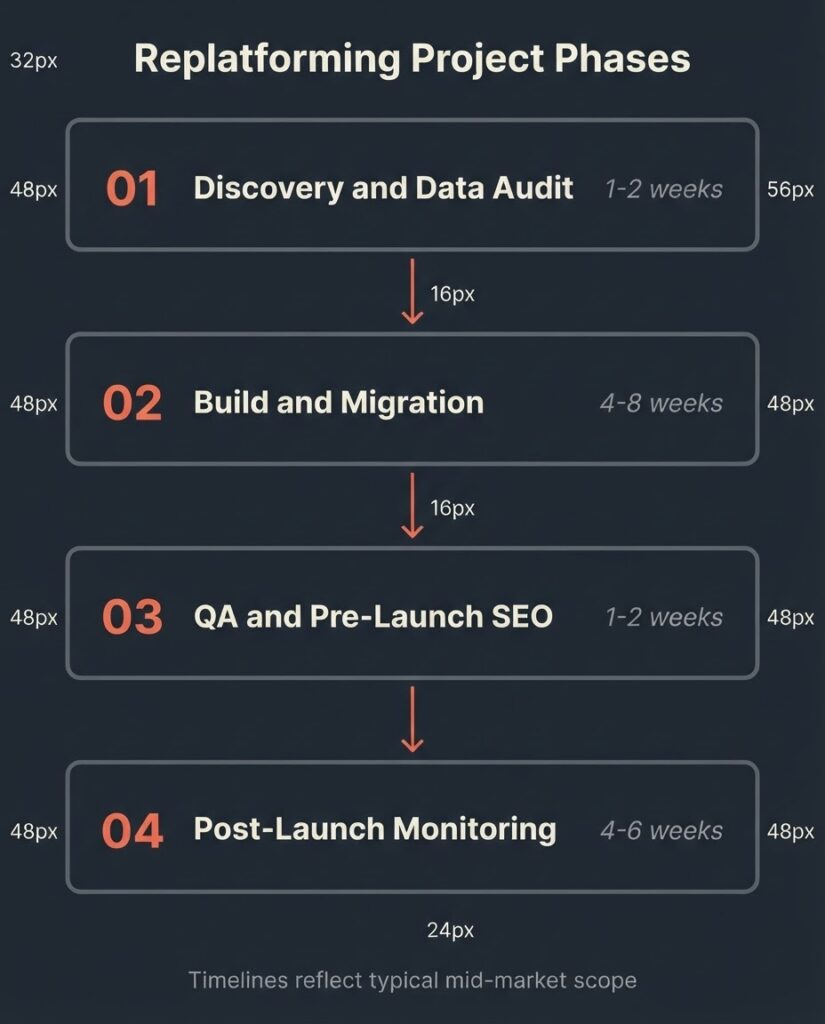
The project breaks into four phases. Phase 1 is discovery and data audit (1 to 2 weeks): URL inventory, integration documentation, current Core Web Vitals baseline, GA4 and Search Console access verification. Phase 2 is build and migration (4 to 8 weeks): new theme development, content migration with metadata review, redirect mapping and implementation, integration re-authentication. Phase 3 is QA and pre-launch SEO check (1 to 2 weeks): redirect chain validation, robots.txt review, sitemap submission, CWV benchmark on the new environment. Phase 4 is post-launch monitoring (4 to 6 weeks): crawl error monitoring in Search Console, traffic comparison in GA4, redirect audit to catch any gaps.
Our team spans Bangladesh and the US, which means a client in Chicago or Boston can give feedback at end of day and find it addressed by the next morning. For migration projects where speed of iteration matters, that time-zone overlap compresses the revision cycle without compressing the quality of the technical work.
FAQ
How much does website replatforming cost for a small business?
For a small business site under 50 pages with minimal integrations and no significant SEO equity at risk, the realistic cost range is $3,000 to $8,000. That assumes a same-family CMS migration (for example, WordPress on one host to WordPress on another), clean URL structure, and no custom functionality that needs to be rebuilt. Add $2,000 to $5,000 if the URL structure is changing and redirect mapping is required.
Does replatforming hurt your SEO?
It can, but it does not have to. A properly executed migration with full redirect mapping, a submitted sitemap, Search Console verification, and Core Web Vitals benchmarking on the new platform carries minimal long-term SEO risk. The problems occur when redirects are missed, when the new site launches with a robots.txt that blocks crawling, or when the new platform’s performance is significantly worse than the old one. Budget for SEO migration as a distinct workstream, not a line item in “launch checklist.”
What is the difference between replatforming and redesigning a website?
A redesign changes the visual design and user experience of a site while keeping the underlying platform the same. A replatform moves the site to a different CMS or hosting architecture while preserving as much of the content, URL structure, and SEO equity as possible. The two are often done simultaneously, but combining them raises both cost and risk. For budget control, it is better to scope and price them separately.
How long does website replatforming take?
A small site (under 50 pages, minimal integrations) can be replatformed in 3 to 6 weeks. A mid-market site with SEO migration requirements takes 6 to 12 weeks. A WooCommerce or ecommerce replatform typically runs 10 to 20 weeks when done properly, including QA and post-launch monitoring. The biggest timeline variable is not the development work: it is content approval cycles on the client side and the time required to clean up data quality issues discovered during migration.
What should I ask a vendor before signing a replatforming contract?
Ask for a line-item breakdown that separately identifies: content migration scope, redirect mapping and SEO migration plan, integration rebuild work, and post-launch monitoring period. Ask whether the quote includes a paid discovery or scoping phase, and what happens to the price if undocumented integrations are found during that phase. Ask for the agency’s process for tracking Core Web Vitals before and after launch. Any vendor who cannot answer these questions specifically is likely to invoice the gaps as change orders.
When does replatforming not make sense?
Replatforming is the wrong call when the underlying problem is a design issue, a content quality issue, or a technical SEO issue that can be resolved on the current platform. If your site’s traffic is declining because your pages are thin and slow, a faster platform does not fix thin content. Run a technical SEO audit and a content gap analysis before committing to a migration budget. In a significant number of cases, the right answer is $3,000 in targeted fixes rather than a $20,000 migration.
Get a Scoped Estimate for Your Replatforming Project
If you already have a site and you are evaluating whether to migrate it, the most useful thing you can do is have someone inventory your current URL structure, integration list, and organic traffic baseline before you request quotes. That inventory takes two to four hours and makes every subsequent vendor conversation more productive.
We do that scoping work as a paid discovery engagement. If you engage us for the full project, the scoping cost is credited back. If you take the scoped brief and hire someone else, you still leave with a document that protects you from vague contracts.