A website migration is one of the highest-risk events in an organization’s digital life. Done right, it resets the foundation for years of compounding organic growth. Done wrong, it produces a traffic drop that persists for 12 to 18 months and costs far more in lost revenue than the migration itself.
The decisions that determine which outcome you get are not made on launch day. They are made in the four to eight weeks before the site goes live, and most of them are invisible to anyone who is not actively looking for them.
This article breaks down the three migration types, the specific failure modes inside each, and the checklist a non-technical founder can use to hold any agency or developer accountable from kickoff through post-launch monitoring.
A website migration can cause a temporary organic traffic drop of 10 to 30 percent in the first two to six weeks; this is normal and recoverable. A poorly executed migration, missing 301 redirects, unremoved noindex tags on the live site, or simultaneous domain and CMS changes, causes drops of 50 percent or more that can persist for 12 to 18 months. The single most protective action is involving an SEO specialist before any development work begins, not after launch.
The Three Migrations Are Not the Same Risk
Business owners and developers often use “website migration” to mean anything from moving hosting providers to rebuilding the entire site on a new platform under a new domain. The actual risk profile varies sharply depending on what is changing.
The lowest-risk migration is a hosting or server move with no URL changes. Your URLs stay identical, your content stays identical, and Google only needs to re-crawl your site at the new server’s IP. Google’s own documentation for this scenario is brief because the SEO checklist is short.
The medium-risk migration is a URL restructure or platform change on the same domain. You move from WordPress to Shopify, or reorganize your URL architecture from /blog/2021/post-name to /blog/post-name. The domain authority stays intact, but every changed URL must be individually mapped and redirected. Google Search Central’s site move documentation explicitly recommends changing only one major variable at a time: domain, CMS, and layout should not all change in the same migration window. When they do, Google’s systems need to re-evaluate every signal simultaneously, which extends the recovery timeline significantly.
The highest-risk migration is a full domain change combined with a CMS switch and a URL restructure.
This is the one that produces the horror stories. Every organic signal, every backlink, every cached ranking is attached to your old domain’s URL structure. Transferring all of it cleanly requires a complete redirect map, properly submitted in Google Search Console, kept active for at minimum one year.
What a “Migration Hangover” Actually Means
The term comes from SEO practitioners who noticed that even technically sound migrations sometimes produce a prolonged traffic dip that does not look like normal post-launch volatility.
According to Search Engine Journal’s analysis of migration hangovers, a normal, temporary dip in site traffic is typically 10 to 30 percent, stabilizes within two to six weeks, and produces no new crawl errors in Google Search Console. A true migration hangover produces a drop of 50 percent or more, new 404 errors appearing after launch, indexed page counts falling week over week, and no stabilization after four or more weeks.
The distinction matters because the remediation is different. Normal volatility requires patience and monitoring. A hangover requires active forensics: redirect chains to untangle, canonical tags pointing to the wrong domain, noindex tags that the development team forgot to remove when the staging site went live.
The most common cause of a hangover is not a technical oversight. It is a process failure: SEO was not part of the project from the start. Developers and designers do their job correctly according to their brief, and the brief never said “preserve organic rankings.” By the time someone calls an SEO team, the site is live, the damage is done, and the rebuild is expensive.
The Six Failure Modes, in the Order They Kill Traffic
Here is where most migration guides fail: they list what to do correctly without naming what specifically causes the worst damage. These six failure modes, ranked by frequency and severity, cover most of the post-launch disasters I have seen.
Failure Mode 1: noindex tags left on from staging
Every responsible development team blocks search engines from indexing the staging environment to prevent duplicate content and premature crawling. They do this with a noindex meta tag or robots.txt block. The failure is not setting those tags; it is forgetting to remove them when the live site launches.
If your live site has <meta name=”robots” content=”noindex”> on every page, Google will de-index your entire site within weeks. The damage is not immediately visible in Search Console because de-indexing takes time. By the time organic traffic falls off a cliff, the noindex tags have been live for three to six weeks and the recovery clock starts from the day they are removed, not the day they were found.
The fix: any competent migration checklist includes a direct URL inspection of five to ten representative live pages in Google Search Console on the day of launch, before any celebration.
Failure Mode 2: missing or incorrect 301 redirects
A 301 redirect tells Google and browsers that a page has permanently moved to a new location. It transfers the accumulated link equity, the backlink authority, from the old URL to the new one. Google’s documentation on redirects confirms that 301 and 308 redirects are the only types that signal to Google the redirect target should be treated as canonical. A 302 (temporary redirect) does not transfer equity and is the wrong choice for any permanently moved page.
The practical failure is a redirect map that is incomplete. Most high-traffic sites have ten to twenty URLs that generate 80 percent of their organic traffic. Those pages have years of backlinks and ranking history attached to them. One missed redirect on a single high-authority page can produce a traffic drop that looks like a site-wide problem.
Any agency quoting a migration to you should be able to show you their redirect map before launch, broken down by source URL, destination URL, and status code. If they cannot, they are guessing.
Failure Mode 3: canonical tags pointing to the old domain
After a domain migration, every page on the new site should have a self-referencing canonical tag pointing to the new URL. If the CMS was copied from the old site and the canonical tags were not updated, Google sees the new pages as duplicates of the old ones and continues ranking the old URLs, which no longer exist.
This is one of the harder failure modes to detect because canonical tag issues do not show up as a crawl error in Google Search Console. They show up as ranking signals failing to transfer, which looks identical to normal post-migration volatility until week six, when normal volatility has resolved and the new site is still not climbing.
Failure Mode 4: Core Web Vitals regression
A new design almost always changes the performance profile of the site. A heavier JavaScript framework, unoptimized hero images, or a new font stack that blocks rendering can push LCP (Largest Contentful Paint) past the 2.5-second threshold, cause CLS (Cumulative Layout Shift) scores above 0.1 from layout changes, or spike INP (Interaction to Next Paint) above 200 milliseconds from new interactive components. All three are confirmed Google ranking signals per Google’s Core Web Vitals documentation.
A migration that launches a visually beautiful site with degraded Core Web Vitals will produce rankings that initially hold and then slowly erode over six to twelve weeks as Google’s systems incorporate the new performance data.
The fix is running a PageSpeed Insights benchmark on the existing site before any design work begins. If your new design cannot match or beat that baseline, the performance gap needs to be addressed in development, not discovered in post-launch monitoring.
[INTERNAL LINK: technical SEO services including Core Web Vitals auditing → https://betatech.co/services/seo-service/]
Failure Mode 5: analytics continuity breaking at launch
If GA4 is not configured on the new site before launch, you have no data to compare against. If GA4 is configured but the event tracking for conversions is not carried over, you lose the ability to measure whether the migration affected your lead or sales funnel, not just your traffic.
This is not a ranking issue; it is a diagnosis issue. Without pre- and post-migration data from the same GA4 property, you cannot prove that a traffic drop is migration-related rather than a seasonal pattern, a broader algorithm update, or a shift in demand. That inability to diagnose is itself a business risk.
Failure Mode 6: combining multiple major changes
Google explicitly advises against changing domain, CMS, and URL structure simultaneously. The reasoning is practical: each change requires Google to re-evaluate ranking signals. Stacking all three changes at once means Google is recrawling, re-evaluating content relevance, re-processing link equity, and re-indexing new URLs all at the same time. Recovery is measurably slower.
The correct approach for a full rebuild: migrate the domain first, stabilize traffic, then restructure URLs. If a phased approach is not technically possible, the SEO scope for the project expands significantly and the monitoring window extends to at least six months.
The Pre-Migration Baseline: The Step Most Teams Skip
Before any development work touches the live site, you need a documented snapshot of its current state. This is not optional; it is the only way to distinguish a normal post-launch dip from a genuine problem.
The baseline should include: the number of indexed pages in Google Search Console, organic clicks and impressions by page for the past 90 days, Core Web Vitals scores for the five to ten highest-traffic pages, keyword rankings for the 20 to 30 terms driving the most organic traffic, and a full crawl export from a tool like Screaming Frog showing all URLs, title tags, canonical tags, and response codes.
This data takes an afternoon to gather and costs nothing. Its absence can cost months of recovery time because without it, nobody can tell you with confidence whether a post-launch traffic shift is from the migration, a coincident Google algorithm update, or seasonal demand patterns.
The 301 Redirect Map: What It Is and What It Must Cover
A redirect map is a spreadsheet with three columns: old URL, new URL, and HTTP status code. Every URL on the old site needs a row. Every URL that is moving to a new location gets a 301 status. Every URL that is being permanently removed and has no equivalent gets a 410 (gone) response, not a redirect to the homepage.
Redirecting dead pages to the homepage is one of the more common mistakes in agency migration work. It produces what Google calls “soft 404s” — pages that return a 200 OK status but deliver content that does not match what Google indexed. Google will eventually stop counting those redirects as valid link equity transfers and treat them as errors.
Priority mapping: any URL with referring domains (external backlinks) pointing to it should be treated as a high-priority row. The pages with the most backlinks carry the most accumulated PageRank. A missed redirect on one of those pages is more damaging than fifty missed redirects on pages with zero inbound links.
According to Google’s documentation, 301 redirects should remain active for at minimum one year. Best practice for high-value pages, homepage, key service pages, top-ranked blog posts, is to keep them permanently or until the referring domains have been updated to point directly to the new URLs.
Google Search Console: What to Do Before and After Launch
Two Search Console actions matter most in a migration. The first is verifying ownership of both the old and new properties before launch. You need both verified under the same Google account to use the Change of Address tool.
The second is using the Change of Address tool in Google Search Console for any domain migration. This tool tells Google to prioritize crawling the new domain and transfers signals from the old one. It runs for 180 days. After that period, Google treats the old and new sites as unrelated, so the 301 redirects and the Change of Address submission need to overlap for the full first six months.
One important exception: the Change of Address tool is not required or recommended for HTTP-to-HTTPS migrations. Google handles those automatically when server-side redirects are in place. You do not need the tool for a hosting provider change with no URL changes, or for moving between www and non-www variants of the same domain.
After launch, submit the new XML sitemap in Search Console. Then submit the old sitemap too. Watching old URLs move from “indexed” to “redirected” in the Coverage report is how you verify that Google is processing the migration correctly. That transition takes days to weeks for small sites and weeks to months for large ones.
[INTERNAL LINK: get a scoped quote for your migration project → https://betatech.co/contact-us/]
What a Well-Managed Migration Timeline Looks Like
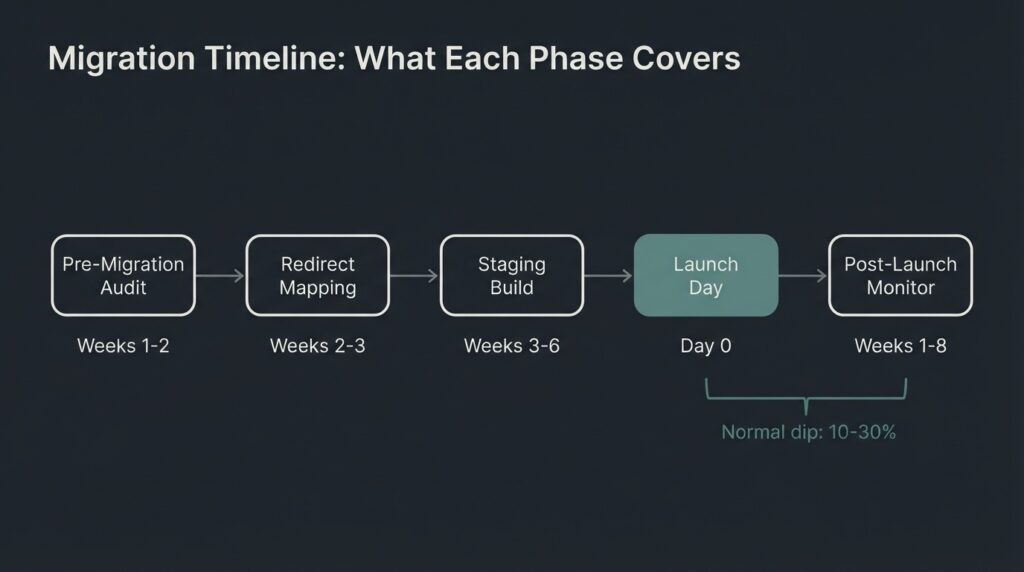
Most small-to-medium site migrations (under 500 pages) can be executed in four to eight weeks when SEO is included in the scope from the start. Here is what that looks like in practice:
| Phase | Timing | Key Deliverables |
| Pre-migration audit | Weeks 1 to 2 | Baseline crawl, GA4 export, Core Web Vitals benchmark, URL inventory, backlink report |
| Redirect mapping | Weeks 2 to 3 | Complete old-to-new URL map, status codes assigned, high-priority pages identified |
| Staging build and testing | Weeks 3 to 6 | New site built, noindex on staging confirmed, redirect map tested on staging, canonical tags verified, GA4 configured |
| Pre-launch SEO check | 48 hours before launch | noindex removal confirmed, robots.txt reviewed, XML sitemap finalized, Search Console properties verified |
| Launch | Day 0 | DNS updated, redirects live, Change of Address submitted (if domain migration), new sitemap submitted |
| Post-launch monitoring | Weeks 1 to 8 | Daily Search Console check for crawl errors, weekly ranking comparison against baseline, Core Web Vitals re-test |
A 10 to 30 percent traffic dip in weeks one through four is normal. If it stabilizes and recovers by week six to eight, the migration was executed correctly. If it exceeds 30 percent and continues dropping past week four, begin the forensic checklist: noindex tags, canonical tags, redirect chains, GA4 data gaps.
What This Costs, and What Skipping the SEO Scope Costs
SEO migration oversight, meaning the audit, the redirect map, the pre-launch checks, and the post-launch monitoring, typically adds $1,500 to $8,000 to a development project depending on site size and complexity. A 50-page informational site sits at the low end; a 500-page e-commerce site with product URL restructuring sits at the high end.
That cost needs to be weighed against what a migration hangover actually produces. A site generating $10,000 per month in revenue from organic traffic loses $5,000 to $10,000 per month during a 50 percent traffic hangover that persists for six months. The SEO oversight that prevents the hangover costs less than one month of that loss.
The argument for including SEO migration scope is not a vendor upsell. It is basic project accounting.
We build in WordPress most of the time at BetaTech. On migrations involving domain changes or significant URL restructuring, SEO review is part of the development scope by default, not an add-on. Our team spans Bangladesh and the US, which means pre-launch SEO checks and staging reviews can happen during hours when the development team’s daily cycle has already closed. Revision cycles on the redirect map and canonical tag verification do not require a separate meeting; they happen across the time zones. That compression matters on projects with tight launch windows.
Post-Launch Monitoring: The 8-Week Window
The migration does not end when the site goes live. Semrush’s website migration checklist identifies post-launch monitoring as a distinct project phase, and that framing is correct. Google’s systems take time to re-crawl, re-process, and re-index a migrated site. The Search Console Index Coverage report is the primary dashboard for this.
In the first two weeks: watch the Coverage report for unexpected spikes in crawl errors, 404s, or “Excluded” pages. Check that your new XML sitemap is being processed. Verify that at least your ten highest-traffic old URLs are returning 301 responses, not 200s (unfixed) or 404s (missed redirect).
In weeks three through eight: track keyword rankings for the 20 to 30 terms from your baseline. Normal volatility looks like rankings that shift by two to five positions and stabilize. A problem looks like pages dropping out of the top 50 entirely for terms they held for months. If specific pages are dropping disproportionately, start with their canonical tags and their redirect status. Those two checks resolve the majority of cases.
After eight weeks: if traffic has not returned to within 20 percent of the pre-migration baseline, the migration has a structural problem that passive monitoring will not resolve. It needs an active technical SEO audit.
FAQ
Will my website rankings drop when I migrate?
A short-term dip of 10 to 30 percent is normal and expected. Google needs time to re-crawl and re-index the new site structure. Most well-executed migrations see traffic stabilize within four to eight weeks. The drops that become permanent are caused by specific, avoidable errors: missing 301 redirects, noindex tags left on the live site, or canonical tags still pointing to the old domain.
How long should I keep 301 redirects active after a migration?
Google recommends a minimum of one year for 301 redirects to allow full signal transfer. For high-value pages with significant backlink profiles, best practice is to keep them active for two to three years or permanently. Removing redirects too early forces any traffic or link equity still pointed at old URLs to hit a dead end, which cannot be recovered after the fact.
Do I need the Google Search Console Change of Address tool for every migration?
No. The Change of Address tool is required only for domain-level moves: for example, moving from example.com to example.org. You do not need it for HTTP-to-HTTPS migrations (Google handles those automatically), for moving between www and non-www on the same domain, for path-level URL restructuring within the same domain, or for hosting provider changes with no URL changes.
What is the difference between a 301 and a 302 redirect for SEO?
A 301 is a permanent redirect. It signals to Google that the old URL has permanently moved and that ranking signals should transfer to the new URL. A 302 is a temporary redirect. Google interprets it as “this page has temporarily moved; keep ranking the old URL.” Using a 302 for a permanent migration means your new URLs do not inherit the ranking authority of the old ones. This is a common mistake made when developers copy redirect templates without checking the status code.
How do I make sure my analytics data survives the migration?
Set up a GA4 property or data stream on the staging site before launch and verify that conversion events are firing correctly. Document your baseline GA4 data, organic sessions, conversions, bounce rate by page, in the two to four weeks before the launch date. After launch, compare the same date range from the previous period week over week. If GA4 was not configured on the new site before launch, you have a gap in data that cannot be recovered retroactively.
What should I do if I see a major traffic drop after my migration?
Start with four checks in this order: (1) Confirm no noindex tags remain on live pages using a direct URL inspection in Google Search Console. (2) Check the Coverage report for a spike in excluded or 404 pages. (3) Run five to ten of your highest-traffic old URLs through a redirect checker to confirm they return 301 to the correct destination, not 302, and not a chain of more than three hops. (4) Check that canonical tags on the new pages point to the new URLs, not the old domain. Resolving those four checks addresses the majority of post-migration traffic drops.
Migration Audit Offer
If your site is six to twelve weeks from a planned migration, or if you have already launched and traffic is not recovering, the right next step is a migration audit, not a general discovery call. The audit reviews your redirect map, your staging configuration, your GA4 setup, and your Search Console properties before any damage becomes permanent. Request a migration audit scope from BetaTech.