Shopify is a good platform for launching a store. It is not always a good platform for running one at scale. The moment you need a custom checkout, a third-party payment processor without a surcharge, or a marketing stack that Shopify does not natively support, the monthly bill starts compounding in ways the initial pricing page did not make obvious.
Most store owners who migrate to WooCommerce do not regret the move. The ones who regret it are the ones who moved without a redirect strategy, let their URL structure change uncontrolled, or handed the job to someone who treated it as a data transfer rather than a site migration. SEO loss on a Shopify to WooCommerce migration is real — but it is entirely preventable if you know what to protect.
This guide covers what moves cleanly, what requires manual work, what the SEO risk actually is and how to eliminate it, and what a well-run migration costs and takes in calendar time.
A Shopify to WooCommerce migration transfers products, customers, and orders to a self-hosted WordPress environment. The typical timeline for a 500-product store ranges from 2 to 6 weeks end-to-end, including hosting setup, data transfer, theme build, and post-migration SEO verification. Done correctly with 301 redirects mapped one-to-one and a new sitemap submitted to Google Search Console, organic rankings recover to pre-migration levels within 4 to 12 weeks in most cases. Done without a redirect strategy, ranking loss can be permanent.
Why Store Owners Leave Shopify
The honest answer is almost always cost or control — and usually both.
Shopify’s published plan pricing runs $39/month on Basic, $105/month on Grow, and $399/month on Advanced. Those numbers are predictable. What is less predictable is the fee structure underneath them. If you use a payment processor other than Shopify Payments, Shopify charges an additional 0.5% to 2% transaction fee on every order depending on your plan. For a store doing $500,000 in annual revenue on the Basic plan, that surcharge runs $10,000 per year before you have paid for a single app.
The checkout customization wall is a bigger forcing function than most people expect. Standard Shopify themes give you limited control over the checkout experience. Meaningful customization — adding a custom upsell, restructuring the form flow, integrating a loyalty program at the checkout level — requires Shopify Plus, which starts at $2,300/month on a three-year term or $2,500/month on a one-year term.
WooCommerce gives you full checkout customization at no additional cost. According to Baymard Institute’s aggregated research across 50 studies, the average cart abandonment rate is 70.22%, with 17% of shoppers citing a “too long or complicated checkout” as the reason. That is not a Shopify-specific problem, but it is a problem that WooCommerce lets you solve without a platform upgrade.
WooCommerce also eliminates the data portability problem. Your order history, customer records, and product catalog live on your server, in a database you control. Shopify holds that data on its infrastructure. That distinction matters when you are building a customer retention program or trying to pass clean data to a CRM.
What a Migration Actually Moves — and What It Does Not
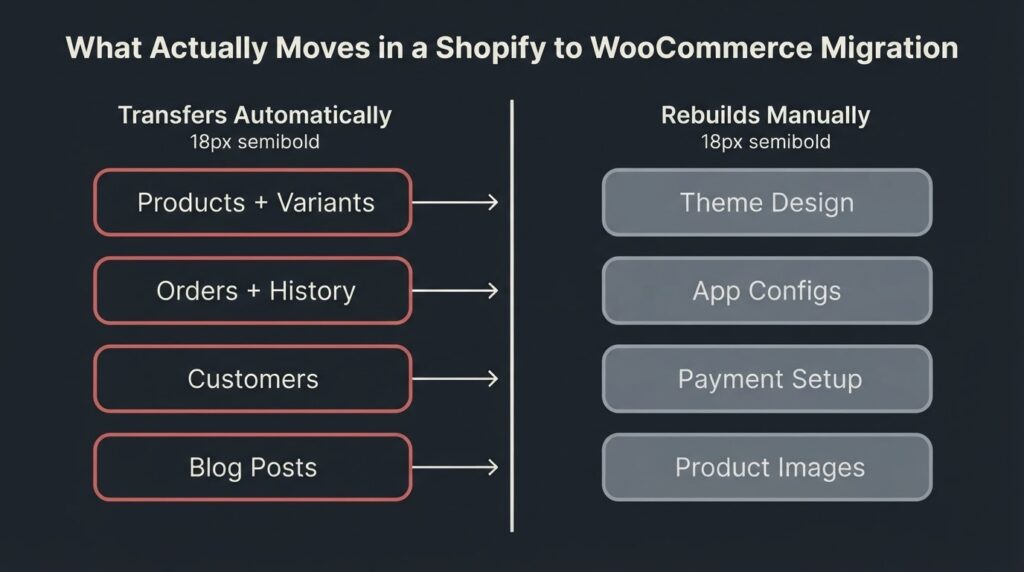
This is where most store owners have unrealistic expectations. A migration tool will move the following reliably: product titles, descriptions, SKUs, prices, variants, categories, and tags; customer names, email addresses, and order history; blog posts and pages; and coupon codes. Cart2Cart, LitExtension, and WooCommerce’s own migration plugin all handle this data well for stores under a few thousand products.
What does not move cleanly: product images (these require a separate import step or manual upload in most workflows); Shopify app configurations (every Shopify app has a WooCommerce equivalent, but you must reconfigure each one from scratch); your theme and storefront design (this rebuilds from zero in WooCommerce — there is no Shopify-to-WordPress theme converter); your Shopify payments setup (WooCommerce uses WooPayments, Stripe, PayPal, or any gateway you choose, but credentials and settings must be re-entered); and any custom Shopify liquid code (which does not exist in WordPress).
The practical implication is that a migration has two distinct workstreams running in parallel.
One is data transfer, which can be largely automated. The other is the site rebuild — choosing and configuring a WooCommerce theme, rebuilding your page templates, reconnecting your marketing tools, and reconfiguring shipping zones and tax rules. That second workstream is where most of the time goes.
The WooCommerce official migration documentation breaks down both paths clearly: the manual CSV route (products only, free, but limited) and the plugin/service route (full data including orders and customers, paid, but comprehensive). For any store with meaningful order history, the plugin route is the correct choice.
The SEO Risk Is Real — Here Is How to Eliminate It
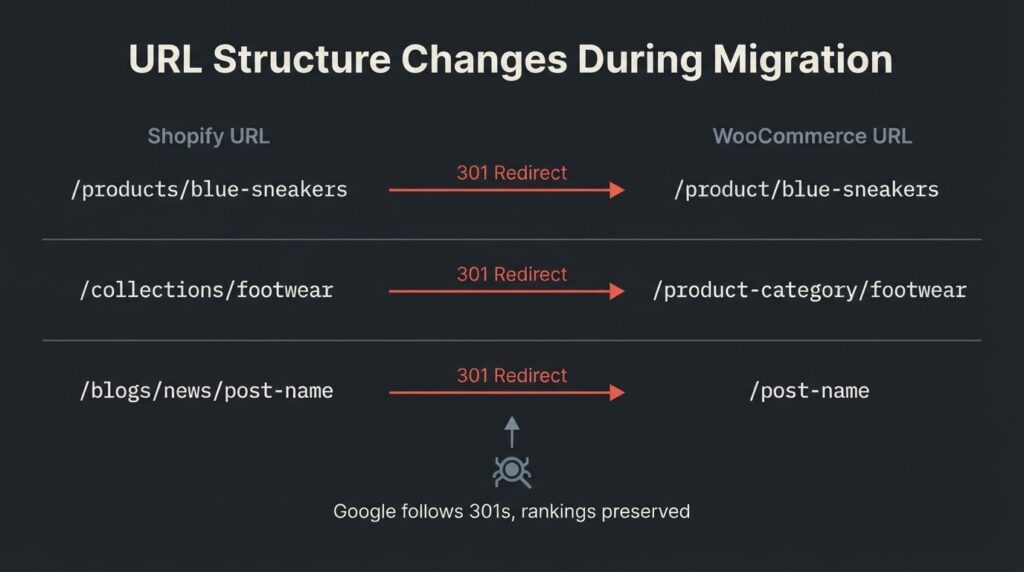
Every URL on your Shopify store will change when you move to WooCommerce. This is not optional and it is not a minor detail. Shopify uses the URL pattern /products/product-name for products and /collections/category-name for collections. WooCommerce defaults to /product/product-name and /product-category/category-name. Every existing backlink, every indexed product page, and every Google Discover appearance is pointing at the Shopify URL pattern.
If those old URLs return a 404 after migration, Google stops counting those signals toward your rankings.
The fix is a one-to-one 301 redirect map: every old Shopify URL redirects permanently to its WooCommerce equivalent. Google follows permanent 301 redirects and transfers ranking signals — this is explicitly confirmed in Google Search Central’s site migration documentation, which states that 301 redirects do not cause PageRank loss. The risk is not the redirect itself. The risk is missing URLs.
The most common places redirects get missed: collection pages that now live at a different path, blog post URLs (Shopify uses /blogs/news/post-name, WordPress defaults to /post-name or a date-based structure), the cart and checkout pages, and any policy pages that were auto-generated by Shopify. Build a full URL export from Shopify before you touch anything. Cross-reference it against your Google Search Console coverage report. Map every indexed URL to its new WooCommerce equivalent. Anything without a destination should return a 404 deliberately, not accidentally.
Post-migration, the checklist runs as follows. Submit a change-of-address notification in Google Search Console if your domain is staying the same but your site structure has changed significantly. Upload a fresh XML sitemap reflecting the new WooCommerce URL structure. Verify that canonical tags on all product pages point to the correct WooCommerce URLs, not the old Shopify paths. Check that your Yoast SEO or Rank Math configuration has preserved meta titles and descriptions from the import. Monitor Google Search Console’s coverage and performance reports weekly for the first eight weeks. Expect some ranking fluctuation during that period — this is normal during large-scale URL migrations and typically resolves within 4 to 12 weeks depending on crawl budget.
Hosting and Technical Requirements: What Your New Environment Needs
WooCommerce runs on WordPress, which means you are choosing and configuring your own hosting environment — something Shopify handles invisibly for you. That is a meaningful operational difference, and it is where some migrators underestimate what they are signing up for.
The minimum technical stack for a production WooCommerce store, per WooCommerce’s server requirements documentation, is PHP 8.3 or later, MySQL 8.0 or later (or MariaDB 10.6+), WordPress 6.9 or later, HTTPS, and a PHP memory limit of 256MB or higher. Running below these specifications puts your site on an unsupported stack with known security vulnerabilities.
For a store doing meaningful volume, shared hosting is not adequate. Managed WordPress hosting from providers like Kinsta, WP Engine, or Cloudways runs $30 to $100/month depending on traffic tier and includes automatic WordPress updates, staging environments, and daily backups. Compare that to Shopify’s hosting-included model, and WooCommerce hosting adds $360 to $1,200 annually, but that cost disappears quickly if you are currently paying Shopify’s transaction fee surcharge or heading toward the Plus tier.
The hosting decision also affects Core Web Vitals. WooCommerce on a well-configured managed host with a CDN (Cloudflare is the straightforward choice) can achieve Largest Contentful Paint under 2.5 seconds and a Cumulative Layout Shift score under 0.1. A default WooCommerce install on a low-tier shared host will fail Core Web Vitals assessments. This matters for both SEO and conversion rate. Plan for hosting before you plan for migration.
The Cost and Timeline, Honestly Stated
A DIY Shopify to WooCommerce migration using a plugin like Cart2Cart or LitExtension costs $69 to $150 for the data transfer on a store with a few hundred products and orders. Add managed hosting ($30 to $100/month), a premium WooCommerce theme ($50 to $200 one-time), and a few plugin licenses for SEO, caching, and security ($100 to $300/year combined), and the self-serve setup cost lands around $300 to $800 in year one.
A professionally managed migration — handled by a developer or agency — runs differently by store size. A small store (under 500 products, minimal custom functionality) typically costs $1,500 to $4,000 for a migration-plus-new-theme build. A mid-market store (500 to 5,000 products, custom checkout flows, multiple integrations) runs $4,000 to $12,000. These ranges cover data migration, theme build, redirect mapping, SEO verification, and post-launch QA. They do not cover ongoing maintenance or marketing.
Timeline follows the same logic. A small store can be migrated, rebuilt, and launched in 2 to 4 weeks by a competent developer working full-time on the project. A mid-market store with custom integrations and a full design refresh takes 6 to 12 weeks. The variable that most often extends timelines is client-side decision-making: waiting on content approvals, theme direction, or feedback on staging site previews. Keeping that feedback loop tight compresses the calendar significantly.
One way BetaTech keeps revision cycles short: our team spans Bangladesh and the US, which means feedback given at the end of a US business day is typically actioned before the next morning. That time zone overlap consistently compresses the staging-to-launch phase on migration projects, and it does so without US agency pricing.
For a Kinsta-hosted walkthrough of the full technical process step by step, their migration guide is one of the most thorough free resources available.
What to Look For in a Migration Partner
Not every agency that lists WooCommerce development on its service page has done a migration under live traffic conditions. The questions that separate competent partners from generalists are specific.
Ask them how they handle the redirect map. If they say they will set up “301 redirects” without explaining how they generate the URL inventory or how they verify coverage, they are describing the concept, not the execution. Ask for their post-migration SEO verification checklist. Ask whether they work on a staging environment before DNS cutover — any professional migration runs on a staging domain first, with the Shopify store remaining live until the WooCommerce build passes QA.
Ask how they handle order history for orders placed during the transition window. For a store that processes 50 or more orders per day, even a 24-hour migration window creates a data reconciliation problem. A good partner has a documented answer for this.
Ask what your Core Web Vitals scores look like post-migration on the staging environment before you approve the DNS switch. A migration that reduces page speed is a migration that needs more work before going live.
DIY vs. Agency: The Honest Tradeoff
A store owner who is comfortable with WordPress and has a week of uninterrupted time can handle a migration of 200 or fewer products without a developer. The CSV import route works. The redirect map is manageable at that scale. The risk is in what you do not know to check — the indexed URLs you have forgotten about, the canonical tag configuration in your SEO plugin, the hosting stack performance after launch.
At 500 or more products, or with any meaningful order history you need preserved, the complexity increases faster than most non-technical store owners expect. The hidden cost of a failed DIY migration is not the tool license — it is three months of ranking recovery, a frustrated customer base that hits 404 pages, and the developer time you eventually spend cleaning up what the initial attempt missed.
We will say this plainly: if your store is under 100 products with no order history you need to preserve, you do not need to hire anyone. Use WooCommerce’s free migration plugin or Cart2Cart’s entry-level tier and follow Kinsta’s step-by-step guide. If your store is above 500 products with live SEO traffic, hire someone who has done this specifically — not someone who does general WordPress development and will figure out the migration piece as they go.
FAQ
How long does a Shopify to WooCommerce migration take?
The data transfer itself takes a few hours to a day for most stores using a tool like Cart2Cart or LitExtension. The full project timeline — including hosting setup, WooCommerce theme build, redirect mapping, and post-migration QA — typically runs 2 to 4 weeks for a small store (under 500 products) and 6 to 12 weeks for a mid-market store with custom integrations. The most common timeline extender is client feedback cycles on the staging site, not the technical work itself.
Will I lose my Google rankings when I migrate?
Not permanently, if the migration is handled correctly. A one-to-one 301 redirect map from every old Shopify URL to its WooCommerce equivalent preserves ranking signals. Google Search Central confirms that permanent redirects do not cause PageRank loss. Expect some fluctuation during the 4 to 12 weeks it takes Google to fully recrawl and re-index the new URL structure. Stores that skip the redirect step or implement it incompletely can lose rankings on those pages permanently.
What data can actually be moved from Shopify to WooCommerce?
Products (titles, descriptions, variants, pricing, SKUs, categories, tags), customers (names, emails, addresses), order history, blog posts, pages, and coupon codes all migrate reliably through tools like Cart2Cart or LitExtension. Product images require a separate import step. Shopify app configurations, theme design, payment gateway credentials, and any custom Liquid code do not transfer — these must be rebuilt in WooCommerce.
Is WooCommerce cheaper than Shopify?
It depends on your revenue volume and what functionality you need. For a store under $100,000 per year using Shopify Payments exclusively, Shopify’s Basic plan at $39/month is straightforward and the cost difference is minimal. For stores using third-party payment gateways, the 0.5% to 2% transaction fee on Shopify can cost thousands of dollars annually. For stores that need custom checkout functionality, avoiding the $2,300 to $2,500/month Shopify Plus requirement alone can justify the migration cost within a year.
What is the best tool for migrating Shopify to WooCommerce?
For full data migration including orders and customers, Cart2Cart and LitExtension are the two most widely used tools. Both start around $69 to $79 for a basic migration. For product-only migration on small stores, WooCommerce’s free CSV import handles the job. A developer-led migration at larger scale typically combines one of these tools for data transfer with custom scripting for redirect mapping and post-migration verification.
Can I keep my Shopify store running while I migrate?
Yes, and you should. Build and test your WooCommerce store on a staging domain first, with your Shopify store staying live throughout. Only switch DNS to the new server once the WooCommerce build has passed QA on the staging environment. This zero-downtime approach is standard practice and the right way to protect both your revenue and your search rankings during the cutover.
Ready to Move Your Store?
If you are managing a store above 300 products and have built organic traffic you cannot afford to lose, the smartest first step is a scoped migration plan — not a quote for the full build, but a documented assessment of your current URL inventory, your redirect exposure, and your hosting requirements. That document is what separates a migration that recovers rankings in six weeks from one that is still troubleshooting three months later. Contact BetaTech for a migration scoping session and we will tell you exactly what your move involves, what it costs, and whether you need us at all.